
Yes! You can use AI to fill out Fidelity Advisor 403(b) Distribution Request Form
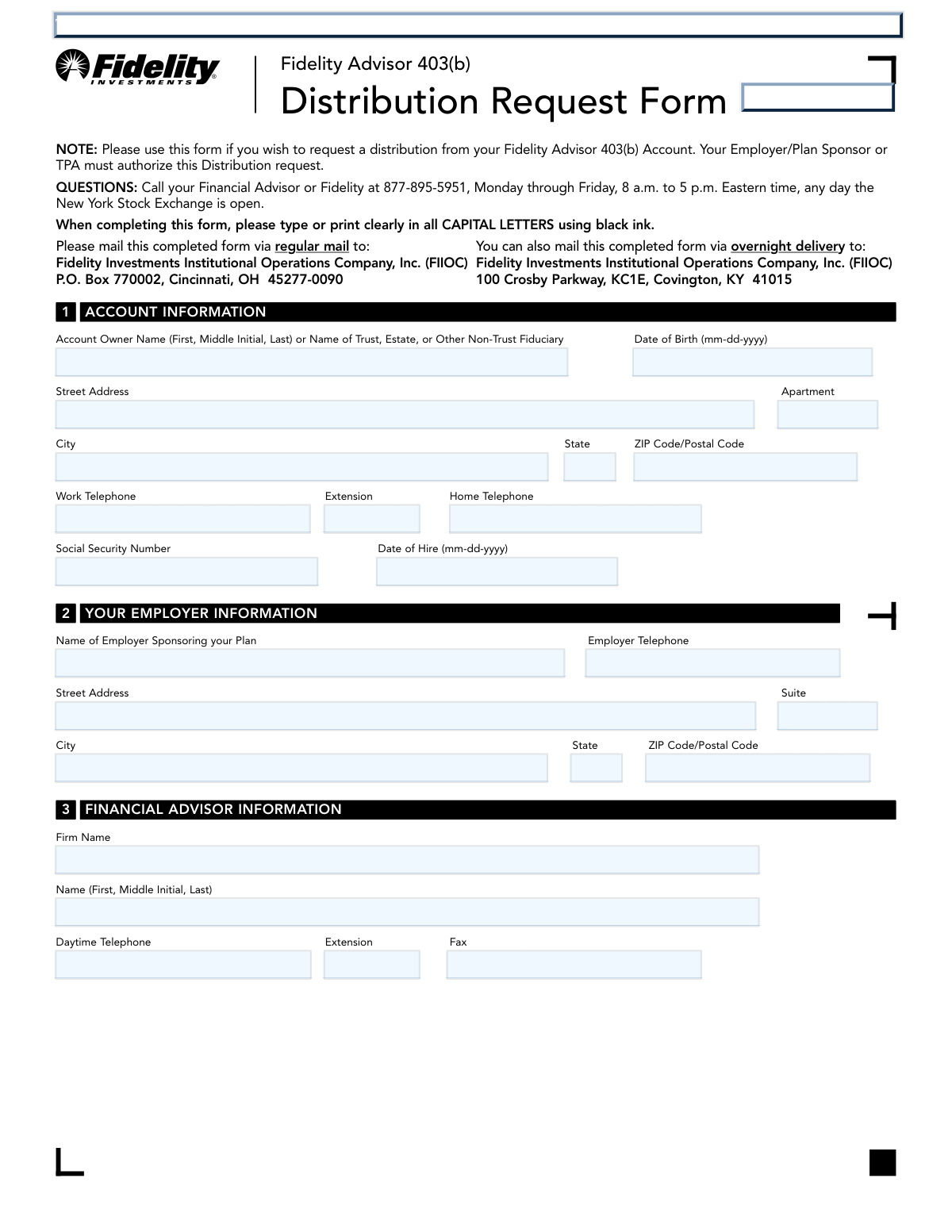
Don't type 115 fields by hand. Tell our AI about yourself, or upload a document you already have, and it fills every field in seconds. You check it, then download, print or sign.
The AI does the filling. You just check it.
No typing into boxes, nothing to install.
What this form asks for
The AI fills all of it, from your answers or your documents.
The AI checks your answers before you download
14 checks built for this form, so a wrong date or a missing answer is caught before anyone else sees it.
This check verifies that the Social Security Number field in Section 1 is not empty and adheres to the standard ###-##-#### format. A valid and correctly formatted SSN is crucial for tax reporting (Form 1099-R) and identity verification. If the SSN is missing or malformed, the form submission will be rejected pending correction to prevent processing errors and ensure regulatory compliance.
This check performs a logical validation between the 'Date of Birth' in Section 1 and the 'Reason for distribution' in Section 4. If the reason selected is 'Attainment of age 59½', the system calculates the applicant's age to confirm they meet this requirement. This is important because age is a primary qualifying event for penalty-free distributions, and failure to meet the age requirement would invalidate the selected reason, potentially leading to rejection or a request for a different reason.
This validation ensures that the 'Employer/Plan Sponsor or TPA Approval' in Section 7 is completed if the reason for distribution is 'Separation from service' or 'Disability'. The form notes that this signature is not required for age-based distributions. This check is critical because the employer must certify these specific qualifying events, and their absence would render the request incomplete and non-compliant with plan rules, causing the request to be rejected.
This check ensures that the user has selected exactly one option in Section 4, 'Reason for distribution'. A distribution can only be processed for a single qualifying event. If zero or multiple reasons are selected, the form is considered ambiguous and cannot be processed, as the tax implications and approval requirements differ for each reason. The submission will fail until a single, clear reason is provided.
This validation verifies that at least one of the four primary distribution methods in Section 5 has been selected and its corresponding details are filled out. The user must specify how they want to receive their funds, whether as a rollover, withdrawal, or installment. A form submitted without a selected distribution method is incomplete and provides no actionable instruction, so it will be rejected.
If 'Option 1 – Direct Rollover' is selected, this check ensures that one and only one of the sub-options (A, B, or C) is chosen and that all its required fields are filled. For example, if Option 1A is selected, the 'Fidelity Advisor IRA Number' must be present. This prevents ambiguity and ensures the funds are transferred to the correct destination account. An incomplete or conflicting selection will cause the rollover to fail.
And 8 more checks
- Partial Distribution Amount Specification Logic
- Systematic Withdrawal Plan Configuration
- Payment Destination Account Number Requirement
- Signature Guarantee Requirement Logic
- Mandatory Account Holder Signature
- Date of Hire and Date of Birth Format
- Full vs. Partial Rollover Exclusivity
- Non-Resident Alien Withholding Election
Let AI fill out your Fidelity Advisor 403(b)
No typing. Every field filled in seconds, checked, ready to sign.
How to Fill Out Fidelity Advisor 403(b) Online for Free in 2026
What the AI walks you through.
- Navigate to Instafill.ai and upload or select the Fidelity Advisor 403(b) Distribution Request Form.
- Use the AI assistant to accurately fill in your personal account information in Section 1, including your name, address, date of birth, and Social Security Number.
- Provide your employer and financial advisor information as prompted for Sections 2 and 3.
- In Section 4, select your reason for the distribution, such as attaining age 59½ or separation from service.
- Choose your desired method of distribution in Section 5, specifying details for a direct rollover, partial/full withdrawal, or systematic withdrawal plan.
- Review the tax withholding information in Section 6 and make your elections. The AI can help clarify these options.
- Obtain the required Employer/Plan Sponsor or TPA approval in Section 7, then review the entire form for accuracy before electronically signing and dating in Section 8.
Common Mistakes in Completing Fidelity Advisor 403(b)
The ones the AI is built to catch.
Missing or Invalid Signature Guarantee
Missing Required Employer/TPA Authorization
Ambiguous Partial Distribution Instructions
Incorrect Rollover Destination Details
Attempting a Hardship Withdrawal with the Wrong Form
Misunderstanding Tax Withholding Elections
Requesting EFT Without the Separate Application
Forgetting to Sign or Date the Form
Failing to Pre-Establish Destination Accounts
Ignoring 'ALL CAPITAL LETTERS' Instruction
Frequently Asked Questions About Fidelity Advisor 403(b)
Is it really free for 7 days?
Can I fill other forms too?
How do I cancel?
How does the AI fill out Fidelity Advisor 403(b)?
What happens to my information?
How complex is Fidelity Advisor 403(b) to fill out?
What is the Fidelity Advisor 403(b) Distribution Request Form used for?
Who needs to fill out this form?
Can I use this form to request a financial hardship withdrawal?
Does my employer always need to sign this form?
What is a signature guarantee and when do I need one?
Where do I send the completed form?
What are my options for receiving the money from my 403(b)?
Will taxes be withheld from my distribution?
Who should I contact if I have questions about this form?
What information do I need to have ready to complete this form?
Can I use an AI tool to help me fill out this form?
How can I use Instafill.ai to fill this form online?
The PDF I downloaded isn't fillable. What can I do?
Get your Fidelity Advisor 403(b) filled out by AI
$0 today. Cancel before Nov 2 and you pay nothing.
Other forms like this one
distribution forms: Fischer Homes Request for In-Service Distribution, Form 1099-DIV, Dividends and Distributions, Form 1099-R, Distributions From Pensions etc., Form 1099-PATR, Taxable Distributions from Cooperatives, Form 1099-SA, Distributions from HSA/MSA, Nationwide Retirement Solutions Participant Distribution Request Form (PNF-0875M9, TRAC Version, 01/2025), Nationwide Retirement Solutions Participant Distribution Request Form (PNF-0875M9, TRAC Version, 01/2025), Fidelity Advisor 403(b) Distribution Request Form, Fidelity Advisor IRA Distribution Request for Automatic Rollover Accounts, Fidelity NetBenefits Distribution - Recurring Payments, Fidelity Investments® Beneficiary Distribution Form, Fidelity Investments Distribution Form, Fidelity IRA Beneficiary Distribution — Charity, Foundation, or a University, IRA Distribution Form, New York State Deferred Compensation Plan Benefit Distribution Request, Individual 401(k) Distribution Request Form, Fidelity Distribution—Rollover, Charles Schwab IRA Distribution Form, Sample IRA Distribution Letter for a Qualified Charitable Distribution (QCD), Vanguard IRA Distribution Kit (including IRA Distribution Form RRDFT and Form W-4R)
403(b) forms: 403(b) Custodial Account Beneficiary Designation Change Form, Fidelity Advisor 403(b) Distribution Request Form, Fidelity Investments 403(b) Beneficiary Designation, Fidelity Investments 403(b)/401(a) Beneficiary Designation, The Church of the Nazarene 403(b) Retirement Savings Plan Beneficiary Designation Form, Beneficiary Designation Form For IRA and 403(b)(7) Accounts, Vanguard 403(b)(7) New Account Form, Vanguard 403(b)(7) ERISA Retirement Plan Distribution Request (Retirement / Severance from Employment / Disability), Account Reduction Loan Application 403(b) Plan, 403(b)(7) Distribution Form, Tax Sheltered Annuity (TSA) IRC Section 403(b) Distribution Request, University of Colorado 403(b) Plan – DSW Scudder Enrollment and Beneficiary Designation Form, Form A - 403(b) Participant's Request For Distribution, Qualified Retirement Plan and 403(b)(7) Custodial Account Distribution Request Form, 403(b) Distribution Form - Davis Funds, Fidelity Investments 403(b) Custodial Account Application, Fidelity Advisor 403(b) Beneficiary Distribution Request, CFS 403-2, Notice of Decision
distribution request forms: ABA Retirement Funds Program Distribution Request Form, Nationwide Retirement Solutions Participant Distribution Request Form (PNF-0875M9, TRAC Version, 01/2025), Nationwide Retirement Solutions Participant Distribution Request Form (PNF-0875M9, TRAC Version, 01/2025), Fidelity Advisor 403(b) Distribution Request Form, Fidelity Advisor IRA Distribution Request for Automatic Rollover Accounts, New York State Deferred Compensation Plan Benefit Distribution Request, Individual 401(k) Distribution Request Form, Fischer Homes Request for In-Service Distribution, Vanguard 403(b)(7) ERISA Retirement Plan Distribution Request (Retirement / Severance from Employment / Disability), Elevator Constructors Union Local No.1 Annuity and 401(k) Fund Distribution Request Due to Qualified Domestic Relations Order, Empower Hardship Distribution Request Form, Fidelity Distribution—Rollover Request Form, Empower Corrective Distribution Request Form, Alternate Payee QDRO Distribution Request form, Empower Required Minimum Distribution Request Form, Distribution Request Form - ISC MEP, Transamerica Retirement Solutions Distribution Request Form, Transamerica Distribution Request (Distribution of Traditional 401(k) to Roth IRA), Minimum Distribution Request, Transamerica Retirement Distribution Request Form and Special Tax Notice
Let AI fill out your Fidelity Advisor 403(b)
Your trial starts once a card is added. You pay nothing before Nov 2.
Our AI already knows this form, all 115 fields of it. Skip the typing: tell it about yourself, or upload what you have, and it fills the whole form in seconds.
- AI fills every field on all 6 pages, checkboxes included
- No typing into boxes: answer a few questions, or upload a document you already have, an old copy of this form, a photo of a document
- The AI checks the answers; you review and change anything before you download
- Download the finished PDF, print it, or sign it online
- Encrypted, and never used to train AI
Cancel before Nov 2 and you pay nothing.
A card is needed to start the trial. Cancel in two clicks from your account.
Terms · Privacy