Yes! You can use AI to fill out Fidelity Advisor 403(b) Beneficiary Distribution Request
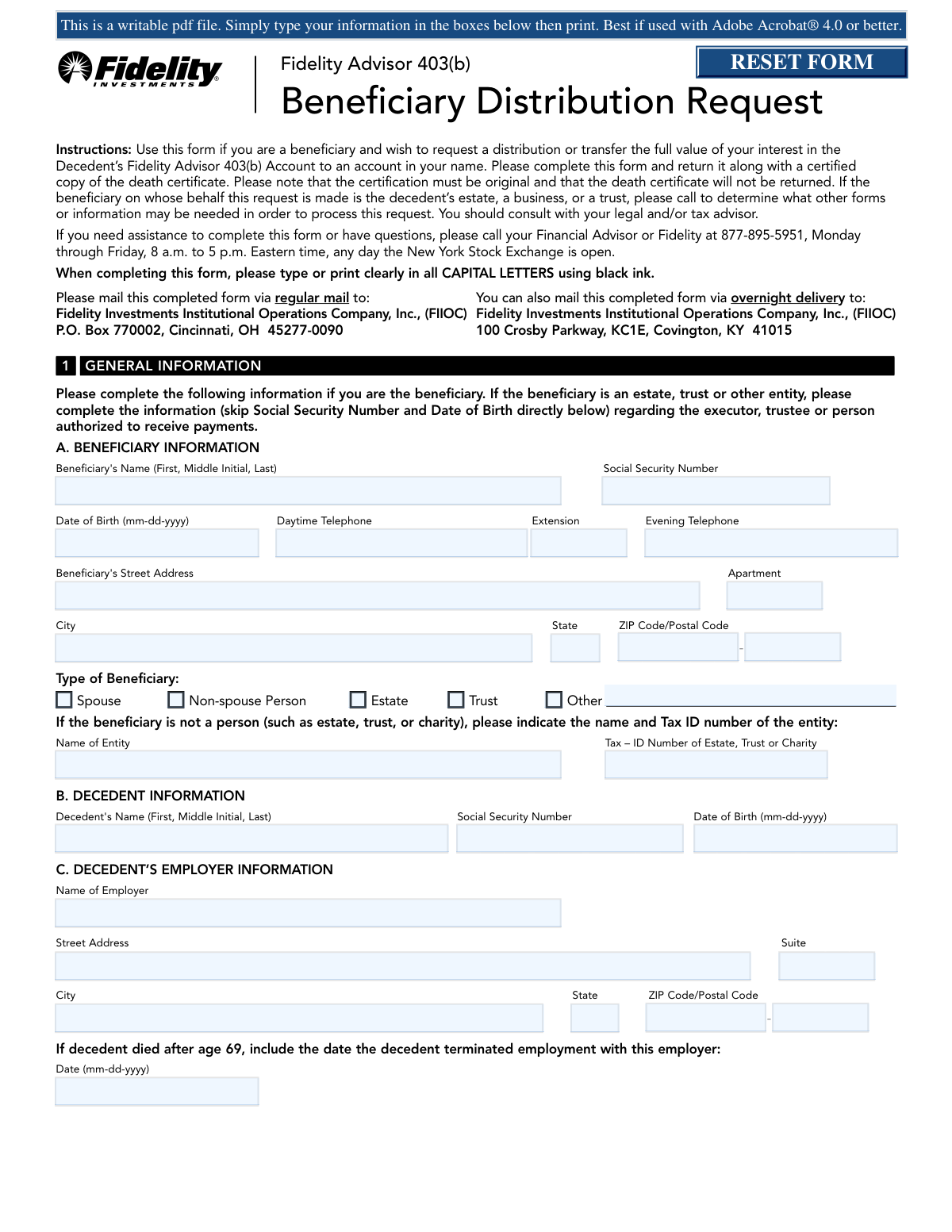
This form is used by a beneficiary of a Fidelity Advisor 403(b) account to request a distribution or transfer of assets after the account holder's death. It allows the beneficiary to choose how they receive the inherited funds, such as a direct rollover, a lump-sum payment, or transferring them into a new beneficiary account. Today, this form can be filled out quickly and accurately using AI-powered services like Instafill.ai, which can also convert non-fillable PDF versions into interactive fillable forms.
Fidelity Beneficiary Distribution Request is part of the
beneficiary forms, 403b forms, Fidelity forms, retirement account forms, distribution forms, financial distribution forms, 403(b) forms, distribution request forms and beneficiary distribution forms categories on Instafill.
Rather not fill this in by hand? Instafill is an online form filler that completes PDF forms automatically — upload the blank form, answer a few questions, and the AI fills every field.
Form specifications
| Form name: | Fidelity Advisor 403(b) Beneficiary Distribution Request |
| Number of pages: | 1 |
| Language: | English |
Our AI automatically handles information lookup, data retrieval, formatting, and form filling.
It takes less than a minute to fill out Fidelity Beneficiary Distribution Request using our AI form filling.
Securely upload your data. Information is encrypted in transit and deleted immediately after the form is filled out.
Instafill Demo: How to fill out PDF forms in seconds with AI
How to Fill Out Fidelity Beneficiary Distribution Request Online for Free in 2026
Are you looking to fill out a FIDELITY BENEFICIARY DISTRIBUTION REQUEST form online quickly and accurately? Instafill.ai offers the #1 AI-powered PDF filling software of 2026, allowing you to complete your FIDELITY BENEFICIARY DISTRIBUTION REQUEST form in just 37 seconds or less.
Follow these steps to fill out your FIDELITY BENEFICIARY DISTRIBUTION REQUEST form online using Instafill.ai:
- 1 Navigate to Instafill.ai and upload the Beneficiary Distribution Request form or select it from the template library.
- 2 Provide the beneficiary, decedent, and employer information in Section 1. The AI can assist by auto-filling known details.
- 3 Choose your desired distribution method in Section 2, such as transferring to a beneficiary account, a direct rollover, or a single sum payment.
- 4 Complete Section 3 if you are requesting Minimum Required Distributions (MRD) and Section 4 to specify your federal and state income tax withholding preferences.
- 5 Carefully review all the information populated by the AI across the form to ensure accuracy and completeness.
- 6 Electronically sign and date the form in Section 5 to certify the information provided.
- 7 Download the completed form and mail it to the specified Fidelity Investments address, ensuring you include a certified copy of the death certificate as required.
Our AI-powered system ensures each field is filled out correctly, reducing errors and saving you time.
Why Choose Instafill.ai for Your Fillable Fidelity Beneficiary Distribution Request Form?
Speed
Complete your Fidelity Beneficiary Distribution Request in as little as 37 seconds.
Up-to-Date
Always use the latest 2026 Fidelity Beneficiary Distribution Request form version.
Cost-effective
No need to hire expensive lawyers.
Accuracy
Our AI performs 10 compliance checks to ensure your form is error-free.
Security
Your personal information is protected with bank-level encryption.
Frequently Asked Questions About Fidelity Beneficiary Distribution Request
This form is for beneficiaries of a decedent's Fidelity Advisor 403(b) account to request a distribution of assets or transfer them to a new beneficiary account in their name.
Any individual, trust, or estate that is a named beneficiary of a Fidelity Advisor 403(b) account and wishes to claim the inherited assets must complete this form.
You must include a certified copy of the decedent's death certificate with your completed form. Please note that the certification must be original, and the certificate will not be returned to you.
The form provides several options, including transferring assets to a new beneficiary account, taking a single lump-sum payment, setting up installment payments, or rolling the funds over to an IRA. You should consult a tax or financial advisor to decide which option is best for your situation.
Eligible rollover amounts paid directly to you are subject to mandatory 20% federal withholding. For other payments, default withholding rules apply, but you can use Section 4 to elect a different amount or, if eligible, opt out of withholding.
You can send the form via regular mail to the P.O. Box in Cincinnati, OH, or via overnight delivery to the street address in Covington, KY. The specific addresses are provided on the first page of the form's instructions.
A signature guarantee is a special stamp from a financial institution that verifies your identity and signature. It is required if your distribution is $100,000 or more, is being sent to an address not on file, or if your address has changed within the last 15 days.
The trustee should fill out the form, providing the trust's name and Tax ID number in Section 1. It is recommended that you call Fidelity to determine if additional forms or information are needed for a trust beneficiary.
Yes, non-spouse beneficiaries can perform a direct rollover of inherited assets to an Inherited IRA, also known as an IRA-BDA. You will need to complete a Fidelity Advisor IRA Application for Beneficiaries along with this form.
If a loan was outstanding at the time of the decedent's death, it is typically treated as a taxable distribution. You should contact Fidelity directly at the number provided on the form for more information about your specific situation.
Yes, services like Instafill.ai use AI to auto-fill form fields accurately and save time. This can help you complete the form more efficiently and reduce the chance of errors.
To fill out the form online, you can upload the PDF to a platform like Instafill.ai. The service will make the document interactive, allowing you to type in your information, select your distribution options, and e-sign before printing for submission.
If you have a non-fillable PDF, you can use a service like Instafill.ai to convert it into an interactive, fillable form. This allows you to easily complete it on your computer instead of printing and filling it out by hand.
Compliance Fidelity Beneficiary Distribution Request
Validation Checks by Instafill.ai
1
Validates SSN and Tax ID Number Formats
This check ensures that the Social Security Number (SSN) fields in Section 1 for the beneficiary and decedent are entered in the correct ###-##-#### format. It also validates that the Tax ID Number for an entity beneficiary (Estate, Trust) is in the correct ##-####### format. Proper formatting is crucial for tax reporting and identity verification, and failure will prevent the system from correctly identifying the parties involved.
2
Ensures Consistent Date Formatting
This validation verifies that all date fields, including Date of Birth (Beneficiary and Decedent) and Decedent's Termination Date, adhere to the required MM-DD-YYYY format. Incorrect date formats can lead to miscalculations of age-related rules (like MRD eligibility) and cause processing rejections. This check ensures data integrity for critical calculations.
3
Verifies Beneficiary Type and Identifier Consistency
This check ensures that if the beneficiary type in Section 1A is 'Spouse' or 'Non-spouse Person', the SSN and Date of Birth fields are completed. Conversely, if the type is 'Estate', 'Trust', or 'Other', it validates that the 'Name of Entity' and 'Tax ID Number' fields are filled. This prevents ambiguity and ensures the correct identifying information is captured for the specific beneficiary type, which is essential for legal and tax compliance.
4
Validates Conditional Entry of Decedent's Termination Date
This check enforces the rule in Section 1C that the decedent's termination date is only provided if the decedent died after age 69. The system would calculate the decedent's age based on their date of birth and the date of death (from the death certificate) to determine if this field should be completed. This prevents the collection of unnecessary information and ensures the form is filled out according to instructions.
5
Ensures Single Distribution Type Selection
This validation confirms that the user has selected exactly one distribution option (A, B, C, D, or E) in Section 2. Selecting multiple options would create an ambiguous and unprocessable request. This check is critical to ensure Fidelity receives clear, actionable instructions for the distribution.
6
Validates Rollover Amount Specification
When Option 2B (Direct Rollover) is selected, this check verifies that exactly one amount option in B1 is chosen: '100%', a specific percentage, or a specific dollar amount. If a percentage is entered, it must be a value between 0 and 100. This prevents conflicting instructions on the amount to be rolled over, ensuring the transaction is processed for the correct value.
7
Verifies Completeness of Rollover Destination Information
If a direct rollover (Option 2B) is requested, this check ensures the destination account information in B2 is complete. If rolling over to a Fidelity Advisor IRA, an account number must be provided. If rolling over to another institution, the name of the custodian/trustee is required. Missing this information would make it impossible to execute the direct rollover.
8
Ensures Installment Payment Parameters are Complete
For Option 2C (Installment Payments), this validation ensures that the user has specified either a period of years or a specific dollar amount, but not both. It also confirms that a payment frequency (e.g., Monthly) and a payment method (e.g., Check) have been selected. Incomplete parameters would prevent the setup of the recurring payment plan.
9
Validates Conditional MRD Calculation Section Completion
This check ensures that the correct subsection within Section 3B is completed based on the beneficiary type from Section 1A. For example, if the beneficiary is a 'Person', Section 3B1 must be filled out; if a 'Trust', Section 3B3 must be completed. This logical check guides the user to provide the correct information needed for their specific MRD calculation, preventing errors and processing delays.
10
Verifies Data for Trust Life Expectancy MRD Calculation
If the beneficiary is a Trust (Section 3B3) and the 'Life Expectancy Rule' is selected as the MRD calculation method, this check validates that the year of birth of the underlying trust beneficiary is provided. This date is essential for Fidelity to correctly calculate the distribution period according to IRS regulations. Failure to provide it would halt the MRD setup.
11
Validates Federal Withholding Election for Rollovers
This check cross-references the distribution type in Section 2 with the withholding election in Section 4. Per IRS rules mentioned in the instructions, eligible rollover amounts not sent via direct rollover are subject to mandatory 20% withholding. If a user requests a single sum payment by check (an eligible rollover), this check would flag an attempt to elect 0% withholding, preventing a non-compliant transaction.
12
Requires Signature and Date for Authorization
This is a critical completeness check to verify that a signature and date are present in Section 5. An unsigned form is not legally valid and cannot be processed. This validation ensures the request is properly authorized by the beneficiary before it is submitted, preventing automatic rejection and delays.
13
Ensures Account Number is Provided for Direct Deposit
This check verifies that if 'direct deposit to a Fidelity Advisor non-retirement account' is selected as a payment method in Section 2C, 2D, or 3A3, a corresponding Fidelity Advisor Account Number is provided. Without the account number, the electronic funds transfer cannot be processed. This check prevents payment failures due to incomplete delivery instructions.
14
Validates Completeness of Contract/Vendor Exchange Information
If Option 2E (403(b) Contract/Vendor Exchange) is selected, this validation ensures all required fields for the new provider are completed, including the provider's name, plan name, account number, and full address. Missing any of this information would prevent Fidelity from successfully transferring the assets to the correct external account.
Common Mistakes in Completing Fidelity Beneficiary Distribution Request
The form requires a Medallion Signature Guarantee for distributions over $100,000 or those sent to a new address, but people often provide a notary stamp instead. A notary only verifies identity, while a signature guarantee also insures the transaction against fraud, which is why financial institutions require it for large transactions. This mistake is a primary cause of processing delays, as the form will be rejected and returned until the correct guarantee is obtained from an eligible financial institution like a bank or broker-dealer.
The instructions explicitly require a certified copy of the decedent's death certificate and state that it will not be returned. Beneficiaries, often acting under stress, may send a standard photocopy or expect the original to be mailed back. Submitting an incorrect version will halt the entire distribution process until a proper certified copy is received, significantly delaying access to the inherited assets.
The form has a complex structure where the distribution choice in Section 2 dictates which other sections (3, 4, 5) must be completed. Beneficiaries frequently get confused and either fill out unnecessary sections or, more critically, omit required ones like tax withholding (Section 4) for a lump sum payment. This leads to an incomplete application that cannot be processed, requiring clarification and resubmission.
Section 3, dealing with MRDs, is highly technical, involving choices between the 'Five Year Rule' and 'Life Expectancy Rule' with different implications based on beneficiary type (spouse vs. non-spouse) and the decedent's age. Beneficiaries often lack the tax knowledge to make an optimal choice, or they provide incomplete information for the calculation. An incorrect election can lead to unintended and potentially unfavorable tax consequences for years to come.
Beneficiaries often misunderstand the tax withholding rules, especially the mandatory 20% federal withholding on eligible rollover distributions that are not sent directly to another retirement account. They might incorrectly elect to have 0% withheld on a check made payable to them, not realizing it's disallowed. This error causes the form to be rejected and requires correction, delaying the payment and causing confusion about tax obligations.
When selecting a direct rollover (Option 2B) or a contract exchange (Option 2E), it is common to omit critical details like the receiving institution's name, address, or the new account number. Without this information, Fidelity cannot execute the transfer, leaving the request in a pending state. The beneficiary must then be contacted to provide the missing details, adding unnecessary delays to a time-sensitive transaction.
In Section 1A, a beneficiary may incorrectly identify their status, most commonly a non-spouse beneficiary checking the 'Spouse' box. This is a critical error, as spousal beneficiaries have significantly different and more flexible rollover and distribution options than non-spouse beneficiaries. This mistake can lead to the rejection of a requested distribution option or the establishment of an incorrect account type, requiring extensive correction.
The form specifies that for certain actions, such as setting up Electronic Funds Transfer (EFT) or opening a new Fidelity account to receive funds, a separate, completed application must be attached. People often focus only on the main distribution form and forget to include these essential attachments. This results in an incomplete package, and the distribution will be held until all required paperwork is submitted.
In Section 2, a person might accidentally select multiple, conflicting options, such as checking both 'Transfer Only' (Option A) and 'Single Sum Payment' (Option D). Alternatively, they might select 'Roll over % of my account' but fail to enter a percentage. These ambiguities make it impossible for Fidelity to know the user's true intent, forcing a rejection of the form and requiring the beneficiary to submit a new, corrected version.
When the beneficiary is a trust or estate, the trustee or executor must provide the entity's name and Tax ID Number (TIN) in Section 1A. A common mistake is for the trustee to enter their own personal name and Social Security Number in these fields. This error creates confusion about the legal beneficiary, leading to processing delays and potential tax reporting issues that must be corrected before the distribution can occur. AI-powered tools like Instafill.ai can help prevent these errors by converting flat PDFs into fillable forms and using smart logic to guide users to the correct fields.
Saved over 80 hours a year
“I was never sure if my IRS forms like W-9 were filled correctly. Now, I can complete the forms accurately without any external help.”
Kevin Martin Green
Your data stays secure with advanced protection from Instafill and our subprocessors




Robust compliance program
Transparent business model
You’re not the product. You always know where your data is and what it is processed for.
ISO 27001, HIPAA, and GDPR
Our subprocesses adhere to multiple compliance standards, including but not limited to ISO 27001, HIPAA, and GDPR.
Security & privacy by design
We consider security and privacy from the initial design phase of any new service or functionality. It’s not an afterthought, it’s built-in, including support for two-factor authentication (2FA) to further protect your account.
Fill out Fidelity Beneficiary Distribution Request with Instafill.ai
Worried about filling PDFs wrong? Instafill securely fills fidelity-advisor-403b-beneficiary-distribution-request forms, ensuring each field is accurate.
