Yes! You can use AI to fill out Qualified Retirement Plan and 403(b)(7) Custodial Account Distribution Request Form

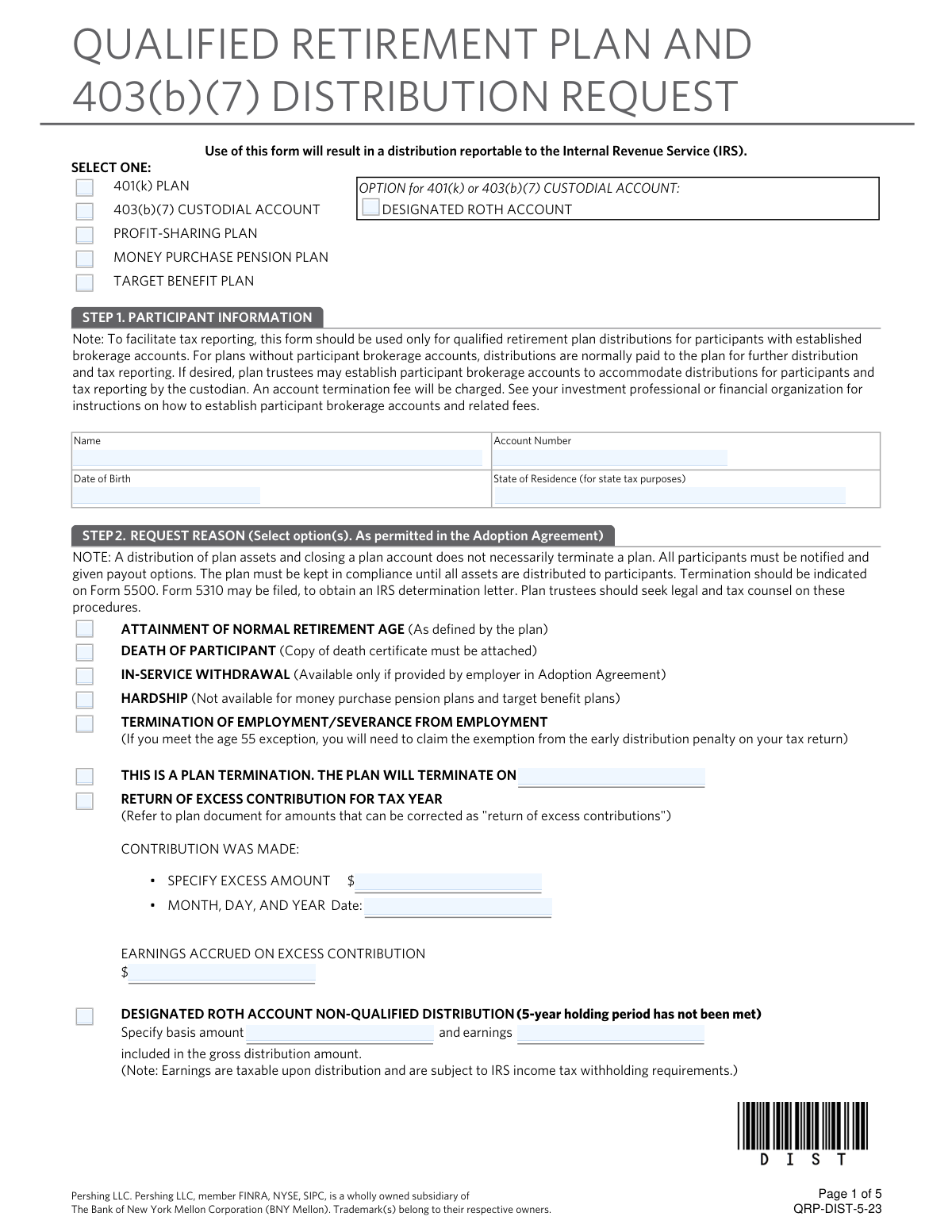
This form is a formal request made by a participant to receive a distribution from their qualified retirement plan or 403(b)(7) custodial account. It details the various payout options, tax consequences, and rollover possibilities, ensuring the participant makes an informed decision in compliance with ERISA and IRS regulations. Today, this form can be filled out quickly and accurately using AI-powered services like Instafill.ai, which can also convert non-fillable PDF versions into interactive fillable forms.
Our AI automatically handles information lookup, data retrieval, formatting, and form filling.
It takes less than a minute to fill out QRP-DIST using our AI form filling.
Securely upload your data. Information is encrypted in transit and deleted immediately after the form is filled out.

Form specifications

Form name: Qualified Retirement Plan and 403(b)(7) Custodial Account Distribution Request Form
Number of pages: 1
Language: English
Categories: retirement forms, retirement plan forms, retirement account forms, distribution forms, custodial account forms
main-image

Instafill Demo: How to fill out PDF forms in seconds with AI

How to Fill Out QRP-DIST Online for Free in 2026

Are you looking to fill out a QRP-DIST form online quickly and accurately? Instafill.ai offers the #1 AI-powered PDF filling software of 2026, allowing you to complete your QRP-DIST form in just 37 seconds or less.
Follow these steps to fill out your QRP-DIST form online using Instafill.ai:
  1. 1 Navigate to Instafill.ai and upload or select the Qualified Retirement Plan and 403(b)(7) Custodial Account Distribution Request Form.
  2. 2 Use the AI assistant to accurately fill in your personal participant information, including name, account number, and date of birth.
  3. 3 Select the reason for your distribution request, such as attainment of retirement age, termination of employment, or hardship.
  4. 4 Choose your desired distribution method, specifying if it's a direct rollover, a one-time payment, or periodic distributions.
  5. 5 Complete the federal and state income tax withholding election section, indicating the percentage or amount to be withheld.
  6. 6 If applicable, fill out the annuity waiver and spousal consent section, which may require a notary signature.
  7. 7 Review all the information for accuracy, then electronically sign and submit the completed form to your plan administrator or investment professional.

Our AI-powered system ensures each field is filled out correctly, reducing errors and saving you time.

Why Choose Instafill.ai for Your Fillable QRP-DIST Form?

Speed

Complete your QRP-DIST in as little as 37 seconds.

Up-to-Date

Always use the latest 2026 QRP-DIST form version.

Cost-effective

No need to hire expensive lawyers.

Accuracy

Our AI performs 10 compliance checks to ensure your form is error-free.

Security

Your personal information is protected with bank-level encryption.

Frequently Asked Questions About Form QRP-DIST

This form is used to request a withdrawal or distribution of funds from your qualified retirement plan, such as a 401(k), or a 403(b)(7) custodial account. You must complete it to receive your vested account balance after a qualifying event like retirement or termination of employment.

You need to fill out this form if you are a participant in a qualified retirement plan or 403(b)(7) account and wish to take a distribution. Beneficiaries of deceased participants also use this form to claim benefits.

A triggering event is a specific circumstance, like terminating employment, reaching retirement age (e.g., 59½), or disability, that legally permits you to access your retirement funds. Your plan's Summary Plan Description outlines the specific events that apply to your account.

You will need your personal information, account number, and the reason for your distribution. Depending on the reason, you may need to attach documents like a death certificate or an acceptance letter from the institution receiving your rollover.

If you are married and choose a distribution option other than a Qualified Joint and Survivor Annuity, federal law requires your spouse's written, notarized consent. This ensures your spouse understands they are waiving their right to survivor benefits.

A direct rollover is a payment from your plan directly to another eligible retirement plan or IRA, which allows you to postpone taxation on the distribution. Choosing this option helps you avoid the mandatory 20% federal income tax withholding that applies if the payment is made directly to you.

If you choose to have an eligible distribution paid directly to you, the plan is required to withhold 20% for federal income taxes. You will receive only 80% of the funds, and the full amount will be reported as taxable income for the year unless you roll it over yourself within 60 days.

In addition to your signature, this form requires a signature from your employer or Plan Administrator to verify your request. If you are married and waiving annuity benefits, your spouse's signature must be notarized.

The law generally requires a minimum 30-day waiting period after you receive the distribution notice to allow you time to consider your options, though you may be able to waive this. After submission, processing times can vary, so check with your plan administrator for specific timelines.

The form outlines several options in Step 4, including a lump-sum payment, periodic installment payments, or an annuity. You can also choose a direct rollover to another retirement account to defer taxes.

Yes, the form itself suggests consulting a professional tax advisor before completing it due to the significant tax implications of your choices. Your plan administrator can also help clarify your plan's specific rules and options.

Yes, services like Instafill.ai use AI to accurately auto-fill form fields, which can save you time and help prevent errors. These tools can extract information from your documents and place it in the correct fields on the form.

You can use a service like Instafill.ai to fill out this form online. Simply upload the PDF, and the AI will make the fields interactive and help you complete them with your information.

If your PDF is a flat, non-fillable file, you can use a tool like Instafill.ai to convert it into an interactive, fillable form. This allows you to type your information directly into the fields, sign electronically, and save or print the completed document.

Compliance QRP-DIST
Validation Checks by Instafill.ai

1
Verifies RMD Selection Eligibility by Age
This check confirms that if the participant selects 'REQUIRED MINIMUM DISTRIBUTION' in Step 4, their age, calculated from the 'Date of Birth' in Step 1, is 72 or older. This is crucial for compliance with IRS regulations which mandate RMDs starting at that age. If the participant is younger than 72, this option is invalid and the form submission should be rejected to prevent an incorrect distribution classification.
2
Ensures Spousal Consent for Annuity Waiver
Validates that if a married participant elects to waive the 'QUALIFIED JOINT AND SURVIVOR ANNUITY' in Step 7, the 'SPOUSAL CONSENT' section is fully completed. This includes the spouse's signature, date, and a notary public's signature. This is a critical legal requirement under ERISA to protect spousal rights, and failure to obtain this consent renders the waiver and the chosen distribution method invalid.
3
Mandatory 20% Withholding for Non-Rollover Distributions
This check enforces the mandatory 20% federal income tax withholding rule. If the distribution is eligible for a rollover but the participant does not select a 'Direct Rollover' in Step 3, the system verifies that the federal withholding election in Step 5 is at least 20%. An election to withhold less than 20% or not withhold at all must be rejected to comply with IRS regulations and avoid penalties for the custodian.
4
Conditional Field Completion for Request Reason
This validation ensures that when a specific request reason is selected in Step 2, all associated required fields are completed. For example, if 'RETURN OF EXCESS CONTRIBUTION' is chosen, the 'SPECIFY EXCESS AMOUNT', 'DATE', and 'EARNINGS' fields must be filled. This ensures the transaction is processed accurately and has all necessary data for correct accounting and tax reporting.
5
Plan Type vs. Hardship Request Compatibility
Checks if the selected plan type is compatible with a hardship request. The form specifies that hardship distributions are not available for 'MONEY PURCHASE PENSION PLAN' and 'TARGET BENEFIT PLAN'. If one of these plan types is selected at the top of the form and 'HARDSHIP' is checked in Step 2, the request is flagged as invalid to prevent a distribution that violates the plan's rules.
6
State-Specific Income Tax Withholding Logic
Cross-references the participant's 'State of Residence' from Step 1 with the state tax withholding rules table and the election made in Step 5. For example, it verifies mandatory withholding for a Maryland resident or confirms that no state tax is withheld for a Texas resident. This ensures compliance with varying state laws and prevents incorrect tax withholding, which could lead to penalties or participant complaints.
7
Completeness of Wire Transfer Details
Verifies that if 'Federal Fund Wire' is selected as the delivery method in Step 8, all necessary banking details are provided, including the ABA/Routing Number, DDA/Bank Account Number, and Bank Name. The ABA number should also be validated for its 9-digit format. Incomplete or inaccurate information would cause the wire transfer to fail, delaying the participant's receipt of funds.
8
Requirement of Death Certificate for Beneficiary Distribution
This check flags the request to ensure a copy of the death certificate is attached if 'DEATH OF PARTICIPANT' is selected as the reason in Step 2. This is a critical piece of documentation required to legally process a distribution to a beneficiary and to prevent fraudulent claims. The system should halt processing until this documentation is confirmed to be present.
9
Verification of All Required Signatures
Ensures that the form is not processed without the required signatures from both the participant in Step 9 and the Plan Administrator in Step 10. The Plan Administrator's signature is particularly important as it also authenticates the participant's signature. Missing signatures render the request unauthorized and legally invalid, so the submission must be rejected.
10
Rollover to External Custodian Documentation Check
This validation confirms that if a direct rollover to a new, non-Pershing custodian is requested in Step 3, an 'Acceptance letter' from the receiving institution is included with the form. The form explicitly states that the request cannot be processed without this letter. This check prevents funds from being sent to an account that cannot or will not accept them, avoiding failed transactions and potential tax consequences.
11
Roth Non-Qualified Distribution Data Entry
If 'DESIGNATED ROTH ACCOUNT NON-QUALIFIED DISTRIBUTION' is selected in Step 2, this check ensures that both the 'basis amount' and 'earnings' fields are populated. This separation is essential for correct tax calculation and reporting, as only the earnings portion of a non-qualified Roth distribution is taxable. An incomplete entry would lead to incorrect tax withholding and reporting to the IRS.
12
Mutually Exclusive Distribution Method Selection
This check ensures that the user has selected either 'PERIODIC DISTRIBUTION' or 'ONE-TIME OR TOTAL DISTRIBUTION' in Step 4, but not both. It also validates that within the chosen section, all necessary sub-options (like amount and frequency) are selected. This prevents ambiguity and ensures the distribution is processed exactly as the participant intends, avoiding errors in payment scheduling or amount.
13
Withholding Format for In-Kind Distributions
This validation checks if an 'In-kind distribution of securities' is requested in Step 4. If so, it confirms that any tax withholding elections in Step 5 are specified as a percentage (%) and not a fixed dollar amount ($). This is because the exact cash value may not be known at the time of processing, and withholding a dollar amount from a securities distribution is not feasible.

Common Mistakes in Completing QRP-DIST

Missing or Incomplete Spousal Consent

In Step 7, married participants who elect to waive the Qualified Joint and Survivor Annuity often forget to obtain their spouse's signature and have it notarized. This happens because they overlook the requirement or don't have immediate access to their spouse and a notary. A missing or un-notarized spousal signature will render the distribution request invalid, leading to its rejection and significant processing delays until the form is correctly completed and resubmitted.

Forgetting the Rollover Acceptance Letter

When requesting a direct rollover to a new, non-Pershing custodian in Step 3, applicants must include an acceptance letter from the receiving institution. People often miss this instruction, assuming the custodian information alone is sufficient. Submitting the form without this letter will halt the process, as the current custodian cannot transfer funds without explicit confirmation and delivery instructions from the new plan, causing delays in moving retirement assets.

Incorrect Federal Tax Withholding Election

Participants often misunderstand the tax withholding rules in Step 5, especially the mandatory 20% withholding on eligible rollover distributions not sent directly to another retirement plan. They may incorrectly select "Do NOT withhold federal income tax," not realizing it's inapplicable for a direct payment to themselves. This leads to confusion when they receive a check for 20% less than expected, and can create tax planning issues. AI-powered tools like Instafill.ai can help by highlighting mandatory withholding rules based on the distribution type selected.

Missing Plan Administrator Signature

The form requires a signature from the Plan Administrator in Step 10 to verify the participant's signature and approve the distribution. Participants frequently submit the form with only their own signature, assuming it's all that is needed. This is one of the most common reasons for immediate rejection, requiring the participant to retrieve the form, get the necessary signature, and resubmit, delaying access to their funds.

Inaccurate or Incomplete Wire Transfer Information

In Step 8, when selecting a Federal Fund Wire for delivery, users are prone to entering incorrect ABA/Routing or DDA/Bank Account numbers. These data entry mistakes are easy to make but have serious consequences, potentially causing the funds to be sent to the wrong account or rejected by the bank. To avoid this, users should meticulously verify all banking details before submission. Using a tool like Instafill.ai can help by validating number formats and reducing manual entry errors.

Ambiguous Distribution Method Instructions

In Step 4, individuals may select a distribution type, such as "Periodic Distribution" or "One-Time Distribution," but fail to provide the specific required details. For example, they might check "Periodic" but not specify a frequency or amount, or select "Total Distribution" without arranging for assets to be liquidated into cash first. This ambiguity forces the processor to either guess the user's intent or, more likely, reject the form, causing delays and frustration.

Failure to Attach Required Documentation

For certain distribution reasons in Step 2, such as "Death of Participant," supporting documentation like a copy of the death certificate is mandatory. Beneficiaries filling out the form may overlook this requirement in the fine print. Submitting the request without the necessary attachments will result in an incomplete application and an automatic rejection, delaying the beneficiary's access to the account assets until all required paperwork is provided.

Confusing Rollover Types for Roth Accounts

The rules for Roth accounts are distinct, as explained in Section 4, yet participants often make mistakes. A common error is attempting to roll over funds from a Designated Roth Account into a Traditional IRA, which is not permitted. This misunderstanding of rollover eligibility leads to a rejected transaction and requires the participant to restart the process with a correct destination, such as a Roth IRA or another employer's designated Roth account.

Ignoring State-Specific Tax Withholding

The State Income Tax Withholding section in Step 5 is often overlooked, as participants focus primarily on the federal election. Since state rules vary from mandatory to voluntary, simply leaving this section blank results in a default action that may not align with the participant's tax strategy, potentially leading to over- or under-withholding. It is crucial to review the state-specific instructions and make an explicit election to ensure the correct amount of state tax is withheld.

Incomplete 'Return of Excess Contribution' Details

When selecting "Return of Excess Contribution" in Step 2, the form requires the user to specify the exact excess amount, the date the contribution was made, and the associated earnings. Participants often fail to provide all three pieces of information, providing only the excess amount. This incomplete data prevents the custodian from accurately processing the corrective distribution and reporting it correctly to the IRS, leading to rejection of the request.
Saved over 80 hours a year

“I was never sure if my IRS forms like W-9 were filled correctly. Now, I can complete the forms accurately without any external help.”

Kevin Martin Green

Your data stays secure with advanced protection from Instafill and our subprocessors

Robust compliance program

Transparent business model

You’re not the product. You always know where your data is and what it is processed for.

ISO 27001, HIPAA, and GDPR

Our subprocesses adhere to multiple compliance standards, including but not limited to ISO 27001, HIPAA, and GDPR.

Security & privacy by design

We consider security and privacy from the initial design phase of any new service or functionality. It’s not an afterthought, it’s built-in, including support for two-factor authentication (2FA) to further protect your account.

Fill out QRP-DIST with Instafill.ai

Worried about filling PDFs wrong? Instafill securely fills qualified-retirement-plan-and-403b7-custodial-account-distribution-request-form forms, ensuring each field is accurate.