Yes! You can use AI to fill out Form DS-82, U.S. Passport Renewal Application for Eligible Individuals

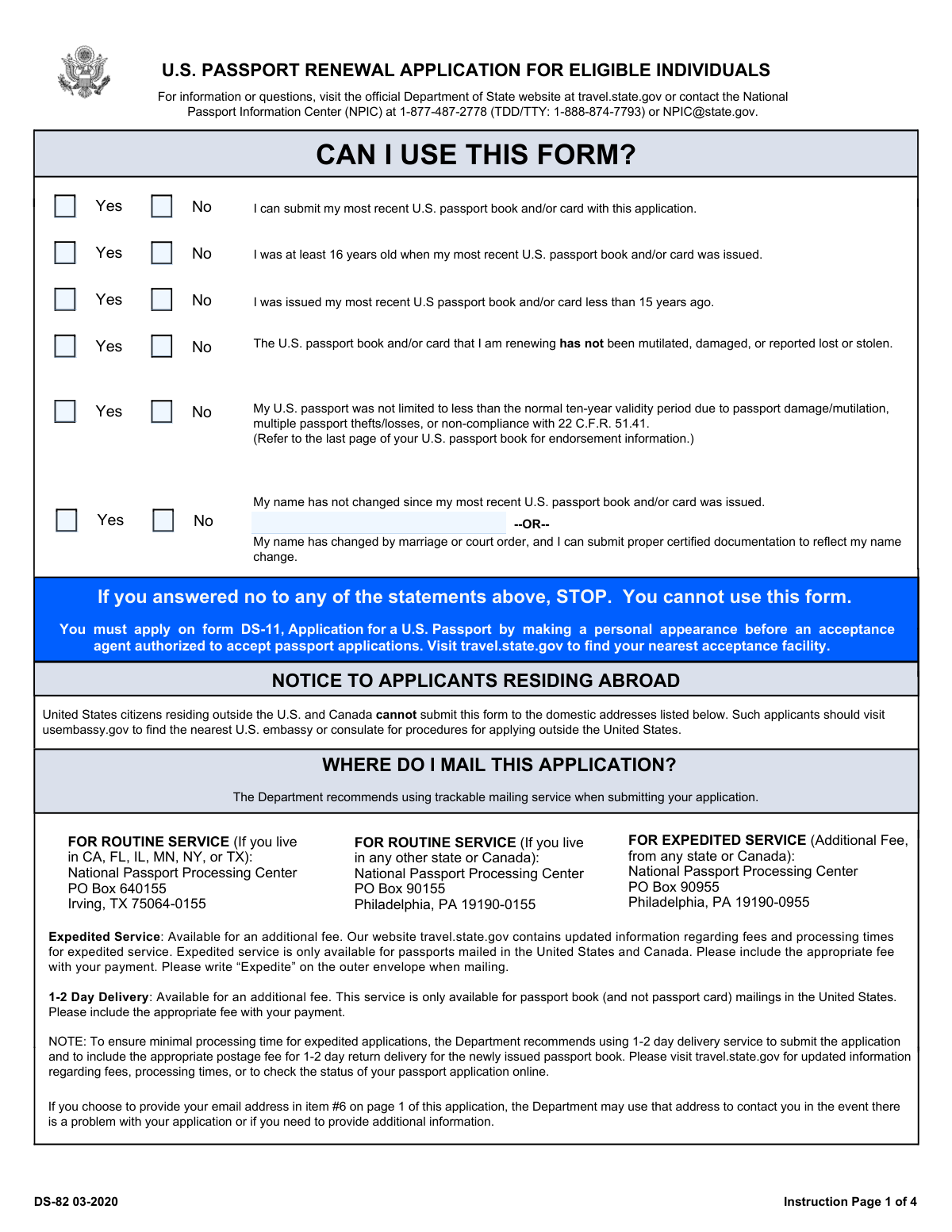
Form DS-82 is the U.S. Department of State’s mail-in passport renewal application for individuals who meet specific eligibility requirements (generally: issued at age 16 or older, issued within the last 15 years, not damaged/lost/stolen, and in the same name or with documented name change). It is important because it is the primary form used to renew a U.S. passport without appearing in person, which can save time compared to filing Form DS-11. The form also allows eligible applicants to request a passport book, a passport card, or both, and to choose routine or expedited processing. Submitting DS-82 with the required supporting documents and correct fees helps avoid delays or denial of the renewal request.
Our AI automatically handles information lookup, data retrieval, formatting, and form filling.
It takes less than a minute to fill out DS-82 using our AI form filling.
Securely upload your data. Information is encrypted in transit and deleted immediately after the form is filled out.

Form specifications

Form name: Form DS-82, U.S. Passport Renewal Application for Eligible Individuals
Number of pages: 6
Filled form examples: Form DS-82 Examples
Language: English
main-image

Instafill Demo: filling out a legal form in seconds

How to Fill Out DS-82 Online for Free in 2026

Are you looking to fill out a DS-82 form online quickly and accurately? Instafill.ai offers the #1 AI-powered PDF filling software of 2026, allowing you to complete your DS-82 form in just 37 seconds or less.
Follow these steps to fill out your DS-82 form online using Instafill.ai:
  1. 1 Confirm eligibility to use DS-82 (your most recent passport was issued at age 16+, within 15 years, is undamaged, not reported lost/stolen, and you have the same name or certified name-change documentation).
  2. 2 Select what you are applying for (passport book, passport card, or both) and any service options (routine vs. expedited; 1–2 day delivery if applicable).
  3. 3 Enter personal details on the application: full legal name, date of birth, place of birth, sex, Social Security number, and contact information (phone/email).
  4. 4 Provide passport details from your most recent passport book/card (passport number and issue date) and complete name-change information if your current name differs from the prior passport.
  5. 5 Complete address sections (mailing address, permanent address if different/if using a PO Box) and add additional details such as height, hair/eye color, occupation/employer, emergency contact, and travel plans (or write “none”).
  6. 6 Upload/attach a compliant 2x2 inch color passport photo taken within the last six months and gather required supporting items (most recent passport, certified marriage certificate/court order if applicable, and payment).
  7. 7 Review for accuracy, print pages 1 and 2 on separate sheets, sign and date in the designated signature area, and prepare the mailing packet to the correct National Passport Processing Center address based on routine/expedited service and your state.

Our AI-powered system ensures each field is filled out correctly, reducing errors and saving you time.

Why Choose Instafill.ai for Your Fillable DS-82 Form?

Speed

Complete your DS-82 in as little as 37 seconds.

Up-to-Date

Always use the latest 2026 DS-82 form version.

Cost-effective

No need to hire expensive lawyers.

Accuracy

Our AI performs 10 compliance checks to ensure your form is error-free.

Security

Your personal information is protected with bank-level encryption.

Frequently Asked Questions About Form DS-82

Form DS-82 is the U.S. Passport Renewal Application for eligible individuals. It is used to renew a U.S. passport book and/or passport card by mail if you meet all eligibility requirements listed on the form.

You can use DS-82 if you can submit your most recent U.S. passport book and/or card, it was issued when you were age 16 or older, it was issued within the last 15 years, and it is not damaged and was not reported lost or stolen.

Stop—you cannot use DS-82. You must apply on Form DS-11 and appear in person before an authorized acceptance agent.

No. If your most recent passport book/card is mutilated, damaged, or was reported lost or stolen, you must apply using DS-11 (and you may also need Form DS-64 for a lost or stolen passport).

Yes, if your name changed by marriage or court order and you can submit certified documentation (such as a certified marriage certificate, divorce decree, or court order) showing the name change. If you cannot document the change, you must use DS-11.

You must submit your most recently issued U.S. passport book and/or card, a new color photo taken within the last six months, and the required fees. If your name changed, include certified name-change documentation.

No. Submit only page 1 and page 2 of the DS-82 application, printed on separate sheets of paper, along with your supporting items.

Routine service mailing addresses depend on where you live. If you live in CA, FL, IL, MN, NY, or TX, mail to the Irving, TX PO Box; if you live in any other state or Canada, mail to the Philadelphia, PA PO Box listed on the form.

For expedited service (additional fee), mail to the expedited address in Philadelphia, PA shown on the form. Write “Expedite” on the outside of the envelope and include the expedited fee.

Not to the domestic mailing addresses on the form. U.S. citizens residing outside the U.S. and Canada should follow procedures through the nearest U.S. embassy or consulate (usembassy.gov).

Pay by personal check or money order made payable to “U.S. Department of State,” and write/print the applicant’s full name and date of birth on the check. Do not send cash; fees are non-refundable.

Submit one 2x2 inch color photo taken within the last six months, on a plain white/off-white background, facing the camera, and meeting size/quality rules (not blurry or pixelated). Glasses are generally not allowed, and hats/head coverings require specific signed statements for religious or medical reasons.

Use 4 staples vertically in the corners as close to the outer edges as possible, and do not bend the photo. Follow the “Use caution when stapling your photo” instructions on the form.

A passport book is valid for international travel by air, land, and sea. A passport card is not valid for international air travel and is generally limited to land border crossings and sea ports of entry from Canada, Mexico, the Caribbean, and Bermuda.

If you have an SSN, you are required to provide it; not providing it may delay or result in denial and may trigger IRS penalties. If you have never been issued an SSN, enter zeros in item #5.

Compliance DS-82
Validation Checks by Instafill.ai

1
Eligibility Gate: All “Can I Use This Form?” Statements Must Be Affirmed
Validate that the applicant’s responses indicate they meet every DS-82 eligibility statement (e.g., can submit most recent passport, issued at age 16+, issued within 15 years, not damaged/lost/stolen, not limited validity, and name-change conditions satisfied). This is critical because DS-82 is only valid for renewals meeting strict criteria; otherwise the applicant must use DS-11 and appear in person. If any eligibility statement is answered “No” (or left blank), the submission should be blocked and routed to a DS-11 guidance outcome.
2
Document Selection Consistency (Book/Card/Both vs Delivery Options)
Ensure the applicant selects at least one product: U.S. Passport Book, U.S. Passport Card, or both, and that any add-on services align with the selection. In particular, 1–2 Day Delivery is only allowed for passport book mailings (not passport card-only applications) and only within the U.S. If the applicant selects card-only with 1–2 Day Delivery, or selects 1–2 Day Delivery while indicating a non-U.S. mailing context, validation should fail and require correction.
3
Applicant Name Completeness and Character Validity
Verify that last name and given name fields are present, non-empty, and contain only allowed characters (letters plus common punctuation such as hyphen and apostrophe) with no numeric or symbol noise. This prevents downstream printing/encoding issues and reduces identity mismatches. If invalid characters or missing components are detected, the form should be rejected for correction.
4
Name Change Logic and Supporting Documentation Requirement
Check that the applicant’s name on the application matches the name on the most recent passport unless the applicant completes the name change section and indicates change by marriage or court order. If a name change is indicated, require the place of name change and enforce that a certified marriage certificate/divorce decree/court order is marked as attached (or otherwise provided in the submission package). If the applicant’s name differs but no name-change pathway/documentation is provided, validation fails because the renewal cannot be adjudicated without proof.
5
Passport Issue Date and 15-Year Eligibility Window
Validate that the most recent passport book/card issue date is a valid date in mm/dd/yyyy format and is not in the future. Then compute whether the issue date is within the last 15 years relative to the application date, as required for DS-82 eligibility. If the issue date is older than 15 years (or missing/invalid), the applicant should be stopped and directed to DS-11.
6
Age-at-Issue Eligibility (Issued at Age 16 or Older)
Using the applicant’s date of birth and the most recent passport issue date, calculate the applicant’s age at issuance and confirm it was at least 16. This is a core DS-82 rule and prevents ineligible minor-issued passports from being renewed via mail. If the computed age is under 16 or dates are inconsistent, validation fails and the applicant must be routed to DS-11 instructions.
7
Date Fields Format and Chronological Consistency
Enforce mm/dd/yyyy formatting for all dates present (date of birth, passport issue dates, travel departure/return dates, signature date, and any name-change dates if captured). Additionally, ensure logical ordering: date of birth must be in the past; passport issue date must be after date of birth; travel return date must be on/after departure date. If any date is malformed or chronologically impossible, the submission should be rejected to avoid processing delays and eligibility errors.
8
Social Security Number (SSN) Format and “All Zeros” Rule
Validate SSN is exactly 9 digits (allowing common formatting with hyphens) and contains only numeric characters once normalized. If the applicant indicates they have never been issued an SSN, enforce the rule that item #5 must be all zeros (000000000) and not partially filled. If SSN is missing, incorrectly formatted, or inconsistent with the “never issued” rule, validation should fail because SSN is required for identity verification and tax-law compliance.
9
Email Address Format (Optional but Must Be Valid if Provided)
If an email address is entered, validate it conforms to standard email syntax (single @, valid domain, no spaces, reasonable length). This matters because the Department may use the email to resolve application issues; invalid emails reduce the ability to cure defects and can delay processing. If invalid, require correction or removal of the email field.
10
Phone Number Format and Minimum Contactability
Validate the primary contact phone number is present and conforms to a valid phone format (e.g., 10 digits for U.S./Canada, or E.164 if international is allowed by the system), and that any additional phone numbers follow the same rules. This is important for resolving application problems quickly and for emergency contactability. If the primary phone is missing or invalid, the submission should be blocked until corrected.
11
Mailing Address Completeness and Country/State/ZIP Rules
Ensure mailing address line 1, city, state/province (when applicable), and ZIP/postal code are provided and match the selected country rules (e.g., U.S. ZIP is 5 digits or ZIP+4). If the country is outside the U.S., require the country field and validate that state is not forced incorrectly. If required address components are missing or inconsistent, validation fails because the passport cannot be delivered reliably.
12
Permanent Address Required When Mailing Address Is a PO Box or Differs
If the mailing address includes a PO Box (or the applicant indicates residence differs), require completion of the permanent address section with a non-PO Box street address. This is necessary for residency verification and to comply with form instructions. If a PO Box is used without a permanent street address, the submission should be rejected as incomplete.
13
Emergency Contact Completeness and Non-Self Constraint
Validate that emergency contact name, relationship, phone number, and address fields are sufficiently complete, and ensure the emergency contact is not the applicant (e.g., not identical name and phone). The form explicitly requests a person not traveling with the applicant, and incomplete emergency contact data reduces safety and operational effectiveness. If missing or appears to be the applicant, require correction.
14
Passport Number Presence and Basic Pattern Validation (Book/Card)
If the applicant provides a most recent passport book number and/or card number, validate that the value is present when the corresponding issue date is provided and that it matches expected alphanumeric length/pattern constraints used by U.S. passport numbers (while allowing for historical variations). This helps prevent transcription errors that can cause identity mismatches and processing delays. If a number is missing when required or contains invalid characters/length, validation should fail and prompt re-entry.
15
Signature and Signature Date Required (Execution of Application)
Require that the applicant’s legal signature is present and that the signature date is completed in mm/dd/yyyy format and not in the future. The declaration under penalty of perjury is not valid without execution, and unsigned applications are routinely rejected. If signature or date is missing/invalid, the submission must be marked incomplete and not accepted for processing.
16
Photo Submission Attestation and Recency Requirement
Confirm the applicant indicates a new color photo is included and that the photo date (if captured by the system) is within the last six months; additionally, enforce that the photo is required for all submissions. Photo compliance is essential for identity verification and production; missing or outdated photos cause immediate processing holds. If the photo is not provided or is outside the allowed recency window, validation fails and the applicant must resubmit with a compliant photo.

Common Mistakes in Completing DS-82

Using DS-82 when not actually eligible

Applicants often check the eligibility statements quickly and miss a single disqualifier (e.g., passport issued before age 16, issued more than 15 years ago, damaged/mutilated, or previously reported lost/stolen). This leads to rejection or a request to reapply on DS-11, adding weeks of delay and extra steps (including an in-person appearance). Avoid this by verifying the issue date, your age at issuance, and the passport’s condition/status before completing DS-82; if any statement is “No,” stop and use DS-11.

Applicants residing abroad mailing to domestic addresses

People living outside the U.S. and Canada sometimes mail DS-82 to the U.S. processing center because the mailing section is prominent. The form explicitly states U.S. citizens residing outside the U.S. and Canada cannot use the domestic addresses, which can result in misrouting, non-processing, or significant delays. Avoid this by following the “NOTICE TO APPLICANTS RESIDING ABROAD” and using the nearest U.S. embassy/consulate procedures via usembassy.gov.

Not submitting the most recently issued passport book/card

A common error is sending an older passport, a photocopy, or forgetting to include the physical most recent passport book and/or card. DS-82 requires you to submit your most recently issued passport product that meets the eligibility rules, and missing it can trigger a suspension letter or force a DS-11/DS-64 path. Avoid this by locating the newest passport book/card and enclosing it in the mailing package (not just the number).

Name mismatch without certified name-change documentation

Applicants frequently enter a current name that differs from the most recent passport but fail to include a certified marriage certificate, divorce decree, or court order (or they send an uncertified copy). This causes processing to stop until acceptable proof is received, or the application may be denied if the change cannot be documented. Avoid this by ensuring item #1 matches the prior passport exactly unless you include certified documentation, and confirm the document is clear, legible, and certified.

Incorrect or incomplete payment (wrong payee, amount, or method)

People often write the check to the wrong payee, send cash, omit required fees for expedited/1–2 day delivery, or use an outdated fee amount. Payment issues can result in immediate rejection or significant delays, and fees are non-refundable once processed. Avoid this by checking current fees at travel.state.gov/passportfees, paying by personal check or money order only, making it payable to “U.S. DEPARTMENT OF STATE,” and including any expedite/return delivery fees you selected.

Forgetting to print applicant name and DOB on the check/money order

Even when the amount and payee are correct, applicants often forget the instruction that the applicant’s full name and date of birth must be typed or printed on the front of the check. This can make it harder to match payment to the application and may delay intake or require follow-up. Avoid this by writing the applicant’s full name and DOB on the payment instrument before sealing the envelope.

Submitting a non-compliant passport photo

Photo problems are among the most frequent causes of delays: wrong size (must be 2x2 inches), incorrect head size, shadows/background issues, low resolution, or the photo being older than six months. Applicants also commonly wear glasses or hats/head coverings without the required medical/religious statement. Avoid this by using a professional passport photo service or carefully following the listed requirements (size, head measurement, plain white/off-white background, no glasses) and including required signed statements if an exception applies.

Improperly attaching the photo (wrong staples or damaged photo)

Applicants sometimes tape, glue, paperclip, or staple through the face, or they use too few staples and the photo detaches. The form instructs using 4 staples vertically in the corners as close to the outer edges as possible and not bending the photo; improper attachment can lead to photo rejection or scanning issues. Avoid this by stapling exactly as directed and keeping the photo flat and undamaged.

Not signing and dating the application on page 1

Because DS-82 is two pages and includes multiple instruction sections, applicants sometimes forget the signature/date block or sign in the wrong place. An unsigned or undated application is incomplete and will be returned or suspended, delaying processing. Avoid this by completing both pages, then double-checking the designated signature area on page 1 before mailing.

Printing/assembling the form incorrectly (not two separate pages or missing page 2)

Applicants often print double-sided, shrink-to-fit, or submit only page 1, despite the instruction to print page one and page two on separate pieces of paper and submit both pages. Missing or improperly formatted pages can cause barcode/scanning problems or an incomplete application. Avoid this by printing single-sided, full-size, and confirming both pages are included in the envelope (instruction pages are not required).

Mailing to the wrong processing address or forgetting to mark “Expedite”

The mailing address changes based on routine vs expedited service and, for routine service, on the applicant’s state of residence (CA/FL/IL/MN/NY/TX vs other states/Canada). Applicants frequently send routine applications to the expedited PO box (or vice versa) or forget to write “Expedite” on the outer envelope, which can slow routing and processing. Avoid this by selecting the correct address for your service level and state, and clearly writing “Expedite” on the envelope when paying for expedited service.
Saved over 80 hours a year

“I was never sure if my IRS forms like W-9 were filled correctly. Now, I can complete the forms accurately without any external help.”

Kevin Martin Green

Your data stays secure with advanced protection from Instafill and our subprocessors

Robust compliance program

Transparent business model

You’re not the product. You always know where your data is and what it is processed for.

ISO 27001, HIPAA, and GDPR

Our subprocesses adhere to multiple compliance standards, including but not limited to ISO 27001, HIPAA, and GDPR.

Security & privacy by design

We consider security and privacy from the initial design phase of any new service or functionality. It’s not an afterthought, it’s built-in, including support for two-factor authentication (2FA) to further protect your account.

Fill out DS-82 with Instafill.ai

Worried about filling PDFs wrong? Instafill securely fills form-ds-82-us-passport-renewal-application-for-eli forms, ensuring each field is accurate.