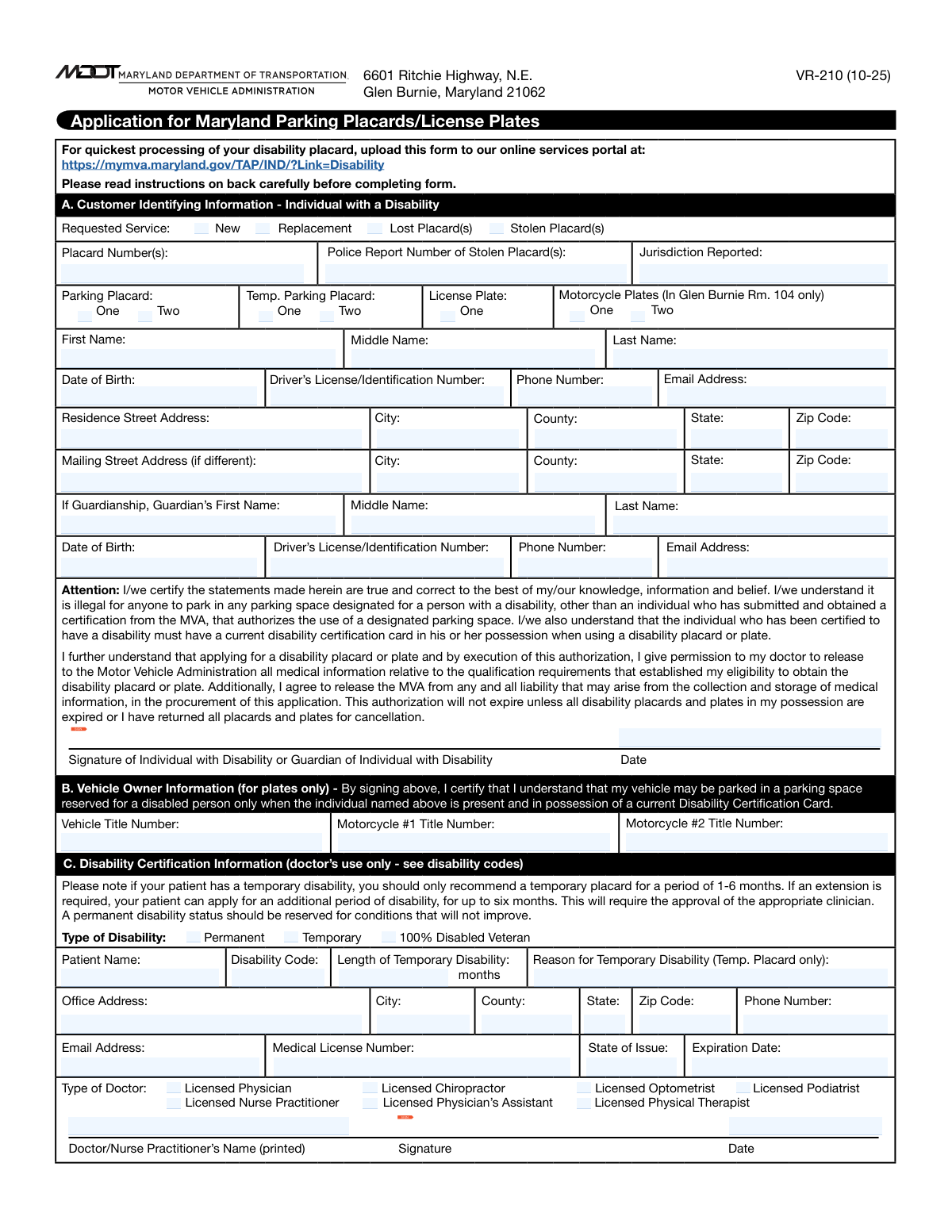
Yes! You can use AI to fill out Form VR-210, Application for Maryland Parking Placards/License Plates for Individuals with a Disability
Form VR-210 is the official document required by the Maryland Motor Vehicle Administration (MVA) for residents seeking disability parking privileges. It is used to apply for new, replacement, or renewed placards and license plates by documenting the applicant's personal information and a required medical certification of their disability. Today, this form can be filled out quickly and accurately using AI-powered services like Instafill.ai, which can also convert non-fillable PDF versions into interactive fillable forms.
VR-210 is part of the
disability application forms, individual application forms and license plate forms categories on Instafill.
Our AI automatically handles information lookup, data retrieval, formatting, and form filling.
It takes less than a minute to fill out VR-210 using our AI form filling.
Securely upload your data. Information is encrypted in transit and deleted immediately after the form is filled out.
Form specifications
| Form name: | Form VR-210, Application for Maryland Parking Placards/License Plates for Individuals with a Disability |
| Number of fields: | 70 |
| Number of pages: | 2 |
| Language: | English |
Instafill Demo: How to fill out PDF forms in seconds with AI
How to Fill Out VR-210 Online for Free in 2026
Are you looking to fill out a VR-210 form online quickly and accurately? Instafill.ai offers the #1 AI-powered PDF filling software of 2026, allowing you to complete your VR-210 form in just 37 seconds or less.
Follow these steps to fill out your VR-210 form online using Instafill.ai:
- 1 Navigate to Instafill.ai and upload or select the Maryland MVA Form VR-210.
- 2 Complete the applicant section with your personal details, including name, address, and driver's license information, allowing the AI to guide you.
- 3 Specify the service you are requesting (new, replacement, lost, stolen) and choose the type of placard or license plate you need.
- 4 Invite your healthcare provider to digitally complete the 'Disability Certification' section, or fill it in using information they have provided to you.
- 5 Review all sections of the application, including your information and the medical certification, to ensure everything is accurate and complete.
- 6 Provide your digital signature and date the form to certify its contents before submission to the Maryland MVA.
Our AI-powered system ensures each field is filled out correctly, reducing errors and saving you time.
Why Choose Instafill.ai for Your Fillable VR-210 Form?
Speed
Complete your VR-210 in as little as 37 seconds.
Up-to-Date
Always use the latest 2026 VR-210 form version.
Cost-effective
No need to hire expensive lawyers.
Accuracy
Our AI performs 10 compliance checks to ensure your form is error-free.
Security
Your personal information is protected with bank-level encryption.
Frequently Asked Questions About Form VR-210
This form is used to apply for a new, replacement, lost, or stolen disability parking placard or license plate for individuals with a qualifying disability.
The applicant (the person with the disability) must complete the personal information sections, and a licensed medical professional must complete and sign the disability certification section. A guardian may also fill out the form on the applicant's behalf.
Select 'Lost' if you have misplaced your placard. If you believe it was stolen, you must select 'Stolen' and provide a police report number and the jurisdiction where the report was filed.
Yes, the form includes checkboxes to request either one or two placards. This applies to both permanent and temporary placards.
A licensed physician, nurse practitioner, physician's assistant, chiropractor, optometrist, physical therapist, or podiatrist is authorized to complete the medical certification section.
Your doctor must provide their contact details, medical license number, and signature. They also need to certify the type of disability (permanent or temporary) and provide a disability code.
You only need to complete the mailing address section if you want official correspondence sent to an address that is different from your primary residence.
A permanent disability is a long-term condition, while a temporary disability is expected to last for a limited time. For temporary disabilities, your doctor must specify the expected duration in months.
Use the 'Guardian / Authorized Representative Information' section to enter your name, ID number, and contact details. You will also sign the form in the designated signature area.
If you are requesting a disability license plate for a vehicle or motorcycle, you must provide the official title number for each vehicle.
Yes, services like Instafill.ai use AI to accurately auto-fill form fields from your saved profile, which can save you time and help prevent errors.
Simply upload the form to Instafill.ai, and its AI will automatically identify and populate the fields using your secure personal information. You can then review, edit, and download the completed form.
You can use a service like Instafill.ai, which can convert flat, non-fillable PDFs into interactive, fillable forms that you can complete easily on your computer.
The form instructions state that you can leave the 'Middle Name' field blank if you do not have one. This applies to both the applicant and guardian sections.
Compliance VR-210
Validation Checks by Instafill.ai
1
Stolen Placard Police Report Requirement
This check verifies that if the 'Stolen Placard(s)' box is checked under 'Requested Service', the 'Police Report Number' field must be filled. This is crucial for documenting the theft and preventing fraudulent replacement requests. If the box is checked but the number is missing, the form submission should be flagged for correction, as the report number is required to process a stolen placard replacement.
2
Temporary Disability Details Requirement
This validation ensures that if the 'Temporary' disability type is selected, both the 'Length of Temporary Disability (months)' and 'Reason for Temporary Disability' fields are completed. These details are essential for the issuing authority to determine the appropriate duration for the temporary placard. A failure in this check would result in an incomplete medical certification, preventing the issuance of a temporary placard until the required information is provided.
3
Patient Name Consistency Check
This check confirms that the 'Patient Name' entered in the 'Patient & Disability Details' section matches the applicant's 'First Name' and 'Last Name'. This is a critical integrity check to ensure the medical certification is for the correct individual applying for the disability benefit. A mismatch could indicate a clerical error or potential fraud and must be resolved before the application can be processed.
4
Clinician License Validity
This validation verifies that the 'License Expiration Date' provided for the certifying clinician is a valid date and is not in the past. It is essential that the certification is completed by a currently licensed medical professional. An expired license would invalidate the medical certification, and the form would be rejected until a certification from a clinician with a valid license is provided.
5
Guardian Age Verification
This check calculates the age of the guardian based on the 'Guardian's Date of Birth' to ensure they are of legal adult age (typically 18 years or older). This is important to confirm that the representative is legally authorized to act on behalf of the applicant. If the guardian's age is calculated to be under 18, the submission should be rejected as the representative may not have the legal standing to sign the application.
6
ZIP Code Format Validation
This check ensures that all ZIP code fields ('ZIP Code', 'Mailing ZIP Code', 'Office ZIP Code') adhere to a valid format, either 5 digits (e.g., 12345) or ZIP+4 (e.g., 12345-6789). Correctly formatted ZIP codes are essential for mail delivery and address verification. An invalid format would cause a validation error, requiring the user to correct the entry before submission.
7
Signature Date Logic
This validation confirms that the 'Signature Date' is a valid date and is not in the future. The signature date documents when the applicant or guardian attested to the information's accuracy. A future date is logically impossible and indicates an error, so the form should be rejected until a valid date (today or in the past) is entered.
8
Vehicle Title Requirement for Plate Requests
This check ensures that if 'License Plate' or 'Motorcycle Plates' are requested, the corresponding 'Vehicle Title Number' or 'Motorcycle Title Number' field is filled. Disability license plates are tied to a specific vehicle, making the title number a mandatory piece of information for registration. If a plate is requested without a title number, the application for the plate cannot be processed.
9
Mailing Address Completeness
This validation rule checks that if any field in the 'Mailing Address' section is filled, then all required mailing address fields ('Mailing Street Address', 'Mailing City', 'Mailing State', 'Mailing ZIP Code') are completed. A partial mailing address is unusable and will lead to failed mail delivery. If this check fails, the user must either complete the entire mailing address section or clear it.
10
Applicant Name Completeness
This check verifies that the 'First Name' and 'Last Name' fields for the applicant are not empty. The applicant's full legal name is the primary identifier on the application and is required for all official records and identification. A submission with a missing first or last name is fundamentally incomplete and must be rejected.
11
Permanent vs. Temporary Disability Logic
This validation ensures that if 'Permanent' disability is checked, the 'Length of Temporary Disability' and 'Reason for Temporary Disability' fields are left blank. These fields are only applicable to temporary conditions. This check prevents contradictory information and ensures the application data is clean and logical, avoiding processing confusion.
12
Applicant Date of Birth Validity
This check validates that the 'Date of Birth' for the applicant is a real, valid date and is not in the future. It also serves as a basic sanity check to ensure the age is reasonable (e.g., less than 120 years). This is a fundamental data quality check to ensure the applicant's identity information is accurate before processing.
13
Email Address Format Validation
This check ensures that any email address fields ('Email Address', 'Guardian's Email Address', 'Clinician Email Address') conform to a standard email format (e.g., '[email protected]'). A valid email is necessary for electronic communication regarding the application status. If the format is invalid, the system should prompt the user for a correction to ensure contact information is usable.
14
Required Service Selection Check
This validation ensures that at least one of the checkboxes under 'Requested Service' ('New', 'Replacement', 'Lost Placard(s)', 'Stolen Placard(s)') is selected. The form's purpose is to request a service, so this selection is mandatory to understand the applicant's intent. If no service is selected, the application has no clear purpose and cannot be processed.
Common Mistakes in Completing VR-210
Applicants often use a nickname, an initial instead of a full middle name, or a slightly different spelling than what is on their official documents. This causes a data mismatch during verification against government records, leading to automatic rejection and processing delays. To avoid this, you must enter your first, middle, and last name exactly as they appear on your government-issued ID.
When filling out the 'Residence Street Address', people living in multi-unit dwellings frequently forget to include their apartment, suite, or unit number. This seemingly small omission can lead to failed mail delivery of the placard, license plates, or other critical correspondence from the agency. Always double-check that your full, complete address is listed to ensure you receive your items without issue.
This section is conditional and should only be completed if the mailing address is different from the residence address. Common mistakes include either redundantly re-entering the residence address or, more critically, forgetting to fill it out when mail cannot be received at the physical residence (e.g., using a P.O. Box). This error can result in important documents being sent to the wrong location or returned as undeliverable.
Applicants often confuse the options for 'Replacement', 'Lost', and 'Stolen'. A 'Stolen' placard requires a police report number to be processed, whereas a 'Lost' one does not. Selecting the wrong service type creates a discrepancy that halts the application, requiring the applicant to resubmit with the correct information and documentation, thereby delaying the issuance of a new placard.
When an applicant correctly checks the 'Stolen Placard(s)' box, they often fail to provide the mandatory 'Police Report Number' and 'Jurisdiction Reported'. The application is considered incomplete without this information and cannot be processed. If you are reporting a placard as stolen, you must first file a police report and then enter the exact report number and police department name on the form.
This error occurs in the medical certification section when a provider checks 'Permanent' but also fills in fields specific to a temporary condition, like 'Length of Temporary Disability'. This contradiction invalidates the medical certification, forcing the agency to return the form for correction. The provider must clearly certify the disability as either permanent OR temporary and complete only the relevant fields for that choice.
For a 'Temporary' disability certification, the form requires the provider to specify the 'Length of Temporary Disability' and the 'Reason for Temporary Disability'. A frequent mistake is submitting a form where the provider has checked 'Temporary' but left these two crucial fields blank. This renders the application incomplete and guarantees its rejection until the missing medical details are provided.
The form requires dated signatures from both the applicant (or their guardian) and the certifying medical professional in separate, clearly marked sections. A missing signature is one of the most common reasons for immediate rejection, as is the applicant accidentally signing on the line reserved for the doctor. An unsigned or incorrectly signed form is not legally valid and must be fully completed to be processed.
The 'Driver's License/Identification Number' and 'Vehicle Title Number' fields must be transcribed with perfect accuracy, including any letters or leading zeros. Simple data entry mistakes, such as transposing digits or omitting a character, will cause verification against official records to fail. This error can be prevented by carefully proofreading the numbers against the source documents. AI-powered form filling tools like Instafill.ai can also help by validating data formats to catch errors.
This section is exclusively for a legally appointed guardian or authorized representative. A common error is for an applicant to fill it out with their own information, or for a spouse who is not a legal guardian to complete it. Conversely, if a legal guardian is required (e.g., for a minor), leaving this section blank will make the application invalid. This section must be completed accurately if and only if a legal guardianship is in place.
Saved over 80 hours a year
“I was never sure if my IRS forms like W-9 were filled correctly. Now, I can complete the forms accurately without any external help.”
Kevin Martin Green
Your data stays secure with advanced protection from Instafill and our subprocessors

Robust compliance program
Transparent business model
You’re not the product. You always know where your data is and what it is processed for.
ISO 27001, HIPAA, and GDPR
Our subprocesses adhere to multiple compliance standards, including but not limited to ISO 27001, HIPAA, and GDPR.
Security & privacy by design
We consider security and privacy from the initial design phase of any new service or functionality. It’s not an afterthought, it’s built-in, including support for two-factor authentication (2FA) to further protect your account.
Fill out VR-210 with Instafill.ai
Worried about filling PDFs wrong? Instafill securely fills form-vr-210-application-for-maryland-parking-placardslicense-plates-for-individuals-with-a-disability forms, ensuring each field is accurate.