Yes! You can use AI to fill out Form DA1, Disability Allowance Application form

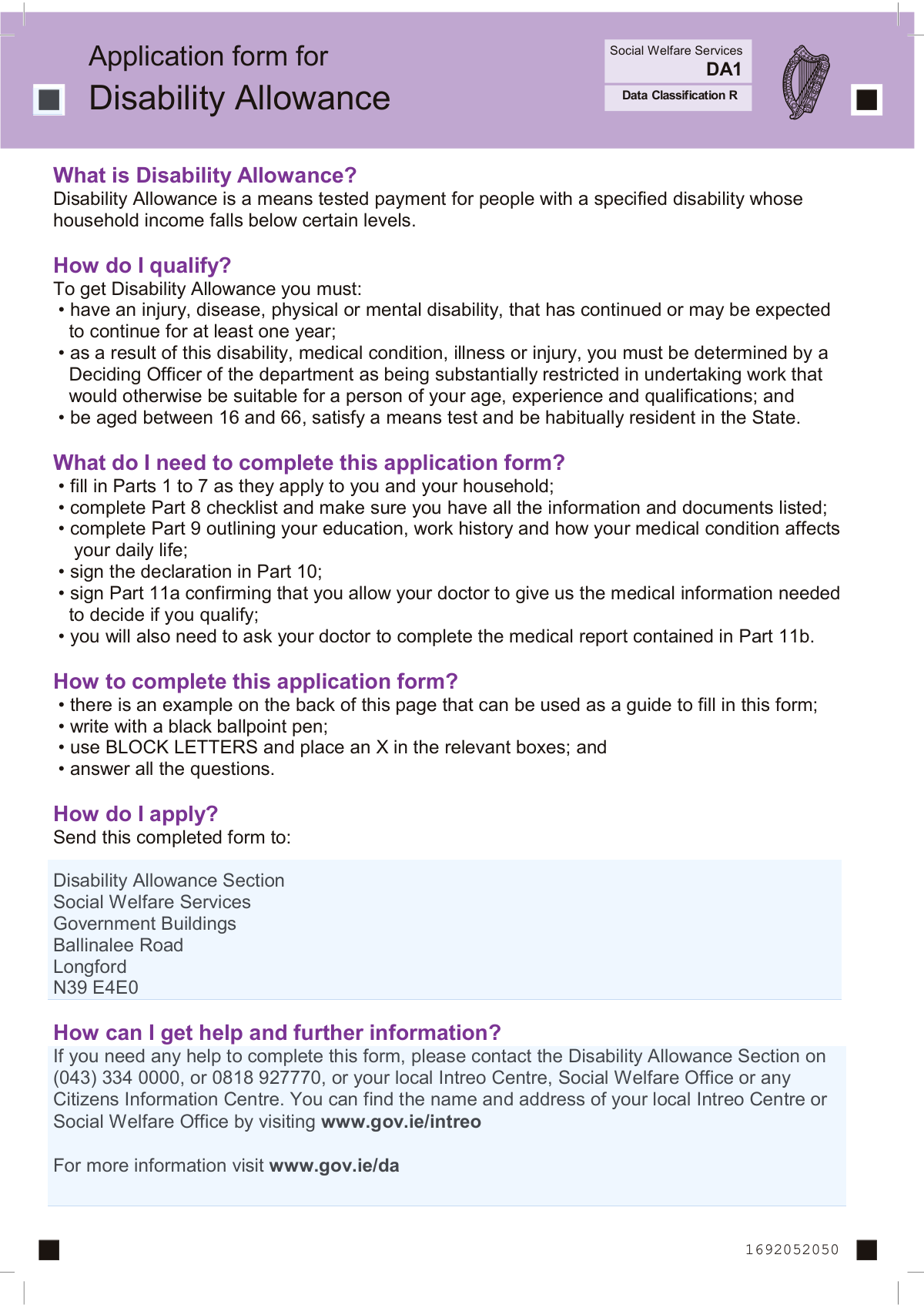
Form DA1 is the official application used to apply for Disability Allowance from Ireland's Department of Social Protection. This is a means-tested payment for individuals between 16 and 66 who have a disability expected to last at least one year and are substantially restricted in their ability to work. Today, this form can be filled out quickly and accurately using AI-powered services like Instafill.ai, which can also convert non-fillable PDF versions into interactive fillable forms.
Our AI automatically handles information lookup, data retrieval, formatting, and form filling.
It takes less than a minute to fill out DA1 using our AI form filling.
Securely upload your data. Information is encrypted in transit and deleted immediately after the form is filled out.

Form specifications

Form name: Form DA1, Disability Allowance Application form
Number of pages: 24
Language: English
Categories: disability forms
main-image

Instafill Demo: How to fill out PDF forms in seconds with AI

How to Fill Out DA1 Online for Free in 2026

Are you looking to fill out a DA1 form online quickly and accurately? Instafill.ai offers the #1 AI-powered PDF filling software of 2026, allowing you to complete your DA1 form in just 37 seconds or less.
Follow these steps to fill out your DA1 form online using Instafill.ai:
  1. 1 Navigate to Instafill.ai and upload or select the Form DA1, Disability Allowance Application.
  2. 2 Use the AI assistant to accurately fill in your personal details in Part 1, including your PPS number, name, address, and marital status.
  3. 3 Provide financial information for yourself and your partner in Parts 2 and 3, detailing employment, self-employment, savings, property, and any other income.
  4. 4 Complete the sections on your residency history (Part 4), dependent children (Part 5), and applications for other benefits like Living Alone Increase or Fuel Allowance (Part 6).
  5. 5 Fill out your education, work history, and the detailed medical report in Part 9, describing how your condition affects your daily life.
  6. 6 Sign the declaration and medical release authorizations in Parts 10 and 11a, and have your doctor complete the medical report in Part 11b.
  7. 7 Review all auto-filled information for accuracy, download the completed form, and submit it with all required supporting documents to the Disability Allowance Section.

Our AI-powered system ensures each field is filled out correctly, reducing errors and saving you time.

Why Choose Instafill.ai for Your Fillable DA1 Form?

Speed

Complete your DA1 in as little as 37 seconds.

Up-to-Date

Always use the latest 2026 DA1 form version.

Cost-effective

No need to hire expensive lawyers.

Accuracy

Our AI performs 10 compliance checks to ensure your form is error-free.

Security

Your personal information is protected with bank-level encryption.

Frequently Asked Questions About Form DA1

This form is used to apply for Disability Allowance, which is a means-tested weekly payment for individuals aged 16 to 66 who have a disability expected to last for at least one year and whose income is below a certain level.

To qualify, you must be aged 16 to 66, have a disability expected to last at least one year that substantially restricts your ability to work, satisfy a means test, and be habitually resident in the State.

Yes, you must sign Part 11a to give permission, and your doctor must complete the medical report in Part 11b. It is important they provide detailed information and any relevant specialist reports to support your claim.

You must declare all your means, which includes income from employment, self-employment, savings, investments, property, and any social welfare payments for both you and your partner. You will need to attach supporting documents like payslips, bank statements, and account details.

Yes, you are legally required to declare all means for your spouse, civil partner, or cohabitant, even if you are not claiming an increase for them, as Disability Allowance is a means-tested payment.

You must submit various documents as listed in the Part 8 checklist, which can include recent payslips, bank statements, medical reports, and property valuations. Failure to provide all required documents will delay the processing of your application.

Yes, on this form you can indicate if you wish to apply for a Living Alone Increase and Fuel Allowance. For the Household Benefits Package, you must apply separately online or using the HB1 form.

Send the fully completed and signed form to the Disability Allowance Section, Social Welfare Services, Government Buildings, Ballinalee Road, Longford, N39 E4E0.

You can contact the Disability Allowance Section, your local Intreo Centre, or a Citizens Information Centre for assistance. If you are unable to manage your own affairs, you can formally appoint an agent to act on your behalf.

Yes, services like Instafill.ai use AI to auto-fill form fields accurately and save time. This can help ensure your information is entered clearly and correctly in the required format.

If you have a non-fillable PDF, you can use a service like Instafill.ai. It can convert flat, non-fillable PDFs into interactive forms that you can easily complete on your computer.

You can use a service like Instafill.ai to upload the PDF form, which will make it interactive and fillable online. After completing the fields, you can download the finished document to print and mail.

Yes, you can apply for an increase for a qualified child who lives with you. This applies to children under 18, or up to age 22 if they are in full-time education, for whom you must provide confirmation from their school or college.

You must use a black ballpoint pen, write in BLOCK LETTERS, and place an 'X' in the relevant boxes. Answering all questions and writing clearly helps to avoid delays in processing your application.

Compliance DA1
Validation Checks by Instafill.ai

1
Verifies Applicant's Age Eligibility
Calculates the applicant's age using the 'Date of birth' from Question 6 against the application submission date. This check ensures the applicant is between the required ages of 16 and 66, as stated in the qualification criteria. If the applicant's age falls outside this range, the system should flag the application as ineligible, preventing further processing for a fundamental requirement failure.
2
Validates PPS Number Format
Ensures the Personal Public Service (PPS) Number in Part 1 (Q1) and Part 2 (Q13) adheres to the standard format of 7 digits followed by one or two letters. This validation is critical for uniquely identifying the applicant and their partner within the social welfare system for data retrieval and to prevent duplicate records. An invalid format would cause a hard failure in record matching and halt the application.
3
Ensures Marital Status and Date Consistency
If the applicant selects 'Married', 'In a Civil Partnership', or 'Cohabiting' in Question 10, this check verifies that a corresponding date is entered in Question 11. It also validates that this date is not in the future and occurs after the applicant's own date of birth. This logic is vital for correctly assessing household composition and applying the correct means test.
4
Confirms Mandatory Signature Presence
Verifies that the applicant's signature (or witnessed mark) is present in Part 10 (Declaration) and Part 11a (Permission to release medical information). These signatures are a legal requirement, confirming the information's accuracy and authorizing the department to obtain necessary medical records. An application missing these signatures is legally incomplete and cannot be processed.
5
Validates Conditional Field Completion for 'Yes' Answers
This check scans questions where a 'Yes' response requires further details, such as Q12 (full-time education), Q19 (employed), or Q26 (own property). If 'Yes' is selected, the corresponding detail field must not be empty. This ensures all necessary information for the means test and eligibility assessment is captured upfront, preventing processing delays caused by incomplete data.
6
Checks for Completeness of Partner's Details
If the applicant's marital status in Question 10 indicates they have a partner ('Married', 'In a Civil Partnership', 'Cohabiting'), this validation ensures Part 2 is fully completed. It checks for the presence of the partner's PPS number, name, and date of birth. Missing partner information makes a complete household means test impossible, which is a core component of the Disability Allowance assessment.
7
Validates Date of Birth is in the Past
This is a fundamental check on the applicant's 'Date of birth' (Q6) and their partner's 'Date of birth' (Q17). It ensures the entered date is not in the future relative to the application submission date. A future date is a logical impossibility and indicates a significant data entry error that would make all age-based eligibility calculations incorrect.
8
Verifies Standard Email Address Format
This validation checks that the email address provided in Question 9, if filled, contains an '@' symbol and a valid domain structure (e.g., 'domain.ie'). While not a mandatory field for submission, ensuring the format is correct if provided is important for reliable electronic communication. An invalid format could lead to the applicant missing important notifications about their claim.
9
Ensures a Valid Payment Method is Selected and Detailed
This check verifies that in Part 7, the applicant has selected only one payment option (Financial Institution or Post Office) and has provided all required details for that choice. For a bank payment, it validates the presence of an IBAN and BIC; for a post office, it checks that the name and address are filled. This is crucial to ensure the applicant can receive their payment without error or delay if the claim is approved.
10
Validates Details for Qualified Children Over 18
If an applicant claims for a child aged 18 to 22 in Part 5, this check confirms that the requirement for them to be in full-time education is met by cross-referencing with the checklist in Part 8. It flags if a child in this age range is listed without the required confirmation from the school or college being marked as provided. This prevents incorrect 'increase for a qualified child' payments.
11
Checks Logic of Medical Condition Onset Date
This validation ensures the 'Date of onset of condition' provided in Part 9 is not a future date and logically precedes the application date. This date is critical for establishing the medical history and satisfying the rule that the disability has continued or is expected to continue for at least one year. A future date would be a logical contradiction and would require correction.
12
Verifies Doctor's Report Completion
This check confirms that key fields in the doctor's report (Part 11b) are completed, such as the diagnosis (Q3), date condition started (Q5), and the doctor's signature and stamp. The form explicitly states the claim cannot be processed without the medical parts being completed. This validation ensures the application is not submitted without the essential medical evidence required for a decision.

Common Mistakes in Completing DA1

Submitting Without the Completed Doctor's Report

Applicants are responsible for getting their doctor to complete Part 11b, but often submit the form without it, assuming they can send it later. This is a critical error, as the form explicitly states the application cannot be processed without the medical report, leading to an automatic rejection or significant delay. To avoid this, ensure you give your doctor ample time to complete their section and only submit the entire application once all parts, including the medical report, are fully completed.

Incomplete Disclosure of Financial Means

As this is a means-tested allowance, applicants often mistakenly under-report or omit sources of income, savings, or property, especially for a cohabiting partner or assets held in another country. This can be seen as a fraudulent claim, leading to application denial, demands for repayment of any benefits received, and potential prosecution. It is crucial to declare all means for both yourself and your partner as requested in Part 3 and attach all required financial statements.

Missing or Incorrect Supporting Documents

The form requires extensive documentation, such as payslips, bank statements, property valuations, and letters from schools (Part 8 Checklist). Applicants frequently forget to attach these documents or provide outdated or incomplete versions, which halts the application process. To prevent this, use the checklist in Part 8 diligently, gathering all necessary documents before you begin filling out the form and double-checking they are all included before sending.

Vague Descriptions of Disability Impact

In Part 9, applicants often provide generic or brief answers about how their condition affects their daily life (e.g., 'walking is difficult'). Deciding Officers need specific, detailed examples to determine if the applicant is 'substantially restricted' in their ability to work, so vague descriptions can lead to a refusal. To avoid this, provide concrete details, such as how far you can walk before needing to rest, what specific household tasks you can no longer do, and how your concentration is affected.

Incorrect Personal Data Entry

Simple transcription errors in critical fields like the PPS Number, date of birth, or Eircode (Part 1) are very common on manual forms. An incorrect PPS Number can prevent the department from locating your record, while an incorrect Eircode can cause important correspondence to be lost, leading to major processing delays. Using an AI-powered tool like Instafill.ai can help prevent these mistakes by auto-filling and validating personal data against official records.

Forgetting to Sign or Date the Form

Overlooking the signature and date fields in the declaration (Part 10) and medical permission (Part 11a) is a simple but frequent mistake that invalidates the entire application. The form must be signed by hand, not in block letters, and dated correctly. An unsigned form will be returned immediately, forcing the applicant to start the process over.

Improper Formatting and Illegible Handwriting

The instructions require using a black ballpoint pen and writing in BLOCK LETTERS, with one character per box. Applicants often use the wrong pen, write in cursive, or squeeze letters together, making the form difficult for processing systems and staff to read. This can lead to data entry errors on the department's side and delays. Since this form is a non-fillable PDF, a tool like Instafill.ai can convert it into a fillable version, ensuring all entries are clear, legible, and correctly formatted.

Errors in Bank Payment Details

Entering an incorrect IBAN or BIC in Part 7 is a frequent error due to the length and complexity of these codes. A single wrong digit will cause any approved payments to fail or, in a worst-case scenario, be sent to the wrong account, creating a significant financial and administrative problem. To avoid this, carefully copy the details from an official bank statement and double-check each character before submitting the form.

Omitting Partner's Details When Cohabiting

The form clearly states that a 'partner' includes a spouse, civil partner, or cohabitant, and their financial details are required for the means test (Part 2 and 3). Some applicants mistakenly believe this only applies to married couples and fail to provide information for the person they live with. This omission will result in an incomplete application and likely lead to a request for more information, delaying the decision.
Saved over 80 hours a year

“I was never sure if my IRS forms like W-9 were filled correctly. Now, I can complete the forms accurately without any external help.”

Kevin Martin Green

Your data stays secure with advanced protection from Instafill and our subprocessors

Robust compliance program

Transparent business model

You’re not the product. You always know where your data is and what it is processed for.

ISO 27001, HIPAA, and GDPR

Our subprocesses adhere to multiple compliance standards, including but not limited to ISO 27001, HIPAA, and GDPR.

Security & privacy by design

We consider security and privacy from the initial design phase of any new service or functionality. It’s not an afterthought, it’s built-in, including support for two-factor authentication (2FA) to further protect your account.

Fill out DA1 with Instafill.ai

Worried about filling PDFs wrong? Instafill securely fills form-da1-disability-allowance-application-form forms, ensuring each field is accurate.