
Yes! You can use AI to fill out Hip and Thigh Conditions Disability Benefits Questionnaire
Don't type 725 fields by hand. Tell our AI about yourself, or upload a document you already have, and it fills every field in seconds. You check it, then download, print or sign.
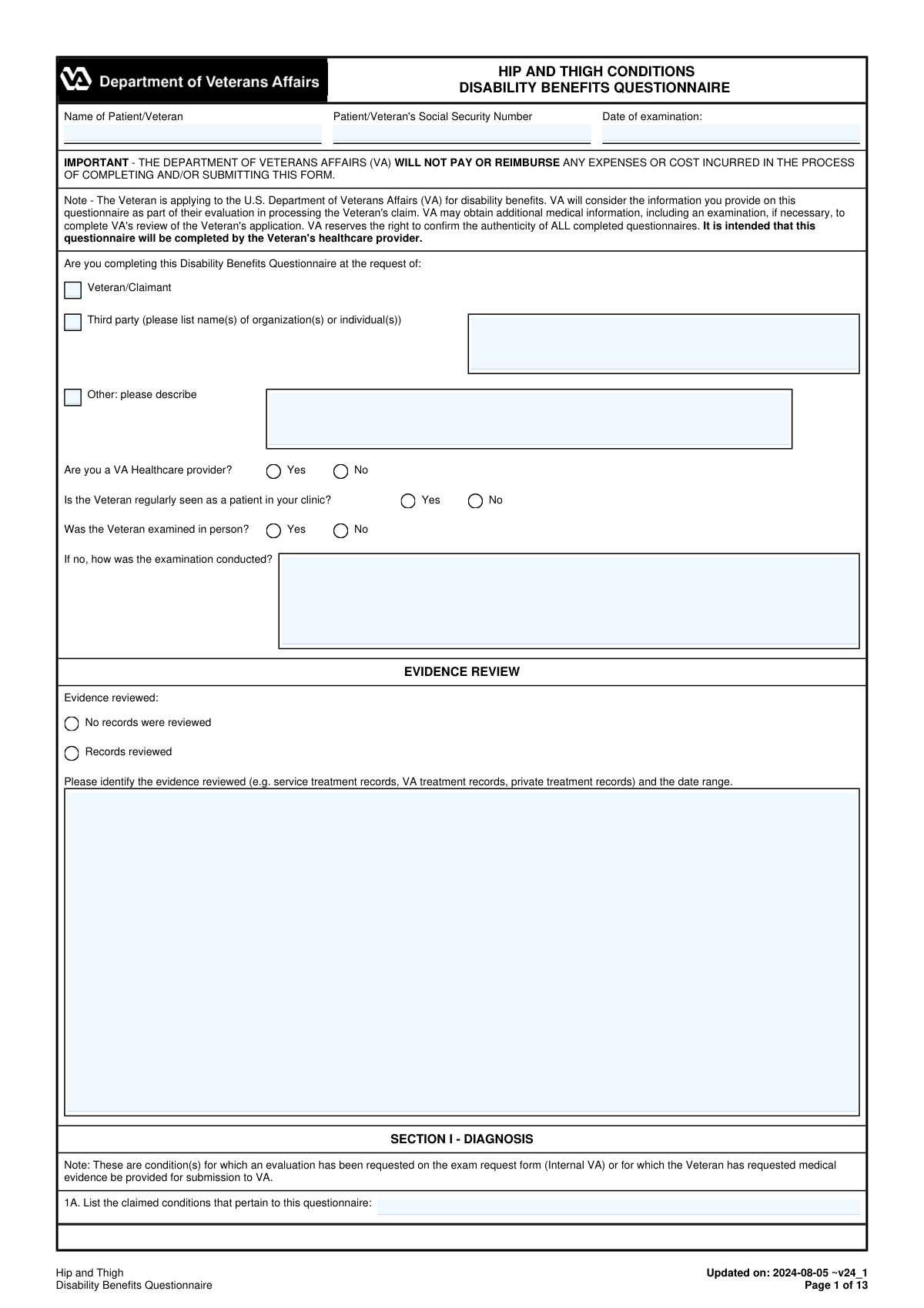
The AI does the filling. You just check it.
No typing into boxes, nothing to install.
What this form asks for
The AI fills all of it, from your answers or your documents.
The AI checks your answers before you download
16 checks built for this form, so a wrong date or a missing answer is caught before anyone else sees it.
Validates that the Patient/Veteran name and Social Security Number fields are not blank and do not contain placeholder text (e.g., 'N/A', 'unknown', or repeated characters). These identifiers are required to correctly associate the DBQ with the correct claimant and prevent misfiling into the wrong record. If validation fails, the submission should be rejected or routed to a correction workflow before acceptance.
Checks that the SSN is exactly 9 digits (optionally allowing hyphens in the ###-##-#### pattern) and is not an invalid/disallowed value (e.g., all zeros, 123456789, 999999999). Correct SSN formatting is critical for downstream VA matching and reduces manual reconciliation. If invalid, the system should block submission and prompt for correction.
Ensures all dates (Date of examination, Date of diagnosis, surgery dates, diagnostic test dates, Date Signed) are valid calendar dates and follow a consistent format (e.g., YYYY-MM-DD). Also checks logical ordering, such as Date Signed not preceding Date of examination, and surgery dates not occurring after the examination date unless explicitly allowed by business rules. If inconsistencies are found, the form should be flagged for review or returned for correction to avoid inaccurate medical timelines.
Validates that exactly one requestor type is selected (Veteran/Claimant, Third party, or Other). If 'Third party' is selected, at least one organization/individual name must be provided; if 'Other' is selected, a description is required. This is important for provenance and auditability of who initiated the DBQ. If missing, the submission should be considered incomplete and not accepted.
Checks that 'Was the Veteran examined in person?' is answered, and if 'No' is selected, the method of examination (e.g., telehealth, records review) is provided. This information affects interpretation of objective findings and compliance with exam requirements. If the modality explanation is missing, the system should require completion before submission.
Validates that the Evidence reviewed section is completed by selecting either 'No records were reviewed' or 'Records reviewed' (not both). If 'Records reviewed' is selected, the evidence types and date range must be provided to support medical opinions and ROM estimates. If evidence details are missing, the form should be flagged because it weakens the basis for conclusions and may be non-compliant.
And 10 more checks
- Diagnosis Selection vs 'No Current Diagnosis' Mutual Exclusivity
- Diagnosis Entry Completeness (Side, ICD Code, Date of Diagnosis)
- Other Diagnosis Free-Text Requires Supporting Fields
- ROM Testing Status Requires Explanation When Not Performed
- ROM Numeric Range and Unit Validation
- Pain-on-ROM Selections Must Align With Pain Evidence and Comments
- Repetitive-Use Testing Logic and Required Follow-Ups
- Repeated Use Over Time / Flare-Up Estimates Require ROM or Feasibility Rationale
- Muscle Atrophy Measurements and Causation Rationale
- Surgery/Implant Entries Require Dates and Residual Severity When Applicable
Let AI fill out your VA DBQ (Hip and Thigh)
No typing. Every field filled in seconds, checked, ready to sign.
How to Fill Out VA DBQ (Hip and Thigh) Online for Free in 2026
What the AI walks you through.
- Enter Veteran/patient identifying information (name, Social Security number, and date of examination) and indicate who requested the DBQ (Veteran/claimant, third party, or other).
- Complete examiner and exam context details: VA provider status, whether the Veteran is a regular patient, whether the exam was in person (and if not, how it was conducted), and list evidence/records reviewed with date ranges.
- Document Section I (Diagnosis): list claimed conditions, select all applicable hip/thigh diagnoses, specify side affected (right/left/both), and provide ICD codes and diagnosis dates; add any “other” diagnoses as needed.
- Fill Section II (Medical History): summarize onset/course, record flare-ups (frequency, duration, triggers, severity), and describe functional loss after repeated use over time in the Veteran’s own words.
- Complete Section III (ROM and Functional Limitation): record active and passive ROM for each hip, note pain on weight-bearing/nonweight-bearing and active/passive motion, perform repetitive-use testing, and estimate ROM during repeated use over time and flare-ups with supporting rationale when required.
- Finish remaining clinical sections: muscle atrophy measurements, ankylosis, femur/flail hip impairment and leg length discrepancy, surgical procedures and residuals, scars/other findings, assistive devices, remaining effective function, and diagnostic testing/imaging results.
- Provide Section XII functional impact on occupational tasks, add any remarks, then complete examiner certification with signature, credentials, specialty, contact information, NPI, license details, and address before generating the final submission copy.
Common Mistakes in Completing VA DBQ (Hip and Thigh)
The ones the AI is built to catch.
Missing patient identifiers and exam date at the top of the form
Not specifying who requested the DBQ (Veteran vs third party) and leaving third-party details blank
Inconsistent answers about in-person examination and how the exam was conducted
Evidence review section completed incorrectly (checked boxes without listing records and date ranges)
Diagnosis section errors: selecting “no current diagnosis” while also listing diagnoses, sides, or ICD codes
Side affected confusion (Right/Left/Both) and mismatched Right:Left fields
Missing or non-specific dates and codes (date of diagnosis, ICD code, surgery dates)
Range of motion (ROM) entered without degrees, with wrong units, or copied as “normal” without measurements
Not addressing required pain testing contexts (active vs passive; weight-bearing vs nonweight-bearing) or failing to explain why not
Flare-up and repeated-use sections left blank or answered “unable to estimate” without case-specific rationale
Assistive device section incomplete (frequency not selected, side/condition not linked in 9B)
Examiner certification details missing (signature, credentials, NPI, license/state, contact info)
Frequently Asked Questions About VA DBQ (Hip and Thigh)
Is it really free for 7 days?
Can I fill other forms too?
How do I cancel?
How does the AI fill out VA DBQ (Hip and Thigh)?
What happens to my information?
How complex is VA DBQ (Hip and Thigh) to fill out?
What is the Hip and Thigh Conditions Disability Benefits Questionnaire (DBQ) used for?
Who is supposed to complete and sign this DBQ?
Will the VA pay my provider or reimburse costs for completing this form?
Can this DBQ be completed without an in-person exam?
What records should the examiner review in the Evidence Review section?
What diagnoses can be listed, and do I need ICD codes and dates of diagnosis?
What if the Veteran has symptoms but no current diagnosis?
How should flare-ups be documented on this DBQ?
What range of motion (ROM) measurements are required for the hip?
What if ROM testing or contralateral joint testing cannot be performed?
What is the difference between observed repetitive-use testing and repeated use over time?
How are surgeries like total hip replacement documented on this form?
Do scars from hip surgery need to be included?
How should assistive devices (cane, walker, brace, wheelchair) be reported?
What diagnostic testing is required for arthritis on this DBQ?
Get your VA DBQ (Hip and Thigh) filled out by AI
$0 today. Cancel before Nov 1 and you pay nothing.
Other forms like this one
disability forms: Form SSA-3368-BK, Disability Report - Adult, Form SSA-16, Application for Disability Benefits, Form SSA-3820-BK, Disability Report - Child, Form SSA-454-BK, Continuing Disability Review, Form 21-526EZ, Application for Disability Compensation, Form N-648, Medical Certification for Disability Exceptions, Form DBQ, Knee and Lower Leg Disability Benefits, Form DBQ, Heart Conditions Disability Benefits, Form DBQ, Hypertension Disability Benefits, Form DBQ, Scars/Disfigurement Disability Benefits, Form DBQ, Diabetes Mellitus Disability Benefits Questionnaire, Form DBQ, Endocrine Diseases Disability Benefits, Form DBQ, Diabetes Mellitus Disability Benefits Questionnaire, Back (Thoracolumbar Spine) Conditions Disability Benefits Questionnaire, Ankle Conditions Disability Benefits Questionnaire, Back (Thoracolumbar Spine) Conditions Disability Benefits Questionnaire, Elbow and Forearm Conditions Disability Benefits Questionnaire, Foot Conditions, Including Flatfoot (Pes Planus) Disability Benefits Questionnaire, Knee and Lower Leg Disability Benefits Questionnaire, Neck (Cervical Spine) Conditions Disability Benefits Questionnaire
benefit forms: Form SSA-16, Application for Disability Benefits, Form SSA-1-BK, Application for Retirement Benefits, Form SSA-2-BK, Application for Spouse's Benefits, Form SSA-4-BK, Application for Child's Insurance Benefits, Form SSA-10, Application for Widow's or Widower's Insurance Benefits, Form SSA-10, Widow's or Widower's Benefits, Form SSA-4-BK, Application for Social Security Benefits, Form SSA-5-BK, Application for Mother's or Father's Benefits, Form DBQ, Knee and Lower Leg Disability Benefits, Form DBQ, Heart Conditions Disability Benefits, Form DBQ, Hypertension Disability Benefits, Form DBQ, Scars/Disfigurement Disability Benefits, Form DBQ, Diabetes Mellitus Disability Benefits Questionnaire, Form DBQ, Endocrine Diseases Disability Benefits, Form DBQ, Diabetes Mellitus Disability Benefits Questionnaire, Back (Thoracolumbar Spine) Conditions Disability Benefits Questionnaire, Ankle Conditions Disability Benefits Questionnaire, Back (Thoracolumbar Spine) Conditions Disability Benefits Questionnaire, Elbow and Forearm Conditions Disability Benefits Questionnaire, Foot Conditions, Including Flatfoot (Pes Planus) Disability Benefits Questionnaire
disability benefits forms: Form SSA-769, Request for Change in Time/Place of Disability Hearing, Form SSA-16, Application for Disability Benefits, Form DBQ, Knee and Lower Leg Disability Benefits, Form DBQ, Heart Conditions Disability Benefits, Form DBQ, Hypertension Disability Benefits, Form DBQ, Scars/Disfigurement Disability Benefits, Form DBQ, Diabetes Mellitus Disability Benefits Questionnaire, Form DBQ, Endocrine Diseases Disability Benefits, Back (Thoracolumbar Spine) Conditions Disability Benefits Questionnaire, Ankle Conditions Disability Benefits Questionnaire, Back (Thoracolumbar Spine) Conditions Disability Benefits Questionnaire, Elbow and Forearm Conditions Disability Benefits Questionnaire, Foot Conditions, Including Flatfoot (Pes Planus) Disability Benefits Questionnaire, Knee and Lower Leg Disability Benefits Questionnaire, Neck (Cervical Spine) Conditions Disability Benefits Questionnaire, Shoulder and Arm Conditions Disability Benefits Questionnaire, Wrist Conditions Disability Benefits Questionnaire (DBQ), Back (Thoracolumbar Spine) Conditions Disability Benefits Questionnaire, Back (Thoracolumbar Spine) Conditions Disability Benefits Questionnaire, Ankle Conditions Disability Benefits Questionnaire (DBQ)
Let AI fill out your VA DBQ (Hip and Thigh)
Your trial starts once a card is added. You pay nothing before Nov 1.
Our AI already knows this form, all 725 fields of it. Skip the typing: tell it about yourself, or upload what you have, and it fills the whole form in seconds.
- AI fills every field on all 13 pages, tables and checkboxes included
- No typing into boxes: answer a few questions, or upload a document you already have, an old copy of this form, a photo of a document
- The AI checks the answers; you review and change anything before you download
- Download the finished PDF, print it, or sign it online
- Encrypted, and never used to train AI
Cancel before Nov 1 and you pay nothing.
A card is needed to start the trial. Cancel in two clicks from your account.
Terms · Privacy