
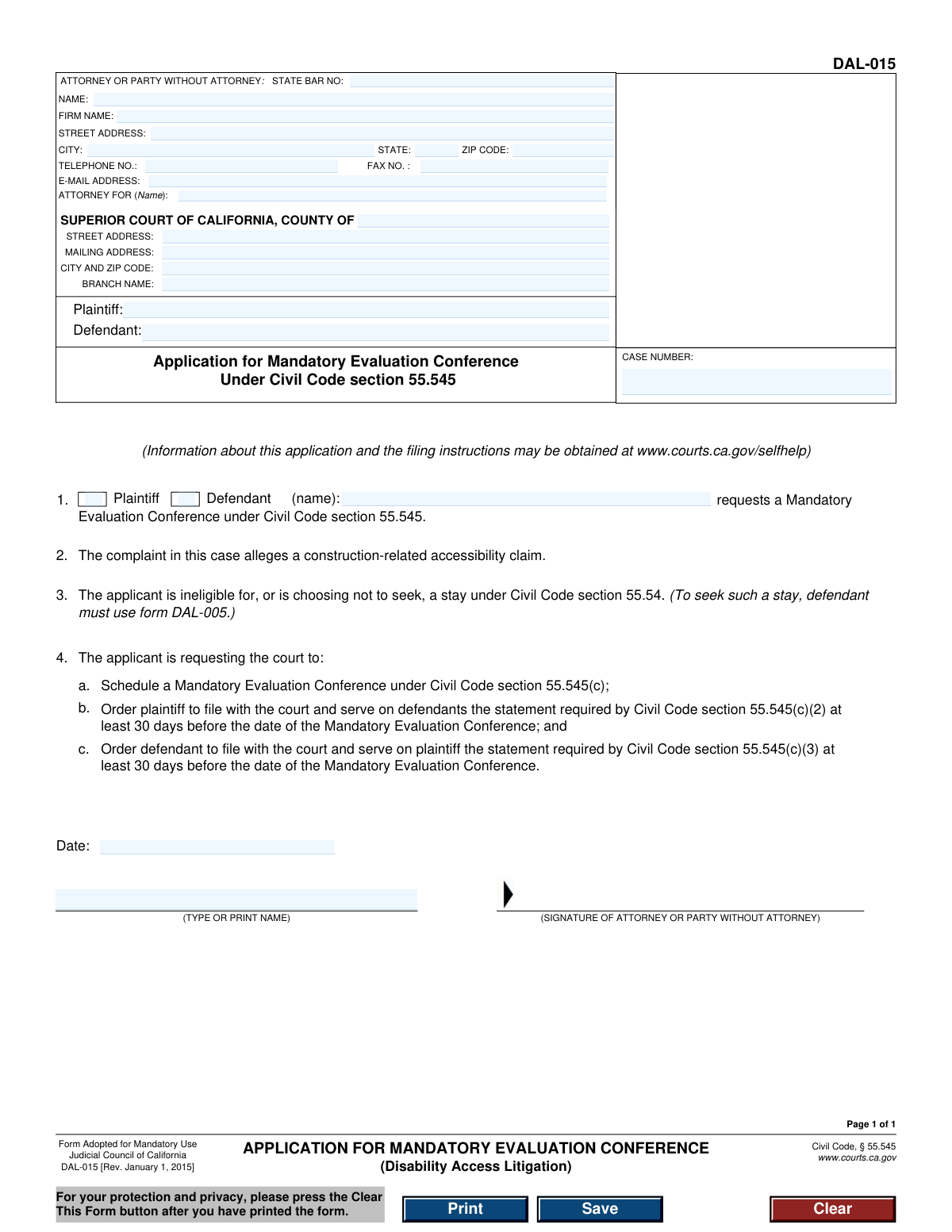
Yes! You can use AI to fill out Form DAL-015, Application for Mandatory Evaluation Conference (Disability Access Litigation)
Don't type 27 fields by hand. Tell our AI about yourself, or upload a document you already have, and it fills every field in seconds. You check it, then download, print or sign.
The AI does the filling. You just check it.
No typing into boxes, nothing to install.
What this form asks for
The AI fills all of it, from your answers or your documents.
The AI checks your answers before you download
14 checks built for this form, so a wrong date or a missing answer is caught before anyone else sees it.
Checks if the Case Number field follows the standard format for California court cases. This is a critical identifier that links the document to the correct legal action in the court's system. An invalid or missing case number will result in the filing being rejected or misfiled, causing significant delays.
Validates that the State Bar Number field contains only numeric digits. If an attorney is filing the form, this number is their unique identifier with the State Bar of California. This check ensures the attorney is properly identified, and failure to provide a valid number can call their authority to file into question.
Ensures that the 'NAME' field under 'ATTORNEY OR PARTY WITHOUT ATTORNEY' is not empty. This field is mandatory as it identifies the individual responsible for the filing. If this field is left blank, the court has no way of knowing who submitted the document, leading to immediate rejection.
Confirms the E-Mail Address field contains a syntactically valid email format, such as '[email protected]'. As courts increasingly rely on electronic communication for notices and service, a valid email address is crucial. An invalid format could cause the filer to miss critical deadlines and court communications.
Checks that the Telephone Number field contains a valid 10-digit phone number, allowing for common formats like (XXX) XXX-XXXX. A valid phone number is essential for the court or opposing counsel to contact the filer for urgent matters. An invalid or missing number can hinder timely communication.
Validates that the ZIP Code for the attorney or party's address is in a valid 5-digit or 9-digit (ZIP+4) format. Correct ZIP codes are essential for the proper delivery of legal notices and official correspondence via mail. An incorrect format could lead to returned mail and missed deadlines.
And 8 more checks
- Requires Superior Court County Name
- Confirms Both Plaintiff and Defendant are Named
- Ensures Applicant Role (Plaintiff/Defendant) is Selected
- Verifies Applicant Name Matches a Listed Party
- Validates Signature Date is Present and Not in the Future
- Requires Printed Name Below Signature Line
- Ensures 'Attorney For' Name Matches a Listed Party
- Validates Completeness of Filer's Address
Let AI fill out your DAL-015
No typing. Every field filled in seconds, checked, ready to sign.
How to Fill Out DAL-015 Online for Free in 2026
What the AI walks you through.
- Navigate to Instafill.ai and upload or select the DAL-015 form.
- Provide the case information, including the case number and the specific Superior Court details (county, address, branch name).
- Enter the information for the attorney or party filing the form, including name, address, contact details, and State Bar number if applicable.
- Input the names of the plaintiff and defendant exactly as they appear on the case documents.
- Indicate whether you are the plaintiff or defendant making the application and provide your name.
- Review all the information populated by the AI for accuracy, then date and e-sign the application.
- Download the completed form to print and file with the court and serve on the opposing party.
Common Mistakes in Completing DAL-015
The ones the AI is built to catch.
Entering an Inaccurate or Incomplete Case Number
Misidentifying the Filer's Role in the Header
Providing Wrong Court Location or Branch Name
Omitting or Incorrectly Selecting Filer's Party Status
Forgetting to Sign or Date the Form
Inaccurate Plaintiff/Defendant Names in the Caption
Procedural Error: Using the Wrong Form for a Stay Request
Missing Applicant Name in Request Statement (Item 1)
Submitting a Poorly Hand-Filled or Scanned Form
Forgetting to Print Name Below Signature
Frequently Asked Questions About DAL-015
Is it really free for 7 days?
Can I fill other forms too?
How do I cancel?
How does the AI fill out DAL-015?
What happens to my information?
How complex is DAL-015 to fill out?
What is the purpose of Form DAL-015?
Who should fill out this application?
What is a Mandatory Evaluation Conference?
What's the difference between this form and Form DAL-005 for requesting a stay?
What information do I need to fill out this form?
What happens after I file Form DAL-015?
Where do I file the completed form?
What does the statement in section 3, 'The applicant is ineligible for, or is choosing not to seek, a stay,' mean?
What are the statements mentioned in section 4 that the parties must file?
Can an AI tool help me fill out this form?
How can I use Instafill.ai to complete this form online?
The PDF version of this form I found is not fillable. What should I do?
Why does the form mention 'For your protection and privacy, please press the Clear This Form button'?
Get your DAL-015 filled out by AI
$0 today. Cancel before Oct 31 and you pay nothing.
Other forms like this one
California court forms: Judicial Council of California Form SC-105, Request for Court Order and Answer (Small Claims), Judicial Council of California Form SC-120, Defendant’s Claim and ORDER to Go to Small Claims Court (Small Claims), Judicial Council of California Form SER-001, Request for Sheriff to Serve Court Papers, Judicial Council of California Form SER-001, Request for Sheriff to Serve Court Papers, Affidavit for Collection of Personal Property California Probate Code Section 13100, Form POS-040, Proof of Service—Civil, Declaration of Facts of Death (California Superior Court), declaration-of-marriage-for-court-proceeding-california-family-law, ADOPT-200, Adoption Request, ADOPT-200, Stepparent Adoption Request, ADOPT-210, Adoption Agreement, ADOPT-310, Contact After Adoption Agreement, Judicial Council of California Form ADOPT-200, Adoption Request, Form ADR-107, Mediation Attendance Sheet, Form ADR-110, Order Appointing Referee, Form ADR-109, Stipulation or Motion for Order Appointing Referee, Form ADR-102, Request for Trial De Novo After Judicial Arbitration, Form ADR-108, Referee's Report (Code Civ. Proc., §§ 638, 639), Form ADR-106, Petition to Confirm, Correct, or Vacate Contractual Arbitration Award, Form ADR-104, Rejection of Award and Request for Trial After Attorney-Client Fee Arbitration
disability application forms: Form DA1, Disability Allowance Application form, Form SSA-16, Application for Disability Benefits, Form 21-526EZ, Application for Disability Compensation, Form 3111E (2018/12), Ontario Works / Ontario Disability Support Program (ODSP) Application for Special Diet Allowance, Form 3111E, Application for Special Diet Allowance (Ontario Disability Support Program / Ontario Works), Form SSA-16, Application for Disability Insurance Benefits, Form DAL-005, Defendant's Application for Stay of Proceedings and Early Evaluation Conference, Joint Inspection (Disability Access Litigation), Form VR-210, Application for Maryland Parking Placards/License Plates for Individuals with a Disability, VA Form 21-526EZ, Application for Disability Compensation and Related Compensation Benefits (Instructions), VA Form 21-526EZ, Application for Disability Compensation and Related Compensation Benefits (Form)
Let AI fill out your DAL-015
Your trial starts once a card is added. You pay nothing before Oct 31.
Our AI already knows this form, all 27 fields of it. Skip the typing: tell it about yourself, or upload what you have, and it fills the whole form in seconds.
- AI fills every field on the form, checkboxes included
- No typing into boxes: answer a few questions, or upload a document you already have, an old copy of this form, a photo of a document
- The AI checks the answers; you review and change anything before you download
- Download the finished PDF, print it, or sign it online
- Encrypted, and never used to train AI
Cancel before Oct 31 and you pay nothing.
A card is needed to start the trial. Cancel in two clicks from your account.
Terms · Privacy