
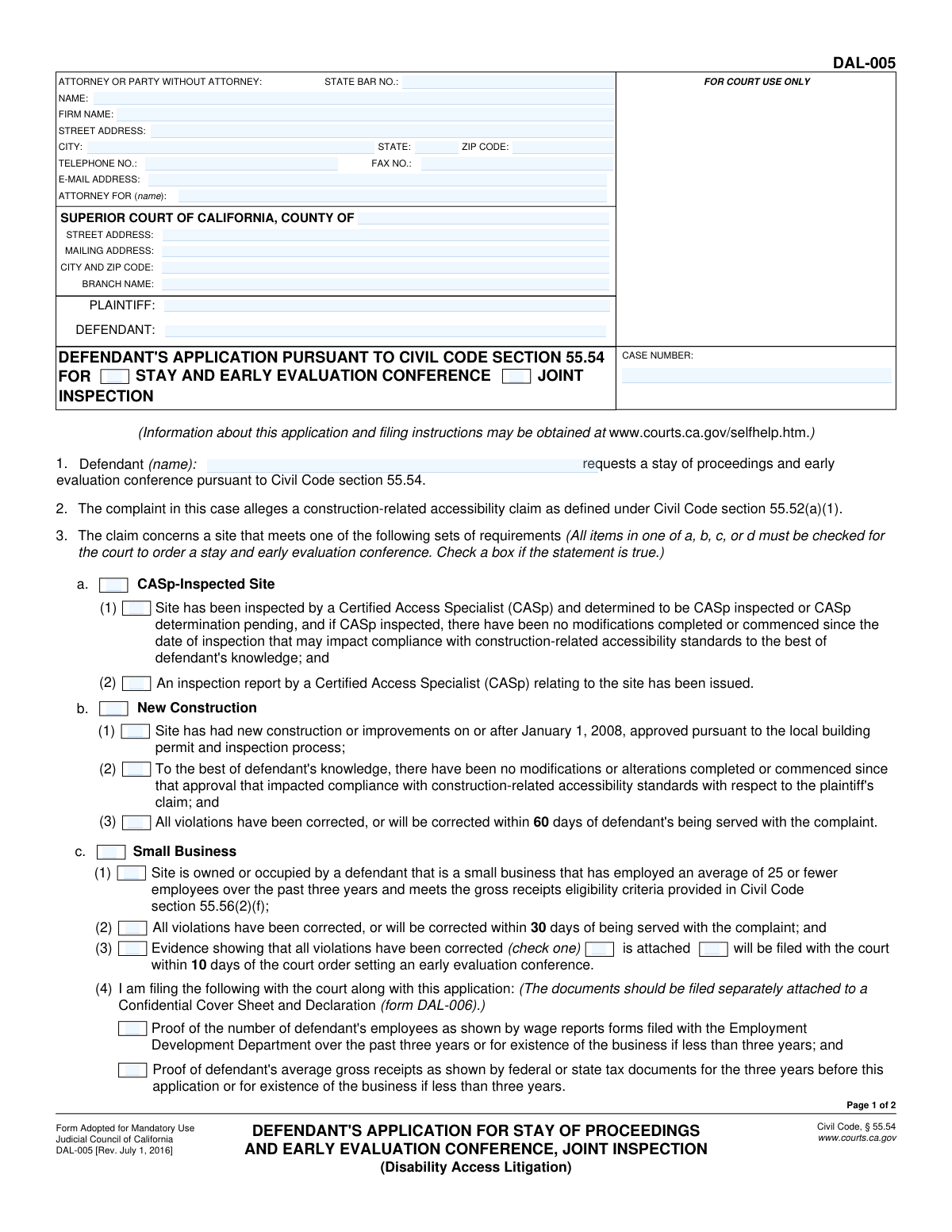
Yes! You can use AI to fill out Form DAL-005, Defendant's Application for Stay of Proceedings and Early Evaluation Conference, Joint Inspection (Disability Access Litigation)
Don't type 52 fields by hand. Tell our AI about yourself, or upload a document you already have, and it fills every field in seconds. You check it, then download, print or sign.
The AI does the filling. You just check it.
No typing into boxes, nothing to install.
What this form asks for
The AI fills all of it, from your answers or your documents.
The AI checks your answers before you download
14 checks built for this form, so a wrong date or a missing answer is caught before anyone else sees it.
This check ensures that the 'CASE NUMBER' field is identical on both page 1 and page 2 of the form. A consistent case number is critical for correct document indexing and association with the proper court file. If the numbers do not match, the document could be misfiled or rejected by the court clerk, causing significant delays in the legal proceedings.
Validates that the 'PLAINTIFF' and 'DEFENDANT' name fields in the main case caption are not empty. These fields are essential for identifying the primary parties to the action. An application submitted without this information is incomplete and cannot be processed, as it's unclear who the legal action involves.
This check verifies that the defendant's name is consistent across three fields: the 'DEFENDANT' field in the caption, the 'Defendant (name)' field in item 1, and the 'ATTORNEY FOR (name)' field if an attorney is listed. Inconsistent naming can create legal ambiguity regarding who is making the application. Failure to maintain consistency may lead to rejection of the form or require a corrected filing.
Ensures that if an attorney's name is provided in the 'ATTORNEY OR PARTY WITHOUT ATTORNEY' section, the 'STATE BAR NO.' field is also filled with a numeric value. This number uniquely identifies a licensed attorney in California and is required for legal filings. A missing or improperly formatted bar number can lead to the court rejecting the document, as the attorney's standing cannot be verified.
This validation checks that the value entered in the 'E-MAIL ADDRESS' field follows a standard email format (e.g., '[email protected]'). A valid email address is crucial for electronic service and communication from the court and other parties. An invalid format would prevent the party or their attorney from receiving important notices, potentially causing them to miss deadlines or hearings.
Verifies that the applicant has selected exactly one primary basis for the stay request from the options in Section 3 (a, b, c, or d). The Civil Code requires the defendant to qualify under a single, specific category. Selecting none, or more than one, makes the application logically invalid and will result in the court being unable to grant the stay.
And 8 more checks
- Completeness of Section 3a (CASp-Inspected Site)
- Completeness of Section 3c (Small Business)
- Completeness of Section 3d (High-Frequency Litigant)
- Conditional Request for CASp Report
- Conditional Request for Correction Evidence
- Declaration Date Validity
- Declarant Name Requirement
- Required Application Requests (4a and 4b)
Let AI fill out your DAL-005
No typing. Every field filled in seconds, checked, ready to sign.
How to Fill Out DAL-005 Online for Free in 2026
What the AI walks you through.
- Navigate to Instafill.ai and upload your DAL-005 form or select it from our library of official California court forms.
- Enter the case information, including the court, county, case number, and the names of the plaintiff and defendant.
- Provide the contact information for the attorney or for yourself if you are a party without an attorney (pro se).
- In Section 3, carefully check the box that corresponds to your situation (e.g., CASp-Inspected Site, New Construction, Small Business, or case filed by a High-Frequency Litigant).
- Review the requests in Section 4, which ask the court to stay the proceedings, schedule a conference, and order the exchange of reports and a joint inspection.
- Complete the declaration by dating and signing the form, affirming under penalty of perjury that the information provided is true and correct.
- Review the entire completed form for accuracy, then download it for filing with the court, ensuring you also prepare any required attachments like confidential financial documents (Form DAL-006).
Common Mistakes in Completing DAL-005
The ones the AI is built to catch.
Incorrect or Incomplete Case Caption Information
Forgetting to Complete the Header on Page 2
Incomplete or Conflicting Selections in Section 3
Failing to File Required 'Small Business' Evidence
Missing or Incorrect Signatures
Using an Incorrect or Casual Defendant Name
Incorrectly Filling the Attorney/Party Information Block
Submitting an Illegible Handwritten Form
Failing to Check the Boxes for Requested Relief in Section 4
Misunderstanding the Declaration Signature
Frequently Asked Questions About DAL-005
Is it really free for 7 days?
Can I fill other forms too?
How do I cancel?
How does the AI fill out DAL-005?
What happens to my information?
How complex is DAL-005 to fill out?
What is the purpose of Form DAL-005?
Who needs to fill out this form?
What does it mean to request a 'stay of proceedings'?
What are the requirements to be eligible for a stay?
What is a Certified Access Specialist (CASp) and do I need a CASp report?
I'm a small business owner. What do I need to provide?
How do I know if the plaintiff is a 'high-frequency litigant'?
How long do I have to correct the accessibility violations?
What happens after I submit Form DAL-005?
Where do I file this application?
Do I need a lawyer to file this form?
Can AI tools help me fill out this form?
How do I use Instafill.ai to complete this form online?
The PDF version of this form I have is not fillable. What should I do?
Get your DAL-005 filled out by AI
$0 today. Cancel before Nov 1 and you pay nothing.
Other forms like this one
California court forms: Judicial Council of California Form SC-105, Request for Court Order and Answer (Small Claims), Judicial Council of California Form SC-120, Defendant’s Claim and ORDER to Go to Small Claims Court (Small Claims), Judicial Council of California Form SER-001, Request for Sheriff to Serve Court Papers, Judicial Council of California Form SER-001, Request for Sheriff to Serve Court Papers, Affidavit for Collection of Personal Property California Probate Code Section 13100, Form POS-040, Proof of Service—Civil, Declaration of Facts of Death (California Superior Court), declaration-of-marriage-for-court-proceeding-california-family-law, ADOPT-200, Adoption Request, ADOPT-200, Stepparent Adoption Request, ADOPT-210, Adoption Agreement, ADOPT-310, Contact After Adoption Agreement, Judicial Council of California Form ADOPT-200, Adoption Request, Form ADR-107, Mediation Attendance Sheet, Form ADR-110, Order Appointing Referee, Form ADR-109, Stipulation or Motion for Order Appointing Referee, Form ADR-102, Request for Trial De Novo After Judicial Arbitration, Form ADR-108, Referee's Report (Code Civ. Proc., §§ 638, 639), Form ADR-106, Petition to Confirm, Correct, or Vacate Contractual Arbitration Award, Form ADR-104, Rejection of Award and Request for Trial After Attorney-Client Fee Arbitration
disability application forms: Form DA1, Disability Allowance Application form, Form SSA-16, Application for Disability Benefits, Form 21-526EZ, Application for Disability Compensation, Form 3111E (2018/12), Ontario Works / Ontario Disability Support Program (ODSP) Application for Special Diet Allowance, Form 3111E, Application for Special Diet Allowance (Ontario Disability Support Program / Ontario Works), Form SSA-16, Application for Disability Insurance Benefits, Form DAL-015, Application for Mandatory Evaluation Conference (Disability Access Litigation), Form VR-210, Application for Maryland Parking Placards/License Plates for Individuals with a Disability, VA Form 21-526EZ, Application for Disability Compensation and Related Compensation Benefits (Instructions), VA Form 21-526EZ, Application for Disability Compensation and Related Compensation Benefits (Form)
Let AI fill out your DAL-005
Your trial starts once a card is added. You pay nothing before Nov 1.
Our AI already knows this form, all 52 fields of it. Skip the typing: tell it about yourself, or upload what you have, and it fills the whole form in seconds.
- AI fills every field on both pages, checkboxes included
- No typing into boxes: answer a few questions, or upload a document you already have, an old copy of this form, a photo of a document
- The AI checks the answers; you review and change anything before you download
- Download the finished PDF, print it, or sign it online
- Encrypted, and never used to train AI
Cancel before Nov 1 and you pay nothing.
A card is needed to start the trial. Cancel in two clicks from your account.
Terms · Privacy