
Yes! You can use AI to fill out VA Form 21-526EZ, Application for Disability Compensation and Related Compensation Benefits (Form)
Don't type 388 fields by hand. Tell our AI about yourself, or upload a document you already have, and it fills every field in seconds. You check it, then download, print or sign.
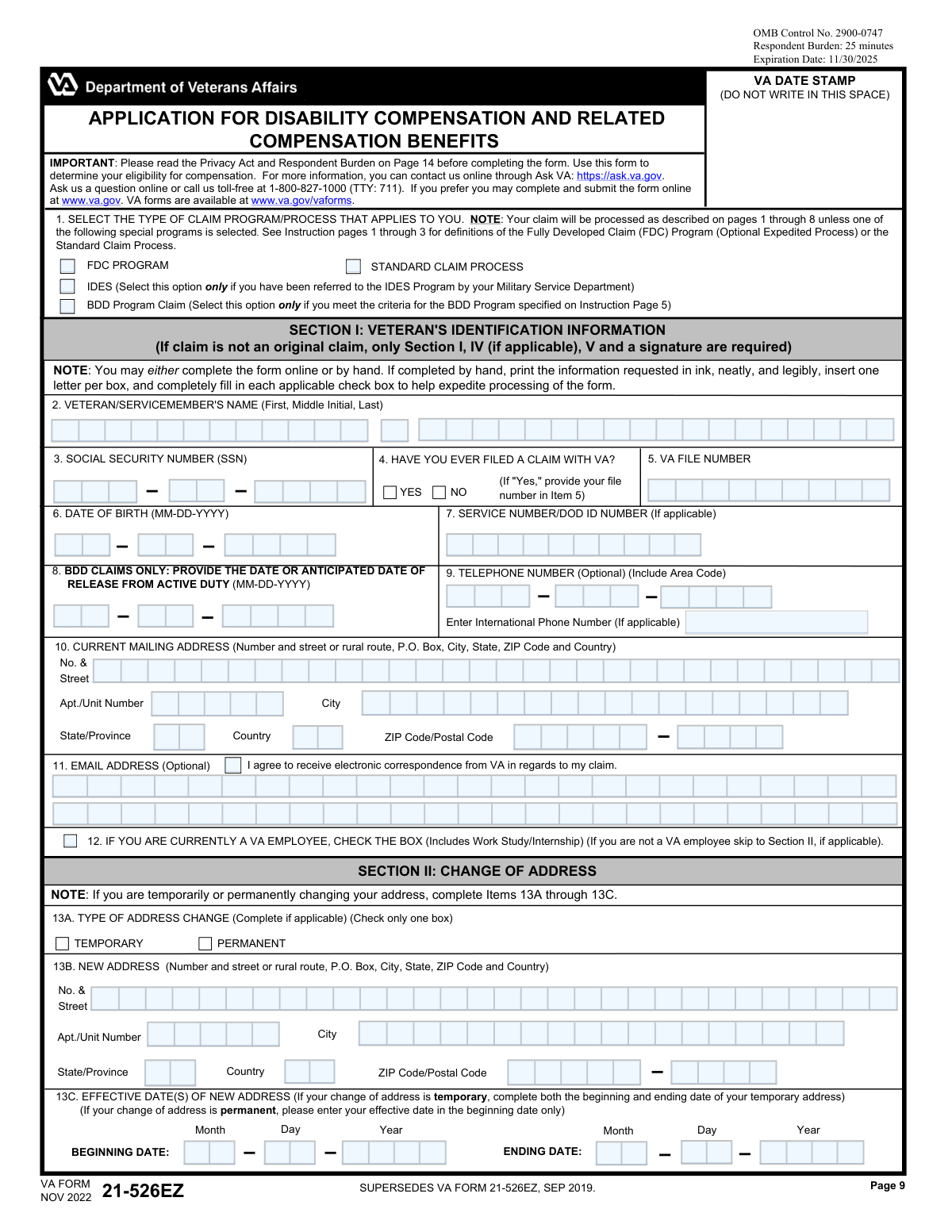
The AI does the filling. You just check it.
No typing into boxes, nothing to install.
What this form asks for
The AI fills all of it, from your answers or your documents.
The AI checks your answers before you download
14 checks built for this form, so a wrong date or a missing answer is caught before anyone else sees it.
This check ensures that the Social Security Number entered in Item 3 consists of exactly nine digits. It is a critical identifier for the veteran across all federal systems. If the SSN is missing, incomplete, or contains non-numeric characters, the form cannot be processed, as it would be impossible to accurately locate the veteran's records or establish a new file.
This validation verifies that the Date of Birth in Item 6 is a complete and valid date that occurs in the past. It also checks that the veteran would be of a plausible age to have served in the military (e.g., older than 17). An invalid or future date of birth would halt processing and require correction, as it is fundamental for identity verification and eligibility calculations.
This check enforces a conditional rule between Item 4 and Item 5. If the applicant answers 'Yes' to having previously filed a claim with the VA (Item 4), then the VA File Number field (Item 5) must be completed. This is important for correctly associating the new application with the veteran's existing records. Failure to provide the file number when required can lead to processing delays or the creation of a duplicate record.
This validation ensures that if the 'BDD Program Claim' is selected in Item 1, a valid and complete date is provided in Item 8 for the 'Anticipated Date of Release From Active Duty'. The date provided must be in the future, as the BDD program is specifically for service members who are still on active duty. An invalid, past, or missing date would invalidate the BDD claim selection and require clarification.
This check verifies that if 'TEMPORARY' is selected in Item 13A for an address change, both a 'BEGINNING DATE' and an 'ENDING DATE' are provided in Item 13C. It also ensures the 'ENDING DATE' is chronologically after the 'BEGINNING DATE'. This logic is crucial for ensuring mail is sent to the correct address during the specified timeframe. If the end date is missing or invalid, the address change may be incorrectly processed as permanent.
This validation checks that if a veteran indicates they are currently homeless by checking 'Yes' in Item 14A, they must also select at least one corresponding living situation in Item 14B. This information is vital for prioritizing the claim and connecting the veteran with appropriate housing resources. An incomplete section would trigger a request for more information, delaying potential assistance.
And 8 more checks
- Conditional Requirement for Toxic Exposure Details
- Verifies Completeness of Claimed Disabilities
- Validates Chronology of Service Dates
- Ensures Direct Deposit Information is Complete or Waived
- Mandatory Signature Verification
- Validates Consistency of SSN Across Pages
- Exclusive Claim Program Selection
- Logical Check of Date of Birth vs. Service Dates
Let AI fill out your VA Form 21-526EZ
No typing. Every field filled in seconds, checked, ready to sign.
How to Fill Out VA Form 21-526EZ Online for Free in 2026
What the AI walks you through.
- Navigate to Instafill.ai and upload your VA Form 21-526EZ, or select it from their library of templates.
- Provide your personal identification details in Section I and your complete service history in Section VI, including branches, dates, and any special circumstances.
- In Section V, carefully list each disability or symptom you are claiming, explaining how it relates to your military service, exposure, or a specific in-service event.
- If applicable, complete Section IV to provide details about any exposure to hazards like Agent Orange, burn pits, or contaminated water at Camp Lejeune.
- List the VA and DoD medical facilities where you received treatment for your claimed disabilities to help the VA gather relevant medical records.
- Complete the direct deposit information in Section VIII for payment, review your choices regarding military pay, and then certify and digitally sign the application in Section IX.
- Let the AI review your completed form for any errors or omissions before you download and submit it to the VA as instructed.
Common Mistakes in Completing VA Form 21-526EZ
The ones the AI is built to catch.
Forgetting to Sign and Date the Application
Misunderstanding Military Pay Waivers
Providing Vague Disability Claim Information
Entering Incorrect Direct Deposit Information
Failing to Report Separation or Severance Pay
Submitting Illegible or Poorly Formatted Information
Incomplete or Incorrect Address Information
Confusing Temporary and Permanent Address Changes
Skipping the Homeless/At-Risk Section
Choosing the Wrong Claim Processing Program
Frequently Asked Questions About VA Form 21-526EZ
Is it really free for 7 days?
Can I fill other forms too?
How do I cancel?
How does the AI fill out VA Form 21-526EZ?
What happens to my information?
How complex is VA Form 21-526EZ to fill out?
What is the purpose of VA Form 21-526EZ?
Who should fill out this form?
I've already filed a claim with the VA. Do I need to complete the entire form?
What is the difference between the FDC, BDD, and Standard claim programs in Section I?
How do I list my disabilities in Section V?
What if I have more disabilities to claim than there are spaces in Section V?
I am currently homeless. Is there a specific section I need to fill out?
What does it mean to waive military retired pay in Section VII?
Do I have to provide my bank account information for direct deposit?
Where can I find the other VA forms mentioned in the application?
Who can sign the form if the veteran is physically or mentally unable to?
Can I use an AI tool to help me fill out this form?
How can I fill out VA Form 21-526EZ online?
The PDF form I downloaded isn't fillable. What should I do?
Get your VA Form 21-526EZ filled out by AI
$0 today. Cancel before Nov 18 and you pay nothing.
Other forms like this one
disability application forms: Form DA1, Disability Allowance Application form, Form SSA-16, Application for Disability Benefits, Form 21-526EZ, Application for Disability Compensation, Form 3111E (2018/12), Ontario Works / Ontario Disability Support Program (ODSP) Application for Special Diet Allowance, Form 3111E, Application for Special Diet Allowance (Ontario Disability Support Program / Ontario Works), Form SSA-16, Application for Disability Insurance Benefits, Form DAL-005, Defendant's Application for Stay of Proceedings and Early Evaluation Conference, Joint Inspection (Disability Access Litigation), Form DAL-015, Application for Mandatory Evaluation Conference (Disability Access Litigation), Form VR-210, Application for Maryland Parking Placards/License Plates for Individuals with a Disability, VA Form 21-526EZ, Application for Disability Compensation and Related Compensation Benefits (Instructions)
disability benefits forms: Form SSA-769, Request for Change in Time/Place of Disability Hearing, Form SSA-16, Application for Disability Benefits, Form DBQ, Knee and Lower Leg Disability Benefits, Form DBQ, Heart Conditions Disability Benefits, Form DBQ, Hypertension Disability Benefits, Form DBQ, Scars/Disfigurement Disability Benefits, Form DBQ, Diabetes Mellitus Disability Benefits Questionnaire, Form DBQ, Endocrine Diseases Disability Benefits, Back (Thoracolumbar Spine) Conditions Disability Benefits Questionnaire, Ankle Conditions Disability Benefits Questionnaire, Back (Thoracolumbar Spine) Conditions Disability Benefits Questionnaire, Elbow and Forearm Conditions Disability Benefits Questionnaire, Foot Conditions, Including Flatfoot (Pes Planus) Disability Benefits Questionnaire, Hip and Thigh Conditions Disability Benefits Questionnaire, Knee and Lower Leg Disability Benefits Questionnaire, Neck (Cervical Spine) Conditions Disability Benefits Questionnaire, Shoulder and Arm Conditions Disability Benefits Questionnaire, Wrist Conditions Disability Benefits Questionnaire (DBQ), Back (Thoracolumbar Spine) Conditions Disability Benefits Questionnaire, Back (Thoracolumbar Spine) Conditions Disability Benefits Questionnaire
disability compensation forms: VA Form 21P-8416, Medical Expense Report, Form 21-526EZ, Application for Disability Compensation, VA Form 21-526EZ, Application for Disability Compensation and Related Compensation Benefits (Instructions)
Let AI fill out your VA Form 21-526EZ
Your trial starts once a card is added. You pay nothing before Nov 18.
Your bank declined that card, so the trial did not start and nothing was charged. Please try another card.
Our AI already knows this form, all 388 fields of it. Skip the typing: tell it about yourself, or upload what you have, and it fills the whole form in seconds.
- AI fills every field on all 7 pages, checkboxes included
- No typing into boxes: answer a few questions, or upload a document you already have, an old copy of this form, a photo of a document
- The AI checks the answers; you review and change anything before you download
- Download the finished PDF, print it, or sign it online
- Encrypted, and never used to train AI
Cancel before Nov 18 and you pay nothing.
A card is needed to start the trial. We check it with a $19.99 hold that is released right away. Cancel in two clicks from your account.
Terms · Privacy