
Instafill.ai
7 days free
AI form filling · 388 fields · 15 pages · done in seconds

Yes! You can use AI to fill out VA Form 21-526EZ, Application for Disability Compensation and Related Compensation Benefits (Instructions)

Don't type 388 fields by hand. Tell our AI about yourself, or upload a document you already have, and it fills every field in seconds. You check it, then download, print or sign.
7 days free, then $19.99/month · Cancel anytime
AI fills it, no typingEncrypted, never used to train AICancel in two clicks
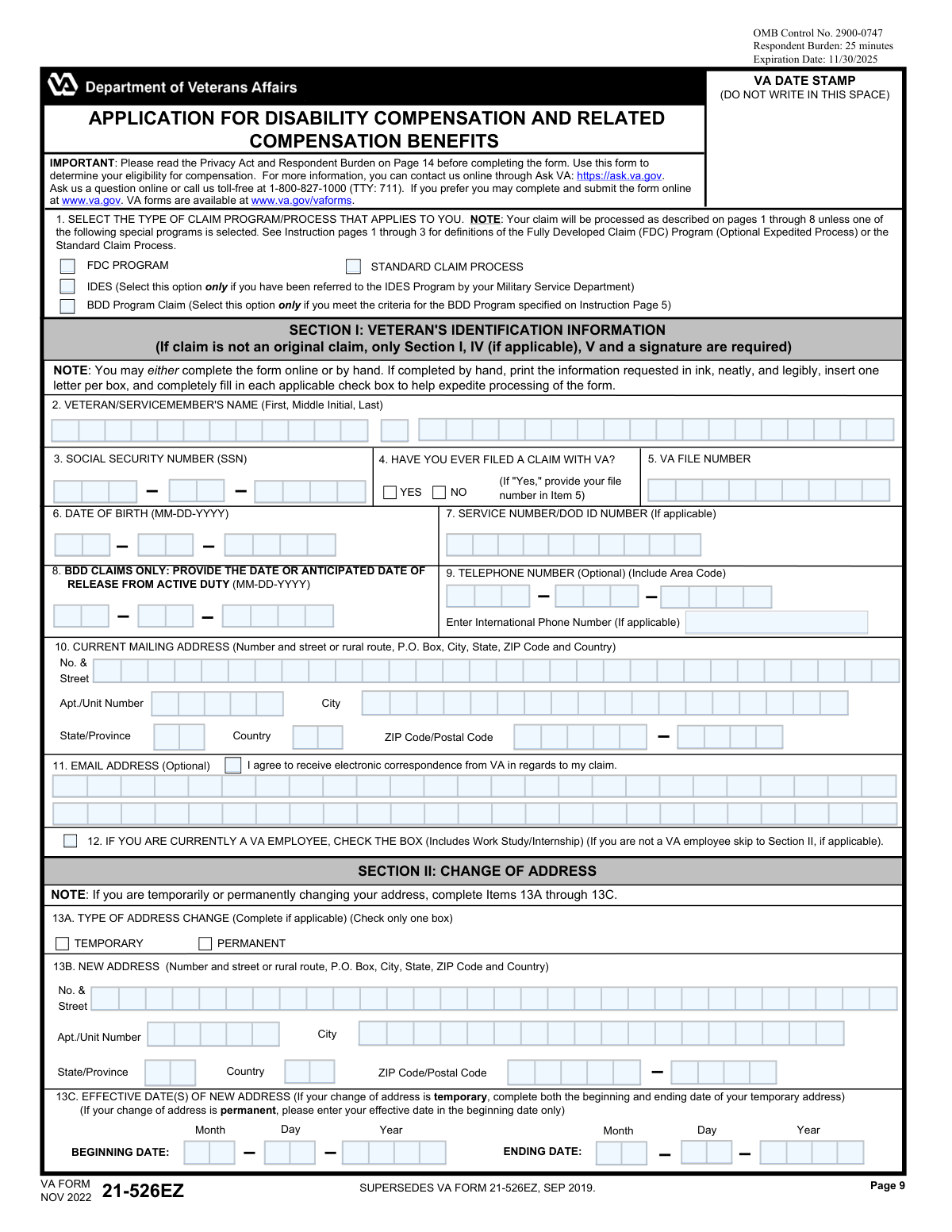
VA Form 21-526EZ, Application for Disability Compensation and Related Compensation Benefits (Instructions), page 1
Complex · 72/100Form Complexity Index

The AI does the filling. You just check it.

No typing into boxes, nothing to install.

Tell the AI about youAnswer a few questions in plain words, or upload a document you already have. That is all the typing there is.
AI fills every field in secondsIt puts each answer in the right box on every page, checkboxes included.
Check it and downloadReview every field, change anything, then download, print or sign the PDF.

What this form asks for

The AI fills all of it, from your answers or your documents.

VA Form 21-526EZ, Application for Disability Compensation and Related Compensation Benefits, is the official document used by U.S. military veterans to file a claim for compensation due to disabilities incurred or aggravated during service. It is a critical step for veterans seeking financial support and other benefits for their service-connected health conditions. Today, this form can be filled out quickly and accurately using AI-powered services like Instafill.ai, which can also convert non-fillable PDF versions into interactive fillable forms.
Fillable fields388
Pages15
Sections38
Form Complexity IndexComplex, 72/100

The AI checks your answers before you download

13 checks built for this form, so a wrong date or a missing answer is caught before anyone else sees it.

SSN Format and Validity

This check ensures the Social Security Number (SSN) in Item 3 is exactly 9 digits and is a valid, issued number. The SSN is the primary identifier for the veteran across federal systems. If the SSN is missing, incomplete, or invalid, the VA cannot accurately locate the veteran's records or process the claim, leading to rejection or significant delays.

Required Veteran Signature

This validation verifies that a signature is present in Item 33A (Veteran/Servicemember Signature). A signature is a legal requirement certifying the information is true and authorizing the VA to collect evidence. A form submitted without a signature is legally invalid and cannot be processed, requiring the VA to return the application to the claimant.

BDD Program Date Eligibility

If the 'BDD Program Claim' box is checked in Item 1, this check validates that the 'Anticipated Date of Release from Active Duty' in Item 8 is provided and falls between 90 and 180 days from the claim's submission date. This is a critical eligibility requirement for the Benefits Delivery at Discharge program. If the date is outside this window, the claim must be removed from the BDD queue and processed under a different, likely slower, program.

Exclusive Claim Program Selection

This check ensures that only one claim program/process option is selected in Item 1 (FDC, IDES, BDD, or Standard). Each program has a unique processing path and requirements. Selecting multiple options creates ambiguity that halts automated processing and requires manual intervention to clarify the veteran's intent, causing delays.

Date of Birth and Service Date Consistency

This validation cross-references the Date of Birth (Item 6) with the military service Entry Date (Item 20A). It ensures the calculated age at the time of entry is plausible (e.g., at least 17 years old). This acts as a crucial sanity check to catch significant data entry errors in key dates that could impact eligibility determinations.

Address Change Completeness

If the 'TEMPORARY' or 'PERMANENT' box is checked in Item 13A to indicate a change of address, this validation ensures the new address fields in Item 13B are fully completed. An incomplete address prevents the VA from updating their records. This is critical because failure to update the address could result in important correspondence, decisions, or payments being sent to the wrong location.

And 7 more checks
  • Homelessness Status Detail
  • Toxic Exposure Claim Detail
  • Claimed Disability Identification
  • Service Dates Chronology
  • Retired Pay Information Completeness
  • Direct Deposit Information Integrity
  • Alternate Signer Authorization

Let AI fill out your VA Form 21-526EZ

No typing. Every field filled in seconds, checked, ready to sign.

7 days free, then $19.99/month · Cancel anytime

How to Fill Out VA Form 21-526EZ Online for Free in 2026

What the AI walks you through.

  1. Navigate to Instafill.ai and upload or select VA Form 21-526EZ to begin the AI-guided filling process.
  2. Provide your personal identification details in Section I, including your name, Social Security Number, date of birth, and contact information.
  3. Complete Section V to list each disability you are claiming, the approximate date it began, and a detailed explanation of how it relates to an in-service event, injury, or exposure.
  4. Fill out Section IV with information about any potential toxic exposures during your service, such as Agent Orange or burn pits, and list treatment facilities in Section V.
  5. Detail your military service history in Section VI, including service dates, branch, and any special circumstances like being a Prisoner of War.
  6. Provide information regarding military pay and direct deposit details in Sections VII and VIII, then certify and sign the application in Section IX.
  7. Use the AI assistant to review all sections for completeness and accuracy before submitting the form to the Department of Veterans Affairs.

Common Mistakes in Completing VA Form 21-526EZ

The ones the AI is built to catch.

Choosing the Wrong Claim Process
Applicants often misunderstand the difference between the 'FDC Program (Optional Expedited Process)' and the 'Standard Claim Process' in Item 1. They may select FDC hoping for faster processing but then submit additional evidence later, which automatically converts the claim to the slower Standard Process, negating any time saved. This confusion leads to processing delays and frustration. To avoid this, carefully read pages 2-3 and decide beforehand if you have all your evidence ready to submit at once (FDC) or if you need the VA's help to gather records (Standard).
Failing to Submit Required Supplemental Forms
The form instructions on pages 2 and 11 clearly state that certain claims require additional, separate forms (e.g., VA Form 21-8940 for Individual Unemployability, VA Form 21-0781 for PTSD). A common mistake is submitting only the VA Form 21-526EZ without these mandatory attachments. This results in an incomplete application, and the VA will halt processing and send a letter requesting the missing forms, significantly delaying the claim review and potential benefits.
Incomplete or Vague Disability Descriptions
In Section V, Item 16, veterans often list disabilities with vague terms like 'bad back' or 'hearing issues' without providing necessary context. It is crucial to list a specific diagnosis, explain how it relates to an in-service event, injury, or exposure, and note if it's a secondary condition. For example, instead of 'anxiety,' write 'Anxiety, secondary to service-connected tinnitus.' Vague entries force the VA to request clarification, which delays the claim and may lead to an improper evaluation.
Misunderstanding Military Pay Waivers
Section VII regarding military retired and separation pay is financially critical but frequently misunderstood. Submitting the form automatically constitutes a waiver of military retired pay equal to any VA compensation awarded, unless you are eligible for concurrent receipt. Many veterans fail to check box 26 if they wish to decline VA pay in favor of their military pay, leading to unexpected reductions in their retirement checks. This can also lead to overpayments that the government will collect.
Forgetting to Sign and Date the Application
A missing signature in Section IX (Item 33A) is one of the most common and completely avoidable errors. An unsigned application is legally invalid and cannot be processed by the VA. The VA will return the entire package, and the official filing date (which determines the effective date for back pay) will be delayed until a properly signed form is received. This simple oversight can cost a veteran months of potential benefits.
Providing Inaccurate Personal or Service Details
Simple typos or inaccuracies in critical fields like Social Security Number (Item 3), service dates (Item 20A), or branch of service (Item 19A) can bring the claims process to a halt. If the VA's system cannot match the provided information to official records, the claim is flagged for manual review and correction, causing significant delays. Double-checking these basic details against official documents like a DD-214 is essential. AI-powered tools like Instafill.ai can help prevent these errors by validating data formats as you enter them.
Omitting Private and Federal Treatment History
In Item 17, veterans may forget to list all VA Medical Centers, DoD facilities, or private doctors where they received treatment for their claimed conditions. This information is vital evidence. If filing under the Standard Process, this list is what the VA uses to request medical records on the veteran's behalf. Omitting a facility means the VA won't get those records, weakening the claim and potentially leading to a denial for lack of evidence.
Failing to Properly Claim Secondary Conditions
Many disabilities are caused or aggravated by an existing service-connected condition (e.g., depression due to chronic pain). Veterans often list these secondary conditions without explicitly linking them to the primary one, as shown in the example 'LEFT KNEE, SECONDARY TO RIGHT KNEE'. This leads the VA to evaluate it as a new primary condition, which is then denied for having no direct link to service. Clearly stating 'secondary to [service-connected disability]' in Item 16 is critical for proper evaluation.
Submitting an Outdated Version of the Form
The VA periodically updates its forms to comply with new laws and regulations, such as the PACT Act. The top of this form clearly states it 'SUPERSEDES VA FORM 21-526EZ, SEP 2019.' Using an old version downloaded from an unofficial site can result in the claim being rejected because it lacks new, mandatory fields. Always download the latest version directly from the va.gov/vaforms website to ensure compliance.
Incorrectly Filling Out Exposure Information
In Section IV, a veteran might check a box indicating exposure to hazards like Agent Orange or burn pits but fail to provide the corresponding locations and dates of service in Item 15. This information is required for the VA to grant a presumptive service connection. Leaving this section incomplete forces the VA to send a development letter requesting the missing details, delaying the claim and placing the burden back on the veteran to recall specific information from decades ago.
Illegible Handwriting on Paper Forms
When filling out the paper form by hand, messy or illegible handwriting is a common problem that can cause significant issues. A claims processor may misread a name, a date, or a critical detail in the disability description, leading to data entry errors, requests for clarification, or incorrect processing. To avoid this, it is best to fill out the form online at va.gov. If a paper form must be used, printing neatly in block letters is essential, or using a tool like Instafill.ai which can convert the flat PDF into a fillable version for typed, legible entries.

Frequently Asked Questions About VA Form 21-526EZ


Is it really free for 7 days?
Yes. You pay $0 today. Cancel before Nov 19 and you are never charged. Keep it, and it is $19.99 a month for 5 fills of your VA Form 21-526EZ.
Can I fill other forms too?
This plan is for your VA Form 21-526EZ: your own AI agent fills it as often as 5 times a month. To fill other forms and upload your own, choose a Professional plan from your account.
How do I cancel?
From your account, in two clicks, any time. No email, no call.
How does the AI fill out VA Form 21-526EZ?
You answer a few questions in plain words, or upload a document you already have. The AI reads what you give it and puts each answer into the right field of VA Form 21-526EZ, on every page, in seconds. It checks the answers against the form's own rules, and you review and change anything before you download, print or sign.
What happens to my information?
It is encrypted in transit and at rest, and it is never used to train AI.
How complex is VA Form 21-526EZ to fill out?
VA Form 21-526EZ has a Form Complexity Index of 72 out of 100, in the complex tier: 388 fillable fields across 15 pages. Instafill.ai's AI fills it in under a minute, with every field there for you to review before you download.
What is VA Form 21-526EZ used for?
This form is used by veterans and service members to apply for disability compensation and related benefits for conditions they believe are connected to their military service. It can be used for new claims, claims for increased compensation, or claims for secondary conditions.
Who needs to fill out Form 21-526EZ?
You should use this form if you are a veteran filing a new claim for disability compensation or a claim for increased benefits for a condition decided more than one year ago. Service members who are 90-180 days from discharge can also use this form for the Benefits Delivery at Discharge (BDD) program.
What is the difference between the FDC Program and the Standard Claim Process?
The FDC (Fully Developed Claim) Program is an optional, faster process where you submit all your evidence at once with your application. The Standard Claim Process is the traditional method where the VA will help you gather evidence, which may take longer to process.
How can I submit my completed VA Form 21-526EZ?
You can submit your claim online at www.va.gov, which is the fastest method, or mail the completed form and evidence to the VA Evidence Intake Center in Janesville, WI. You can also get free help from an accredited Veterans Service Officer (VSO).
I'm still on active duty. Can I file a claim before I separate?
Yes, if you are between 90 and 180 days from your separation date, you can file a claim under the Benefits Delivery at Discharge (BDD) program. This allows you to have your VA medical exams completed before you leave the service, potentially speeding up your benefits delivery.
My claim was denied, but I have new evidence. Should I use this form?
No, if you are submitting new and relevant evidence for a claim that was previously decided, you should use VA Form 20-0995, Decision Review Request: Supplemental Claim. Form 21-526EZ is for new claims or claims for an increase on a decision made over a year ago.
What documents do I need to submit with my claim?
You should submit all relevant private medical records, identify any treatment records at federal facilities, and provide your service treatment records. Depending on your claim, you may also need additional forms for things like PTSD (VA Form 21-0781) or Individual Unemployability (VA Form 21-8940).
How do I fill out Section V, 'Claim Information'?
In this section, you must list each current disability you are claiming. For each condition, explain how it is related to an in-service injury, event, or exposure, and provide the approximate date the disability began or worsened.
I receive military retired pay. How will that affect my VA compensation?
Submitting this application generally constitutes a waiver of military retired pay equal to the amount of VA compensation you are awarded, as you typically cannot receive both. However, VA compensation is non-taxable, so it may be the greater benefit, and some retirees may qualify for concurrent receipt.
I am homeless or at risk of becoming homeless. Is there a special section for me?
Yes, Section III of the form is specifically for applicants who are homeless or at risk of homelessness. Completing this section can help the VA prioritize the processing of your claim.
What is Section IV, 'Exposure Information,' for?
This section is for claiming conditions related to toxic exposures during your service, such as Agent Orange, Gulf War hazards, or contaminated water at Camp Lejeune. You will need to provide details about the location and dates of your exposure.
Can AI tools help me fill out VA Form 21-526EZ?
Yes, services like Instafill.ai use AI to accurately auto-fill form fields, which can save you time and help reduce errors. This technology can help pre-populate your personal information and guide you through the required sections.
How can I use Instafill.ai to complete this form online?
Simply upload the VA Form 21-526EZ to the Instafill.ai platform. The AI will identify the form fields, and you can then provide your information once to have it automatically and accurately filled across the document.
What if the PDF version of the form I have is not fillable?
If you have a non-fillable or 'flat' PDF, you can use a service like Instafill.ai to convert it into an interactive, fillable form. This allows you to easily type your information directly into the fields before printing or submitting.
Encrypted in transit and at restNever used to train AIDelete your forms any time

Get your VA Form 21-526EZ filled out by AI

$0 today. Cancel before Nov 19 and you pay nothing.

Other forms like this one

disability application forms: Form DA1, Disability Allowance Application form, Form SSA-16, Application for Disability Benefits, Form 21-526EZ, Application for Disability Compensation, Form 3111E (2018/12), Ontario Works / Ontario Disability Support Program (ODSP) Application for Special Diet Allowance, Form 3111E, Application for Special Diet Allowance (Ontario Disability Support Program / Ontario Works), Form SSA-16, Application for Disability Insurance Benefits, Form DAL-005, Defendant's Application for Stay of Proceedings and Early Evaluation Conference, Joint Inspection (Disability Access Litigation), Form DAL-015, Application for Mandatory Evaluation Conference (Disability Access Litigation), Form VR-210, Application for Maryland Parking Placards/License Plates for Individuals with a Disability, VA Form 21-526EZ, Application for Disability Compensation and Related Compensation Benefits (Form)

disability benefits forms: Form SSA-769, Request for Change in Time/Place of Disability Hearing, Form SSA-16, Application for Disability Benefits, Form DBQ, Knee and Lower Leg Disability Benefits, Form DBQ, Heart Conditions Disability Benefits, Form DBQ, Hypertension Disability Benefits, Form DBQ, Scars/Disfigurement Disability Benefits, Form DBQ, Diabetes Mellitus Disability Benefits Questionnaire, Form DBQ, Endocrine Diseases Disability Benefits, Back (Thoracolumbar Spine) Conditions Disability Benefits Questionnaire, Ankle Conditions Disability Benefits Questionnaire, Back (Thoracolumbar Spine) Conditions Disability Benefits Questionnaire, Elbow and Forearm Conditions Disability Benefits Questionnaire, Foot Conditions, Including Flatfoot (Pes Planus) Disability Benefits Questionnaire, Hip and Thigh Conditions Disability Benefits Questionnaire, Knee and Lower Leg Disability Benefits Questionnaire, Neck (Cervical Spine) Conditions Disability Benefits Questionnaire, Shoulder and Arm Conditions Disability Benefits Questionnaire, Wrist Conditions Disability Benefits Questionnaire (DBQ), Back (Thoracolumbar Spine) Conditions Disability Benefits Questionnaire, Back (Thoracolumbar Spine) Conditions Disability Benefits Questionnaire

disability compensation forms: VA Form 21P-8416, Medical Expense Report, Form 21-526EZ, Application for Disability Compensation, VA Form 21-526EZ, Application for Disability Compensation and Related Compensation Benefits (Form)

7 days free, then $19.99/month · Cancel anytime