Yes! You can use AI to fill out Form 3111E (2018/12), Ontario Works / Ontario Disability Support Program (ODSP) Application for Special Diet Allowance
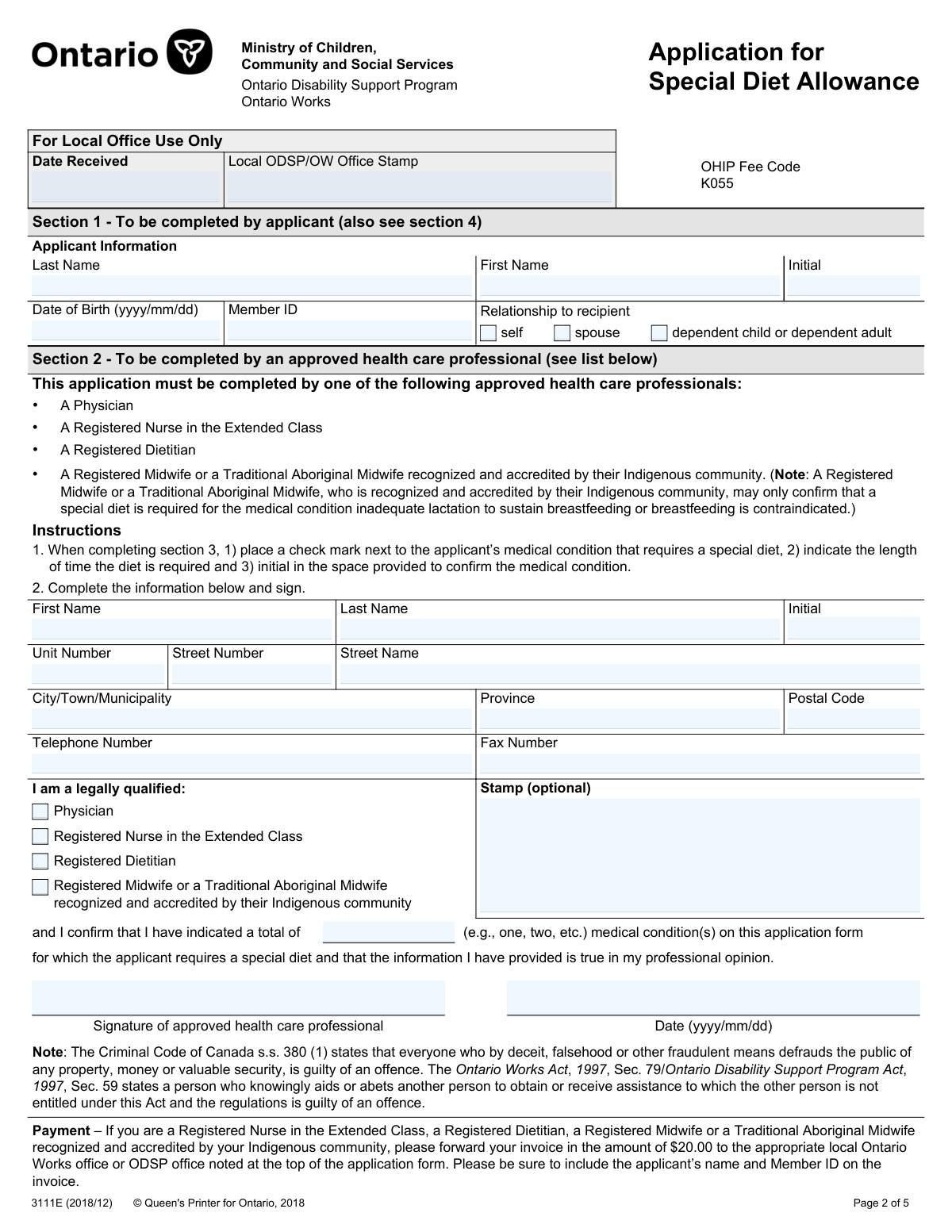
Form 3111E is an Ontario Ministry of Children, Community and Social Services application used to request a Special Diet Allowance under Ontario Works or the Ontario Disability Support Program (ODSP). The applicant completes their personal information and relationship to the recipient, and an approved health care professional confirms eligible medical condition(s), required duration, and signs the form; the applicant (or authorized signer) must also sign the declaration and consent for release of information. It is important because the allowance will not be approved without the required signatures and medical confirmation, and the original completed form must be returned to the local OW/ODSP office (photocopies are not accepted). Today, this form can be filled out quickly and accurately using AI-powered services like Instafill.ai, which can also convert non-fillable PDF versions into interactive fillable forms.
Our AI automatically handles information lookup, data retrieval, formatting, and form filling.
It takes less than a minute to fill out 3111E using our AI form filling.
Securely upload your data. Information is encrypted in transit and deleted immediately after the form is filled out.
Form specifications
| Form name: | Form 3111E (2018/12), Ontario Works / Ontario Disability Support Program (ODSP) Application for Special Diet Allowance |
| Number of pages: | 5 |
| Filled form examples: | Form 3111E Examples |
| Language: | English |
| Categories: | disability forms |
Instafill Demo: filling out a legal form in seconds
How to Fill Out 3111E Online for Free in 2026
Are you looking to fill out a 3111E form online quickly and accurately? Instafill.ai offers the #1 AI-powered PDF filling software of 2026, allowing you to complete your 3111E form in just 37 seconds or less.
Follow these steps to fill out your 3111E form online using Instafill.ai:
- 1 Go to Instafill.ai and upload Form 3111E (Application for Special Diet Allowance) or select it from the form library.
- 2 Use AI-assisted extraction to populate Section 1 with the applicant’s personal details (name, date of birth, Member ID) and select the relationship to the recipient (self/spouse/dependent).
- 3 Review the form for completeness and confirm any local-office-only fields are left blank unless instructed by your local OW/ODSP office.
- 4 Share or export the partially completed form for the approved health care professional to complete Section 2 and Section 3 (provider details, professional type, medical condition(s), duration, initials, signature, and date).
- 5 After the health care professional completes their sections, return to Instafill.ai to verify all required checkboxes, durations, initials, and totals (e.g., total medical conditions indicated) are consistent and legible.
- 6 Complete Section 4 by adding the applicant/authorized individual signature and date (and ensure the consent language is acknowledged), then generate the final clean copy for submission.
- 7 Download/print the finalized original form and submit the original to your local Ontario Works or ODSP office (in person or by mail), since photocopies are not accepted.
Our AI-powered system ensures each field is filled out correctly, reducing errors and saving you time.
Why Choose Instafill.ai for Your Fillable 3111E Form?
Speed
Complete your 3111E in as little as 37 seconds.
Up-to-Date
Always use the latest 2026 3111E form version.
Cost-effective
No need to hire expensive lawyers.
Accuracy
Our AI performs 10 compliance checks to ensure your form is error-free.
Security
Your personal information is protected with bank-level encryption.
Frequently Asked Questions About Form 3111E
This is the Ontario Works (OW) / Ontario Disability Support Program (ODSP) Application for Special Diet Allowance. Itâs used to request extra financial support when a verified medical condition requires a special diet.
OW or ODSP applicants/recipients who have a qualifying medical condition requiring a special diet should use this form. You can also apply on behalf of your spouse or a dependent child/dependent adult.
You complete Section 1 (Applicant Information). An approved health care professional completes Sections 2 and 3, and then you (or an authorized signer) must sign Section 4 after the health care professional has completed the form.
Only the listed approved professionals can complete the medical sections: a Physician, a Registered Nurse in the Extended Class, a Registered Dietitian, or a Registered Midwife/Traditional Aboriginal Midwife recognized and accredited by their Indigenous community (with limits for confirming breastfeeding-related conditions).
YesâSection 4 must be signed or the application will not be approved. Sign Section 4 only after the health care professional has completed the form.
Section 4 must be signed by the social assistance applicant/recipient or another person lawfully authorized to sign for the child (such as a parent or guardian). The child does not sign the declaration.
Youâll need the applicantâs name, date of birth (yyyy/mm/dd), Member ID, and the relationship to the recipient (self, spouse, or dependent child/dependent adult). Make sure the Member ID matches what OW/ODSP has on file.
They must check the medical condition(s) that require a special diet, select how long the diet is required (6 months, 12 months, or indefiniteâwhere available), and initial beside each condition to confirm it. Some conditions have special rules (for example, gestational diabetes requires an expected delivery date).
Not alwaysâseveral conditions on the form state that if more than one is indicated, only one allowance (often the highest) will be provided. For example, wheat allergy and celiac disease together result in only one allowance amount.
No. The instructions state that photocopies will not be acceptedâyou must return the original completed and signed form to your local OW or ODSP office.
After itâs completed and signed by both you (or an authorized signer) and the health care professional, return the original to your local Ontario Works or ODSP office. You can drop it off in person or mail it.
The form notes an OHIP fee code (K055) and also states that Registered Nurses in the Extended Class, Registered Dietitians, and Midwives/Traditional Aboriginal Midwives may submit an invoice for $20.00 to the local OW/ODSP office (including the applicantâs name and Member ID).
By signing, you declare the information is true and consent to the health care professional releasing relevant health-record information to the ministry and/or delivery agent to determine initial and ongoing eligibility. You can refuse or revoke consent, but that may prevent or affect receiving the allowance.
Yes. AI form-filling services like Instafill.ai can help auto-fill your personal details into the correct fields, reduce typing errors, and save timeâwhile you still need an approved health care professional to complete and sign the medical sections.
You can upload the form to Instafill.ai, map or confirm your details (name, DOB, Member ID, etc.), and have the tool populate the fillable fields for Section 1 and other non-medical fields. If the PDF is flat/non-fillable, Instafill.ai can convert it into an interactive fillable form so you can complete it digitally before printing the original for signatures and submission.
Compliance 3111E
Validation Checks by Instafill.ai
1
Validates all date fields use YYYY/MM/DD and are real calendar dates
Checks that every date field (Applicant Date of Birth, Date Received, Health Care Professional Signature Date, Applicant Signature Date, Expected Delivery Date, Infant Date of Birth) matches the required format yyyy/mm/dd and represents a valid calendar date (e.g., no 2026/02/30). This prevents downstream processing errors and ensures consistent interpretation across systems. If validation fails, the submission should be rejected or the specific date field flagged for correction before acceptance.
2
Ensures applicant identity fields are complete (Last Name, First Name, DOB, Member ID)
Verifies that Applicant Last Name, Applicant First Name, Applicant Date of Birth, and Applicant Member ID are present and not blank/whitespace. These fields are essential to match the application to the correct ODSP/OW case and avoid misdirected benefits. If any are missing, the form should be considered incomplete and returned for completion.
3
Validates Member ID format and basic integrity
Checks that Member ID conforms to the programâs expected format (e.g., numeric-only and correct length, if defined by the receiving system) and is not an obviously invalid placeholder (e.g., all zeros). This reduces failed lookups and prevents attaching medical information to the wrong case. If the Member ID fails validation, the submission should be stopped and routed for manual review or correction.
4
Enforces exactly one relationship-to-recipient selection
Validates that exactly one of the relationship checkboxes is selected: self, spouse, or dependent child/dependent adult. Multiple selections create ambiguity about who the allowance is for and who must sign, while no selection prevents correct eligibility routing. If validation fails, require the applicant to select one and only one option.
5
Validates applicant age logic for dependent child scenarios
If the relationship indicates 'dependent child', checks whether the applicant/recipient date of birth implies the recipient is under 16 and flags that Section 4 must be signed by a parent/guardian or other lawfully authorized individual (as per instructions). This ensures legal consent is obtained for minors and reduces risk of invalid authorization. If the age/relationship combination is inconsistent or missing required authorization, the submission should be rejected or sent for follow-up.
6
Ensures approved health care professional identification and address are complete
Checks that the health care professionalâs First Name, Last Name, Street Number, Street Name, City/Town, Province, and Postal Code are provided (Unit Number optional). This information is needed for auditability, follow-up, and payment/invoicing where applicable. If required fields are missing, the form should be considered incomplete and not processed.
7
Validates Canadian postal code format for health care professional address
Ensures the Postal Code matches Canadian format (e.g., A1A 1A1, allowing optional space) and contains valid characters. Correct postal codes support correspondence, verification, and provider identification. If invalid, the system should prompt correction and prevent submission until fixed.
8
Validates health care professional telephone and fax number formats
Checks that Telephone Number and Fax Number (if provided/required by business rules) are valid North American numbers (10 digits with optional separators and optional country code +1). This reduces failed contact attempts and supports verification and payment inquiries. If invalid, the system should flag the specific number and require correction (or allow fax to be blank if not mandatory).
9
Enforces exactly one health care professional qualification type and midwife restrictions
Validates that exactly one qualification checkbox is selected (Physician, RN Extended Class, Registered Dietitian, Registered Midwife/Traditional Aboriginal Midwife). Additionally, if the midwife option is selected, ensures only the permitted condition is confirmed (inadequate lactation/breast-feeding contraindicated) and blocks other medical conditions from being selected. If the qualification selection is missing, multiple, or violates the midwife restriction, the submission must be rejected for correction.
10
Requires health care professional signature and signature date
Checks that the Health Care Professional Signature is present and the Health Care Professional Signature Date is completed and valid. This is the formal attestation that the medical information is true in the professionalâs opinion and is required for eligibility determination. If missing, the application should not proceed and must be returned as incomplete.
11
Requires applicant/authorized individual signature and signature date (Section 4)
Validates that the Applicant or Authorized Individual Signature and Signature Date are present and properly formatted. The form explicitly states the application will not be approved without this consent, so it is a hard stop requirement. If missing or invalid, the system should reject the submission and indicate that Section 4 must be signed.
12
Validates at least one medical condition is selected in Section 3
Ensures that the health care professional has checked at least one medical condition requiring a special diet. Without a selected condition, there is no basis for an allowance and the 'Total Medical Conditions Indicated' attestation becomes inconsistent. If none are selected, the submission should be rejected as incomplete.
13
For each selected medical condition, enforces exactly one duration and required initials
For every checked condition that uses duration options (6 m / 12 m / indefinite), validates that exactly one duration is selected and the corresponding 'Health care professionalâs initials' field is completed. This ensures the allowance period is unambiguous and that each condition is explicitly confirmed by the provider. If duration is missing/multiple or initials are missing, the system should flag the specific condition row and prevent submission.
14
Validates special-case date dependencies (Gestational Diabetes and Inadequate Lactation)
If Gestational Diabetes is selected, requires an Expected Delivery Date in yyyy/mm/dd and ensures it is not earlier than the health care professional signature date by an unreasonable margin (e.g., already long past), since the allowance is tied to pregnancy and 3 months postpartum. If Inadequate lactation/breast-feeding contraindicated is selected, requires Infant Date of Birth and ensures it is not in the future and is within the first 12 months relative to Date Received (or flags for review), per the note about payment during the first 12 months. If these dependencies fail, the submission should be blocked or routed to manual review depending on policy.
15
Enforces mutually exclusive/priority condition rules to prevent conflicting selections
Applies the formâs explicit rules: (1) if both Allergy to wheat and Celiac disease are selected, allow both but flag that only one allowance amount will be paid; (2) if both Allergy to milk/dairy and Lactose intolerance are selected, allow both but ensure the system applies the milk/dairy allergy allowance; (3) within the specified groups where only the highest allowance applies (e.g., the 7-condition group including diabetes/hypertension/hyperlipidemia/etc., renal failure group, chronic hepatitis/wounds group, unintended weight loss group), ensure the system either restricts to one selection or records multiple but calculates only the highest. This prevents overpayment and aligns adjudication with policy. If conflicting selections are made without proper handling, the submission should be flagged and the calculated allowance should be corrected before approval.
16
Validates 'Total Medical Conditions Indicated' matches the number of selected conditions
Checks that the numeric/text entry for Total Medical Conditions Indicated corresponds to the count of medical conditions checked in Section 3 (based on the systemâs definition of what constitutes a condition). This supports the providerâs attestation and helps detect incomplete scanning/data entry where checkmarks were missed. If the total does not match, the submission should be flagged for reconciliation and not auto-approved until resolved.
Common Mistakes in Completing 3111E
People often assume the health care professionalâs signature is enough and overlook the applicant/authorized signer requirement in Section 4. The form explicitly states the application will not be approved without this signature, which leads to automatic denial or delays while the office requests a re-submission. Always sign and date Section 4 after the health care professional completes the medical sections, and ensure the signer is legally authorized (especially for children under 16). AI-powered tools like Instafill.ai can flag missing required signatures/dates before you submit.
Applicants frequently scan/photocopy the completed package for convenience or to mail a copy while keeping the original. This form states photocopies will not be accepted, so submitting anything other than the original can result in rejection and the need to redo signatures/initials. Plan ahead to return the original to the local OW/ODSP office (drop-off or mail) and keep a separate copy only for your records. If you only have a flat, non-fillable PDF, Instafill.ai can convert it into a fillable version to reduce printing and rework errorsâjust remember the office still requires the original signed document.
A common misunderstanding is assuming any clinician (e.g., a therapist, pharmacist, or standard RN) can complete the medical portion. Only the listed professionals (Physician, RN Extended Class, Registered Dietitian, Registered Midwife/Traditional Aboriginal Midwife with limits) are accepted; using the wrong provider can invalidate the application. Confirm the providerâs designation and have them check the correct qualification box in Section 2. Instafill.ai-style validation can help by prompting for the required provider type and preventing incompatible selections.
In Section 3, each checked condition must be confirmed with the health care professionalâs initials, but many forms come back with conditions checked and no initials. This creates uncertainty about what was clinically confirmed and often triggers follow-up, delays, or refusal. Ensure every selected condition has (1) a check mark, (2) a duration, and (3) the providerâs initials in the confirmation column. Instafill.ai can help by detecting checked conditions that are missing initials or duration selections.
Applicants/providers sometimes check the condition but forget to choose how long the special diet is required, especially when multiple conditions are listed. Missing duration can prevent the office from determining eligibility period and may result in processing delays or a request to redo the form. For every condition indicated, select exactly one duration option (and follow special rules like conditions that are only eligible for 6 or 12 months). Automated form tools like Instafill.ai can enforce âone duration per selected conditionâ and highlight omissions.
This form repeatedly specifies the yyyy/mm/dd format, but many people enter dates as dd/mm/yyyy or mm/dd/yyyy out of habit. Incorrect formats can cause misinterpretation (e.g., swapping month/day), data entry errors at the office, and delays in eligibility determination. Always write dates as four-digit year, two-digit month, two-digit day (e.g., 2026/02/13). Instafill.ai can automatically format dates correctly and validate that the date is a real calendar date.
Applicants sometimes omit the Member ID, use a nickname, or enter a DOB that doesnât match the social assistance file. This happens when people rely on memory or copy details from another document with different formatting. Missing or mismatched identifiers can prevent the local office from matching the application to the correct case, causing delays or rejection. Use the exact legal name and the correct Member ID from OW/ODSP correspondence; Instafill.ai can help by standardizing names and checking for missing key identifiers.
When someone is helping complete the form, they may accidentally select their own relationship rather than the applicantâs relationship to the recipient, or check multiple boxes. This can confuse who the allowance is for and may lead to incorrect case processing or requests for clarification. Select only one relationship option that accurately reflects who the recipient is (self, spouse, or dependent child/adult). Instafill.ai can reduce this error by prompting a single-choice selection and warning if multiple boxes are selected.
Section 3 includes important notes that limit eligibility (e.g., midwives can only confirm inadequate lactation/breastfeeding contraindicated; Rett Syndrome and Chronic Hepatitis C have duration limits; gestational diabetes requires an expected delivery date; infant formula allowance is tied to the first 12 months). People often miss these footnotes and submit combinations or durations that are not allowed. This can result in denial for that condition or a request to correct and resubmit. Carefully read the notes under each condition and ensure the providerâs selections comply; Instafill.ai can surface these rules and prevent incompatible entries.
Applicants sometimes check many conditions believing it will increase the allowance, but the form states that in several groups only one allowance (often the highest) will be provided, and some combinations collapse into a single amount (e.g., wheat allergy vs celiac; milk allergy vs lactose intolerance; unintended weight loss only one per applicant). This misunderstanding can lead to frustration, unnecessary provider work, and follow-up questions when the payment doesnât match expectations. Only list conditions that are clinically accurate and necessary, and understand that payment may be capped to one allowance in certain categories. Instafill.ai can help by warning when selected conditions fall under âonly one allowanceâ rules so expectations are clear.
Saved over 80 hours a year
âI was never sure if my IRS forms like W-9 were filled correctly. Now, I can complete the forms accurately without any external help.â
Kevin Martin Green
Your data stays secure with advanced protection from Instafill and our subprocessors

Robust compliance program
Transparent business model
Youâre not the product. You always know where your data is and what it is processed for.
ISO 27001, HIPAA, and GDPR
Our subprocesses adhere to multiple compliance standards, including but not limited to ISO 27001, HIPAA, and GDPR.
Security & privacy by design
We consider security and privacy from the initial design phase of any new service or functionality. Itâs not an afterthought, itâs built-in, including support for two-factor authentication (2FA) to further protect your account.
Fill out 3111E with Instafill.ai
Worried about filling PDFs wrong? Instafill securely fills form-3111e-201812-ontario-works-ontario-disability-support-program-odsp-application-for-special-diet-allowance forms, ensuring each field is accurate.



