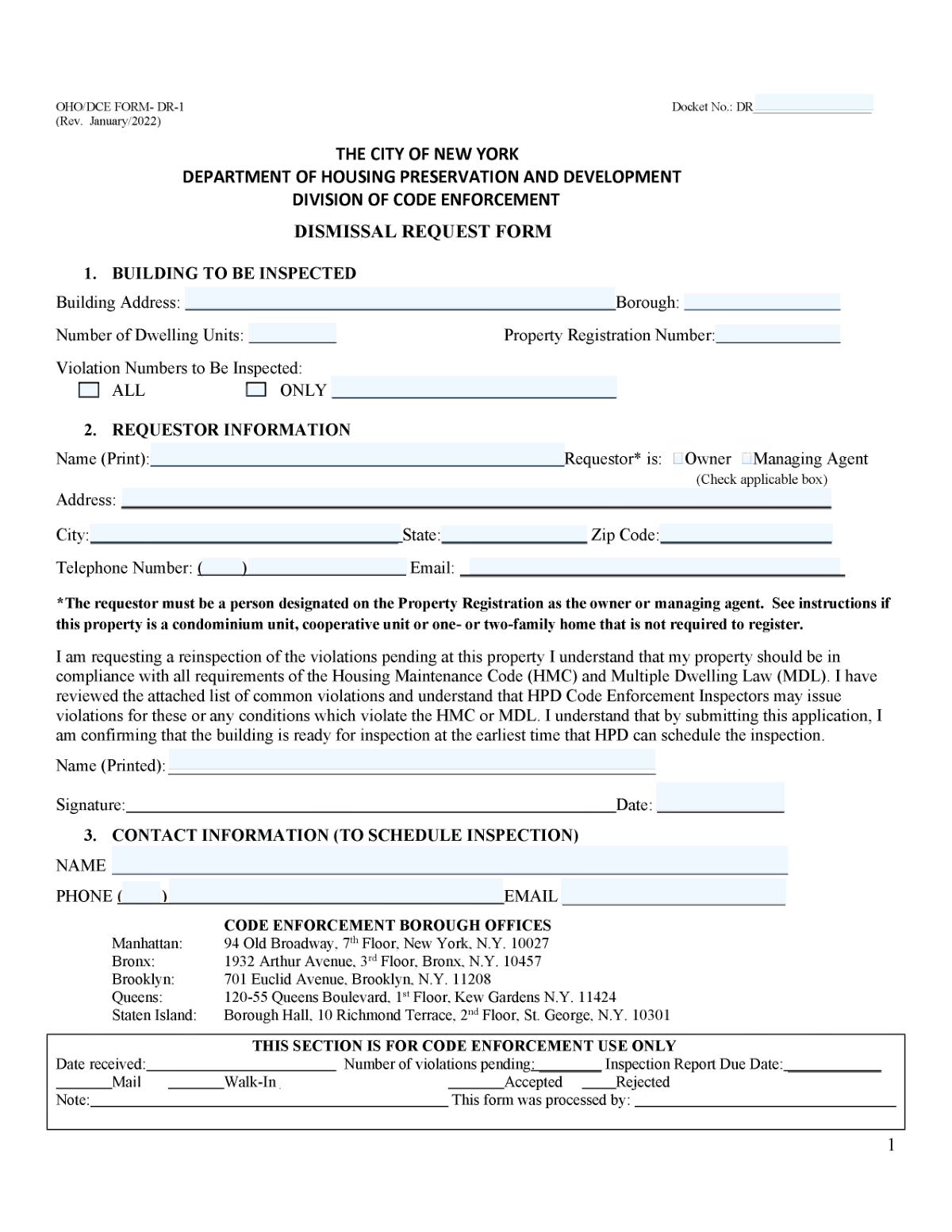
Yes! You can use AI to fill out OHO/DCE Form DR-1, Dismissal Request

OHO/DCE Form DR-1 is a Dismissal Request form used by property owners and managing agents, typically in jurisdictions like New York City, to certify that they have corrected specific housing code violations. By submitting this form, the requestor asks for an inspection to verify the corrections and officially dismiss the violations from the property's record, which is crucial for maintaining compliance and avoiding further penalties. Today, this form can be filled out quickly and accurately using AI-powered services like Instafill.ai, which can also convert non-fillable PDF versions into interactive fillable forms.
Our AI automatically handles information lookup, data retrieval, formatting, and form filling.
It takes less than a minute to fill out OHO/DCE Form DR-1 using our AI form filling.
Securely upload your data. Information is encrypted in transit and deleted immediately after the form is filled out.

Form specifications

Form name: OHO/DCE Form DR-1, Dismissal Request
Number of fields: 69
Number of pages: 9
Language: English
Categories: SSA forms
main-image

Instafill Demo: How to fill out PDF forms in seconds with AI

How to Fill Out OHO/DCE Form DR-1 Online for Free in 2026

Are you looking to fill out a OHO/DCE FORM DR-1 form online quickly and accurately? Instafill.ai offers the #1 AI-powered PDF filling software of 2026, allowing you to complete your OHO/DCE FORM DR-1 form in just 37 seconds or less.
Follow these steps to fill out your OHO/DCE FORM DR-1 form online using Instafill.ai:
  1. 1 Navigate to Instafill.ai and upload or select the OHO/DCE Form DR-1.
  2. 2 Provide the building information, including the docket number, address, and property registration number. Specify whether the inspection is for ALL violations or ONLY specific ones.
  3. 3 Complete the Requestor Identification section with your name, address, contact details, and your relationship to the property (e.g., Owner, Managing Agent).
  4. 4 If applicable, fill out the sections detailing the corrective work for each violation, including the condition description, who performed the work, and the completion date.
  5. 5 Enter the name and contact information for the person who will schedule the inspection with the agency.
  6. 6 Carefully complete the certification section by printing your name and dating the form. If required, have the affidavit section completed and notarized.
  7. 7 Review all entered information for accuracy, then use the AI service to finalize and download your completed Form DR-1 for submission.

Our AI-powered system ensures each field is filled out correctly, reducing errors and saving you time.

Why Choose Instafill.ai for Your Fillable OHO/DCE Form DR-1 Form?

Speed

Complete your OHO/DCE Form DR-1 in as little as 37 seconds.

Up-to-Date

Always use the latest 2026 OHO/DCE Form DR-1 form version.

Cost-effective

No need to hire expensive lawyers.

Accuracy

Our AI performs 10 compliance checks to ensure your form is error-free.

Security

Your personal information is protected with bank-level encryption.

Frequently Asked Questions About Form OHO/DCE Form DR-1

This form, also known as a Dismissal Request, is used to certify that building code violations have been corrected and to request an official inspection for their dismissal.

The property owner, managing agent, or another authorized representative responsible for correcting violations and managing the property should complete this form.

Select 'ALL' if you want every outstanding violation for the property inspected. Select 'ONLY' and list the specific violation numbers if you are only addressing certain violations at this time.

The form has a section where you can declare that you are the owner of a private dwelling, condominium, or cooperative unit. Checking the appropriate box explains why a Property Registration Number is not required.

For each violation, you must provide the violation number, a description of the corrected condition, the name of the person or company who did the work, and the date the work was completed.

Yes, the form includes a Notary Acknowledgment section. You must sign the form in the presence of a Notary Public, who will then complete and stamp this section.

List a person who is readily available and has access to the property, such as a building superintendent or managing agent. Providing their direct contact information is crucial for scheduling the inspection without delay.

This section is your legal certification that you have mailed a copy of this form to the tenant of the affected apartment. You must enter the date this notice was mailed to the tenant.

If you need to certify more than five violations, you may need to attach an additional sheet with the same required information for the remaining violations. Always check with the issuing agency for their specific guidelines on this.

The Docket Number is a unique identifier for your OHO/DCE case and should be printed on any official notices or correspondence you have received regarding the violations.

Yes, services like Instafill.ai use AI to help you accurately auto-fill form fields from your saved information, which saves time and helps prevent common errors.

Simply upload the form's PDF to the Instafill.ai platform. You can then easily type your information into the fields, add signatures, and save or print the completed document.

If you have a non-fillable or 'flat' PDF, you can upload it to a service like Instafill.ai. Its technology can convert the document into an interactive, fillable form that you can complete on your computer.

Compliance OHO/DCE Form DR-1
Validation Checks by Instafill.ai

1
Ensures Exclusive Selection for Violation Scope
Validates that either the 'ALL' checkbox is checked or the 'ONLY' checkbox is checked, but not both. If the 'ONLY' checkbox is selected, the 'Violation Numbers (Only)' field must also be filled. This prevents ambiguity in the inspection request and ensures the inspector knows exactly which violations to check, avoiding wasted time or incomplete inspections.
2
Validates Chronology of Work Completion and Certification Dates
Compares each 'Date Work Completed' against the final 'Certification Date'. All work completion dates must be on or before the date of certification. This logical check is crucial for preventing fraudulent claims and ensuring the certification is chronologically valid. A certification dated before the work was finished would be invalid and rejected.
3
Verifies Consistency of Affiant's Printed Name
This validation confirms that the name entered in 'Affiant Print Name' is identical to the name in 'Affiant Printed Name (Signature Block)'. This consistency is crucial for the legal validity of the affidavit, ensuring the person making the sworn statement is the same person identified at the signature block. A mismatch could call the document's authenticity and legal standing into question.
4
Validates Notary Acknowledgment Date
Checks that the 'Month', 'Day', and 'Year' provided in the 'Notary Acknowledgment' section form a real, valid calendar date that is not in the future. This is fundamental for the legal standing of the notarized document. An impossible or future date would invalidate the notary's acknowledgment and require the form to be re-notarized.
5
Enforces Conditional Property Registration Number
This check validates that if no ownership exemption is claimed (i.e., 'Owner of private dwelling', 'Owner of condominium unit', or 'Owner of cooperative shares' are all unchecked), then the 'Property Registration Number' field must be filled. This ensures that all non-exempt properties are properly identified by their registration number, which is essential for regulatory tracking. Failure to provide it when required will result in the form being rejected as incomplete.
6
Ensures Completeness of Individual Violation Correction Entries
For each of the five violation work entries, this check validates that if any field in the row is filled (e.g., Violation Number), then all other fields in that same row (Condition Description, Work Done By, Date Work Completed) are also completed. This prevents partial, unusable data for a specific violation correction. Incomplete entries cannot be processed and would require the user to provide the missing information.
7
Validates Format of Inspection Contact Phone Number
Checks that the 'Contact Phone Number' for scheduling an inspection is a valid 10-digit phone number. The number must consist of numeric digits and adhere to a standard US phone number format. A valid phone number is absolutely essential for the agency to schedule the inspection, and failure to provide one will halt the entire process.
8
Ensures Valid Email Address Format
Verifies that the 'Email Address' fields for both the requestor and the inspection contact contain a string in a valid email format (e.g., '[email protected]'). This ensures that electronic communications, confirmations, and scheduling details can be successfully delivered. An invalid email format would lead to communication failures and processing delays.
9
Validates Chronology of Tenant Mailing and Certification
Ensures the 'Date Notice Was Mailed to Tenant' is on or before the 'Certification of Mailing Date'. A person certifies on a certain date that they have mailed the notice, so the mailing must have already occurred or be happening that same day. This validation upholds the integrity of the legal notification process, and a chronological inconsistency could invalidate the certification.
10
Requires Conditional Address for Ownership Exemption
This validation checks that if an ownership exemption box is checked ('Owner of private dwelling', 'Owner of condominium unit', or 'Owner of cooperative shares'), the corresponding address field(s) for that selection are filled out. This information is required to verify the owner's claim of exemption from property registration. An empty address field would render the exemption claim incomplete and invalid.
11
Validates Exclusive Requestor Role Selection
Verifies that exactly one of the 'Owner' or 'Managing Agent' checkboxes is selected in the 'Requestor Identification' section. This clarifies the requestor's legal standing and relationship to the property for the record. Submissions with no role or multiple roles selected would be considered incomplete and require correction.
12
Ensures Completeness of Core Building Information
Verifies that the 'Building Address', 'Borough', and 'Number of Dwelling Units' fields are all completed. This information is fundamental for identifying the property in question and understanding its scale. Missing any of this core data would make it impossible to locate the building for inspection or to access its records.
13
Validates Docket Number Format
Checks if the 'Docket Number' follows the expected OHO/DCE format, which likely includes specific alphanumeric characters, lengths, and separators like slashes. This ensures the request is linked to the correct case file in the system. An invalid format could lead to processing delays or outright rejection as the case cannot be identified.

Common Mistakes in Completing OHO/DCE Form DR-1

Ambiguous Violation Inspection Scope

Users often create confusion by either checking 'ONLY' without listing specific violation numbers, or checking 'ALL' while also listing numbers, creating an ambiguous request. This forces the agency to guess the requestor's intent, leading to processing delays or an inspection that doesn't cover the intended scope. To avoid this, clearly choose one option: either check 'ALL' for a comprehensive inspection or check 'ONLY' and meticulously list the exact violation numbers to be inspected on the provided line.

Inconsistent Affiant/Requestor Name

The form requires the requestor's or affiant's printed name in multiple locations, such as 'Requestor Name (Printed)' and 'Affiant Print Name'. People frequently use different variations of their name or leave one of these fields blank, which can raise questions about the identity of the person certifying the form and may lead to rejection. To prevent this, ensure you enter your full, legal name consistently across all designated 'Printed Name' fields.

Incorrect Owner Type Declaration

The section for 'Owner of private dwelling,' 'condominium unit,' or 'cooperative shares' is often filled out incorrectly, with users checking a box but failing to provide the required address and apartment number in the corresponding fields. This error can invalidate the claim that a Property Registration is not required, causing the form to be rejected. Carefully read each option and fill out only the section that accurately describes your ownership status and property details.

Invalid Property Registration Number

Applicants often confuse the 'Property Registration Number' with other identifiers like a docket number or tax ID, or they leave it blank entirely. This number is a unique identifier crucial for the agency to locate the property's official file, and submitting an incorrect or missing number will halt the process. Before filling out the form, double-check official property documents to find the correct registration number. AI-powered tools like Instafill.ai can help by storing and accurately populating such specific identifiers.

Mismatched Contact and Party Information

This form asks for details for the Requestor, a separate Contact for scheduling, and the Tenant, which can be confusing. A common mistake is to enter the same information in all fields without consideration, leading to inspection scheduling calls or official notices going to the wrong person and causing significant delays. Carefully distinguish between the person submitting the form (Requestor), the person to arrange access (Contact), and the resident of the unit (Tenant).

Incomplete Notary Acknowledgment

The 'Notary Acknowledgment' section requires a signature and stamp from a licensed Notary Public to be legally valid, but many people submit the form without getting it notarized. An unnotarized affidavit is invalid and will be immediately rejected, requiring the entire process to be restarted. Always complete the form, sign it in the presence of a notary, and ensure the notary properly fills out their entire section before you submit it.

Insufficient Violation Correction Description

In the 'Condition Description' fields, users often write vague entries like 'Fixed' or 'Repaired,' which lack the necessary detail for an official to determine if the work meets legal standards. This often results in a failed certification and requires a physical re-inspection, wasting time and resources. Provide a clear, concise summary of the specific work performed, such as 'Replaced broken window pane in living room' instead of 'Fixed window'.

Improperly Formatted Phone Number

The form explicitly separates the 'Telephone Area Code' from the main 'Telephone Number,' a common source of data entry errors. Users may enter the full 10-digit number into one field or mis-key the digits when splitting them, which can prevent the agency from being able to make contact. Carefully enter the three-digit area code in its designated field. Using a tool like Instafill.ai can prevent this by automatically parsing and formatting contact information into the correct fields.

Mixing Up Critical Dates

The form includes multiple distinct date fields: 'Date Work Completed,' 'Certification Date,' and 'Date Notice Was Mailed to Tenant.' Users often get these dates confused, entering the same date in all fields or putting the wrong date in a specific box, which can create legal and compliance issues. Pay close attention to the label for each date field and enter the precise date that corresponds to that specific action to ensure your submission is accurate.

Missing Apartment or Unit Numbers

When dealing with multi-unit buildings, failing to include the specific apartment or unit number in fields like 'Condominium Apartment Number' or 'Apartment Number (Property and Tenant Information)' is a critical omission. This makes it impossible for the agency to identify the correct location, causing the request to be returned as incomplete. If the form is a non-fillable PDF, a tool like Instafill.ai can convert it into a fillable version, making it easier to ensure all required fields, including unit numbers, are completed.
Saved over 80 hours a year

“I was never sure if my IRS forms like W-9 were filled correctly. Now, I can complete the forms accurately without any external help.”

Kevin Martin Green

Your data stays secure with advanced protection from Instafill and our subprocessors

Robust compliance program

Transparent business model

You’re not the product. You always know where your data is and what it is processed for.

ISO 27001, HIPAA, and GDPR

Our subprocesses adhere to multiple compliance standards, including but not limited to ISO 27001, HIPAA, and GDPR.

Security & privacy by design

We consider security and privacy from the initial design phase of any new service or functionality. It’s not an afterthought, it’s built-in, including support for two-factor authentication (2FA) to further protect your account.

Fill out OHO/DCE Form DR-1 with Instafill.ai

Worried about filling PDFs wrong? Instafill securely fills ohodce-form-dr-1-dismissal-request forms, ensuring each field is accurate.