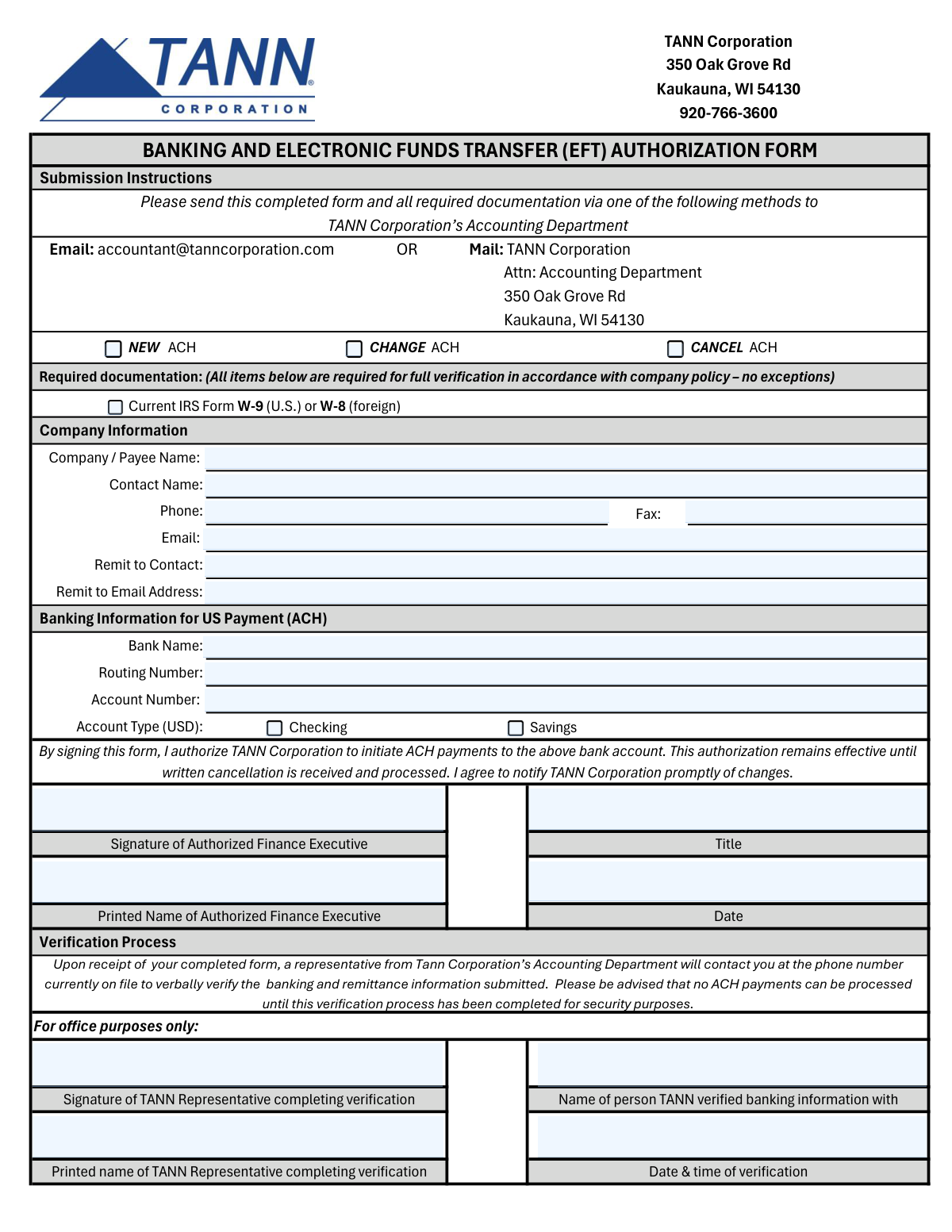
Yes! You can use AI to fill out TANN Corporation ACH/EFT Payment Authorization Form
The TANN Corporation ACH/EFT Payment Authorization Form is a legal document used by companies, vendors, or individuals to authorize TANN Corporation to make payments directly into their bank account via Electronic Funds Transfer (EFT). This process replaces traditional paper checks, offering a more secure and efficient method for receiving payments. Today, this form can be filled out quickly and accurately using AI-powered services like Instafill.ai, which can also convert non-fillable PDF versions into interactive fillable forms.
TANN ACH Authorization is part of the
ACH authorization forms, EFT authorization forms and payment authorization forms categories on Instafill.
Our AI automatically handles information lookup, data retrieval, formatting, and form filling.
It takes less than a minute to fill out TANN ACH Authorization using our AI form filling.
Securely upload your data. Information is encrypted in transit and deleted immediately after the form is filled out.
Form specifications
| Form name: | TANN Corporation ACH/EFT Payment Authorization Form |
| Number of fields: | 24 |
| Number of pages: | 1 |
| Language: | English |
Instafill Demo: How to fill out PDF forms in seconds with AI
How to Fill Out TANN ACH Authorization Online for Free in 2026
Are you looking to fill out a TANN ACH AUTHORIZATION form online quickly and accurately? Instafill.ai offers the #1 AI-powered PDF filling software of 2026, allowing you to complete your TANN ACH AUTHORIZATION form in just 37 seconds or less.
Follow these steps to fill out your TANN ACH AUTHORIZATION form online using Instafill.ai:
- 1 Navigate to Instafill.ai and upload the TANN Corporation ACH/EFT Payment Authorization Form or select it from their template library.
- 2 Indicate the submission type by checking the box for 'New', 'Change', or 'Cancel' ACH to specify the purpose of your request.
- 3 Provide your company's legal name, contact person, phone number, and email address in the Company Contact Information section.
- 4 Enter your financial institution's name, routing number, and account number, and specify the account type (Checking or Savings).
- 5 Confirm that you are submitting a current IRS Form W-9 or W-8 by checking the required documentation box.
- 6 An authorized finance executive must provide their signature, printed name, title, and the date to formally approve the ACH authorization.
- 7 Review all entered information for accuracy with the AI assistant's help, then securely submit the completed form to TANN Corporation as instructed.
Our AI-powered system ensures each field is filled out correctly, reducing errors and saving you time.
Why Choose Instafill.ai for Your Fillable TANN ACH Authorization Form?
Speed
Complete your TANN ACH Authorization in as little as 37 seconds.
Up-to-Date
Always use the latest 2026 TANN ACH Authorization form version.
Cost-effective
No need to hire expensive lawyers.
Accuracy
Our AI performs 10 compliance checks to ensure your form is error-free.
Security
Your personal information is protected with bank-level encryption.
Frequently Asked Questions About Form TANN ACH Authorization
This form is an ACH/EFT Authorization Agreement. It's used to authorize TANN Corporation to send payments directly to your bank account, update your banking details, or cancel existing electronic payment arrangements.
Any company, vendor, or payee that wants to receive payments electronically from TANN Corporation must complete and submit this form.
A current IRS Form W-9 (for U.S. entities) or W-8 (for foreign entities) is required for tax reporting purposes. TANN Corporation needs this document to verify your taxpayer information and comply with IRS regulations.
The 'Company Contact' is the general contact person for your business. The 'Remit-To Contact' is the specific person or department that should receive email notifications and details about payments being sent.
You can find your routing (ABA) and account numbers printed on the bottom of your checks. This information is also available through your bank's online portal or by contacting your financial institution directly.
The signatory must be a person with financial authority in your company, such as a Chief Financial Officer (CFO), Controller, Treasurer, or Director of Finance.
You should leave this section blank. It is reserved for internal use by TANN Corporation representatives to document their verification of your banking information.
The form itself does not specify submission instructions. You should contact your TANN Corporation representative or their accounts payable department to determine the correct submission method, such as email or a secure portal.
Processing times can vary. It may take one to two payment cycles for the electronic payments to begin, so you should confirm the expected start date with TANN Corporation.
By selecting 'Cancel ACH', you are instructing TANN Corporation to stop sending electronic payments to your account. Future payments will likely be sent via paper check until new arrangements are made.
Yes, services like Instafill.ai use AI to accurately auto-fill form fields from your saved information, which can save you time and help prevent errors.
You can use a service like Instafill.ai to upload the PDF and fill it out digitally. This allows you to easily type your information, add an electronic signature, and download the completed form.
If you have a flat, non-fillable PDF, you can use Instafill.ai to convert it into an interactive, fillable form. This lets you type your information directly onto the document without needing to print and scan it.
Compliance TANN ACH Authorization
Validation Checks by Instafill.ai
1
Exclusive Submission Type Selection
This check ensures that the user selects exactly one submission type: 'New ACH', 'Change ACH', or 'Cancel ACH'. This is vital for routing the request to the correct internal workflow and preventing ambiguity. If the user selects none or more than one, an error is displayed, forcing a clear choice before submission.
2
Required W-9/W-8 Documentation Confirmation
This validation ensures that the checkbox confirming the submission of a current IRS Form W-9 or W-8 is ticked. This is a mandatory compliance step for tax reporting and legal payment processing. The form cannot be submitted without this confirmation, preventing incomplete or non-compliant applications.
3
Conditional Field Logic for Cancellation
This validation rule ensures that if 'Cancel ACH' is selected, the banking details section (Bank Name, Routing Number, Account Number, Account Type) is not required and may be hidden or disabled. This simplifies the user experience for cancellations, as banking information is irrelevant for stopping payments. It prevents user confusion and unnecessary data entry.
4
Company/Payee Name Presence
This check ensures the 'Company / Payee Name' field is not left blank. This field contains the legal name of the entity to be paid, which is the most fundamental data point for a financial transaction. A submission will be rejected without this information, as payment cannot be issued without a valid payee.
5
Valid Contact Email Format
This check verifies that the value entered in the 'Email Address' field follows a standard email format (e.g., [email protected]). A valid email is essential for communication regarding the ACH setup or any potential issues. If the format is invalid, the user will receive an error message and must correct the entry before proceeding.
6
Required Remit-To Email for New/Change ACH
This check ensures the 'Remit-To Email Address' is provided and correctly formatted for 'New ACH' or 'Change ACH' submissions. This email is the destination for critical payment remittance advice, and its absence would hinder the payee's ability to reconcile payments. The field is mandatory for new or updated setups.
7
Standard Phone Number Format
This validation checks that the 'Phone Number' field is entered in a recognizable and standard format (e.g., (XXX) XXX-XXXX). A correctly formatted phone number is crucial for TANN Corporation to be able to contact the payee for urgent verification or issue resolution. The system should guide the user to enter a valid 10-digit number and reject invalid entries.
8
ABA Routing Number Integrity
This performs a two-part check on the 'Routing Number': it must be exactly 9 digits long and must be a valid number according to the ABA checksum algorithm. This is a critical validation, as an incorrect routing number guarantees the failure of an ACH transaction. An invalid number will block form submission with a clear error message.
9
Bank Account Number Requirement for New/Change ACH
This check ensures the 'Account Number' field is populated when the submission type is 'New ACH' or 'Change ACH'. The account number is essential for directing funds to the correct destination. The form will not allow submission for new or updated payment setups without this critical piece of data.
10
Exclusive Bank Account Type Selection
For 'New ACH' or 'Change ACH' requests, this check ensures that the user selects exactly one account type: 'Checking' or 'Savings'. The ACH network requires this specification to process transactions correctly. The form must prevent users from selecting both or neither, ensuring data completeness for successful payments.
11
Complete Authorization Section Requirement
This check ensures that the 'Authorized Finance Executive Signature', 'Printed Name', and 'Title' fields are all completed. This section provides legal authorization for the ACH transaction and confirms the identity and authority of the approver. Incomplete authorization invalidates the request, so the form will not be submittable until all three fields are filled.
12
Required Authorizer Title
This check ensures the 'Authorized Finance Executive Title' field is completed. The title (e.g., CFO, Controller, Treasurer) is crucial for verifying that the person signing the form has the appropriate authority within their organization to authorize financial changes. Submissions without a title will be considered incomplete and will be rejected until the information is provided.
13
Valid and Logical Signature Date
This validation ensures the 'Signature Date' is a valid calendar date and is not set to a future date. The signature date establishes the legal timing of the authorization and must reflect the actual date of signing. The system will reject illogical future dates or incorrectly formatted dates to maintain data integrity.
14
Bank Name Requirement for New/Change ACH
This validation confirms that the 'Bank Name' field is filled out for 'New ACH' or 'Change ACH' submissions. While the routing number identifies the bank electronically, the bank name is important for verification, record-keeping, and resolving any discrepancies. The form will require this field to be completed to ensure a full and accurate banking profile is on file.
Common Mistakes in Completing TANN ACH Authorization
Users often check the wrong box, such as selecting 'New ACH' when they are actually updating their bank details ('Change ACH'). This mistake leads to incorrect processing, potentially creating duplicate vendor profiles or failing to update critical payment information, which causes payment delays. To avoid this, carefully read the description for each option and select the one that accurately reflects your request before submitting the form.
People sometimes enter a DBA ('doing business as') name or an abbreviated company name instead of the full legal entity name. This causes a mismatch with the name on the required IRS Form W-9 and the bank account, leading to payment rejections by the bank's automated verification systems. Always use the official legal name as registered with the IRS and your financial institution to ensure successful transactions.
The 9-digit routing number is frequently mistyped, or users may provide the number for wire transfers instead of the one for ACH, which are often different. An incorrect routing number is a critical error that will cause the payment to fail immediately, leading to significant delays and requiring the form to be resubmitted. Double-check the ACH routing number by referencing a voided check or your bank's official documentation. AI-powered form fillers like Instafill.ai can help validate the format and checksum of routing numbers to catch errors.
This form requires a current IRS Form W-9 or W-8 to be submitted with it for tax compliance. Applicants often forget to attach this separate, mandatory document, even if they check the confirmation box. This omission will halt the entire setup process until the required tax form is received, delaying all future payments. Always ensure you have a completed, up-to-date W-9 or W-8 ready to submit along with this authorization form.
The form requests both a general 'Company Contact' and a specific 'Remit-To Contact' for payment correspondence. A common error is entering the same general contact information for both. This results in crucial payment notifications being sent to a person not involved in accounting, causing delays in payment reconciliation. Ensure the 'Remit-To' details point directly to the accounts receivable department or the specific person who handles payment posting.
A simple typo in the bank account number is one of the most damaging yet common mistakes. This can cause payments to be rejected or, in the worst-case scenario, deposited into the wrong account, creating a significant financial and security risk. Carefully proofread the account number digit-by-digit against a reliable source like a voided check or your online banking portal before submission.
The form specifies that an 'Authorized Finance Executive' must sign. A signature from an unauthorized individual will invalidate the form, and people often forget to include their title, printed name, or the signature date. Any missing information in this section will lead to rejection and require the form to be filled out and signed all over again, delaying the payment setup.
Applicants frequently overlook checking the 'Checking' or 'Savings' box to specify the account type. While it seems minor, this omission can cause transaction processing errors or rejections by the receiving bank, as the transaction code may not match the account's capabilities. Always double-check that you have selected the correct account type to ensure smooth payment processing.
Applicants sometimes mistakenly write in the section clearly marked 'For office purposes only'. This creates confusion for the internal verification team at TANN Corporation, who may assume a verification step was completed incorrectly or by an unauthorized person. This can slow down the approval process. Applicants must leave all fields in this section completely blank.
When a form is only available as a non-fillable PDF, users may print, handwrite, and scan it back, often resulting in illegible information, especially for long account numbers. This poor quality can lead to data entry errors by the processing team and subsequent payment failures. To prevent this, use a tool like Instafill.ai, which can convert flat PDFs into digitally fillable forms, ensuring all information is clear, legible, and accurate.
Saved over 80 hours a year
“I was never sure if my IRS forms like W-9 were filled correctly. Now, I can complete the forms accurately without any external help.”
Kevin Martin Green
Your data stays secure with advanced protection from Instafill and our subprocessors

Robust compliance program
Transparent business model
You’re not the product. You always know where your data is and what it is processed for.
ISO 27001, HIPAA, and GDPR
Our subprocesses adhere to multiple compliance standards, including but not limited to ISO 27001, HIPAA, and GDPR.
Security & privacy by design
We consider security and privacy from the initial design phase of any new service or functionality. It’s not an afterthought, it’s built-in, including support for two-factor authentication (2FA) to further protect your account.
Fill out TANN ACH Authorization with Instafill.ai
Worried about filling PDFs wrong? Instafill securely fills tann-corporation-acheft-payment-authorization-form forms, ensuring each field is accurate.