
Instafill.ai
7 days free
AI form filling · 73 fields · 2 pages · done in seconds

Yes! You can use AI to fill out Schedule 1 (Form 1040), Additional Income and Adjustments to Income (2025)

Don't type 73 fields by hand. Tell our AI about yourself, or upload your W-2 or last year's return, and it fills every field in seconds. You check it, then download, print or sign.
7 days free, then $19.99/month · Cancel anytime
AI fills it, no typingEncrypted, never used to train AICancel in two clicks
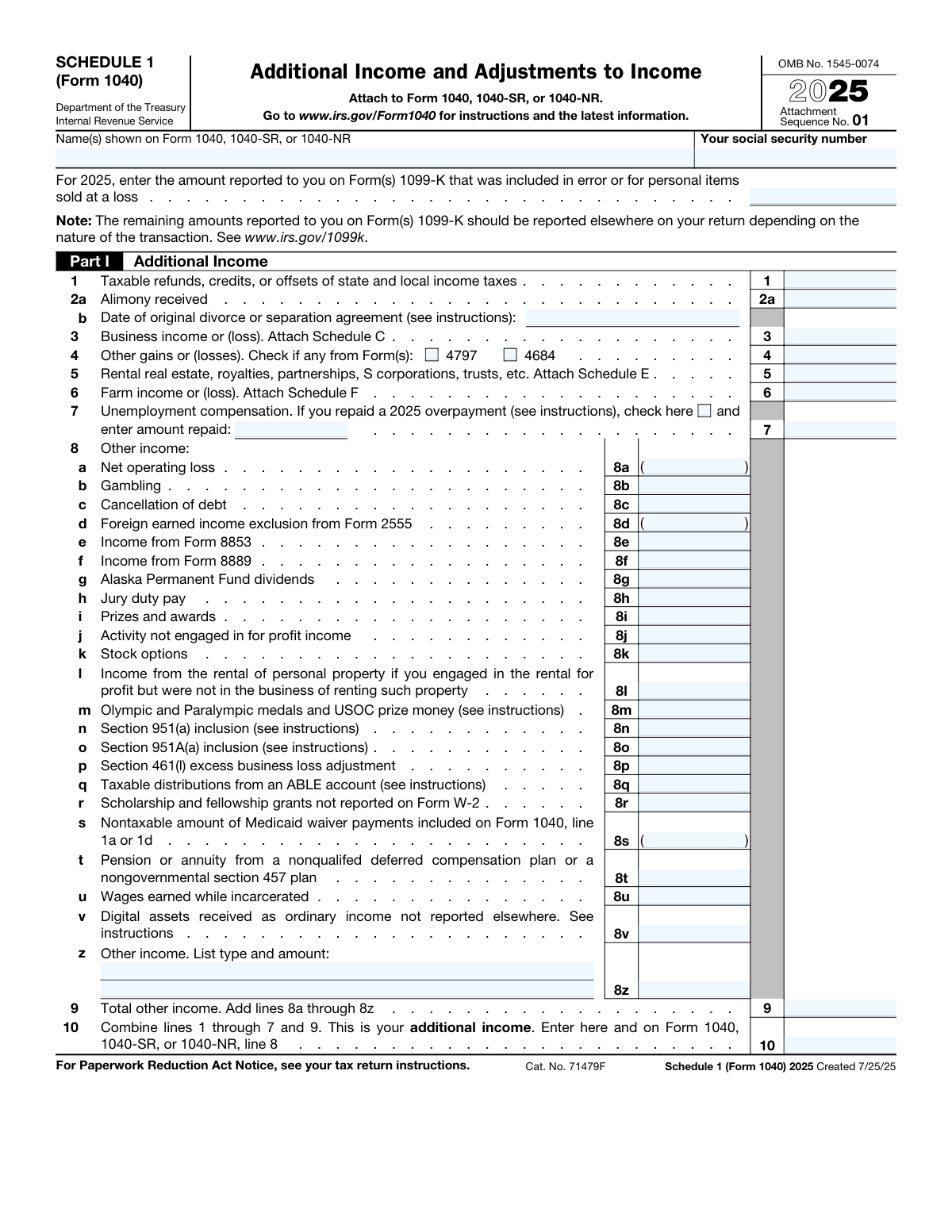
Schedule 1 (Form 1040), Additional Income and Adjustments to Income (2025), page 1
Complex · 66/100Form Complexity Index

The AI does the filling. You just check it.

No typing into boxes, nothing to install.

Tell the AI about youAnswer a few questions in plain words, or upload your W-2 or last year's return. That is all the typing there is.
AI fills every field in secondsIt puts each answer in the right box on every page, tables and checkboxes included.
Check it and downloadReview every field, change anything, then download, print or sign the PDF.

What this form asks for

The AI fills all of it, from your answers or your documents.

IRS Schedule 1 is a supplemental tax form attached to Form 1040, 1040-SR, or 1040-NR to report certain types of income and deductions. Part I is for reporting additional income like business profits, unemployment compensation, or alimony received, while Part II is for claiming adjustments to income, such as educator expenses, student loan interest, or IRA deductions. Today, this form can be filled out quickly and accurately using AI-powered services like Instafill.ai, which can also convert non-fillable PDF versions into interactive fillable forms.
Fillable fields73
Pages2
Sections60
Tables and lists2
Questions that depend on earlier answers6
Form Complexity IndexComplex, 66/100

The AI checks your answers before you download

14 checks built for this form, so a wrong date or a missing answer is caught before anyone else sees it.

SSN Format and Presence

This check verifies that the 'Your social security number' field contains a value formatted as a valid nine-digit Social Security Number (XXX-XX-XXXX or XXXXXXXXX). It is crucial for correctly identifying the taxpayer and linking the schedule to the main tax return. A failure would prevent the form from being processed, as the IRS cannot associate the income and adjustments with the correct taxpayer account.

Cross-Form Name Consistency

Validates that the 'Name(s) shown on Form 1040' field on Schedule 1 exactly matches the primary taxpayer name(s) entered on the associated Form 1040, 1040-SR, or 1040-NR. This consistency is essential for the IRS automated systems to correctly link all parts of a tax return together. A mismatch could lead to processing delays, rejection of the e-filing, or manual review correspondence from the IRS.

Alimony Received Date Requirement

This validation ensures that if an amount is entered for 'Alimony received' on line 2a, then a valid date must be entered in the 'Date of original divorce or separation agreement' field on line 2b. The date is required by the IRS to determine the taxability of the alimony based on when the agreement was executed. If the date is missing when alimony is reported, the form is incomplete and may be rejected or flagged for review.

Other Gains or Losses Form Reference

Checks that if a monetary value is entered on Line 4 for 'Other gains or (losses)', at least one of the corresponding checkboxes for Form 4797 or Form 4684 is checked. This provides necessary context for the source of the gain or loss, which is required for proper tax assessment. Failure to check a box when an amount is present would result in an incomplete entry, potentially triggering an IRS inquiry.

Unemployment Repayment Conditional Entry

This rule verifies that if the checkbox on Line 7 indicating repayment of a 2025 unemployment overpayment is checked, then the 'amount repaid' field must contain a numeric value greater than zero. This ensures that the filer provides the specific amount being claimed as a repayment. If the box is checked but the amount is missing, the form is considered incomplete and the intended tax benefit cannot be calculated.

Total Other Income Calculation (Line 9)

Performs an arithmetic check to confirm that the value on Line 9, 'Total other income', is the correct sum of all amounts entered on lines 8a through 8z. This is a critical calculation that ensures the sub-total for various income types is accurate before being carried forward. An incorrect sum will cause all subsequent totals on the return to be wrong, leading to an incorrect tax liability and likely requiring an amended return.

And 8 more checks
  • Total Additional Income Calculation (Line 10)
  • Alimony Paid Completeness Check
  • Alimony Recipient SSN Format
  • Student Loan Interest Deduction Limit
  • Jury Duty Pay Adjustment Consistency
  • Paired 'Other Income' Field Validation (Line 8z)
  • Total Adjustments to Income Calculation (Line 26)
  • Attached Form Requirement for Business Income

Let AI fill out your Schedule 1 (Form 1040)

No typing. Every field filled in seconds, checked, ready to sign.

7 days free, then $19.99/month · Cancel anytime

How to Fill Out Schedule 1 (Form 1040) Online for Free in 2026

What the AI walks you through.

  1. Navigate to Instafill.ai and upload your Schedule 1 (Form 1040) or select it from the template library.
  2. Enter your name and Social Security Number exactly as they appear on your main Form 1040, 1040-SR, or 1040-NR.
  3. Complete Part I by providing information for any additional income sources you have, such as business income (Schedule C), unemployment compensation, or gambling winnings.
  4. Fill out Part II by entering all applicable adjustments to your income, like educator expenses, student loan interest deduction, or contributions to a health savings account (HSA).
  5. Let the AI tool automatically calculate the total additional income on Line 10 and the total adjustments to income on Line 26.
  6. Carefully review all the auto-filled and manually entered information for accuracy.
  7. Download, print, or e-file the completed Schedule 1, ensuring it is attached to your primary tax return (Form 1040, 1040-SR, or 1040-NR).

Common Mistakes in Completing Schedule 1 (Form 1040)

The ones the AI is built to catch.

Mismatched Name or Social Security Number
A frequent error is when the name(s) and Social Security Number (SSN) at the top of Schedule 1 do not exactly match what is on the main Form 1040. This can happen due to typos, using a nickname instead of a legal name, or name changes that haven't been updated with the Social Security Administration. This mismatch can cause the IRS e-filing system to reject the return or lead to significant processing delays and manual review. To avoid this, meticulously copy the information exactly as it appears on your Form 1040. AI-powered tools like Instafill.ai can prevent this by auto-populating identifying information consistently across all related tax forms.
Forgetting to Attach Required Schedules
Several lines on Schedule 1, such as Line 3 (Business Income), Line 5 (Rental Real Estate), and Line 6 (Farm Income), require an entire separate schedule (Schedule C, E, or F, respectively) to be attached. Taxpayers often enter the final profit or loss number on Schedule 1 but forget to include the detailed supporting schedule. Without the required attachment, the IRS cannot verify the figure, which will result in processing delays, correspondence from the IRS, and potential disallowance of claimed losses. Always double-check the line instructions, which explicitly state 'Attach Schedule...'
Incorrectly Reporting Gambling Winnings
On Line 8b, taxpayers are required to report their total gross gambling winnings for the year. A very common mistake is to report net winnings, which is the amount won minus the amount lost. This is incorrect and constitutes underreporting of income. Gambling losses are deductible only if you itemize deductions on Schedule A, and the deduction is limited to the amount of your winnings. This error can trigger an IRS notice or audit, leading to back taxes, interest, and penalties. Always report the full amount of winnings from all sources on Line 8b.
Mishandling Jury Duty Pay
Jury duty pay has a unique two-step reporting process that is often handled incorrectly. The income must be reported on Line 8h, but if you gave that pay to your employer (who continued your salary), you can deduct it on Line 24a. People commonly make one of two mistakes: they report the income on Line 8h but forget to take the corresponding deduction on Line 24a, or they omit the income entirely. Forgetting the deduction on Line 24a results in overpaying your taxes. To avoid this, ensure you enter the amount on both lines if you turned the pay over to your employer.
Errors in Alimony Reporting
The rules for alimony are complex and depend on the date of the divorce agreement. For alimony paid under pre-2019 agreements (Line 19a), the most critical error is failing to enter the recipient's Social Security Number (SSN) on Line 19b. The IRS requires the recipient's SSN to match the income they report, and omitting it will lead to an automatic disallowance of your deduction. This results in a higher tax bill and requires you to amend your return after obtaining the information. Always ensure you have the recipient's correct SSN before filing.
Overstating the Student Loan Interest Deduction
While student loan interest is deductible on Line 21, there are limits that are often overlooked. The deduction is capped at $2,500 per year and is subject to income phase-outs, meaning the amount you can deduct is reduced or eliminated if your Modified Adjusted Gross Income (MAGI) is too high. People mistakenly claim the full amount of interest they paid, exceeding the cap, or claim the deduction when they are not eligible due to high income. This leads to an incorrect tax calculation that the IRS will later correct, resulting in a balance due with interest. Use the IRS worksheet to confirm your eligibility and calculate the correct amount.
Mathematical and Transposition Errors
When filling out a form by hand, simple math errors are common when summing up the columns for Line 10 (Total Additional Income) and Line 26 (Total Adjustments to Income). Another frequent mistake is transposing numbers when carrying them over from other forms or schedules (e.g., writing $670 instead of $760). These errors, while unintentional, will cause the IRS's automated systems to issue a math error notice (CP2000), delaying your refund or creating an unexpected tax bill. Using tax software or an AI-powered tool like Instafill.ai, which can make non-fillable PDFs fillable and perform automatic calculations, eliminates these manual errors.
Incomplete 'Other Income' or 'Other Adjustments' Entries
Lines 8z and 24z are catch-all lines for miscellaneous income and adjustments, but they require both a description and an amount. A common oversight is to enter a dollar figure but leave the description field blank. The IRS needs to know the source of the income or the reason for the adjustment to ensure it's being treated correctly. Leaving this blank can halt the processing of your return and trigger a letter from the IRS asking for clarification. Always provide a clear, concise description, such as 'Hobby income' or 'Reforestation expenses'.
Misclassifying Digital Asset Income
Line 8v, for reporting ordinary income from digital assets, is a source of significant confusion. Taxpayers often fail to realize that receiving digital assets from activities like airdrops, staking rewards, or as payment for services constitutes taxable ordinary income that must be reported here. They may omit it entirely or incorrectly believe it's only a capital gain to be reported when sold. This failure to report can lead to substantial underpayment of tax, interest, and penalties. To avoid this, keep detailed records and report the fair market value of any digital assets received as income on Line 8v.
Forgetting to Attach Form 8889 for HSA Deduction
To claim a Health Savings Account (HSA) deduction on Line 13, you must first complete and attach Form 8889. A common mistake is to simply write the total annual HSA contribution on Line 13 without the required supporting form. The deduction amount must be calculated on Form 8889, which accounts for contribution limits and other factors. Without the attached Form 8889, the IRS will disallow the deduction, increasing your tax liability and delaying your return. Always complete Form 8889 first and attach it to your tax filing.

Frequently Asked Questions About Schedule 1 (Form 1040)


Is it really free for 7 days?
Yes. You pay $0 today. Cancel before Nov 18 and you are never charged. Keep it, and it is $19.99 a month for 5 fills of your Schedule 1 (Form 1040).
Can I fill other forms too?
This plan is for your Schedule 1 (Form 1040): your own AI agent fills it as often as 5 times a month. To fill other forms and upload your own, choose a Professional plan from your account.
How do I cancel?
From your account, in two clicks, any time. No email, no call.
How does the AI fill out Schedule 1 (Form 1040)?
You answer a few questions in plain words, or upload your W-2 or last year's return. The AI reads what you give it and puts each answer into the right field of Schedule 1 (Form 1040), on every page, in seconds. It checks the answers against the form's own rules, and you review and change anything before you download, print or sign.
What happens to my information?
It is encrypted in transit and at rest, and it is never used to train AI.
How complex is Schedule 1 (Form 1040) to fill out?
Schedule 1 (Form 1040) has a Form Complexity Index of 66 out of 100, in the complex tier: 73 fillable fields across 2 pages. Instafill.ai's AI fills it in under a minute, with every field there for you to review before you download.
What is the purpose of Schedule 1 (Form 1040)?
Schedule 1 is used to report certain types of additional income, like business income or unemployment compensation, and to claim specific deductions known as 'adjustments to income,' such as student loan interest or educator expenses.
Who needs to file Schedule 1 with their tax return?
You must file Schedule 1 if you have any of the income types listed in Part I or are eligible for any of the deductions (adjustments) listed in Part II. If all your income and deductions are reported directly on Form 1040, you do not need to attach Schedule 1.
What is the difference between Part I and Part II on Schedule 1?
Part I is for reporting 'Additional Income' that doesn't appear on the main Form 1040, such as farm income or alimony received. Part II is for claiming 'Adjustments to Income,' which are deductions that lower your adjusted gross income (AGI).
Where do I report unemployment benefits?
You should report the total amount of unemployment compensation you received on Line 7 of Part I. If you repaid an overpayment in 2025, you can also note the amount repaid on this line.
I'm a teacher. Can I deduct the cost of classroom supplies?
Yes, eligible educators can deduct unreimbursed expenses for classroom supplies and professional development. This deduction is claimed on Line 11, 'Educator expenses,' in Part II.
How do I report income from my freelance work?
You should report your net income or loss from freelance work on Line 3, 'Business income or (loss).' You are also required to complete and attach Schedule C to your tax return to detail your business's profit and loss.
Can I deduct the interest I paid on my student loans?
Yes, you can deduct the amount of student loan interest you paid during the year, subject to income limitations. This deduction is claimed on Line 21, 'Student loan interest deduction,' in Part II.
What documents do I need to complete Schedule 1?
You may need various documents, such as Form 1099-G for unemployment, Form 1098-E for student loan interest, Form 1099-K for payment card transactions, and your own records for business or rental income.
How do I submit Schedule 1?
Schedule 1 is not a standalone form; it must be attached to your main tax return (Form 1040, 1040-SR, or 1040-NR). The totals from Schedule 1 are carried over to the appropriate lines on your main tax form.
I received a Form 1099-K for selling personal items at a loss. What should I do?
The form provides a specific line at the very top to report amounts from Form 1099-K that were for personal items sold at a loss or were included in error. This ensures you are not taxed on these non-taxable transactions.
Where do I report income from digital assets like cryptocurrency?
If you received digital assets as ordinary income (for example, as payment for services) and it's not reported elsewhere, you should enter the amount on Line 8v, 'Digital assets received as ordinary income'.
Can AI tools help me fill out Schedule 1?
Yes, services like Instafill.ai use AI to accurately auto-fill form fields, which can save you time and help prevent errors. This is particularly useful for transferring data from multiple source documents like 1099s.
How can I fill out Schedule 1 online using Instafill.ai?
Simply upload the Schedule 1 PDF to the Instafill.ai platform. The AI will make the form fillable, and you can either type directly into the fields or upload your financial documents to have the information automatically extracted and placed into the correct lines.
The Schedule 1 PDF I downloaded from the IRS website is not fillable. What can I do?
If you have a non-fillable or 'flat' PDF, you can use a tool like Instafill.ai. It can convert the static PDF into an interactive, fillable form that you can easily complete and sign online.
Encrypted in transit and at restNever used to train AIDelete your forms any time

Get your Schedule 1 (Form 1040) filled out by AI

$0 today. Cancel before Nov 18 and you pay nothing.

7 days free, then $19.99/month · Cancel anytime