Yes! You can use AI to fill out Form 1120-S (2025), U.S. Income Tax Return for an S Corporation
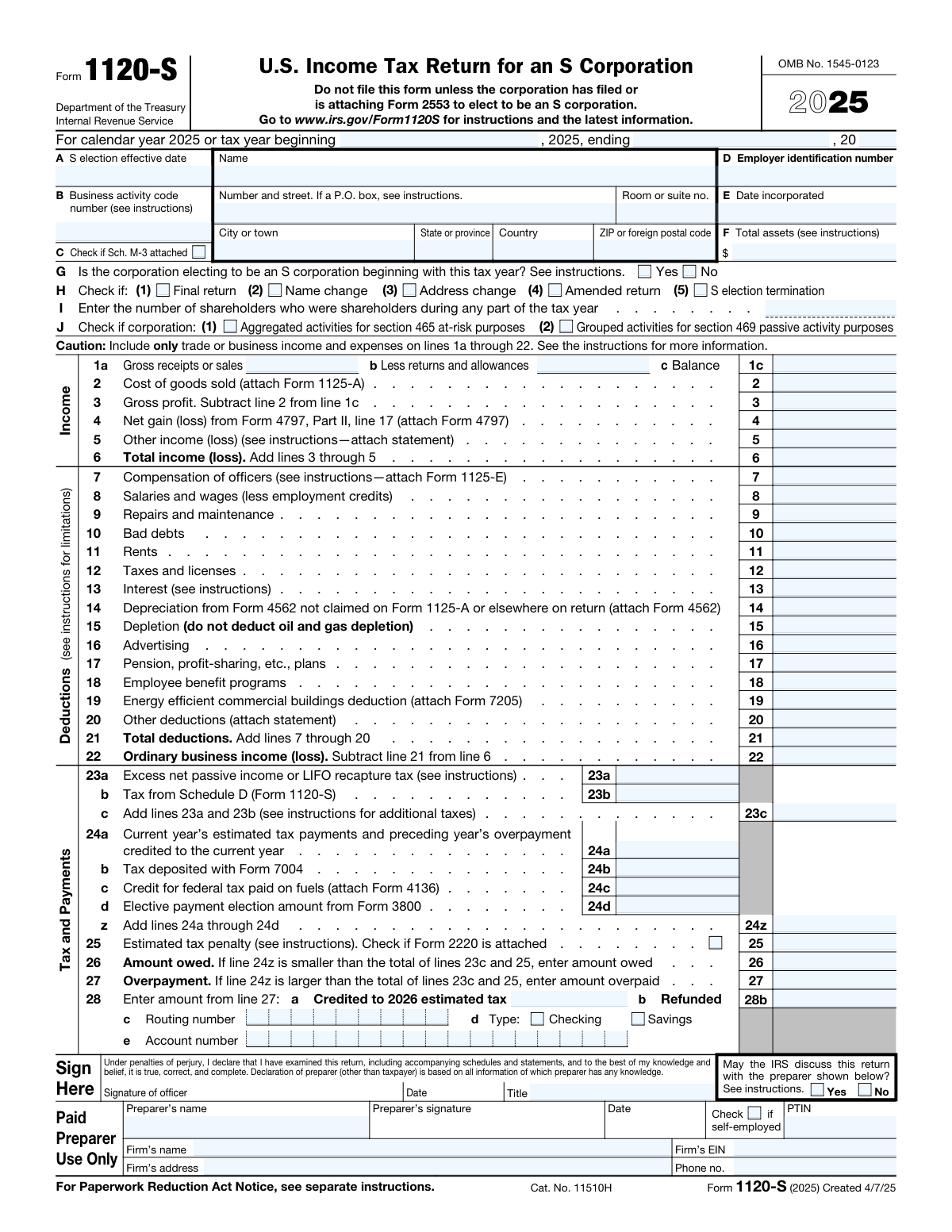
Form 1120-S is the federal income tax return filed by an S corporation to report the corporation’s business results for the tax year and calculate any entity-level taxes (such as certain passive income or recapture taxes). The return also reports each category of income, deduction, and credit that must be allocated to shareholders via Schedule K (and ultimately Schedule K-1s). It is important because it supports the S corporation’s pass-through tax treatment and provides the IRS and shareholders the information needed to correctly report items on individual returns. The form also captures key corporate details (EIN, incorporation date, total assets) and may require additional schedules and attachments depending on the corporation’s activities.
Our AI automatically handles information lookup, data retrieval, formatting, and form filling.
It takes less than a minute to fill out Form 1120-S using our AI form filling.
Securely upload your data. Information is encrypted in transit and deleted immediately after the form is filled out.
Form specifications
| Form name: | Form 1120-S (2025), U.S. Income Tax Return for an S Corporation |
| Number of pages: | 5 |
| Filled form examples: | Form Form 1120-S Examples |
| Language: | English |
Instafill Demo: filling out a legal form in seconds
How to Fill Out Form 1120-S Online for Free in 2026
Are you looking to fill out a FORM 1120-S form online quickly and accurately? Instafill.ai offers the #1 AI-powered PDF filling software of 2026, allowing you to complete your FORM 1120-S form in just 37 seconds or less.
Follow these steps to fill out your FORM 1120-S form online using Instafill.ai:
- 1 Enter basic corporation information: legal name, address, EIN, date incorporated, S election effective date, business activity code, tax year dates, and total assets; check applicable status boxes (final, amended, name/address change, etc.).
- 2 Complete the Income section (lines 1a–6): report gross receipts, returns/allowances, cost of goods sold (attach Form 1125-A if required), gains/losses (Form 4797), other income statements, and compute total income.
- 3 Complete the Deductions section (lines 7–22): enter officer compensation (attach Form 1125-E), wages, repairs, rents, taxes, interest, depreciation (Form 4562), and other deductions; total deductions and compute ordinary business income (loss).
- 4 Finish Tax and Payments (lines 23–28): calculate any entity-level taxes (including Schedule D tax if applicable), enter estimated payments/credits (e.g., Form 7004 deposits, Form 4136 fuel credit, elective payment amount from Form 3800), determine amount owed or overpayment, and provide direct deposit/refund details if applicable.
- 5 Complete Schedule B (Other Information): answer required yes/no questions (accounting method, ownership interests, 1099 filing, debt cancellation, digital asset activity, section 163(j) considerations, small corporation exceptions) and attach any required supporting schedules/forms (e.g., Schedule B-1, Form 8990, Form 8996).
- 6 Complete Schedule K and related schedules: report shareholders’ pro rata items (income, deductions, credits, AMT items, basis items, other information), and include Schedule K-2 if international items apply (or claim an exception if eligible).
- 7 Complete Schedules L, M-1, and M-2 (if required): enter book balance sheet amounts, reconcile book income to tax return income, analyze AAA/AE&P/other accounts, then e-sign and complete paid preparer information and attach all required statements and forms before filing.
Our AI-powered system ensures each field is filled out correctly, reducing errors and saving you time.
Why Choose Instafill.ai for Your Fillable Form 1120-S Form?
Speed
Complete your Form 1120-S in as little as 37 seconds.
Up-to-Date
Always use the latest 2026 Form 1120-S form version.
Cost-effective
No need to hire expensive lawyers.
Accuracy
Our AI performs 10 compliance checks to ensure your form is error-free.
Security
Your personal information is protected with bank-level encryption.
Frequently Asked Questions About Form Form 1120-S
Form 1120-S is the U.S. income tax return used by an S corporation to report the corporation’s income, deductions, credits, and other tax items for the year. It also reports the totals that flow through to shareholders on Schedule K-1.
A corporation that has elected to be treated as an S corporation for federal tax purposes must file Form 1120-S each year it exists (even if it has little or no activity). The form states you should not file it unless the corporation has filed or is attaching Form 2553 to elect S status.
If the corporation has not already made a valid S election, it generally must file or attach Form 2553 to elect S corporation status. If the S election is already in effect from a prior year, you typically do not attach Form 2553 again.
Box A is the date the S corporation election became effective (the start date of S status). Enter the effective date shown on the S election filing/acceptance information, following the instructions for Form 1120-S.
You must provide the corporation’s legal name and address, Employer Identification Number (EIN), date incorporated, business activity code, and total assets. These items identify the entity and help determine which schedules and reporting requirements apply.
Line G asks whether the corporation is making its S election effective for the first time for the current tax year. If “Yes,” you generally need to ensure Form 2553 is filed/attached and completed correctly.
Check the box that matches the return’s status: final return if the corporation is ending, name/address change if those changed since the last filing, amended return if correcting a previously filed 1120-S, and S election termination if S status ended. Only check boxes that apply for the year being filed.
Report gross receipts or sales on line 1a and subtract returns and allowances on line 1b to get line 1c. If the corporation has inventory or produces/sells goods, report cost of goods sold on line 2 and attach Form 1125-A.
Common attachments include Form 1125-A (COGS), Form 1125-E (officer compensation), Form 4562 (depreciation/Section 179), Form 4797 (sales of business property), Schedule D (Form 1120-S) for capital gains/losses, and statements for “Other income” or “Other deductions.” Some items also require specific forms like Form 7205 (energy efficient buildings deduction) or Form 4136 (fuel credit).
Schedule K summarizes the corporation’s total “pass-through” items (income, deductions, credits, and other information) that are allocated to shareholders. These totals are used to prepare each shareholder’s Schedule K-1.
If the corporation has items of international tax relevance, you generally must attach Schedule K-2 and check the box on Schedule K, line 14a. If you qualify for an exception, you can check the exception box on line 14b instead, as described in the instructions.
If the corporation’s total receipts for the tax year were less than $250,000 and total assets at year-end were less than $250,000 (Schedule B, line 11), it is not required to complete Schedules L and M-1. If either threshold is not met, those schedules are generally required.
Schedule M-1 reconciles book income (financial statement income) to the income reported on the tax return. It explains differences such as depreciation timing, nondeductible expenses, and tax-exempt income.
Schedule B asks about shareholder types (for example, disregarded entities, trusts, estates, or nominees) and ownership interests in other corporations or partnerships above certain thresholds. If you answer “Yes” to these questions, you may need to complete additional details on the form and attach required schedules such as Schedule B-1.
You report estimated tax payments and other credits on line 24, any estimated tax penalty on line 25, and then calculate either an amount owed (line 26) or overpayment (line 27). If there is an overpayment, you choose whether to credit it to next year’s estimated tax (line 28a) or request a refund and provide bank information for direct deposit (line 28b–e).
Compliance Form 1120-S
Validation Checks by Instafill.ai
1
Tax year period completeness and date format validation
Validate that the tax year beginning and ending dates are present (unless the filer explicitly indicates a calendar year return) and are in a valid date format (MM/DD/YYYY or IRS-accepted equivalent). Ensure the ending date is after the beginning date and that the period length is consistent with an allowable tax year (generally 12 months unless a short-year return is indicated). If validation fails, flag the return as incomplete/invalid because many computations and filing requirements depend on the correct tax period.
2
Corporation name and address required fields and structure validation
Ensure the corporation name and full mailing address are provided, including street (or P.O. box where allowed), city, state/province, and ZIP/foreign postal code, and country when not U.S. Validate state as a valid USPS abbreviation and ZIP as 5-digit or ZIP+4 (or a non-U.S. postal code format when country is not U.S.). If validation fails, the submission should be rejected or routed for correction because IRS correspondence and identity matching rely on accurate entity and address data.
3
Employer Identification Number (EIN) format and presence validation
Validate that the EIN is present and matches the required 9-digit format (NN-NNNNNNN or NNNNNNNNN), rejecting SSN-like formats where applicable. Apply basic checks such as numeric-only content (ignoring hyphen) and disallow all zeros. If validation fails, the return should not be accepted because EIN is a primary key for IRS processing and misformatted EINs cause matching and posting errors.
4
S election effective date required/conditional validation
If the corporation indicates it is electing to be an S corporation beginning with this tax year (Line G = Yes), validate that the S election effective date (Line A) is provided and is on or before the start of the tax year (or otherwise consistent with IRS rules for effective dates). If Line G = No, ensure the effective date is either blank or consistent with a prior election (depending on system design). If validation fails, flag for correction because S status determines whether Form 1120-S is appropriate and affects tax treatment.
5
Date incorporated format and logical consistency validation
Validate that the date incorporated is present and in a valid date format, and that it is not after the tax year end date. Optionally, ensure it is not unreasonably far in the future/past relative to the filing year. If validation fails, the return should be flagged because incorporation date is used for entity validation and can affect eligibility and compliance checks.
6
Business activity code format and dependency validation
Validate that the business activity code is present and matches the expected IRS code format (typically a 6-digit NAICS-based code for this form year). Also validate that Schedule B line 2a “Business activity” and 2b “Product or service” are completed and not contradictory (e.g., blank descriptions with a code present). If validation fails, the return should be flagged because activity coding drives IRS classification, analytics, and certain rule checks.
7
Shareholder count (Line I) numeric and range validation
Ensure the number of shareholders is provided, is an integer, and is greater than zero. Apply a reasonableness check for S corporation eligibility (generally not exceeding the statutory shareholder limit) and flag if the count is outside expected bounds. If validation fails, the return should be stopped for review because shareholder count impacts eligibility and downstream K-1/K schedules processing.
8
Mutually exclusive return status checkbox validation (Final/Amended/Termination)
Validate that incompatible status boxes are not selected together (e.g., “Final return” and “Amended return” may be allowed only under specific circumstances; “S election termination” should be consistent with other answers). If “S election termination” is checked, ensure related Schedule B items (e.g., QSub termination question if applicable) and effective dates/attachments are provided as required by instructions. If validation fails, route for correction because status drives IRS processing paths and can change required schedules.
9
Income line arithmetic validation (Lines 1a–6)
Validate that line 1c equals line 1a minus line 1b, and that line 3 equals line 1c minus line 2. Validate that line 6 equals the sum of lines 3 through 5, with correct handling of negative values. If validation fails, reject or flag because arithmetic errors propagate to ordinary income and Schedule K amounts.
10
Deductions and ordinary business income arithmetic validation (Lines 7–22)
Validate that line 21 equals the sum of lines 7 through 20, and that line 22 equals line 6 minus line 21. Enforce numeric formatting (currency with optional cents per system rules) and allow negative results where permitted. If validation fails, the return should be flagged because line 22 feeds Schedule K and multiple downstream reconciliations.
11
Required attachment triggers for specific line entries
If certain lines have non-zero amounts, validate that the corresponding required forms/statements are attached: e.g., line 2 requires Form 1125-A; line 7 requires Form 1125-E; line 14 requires Form 4562; line 19 requires Form 7205; line 4 requires Form 4797; Schedule K lines 7/8 require Schedule D; rental real estate income requires Form 8825. If validation fails, mark the submission incomplete because IRS processing and substantiation depend on these attachments.
12
Tax and payments arithmetic and exclusivity validation (Lines 23–28)
Validate that line 23c equals 23a + 23b, and that line 24z equals the sum of 24a through 24d. Validate that either line 26 (amount owed) or line 27 (overpayment) is populated, not both, and that the populated value equals the computed difference between (23c + 25) and 24z. If validation fails, flag because payment/refund outcomes and IRS posting depend on these totals being correct.
13
Refund allocation and bank account validation (Line 28 and banking fields)
If line 27 (overpayment) is greater than zero, validate that line 28a + line 28b equals line 27, and that neither allocation is negative. If any amount is to be refunded (28b > 0), validate routing number is 9 digits and passes the ABA checksum, account number is present and within acceptable length/character rules, and account type (checking/savings) is selected. If validation fails, prevent e-file acceptance or hold refund instructions because incorrect banking data can misdirect funds or cause refund rejection.
14
Schedule B conditional detail completion for ownership questions (Lines 4a/4b)
If Schedule B line 4a is answered “Yes,” validate that at least one row of (i)–(v) is completed with required fields, including percentage owned as a valid percent (0–100) and country of incorporation present. If percentage is 100%, validate that the QSub election date field is completed when applicable. If validation fails, flag because foreign/domestic ownership disclosures are mandatory and drive additional reporting requirements.
15
Schedule B restricted stock/options follow-up numeric consistency validation (Line 5a/5b)
If restricted stock is “Yes,” validate that total restricted and non-restricted shares are provided and are non-negative integers, and that at least one is greater than zero. If options/warrants are “Yes,” validate that shares outstanding and fully-exercised shares are provided and that fully-exercised shares are greater than or equal to shares outstanding. If validation fails, flag because equity structure affects shareholder reporting and potential compliance checks.
16
Schedule K linkage and reconciliation validation (K-1 ordinary income and Schedule K line 1)
Validate that Schedule K line 1 equals page 1 line 22 (ordinary business income/loss) exactly, including sign. Also validate that Schedule K line 18 reconciliation is mathematically consistent with the entered Schedule K income and deduction lines per the form instruction (combine lines 1–10 minus lines 11–12e and 16f). If validation fails, flag because mismatches indicate transcription errors and will cause shareholder K-1 inconsistencies.
Common Mistakes in Completing Form 1120-S
Many filers start with Form 1120-S even though the corporation never filed (or can’t substantiate) a timely Form 2553, or they enter an incorrect S election effective date in item A. This often happens when the business “assumes” it is an S corporation based on how it has been reporting or paying owners. The consequence can be IRS rejection, treatment as a C corporation, or delays while the IRS requests proof of the election. Avoid this by confirming acceptance of Form 2553, matching the effective date to the election, and addressing late-election relief before filing if needed.
Filers frequently forget to complete the “tax year beginning/ending” fields or enter dates that don’t match the corporation’s accounting period (especially for short years, new incorporations, or final returns). This happens because the header looks like a standard calendar-year form, and people overlook that it must reflect the entity’s actual tax year. Incorrect dates can cause processing errors, mismatch with payroll/1099 reporting periods, and confusion about short-year filings. Avoid this by verifying the entity’s tax year, entering exact start/end dates, and ensuring the “Final return” box is consistent with a short-year end.
A common error is entering a trade name instead of the legal corporate name, transposing digits in the EIN, or using an outdated address without checking the “Name change” or “Address change” boxes in item H. This often occurs when information is copied from invoices, bank accounts, or prior preparer files rather than IRS records. The result can be IRS notices, delayed refunds, misapplied payments, or difficulty matching the return to the entity’s account. Avoid this by matching the name/EIN exactly to the IRS EIN assignment letter and checking the appropriate change boxes when updates occurred.
People often pick a business activity code that “sounds close” or leave the business activity/product or service description too vague. This happens because the code list is long and filers don’t realize the code affects IRS classification and can influence follow-up questions. An incorrect code can trigger correspondence, complicate comparisons to industry norms, and create inconsistencies with other filings. Avoid this by using the instructions to select the most accurate NAICS-based code and writing a clear, specific product/service description.
A frequent mistake is reporting rental real estate, portfolio interest/dividends, capital gains, charitable contributions, or other separately stated items on page 1 income/deductions rather than on Schedule K (and K-1s). This happens because filers treat the S corporation like a sole proprietorship and try to “net everything” into ordinary income. The consequence is incorrect shareholder reporting, basis errors, and amended K-1s when items must be separately stated. Avoid this by following the caution: keep page 1 lines 1a–22 limited to trade or business items and route separately stated items to Schedule K with required attachments (e.g., Form 8825, Schedule D).
Filers commonly enter net sales on line 1a and also enter returns/allowances on line 1b (double-netting), or they omit returns/allowances entirely and can’t reconcile to accounting records or third-party reports. This happens when numbers are pulled from a profit-and-loss statement that already nets refunds/discounts. The result can be overstated or understated gross receipts and IRS mismatch notices when information returns (e.g., 1099-K) don’t align. Avoid this by confirming whether your books report gross vs. net sales, using line 1a for gross receipts, line 1b only for true returns/allowances not already netted, and keeping a reconciliation to books.
Many filers claim COGS on line 2 but forget to attach Form 1125-A, or they move operating expenses (rent, wages, repairs) into COGS to increase gross profit presentation or by misunderstanding inventory rules. This often happens when bookkeeping categories are inconsistent or when using cash-basis records for inventory-heavy businesses. The consequence is an incomplete return, distorted margins, and higher audit risk due to unusual COGS ratios. Avoid this by completing Form 1125-A, applying consistent inventory/capitalization methods, and classifying only direct production/resale costs in COGS.
A common issue is putting shareholder-officer wages on line 8 (Salaries and wages) instead of line 7 (Compensation of officers), or failing to attach Form 1125-E when required. This happens because payroll reports don’t distinguish officer wages, and filers may not realize the form requires separate reporting. Misclassification can lead to IRS questions about reasonable compensation and inconsistencies with payroll filings. Avoid this by identifying all corporate officers, reporting their compensation on line 7, completing Form 1125-E, and ensuring totals tie to Forms W-2/941.
Filers often claim depreciation on line 14 without attaching Form 4562, or they deduct the same asset in multiple places (e.g., in COGS via 1125-A and again on line 14). This happens when fixed asset schedules are not maintained or when software imports are duplicated. The consequence is disallowed deductions, processing delays, and incorrect shareholder basis calculations. Avoid this by maintaining a fixed asset register, attaching Form 4562 whenever depreciation/179 is claimed, and ensuring each asset’s deduction appears only once in the correct section.
People frequently skip Schedule B questions or answer “No” by default, especially for items like certain shareholder types (requiring Schedule B-1), section 163(j) interest limitation (Form 8990), Qualified Opportunity Fund self-certification (Form 8996), 1099 filing requirements, and digital asset activity. This happens because these questions look like “extra” compliance items rather than mandatory disclosures. Incorrect answers can trigger IRS correspondence, penalties (e.g., for missing information returns), and incomplete international/interest limitation reporting. Avoid this by reviewing each question carefully, confirming with ownership and accounting records, and attaching the required forms/statements whenever a “Yes” applies.
A very common mistake is having Schedule L not balance (assets ≠liabilities + equity), or having Schedule L total assets not match page 1 item F, or having Schedule M-1/M-2 figures that don’t reconcile to ordinary income and distributions. This happens when book entries are incomplete (shareholder loans, distributions, retained earnings) or when tax adjustments aren’t tracked separately from books. The consequence is higher scrutiny, IRS requests for clarification, and shareholder basis/K-1 errors. Avoid this by reconciling books before filing, ensuring Schedule L balances, tying item F to end-of-year total assets, and using M-1/M-2 to properly track book-tax differences and the AAA/distribution activity.
Saved over 80 hours a year
“I was never sure if my IRS forms like W-9 were filled correctly. Now, I can complete the forms accurately without any external help.”
Kevin Martin Green
Your data stays secure with advanced protection from Instafill and our subprocessors

Robust compliance program
Transparent business model
You’re not the product. You always know where your data is and what it is processed for.
ISO 27001, HIPAA, and GDPR
Our subprocesses adhere to multiple compliance standards, including but not limited to ISO 27001, HIPAA, and GDPR.
Security & privacy by design
We consider security and privacy from the initial design phase of any new service or functionality. It’s not an afterthought, it’s built-in, including support for two-factor authentication (2FA) to further protect your account.
Fill out Form 1120-S with Instafill.ai
Worried about filling PDFs wrong? Instafill securely fills form-1120-s-2025-us-income-tax-return-for-an-s-cor forms, ensuring each field is accurate.



