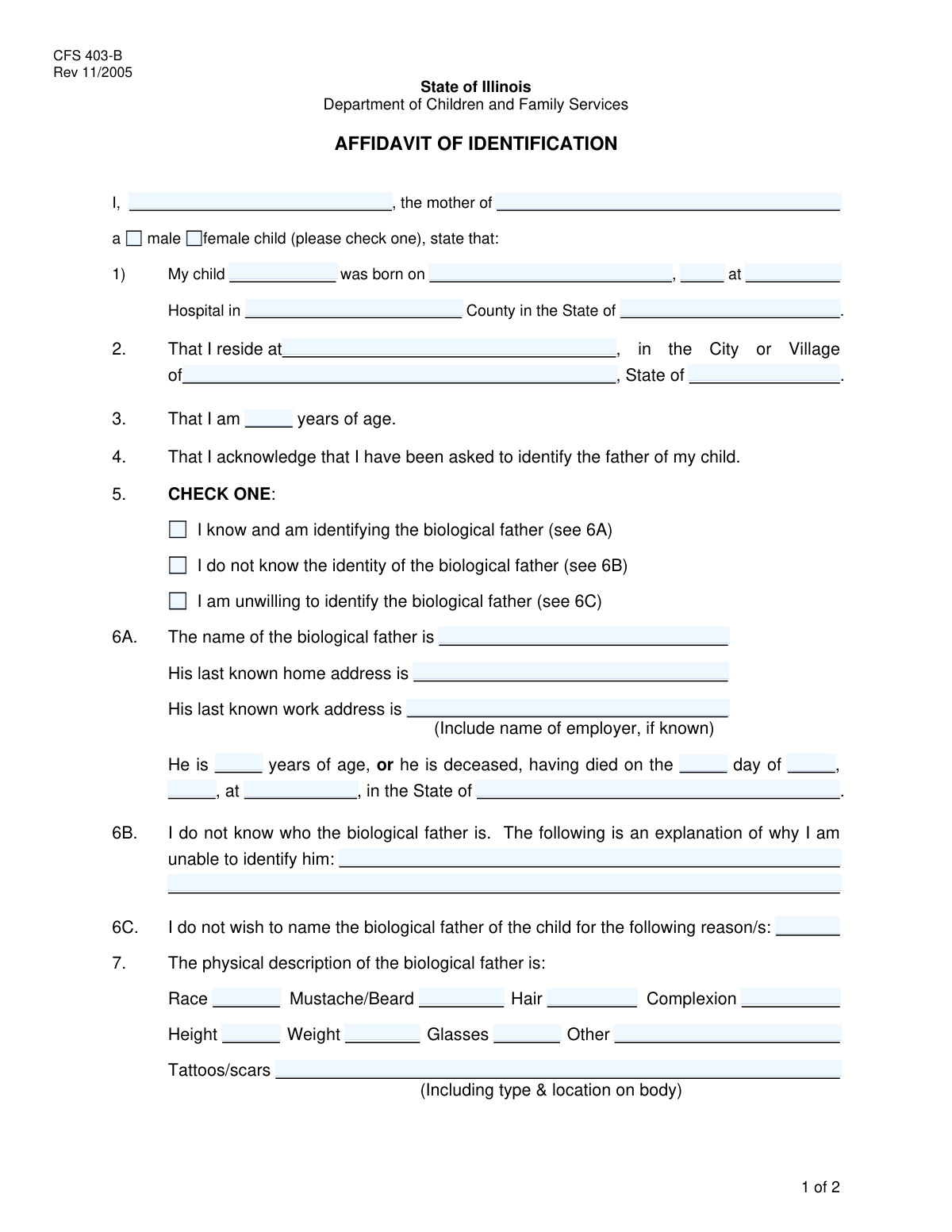
Yes! You can use AI to fill out Affidavit of Parentage
An Affidavit of Parentage is a formal legal document in which a person, typically the mother, provides a sworn statement detailing information about a child's biological father. This form is critically important for legal proceedings related to establishing paternity, child support, custody arrangements, and inheritance rights. Today, this form can be filled out quickly and accurately using AI-powered services like Instafill.ai, which can also convert non-fillable PDF versions into interactive fillable forms.
Paternity Affidavit is part of the
affidavit forms category on Instafill.
Our AI automatically handles information lookup, data retrieval, formatting, and form filling.
It takes less than a minute to fill out Paternity Affidavit using our AI form filling.
Securely upload your data. Information is encrypted in transit and deleted immediately after the form is filled out.
Form specifications
| Form name: | Affidavit of Parentage |
| Number of fields: | 43 |
| Number of pages: | 2 |
| Filled form examples: | Form Paternity Affidavit Examples |
| Language: | English |
Instafill Demo: How to fill out PDF forms in seconds with AI
How to Fill Out Paternity Affidavit Online for Free in 2026
Are you looking to fill out a PATERNITY AFFIDAVIT form online quickly and accurately? Instafill.ai offers the #1 AI-powered PDF filling software of 2026, allowing you to complete your PATERNITY AFFIDAVIT form in just 37 seconds or less.
Follow these steps to fill out your PATERNITY AFFIDAVIT form online using Instafill.ai:
- 1 Navigate to Instafill.ai and upload your Affidavit of Parentage form or select it from a template library.
- 2 Use the AI-guided interface to enter your information as the affiant and the child's identification details, including name, gender, and birth information.
- 3 Complete the section for your current residence, providing your street address, city, and state.
- 4 Select the appropriate option regarding the biological father: whether you are identifying him, do not know his identity, or are unwilling to identify him.
- 5 Fill in the corresponding details based on your selection, such as the father's name and address, a physical description, or a written explanation for not identifying him.
- 6 Carefully review all the information populated by the AI for accuracy, then proceed to the signature section to date and e-sign the affidavit.
- 7 Download your completed and signed Affidavit of Parentage, ready for submission to the appropriate court or agency.
Our AI-powered system ensures each field is filled out correctly, reducing errors and saving you time.
Why Choose Instafill.ai for Your Fillable Paternity Affidavit Form?
Speed
Complete your Paternity Affidavit in as little as 37 seconds.
Up-to-Date
Always use the latest 2026 Paternity Affidavit form version.
Cost-effective
No need to hire expensive lawyers.
Accuracy
Our AI performs 10 compliance checks to ensure your form is error-free.
Security
Your personal information is protected with bank-level encryption.
Frequently Asked Questions About Form Paternity Affidavit
This form is an affidavit used to formally declare information about a child and their biological father. It is often required for legal matters such as establishing paternity, child support cases, or for public assistance applications.
The 'Affiant' is the person making the sworn statement, which in the context of this form is typically the child's mother. The mother should complete the form with information about herself, her child, and the child's biological father.
Select 'Do not know' if you genuinely lack the information to identify him. Choose 'Unwilling to identify' if you know who the father is but are choosing not to name him, in which case you must provide a reason.
You should provide the last known home or work address you have for him. Even partial information, such as the city and state, can be helpful, so fill in as much detail as you can.
This information helps agencies locate or confirm the identity of the biological father, especially when other identifying details like a full address or date of birth are unknown.
If you are identifying the father and know he is deceased, you should fill in the specific fields for the date and place of his death to the best of your knowledge.
You should provide a detailed account of the circumstances of conception and explain why you do not have the information to identify the father. Be as thorough as possible.
If you have safety concerns, you can select 'Unwilling to identify biological father' and provide your reason. It is strongly recommended to discuss your situation with a legal professional or a case worker.
The witness is typically an official, such as a notary public or an employee of the agency requesting the form, who confirms your identity and watches you sign the affidavit.
Submission instructions are usually provided by the agency that requires the form. Generally, you will submit it in person or by mail to the relevant government office or court.
Yes, services like Instafill.ai use AI to help you accurately auto-fill form fields from your saved profile, which can save time and help prevent errors.
You can upload a digital copy of the form to Instafill.ai. The platform will make the fields interactive, allowing you to type your answers, and can pre-fill information to speed up the process.
You can use a service like Instafill.ai, which can convert flat, non-fillable PDFs into interactive forms. This allows you to easily complete and sign the document on your computer or mobile device.
Compliance Paternity Affidavit
Validation Checks by Instafill.ai
1
Child Name Consistency Check
This validation ensures that the 'Child's Name' entered in the 'Affiant and Child Identification' section is identical to the 'Child's Name' in the 'Child's Birth Information' section. This is crucial for maintaining data integrity and ensuring the affidavit consistently refers to the same individual. If the names do not match, the user will be prompted to correct the discrepancy to prevent legal and administrative errors.
2
Exclusive Gender Selection
This check verifies that for the 'Child's Gender' section, only one option ('Male' or 'Female') is selected. It prevents ambiguous or contradictory data by enforcing a mutually exclusive choice. If both or neither are selected, the form submission will be blocked, and the user will be required to select exactly one option.
3
Valid and Past Child's Date of Birth
This validation confirms that the 'Date of Birth' for the child is a real, valid calendar date and that it occurs in the past, not on the current day or in the future. This is essential for the logical consistency of a birth affidavit. An invalid format or a future date would render the document nonsensical and legally void, so the user must provide a valid past date to proceed.
4
Exclusive Father Identification Choice
This check ensures that exactly one of the three options under 'Father Identification Choice' is selected: 'Know and identify', 'Do not know', or 'Unwilling to identify'. These choices are mutually exclusive and determine which subsequent sections of the form are required. Failure to select exactly one option would leave the affiant's statement regarding the father incomplete and ambiguous, so the form will require a single selection.
5
Conditional Requirement for Father's Details
This validation is triggered if the affiant checks 'Know and identify biological father'. It then verifies that required fields like 'Biological Father's Name' and 'Biological Father's Home Address' are filled out. This ensures that when the affiant claims to know the father, the necessary identifying information is actually provided for legal and contact purposes. If these fields are left blank, the submission will fail.
6
Conditional Requirement for Inability Explanation
If the affiant selects 'Do not know biological father's identity', this check ensures that the 'Explanation for Inability to Identify Father' field is not empty. A detailed explanation is often a legal requirement in this scenario to document the circumstances. The validation enforces this rule, preventing the user from proceeding without providing the necessary context for their claim.
7
Conditional Requirement for Unwillingness Reason
When the affiant checks 'Unwilling to identify biological father', this validation confirms that the 'Reason for Unwillingness' text field has been completed. This reason can have significant legal implications (e.g., concerns for safety), and documenting it is critical. The check ensures this mandatory explanation is captured before the form can be submitted.
8
Logical Consistency of Affiant's Age
This check compares the 'Affiant's Age' with the child's 'Date of Birth' to ensure a biologically plausible scenario. For example, it would flag an entry where the affiant would have been under a certain age (e.g., 12 years old) at the time of the child's birth. This prevents data entry errors and ensures the affidavit's claims are credible. If an illogical age is detected, the user will be asked to review and correct the inputs.
9
Valid and Non-Future Signature Date
This validation ensures the 'Signature Date' fields (Month, Day, Year) combine to form a valid calendar date that is not in the future. The signature date legally marks when the affidavit was sworn, so it must be a real date that has already occurred or is the present day. An invalid or future date would compromise the document's legal standing, so the system will reject it.
10
Logical Father's Date of Death
This check validates that if a 'Date of Death' for the biological father is entered, it is logically consistent with the child's 'Date of Birth'. Specifically, the father's death date cannot be earlier than the approximate date of the child's conception (roughly 9 months prior to the child's DOB). This prevents impossible scenarios from being entered into a legal document, ensuring the integrity of the provided information.
11
Completeness of Core Affiant and Residence Information
This validation verifies that critical fields such as 'Affiant Name', 'Street Address', 'City or Village', and 'State' are all filled out. This information is fundamental for identifying the person making the affidavit and establishing jurisdiction. An incomplete submission would be legally deficient, so the system enforces the completion of this core data.
12
Valid State Format
This check validates that the 'Birth State' and 'State (Residence Information)' fields contain a valid state name or abbreviation from a predefined list. This prevents misspellings and ensures the location data is standardized and accurate for record-keeping and legal purposes. An unrecognized entry would trigger an error, prompting the user to select a valid state.
13
Plausible Age Value
This validation ensures that the values entered for 'Affiant's Age' and 'Biological Father's Age' are positive integers within a reasonable human range (e.g., 1-120). This simple check helps catch typos or nonsensical entries (like negative numbers or zero). If an implausible age is entered, the user will be prompted to correct the value.
14
Valid Time of Birth Format
This check ensures that the 'Time of Birth' is entered in a valid and recognizable format (e.g., HH:MM AM/PM or a 24-hour format). Accurate time of birth is a key piece of data for a birth certificate and related documents. This validation prevents ambiguous or incorrectly formatted time entries that could cause processing errors.
Common Mistakes in Completing Paternity Affidavit
Users often make errors with the three-part father identification choice, such as checking contradictory boxes (e.g., 'Know and identify' and 'Do not know') or failing to fill out the required corresponding section. This happens due to not reading the instructions carefully. Such errors make the affidavit logically inconsistent and will almost certainly lead to its rejection, requiring a time-consuming resubmission.
When required to explain the inability or unwillingness to identify the father, applicants often provide one-word or very brief answers like 'Unknown' or 'Personal'. This is usually insufficient for legal or administrative purposes, as these sections require a detailed narrative to be considered complete. An inadequate explanation can cause the form to be rejected or trigger a mandatory follow-up interview to obtain the necessary details.
Applicants frequently enter nicknames, initials, or omit middle names for the affiant, child, or father (e.g., 'Mike' instead of 'Michael John'). Since this is a legal affidavit, full legal names as they appear on official documents like birth certificates or driver's licenses are required. Using incorrect names can cause a mismatch with official records, leading to processing delays or outright rejection of the document.
Dates, such as the child's date of birth or the signature date, are often entered in non-standard or ambiguous formats (e.g., 01/02/2023). This can cause confusion between MM/DD/YYYY and DD/MM/YYYY formats, leading to data entry errors. For fields split by Month, Day, and Year, users may incorrectly enter the full date in the first box. To avoid this, use the standard MM/DD/YYYY format unless specified otherwise and carefully enter data into split fields.
People often leave fields like 'Biological Father's Home Address' or 'Hospital Name' blank if they are uncertain or don't know the current information. However, the form often asks for 'last known' information, and leaving it blank is ambiguous—it's unclear if the information is unknown or was simply missed. This can cause the form to be returned. It is better to write 'Unknown' or 'N/A' to show the field was considered.
The form asks for the 'Child's Name' in two different sections, which serves as a consistency check. A common mistake is a typographical error in one entry but not the other, creating a discrepancy. This raises red flags about the overall accuracy of the affidavit and may halt processing until the inconsistency is clarified. Using an AI-powered tool like Instafill.ai can prevent this by auto-populating repeated information, ensuring perfect consistency.
In the 'Biological Father's Physical Description' section, users often provide unhelpful, subjective information like 'average height,' 'dark hair,' or 'normal build.' These descriptions are too vague for identification purposes. To avoid this, be as objective and specific as possible, for example, 'approx. 5'10"', 'short, black, curly hair,' or providing specific details about tattoos and their locations.
The form asks for the current age of the affiant and the biological father, not their date of birth. People often miscalculate this, especially if they are estimating or only know the birth year. An incorrect age is a data error that can create inconsistencies if a date of birth is provided elsewhere or discovered later. For accuracy, calculate the age based on the full date of birth as of the day you are signing the affidavit.
An affidavit is only valid once it is signed and dated. A common error is forgetting to sign the document or entering a date that is not the actual date of signing (post-dating or back-dating). An incorrectly dated or unsigned affidavit has no legal force and will be rejected. Always sign and fill in the date fields on the same day to ensure the document's validity.
When filling out fields like 'Hospital Name' or 'Employer Name', people tend to use common abbreviations or shortened versions (e.g., 'St. Luke's' instead of 'St. Luke's University Health Network'). For a legal document, this creates ambiguity and can make it difficult to verify information against official records. Always use the full, official name of any institution to prevent processing delays. If the form is a non-fillable PDF, a tool like Instafill.ai can convert it to a fillable version to make entering this detailed information easier.
Saved over 80 hours a year
“I was never sure if my IRS forms like W-9 were filled correctly. Now, I can complete the forms accurately without any external help.”
Kevin Martin Green
Your data stays secure with advanced protection from Instafill and our subprocessors
Robust compliance program
Transparent business model
You’re not the product. You always know where your data is and what it is processed for.
ISO 27001, HIPAA, and GDPR
Our subprocesses adhere to multiple compliance standards, including but not limited to ISO 27001, HIPAA, and GDPR.
Security & privacy by design
We consider security and privacy from the initial design phase of any new service or functionality. It’s not an afterthought, it’s built-in, including support for two-factor authentication (2FA) to further protect your account.
Fill out Paternity Affidavit with Instafill.ai
Worried about filling PDFs wrong? Instafill securely fills affidavit-of-parentage forms, ensuring each field is accurate.