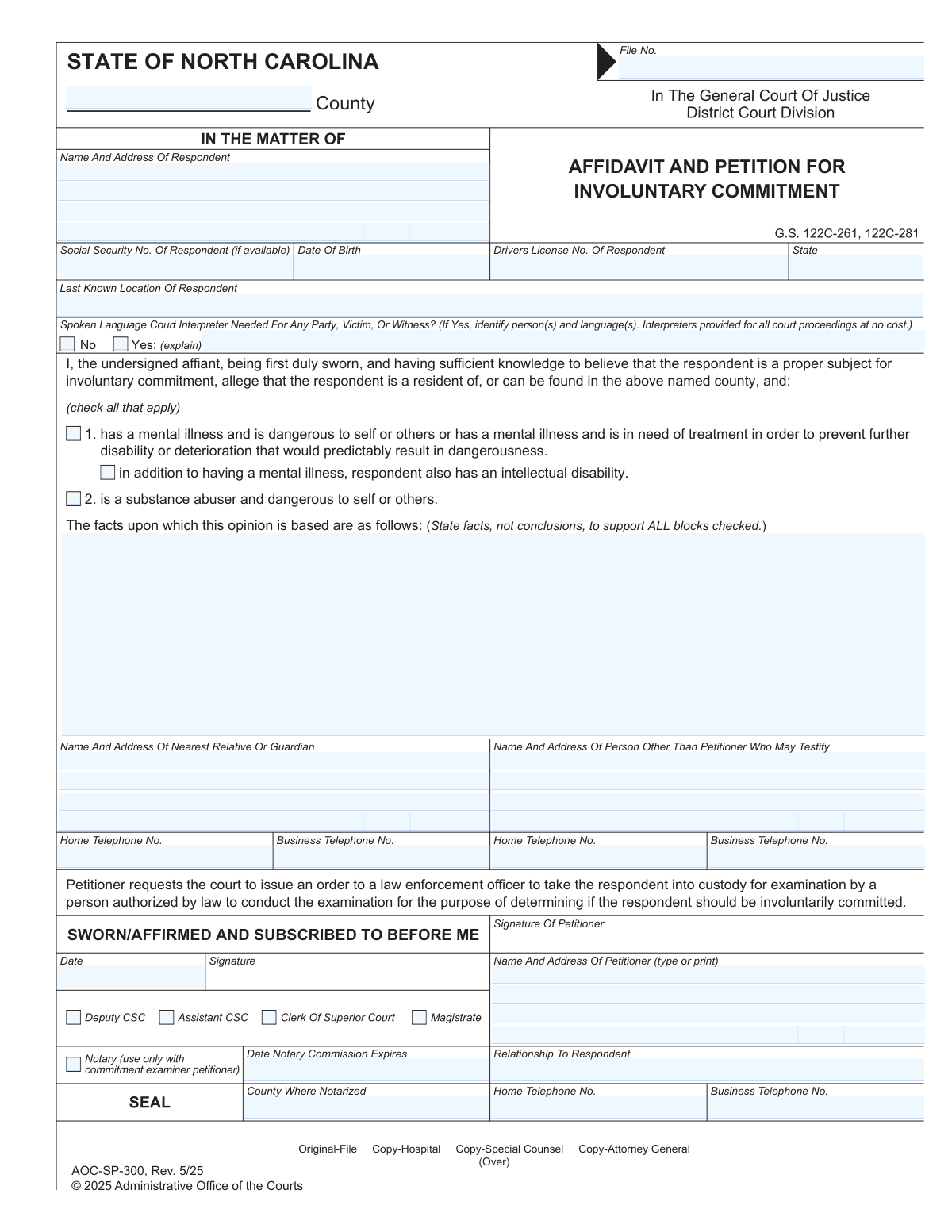
Yes! You can use AI to fill out Form AOC-SP-300, Petition And Affidavit/Affirmation For Involuntary Commitment

Form AOC-SP-300, Petition And Affidavit/Affirmation For Involuntary Commitment, is a sworn legal document used in North Carolina to initiate the involuntary commitment process. It is filed by a petitioner who alleges that an individual is dangerous to themselves or others due to mental illness or substance abuse, and it serves as the legal basis for a magistrate or clerk to issue a custody order for examination. Today, this form can be filled out quickly and accurately using AI-powered services like Instafill.ai, which can also convert non-fillable PDF versions into interactive fillable forms.
Our AI automatically handles information lookup, data retrieval, formatting, and form filling.
It takes less than a minute to fill out AOC-SP-300 using our AI form filling.
Securely upload your data. Information is encrypted in transit and deleted immediately after the form is filled out.

Form specifications

Form name: Form AOC-SP-300, Petition And Affidavit/Affirmation For Involuntary Commitment
Number of fields: 55
Number of pages: 2
Language: English
Categories: AOC forms
main-image

Instafill Demo: How to fill out PDF forms in seconds with AI

How to Fill Out AOC-SP-300 Online for Free in 2026

Are you looking to fill out a AOC-SP-300 form online quickly and accurately? Instafill.ai offers the #1 AI-powered PDF filling software of 2026, allowing you to complete your AOC-SP-300 form in just 37 seconds or less.
Follow these steps to fill out your AOC-SP-300 form online using Instafill.ai:
  1. 1 Navigate to Instafill.ai and upload the AOC-SP-300 form or select it from their template library.
  2. 2 Provide the court case information, including the North Carolina county and file number if available.
  3. 3 Enter the respondent's complete personal information, such as name, address, date of birth, and other identifiers.
  4. 4 Select the appropriate allegations regarding mental illness or substance abuse and write a detailed, factual narrative supporting your opinion in the designated section.
  5. 5 Input your information as the petitioner, including your name, address, contact details, and your relationship to the respondent.
  6. 6 List contact information for the respondent's nearest relative or guardian and any other individuals who may testify.
  7. 7 Review all entered information for accuracy, then download the completed form to be signed under oath before a clerk, magistrate, or other authorized official for filing.

Our AI-powered system ensures each field is filled out correctly, reducing errors and saving you time.

Why Choose Instafill.ai for Your Fillable AOC-SP-300 Form?

Speed

Complete your AOC-SP-300 in as little as 37 seconds.

Up-to-Date

Always use the latest 2026 AOC-SP-300 form version.

Cost-effective

No need to hire expensive lawyers.

Accuracy

Our AI performs 10 compliance checks to ensure your form is error-free.

Security

Your personal information is protected with bank-level encryption.

Frequently Asked Questions About Form AOC-SP-300

This form is a petition to a North Carolina court for the involuntary commitment of an individual (the respondent) who you allege has a mental illness, intellectual disability, or substance abuse problem and is dangerous to themselves or others.

The petitioner is the person filing the form. You can be a petitioner if you are a relative, guardian, friend, or another individual with direct knowledge of the respondent's condition and behavior.

You will need the respondent's full name, address, and date of birth. It is also helpful to provide their Social Security number, driver's license number, and last known location to help the court identify them.

No, the form requests the Social Security Number 'if available.' While it is useful for identification, you can still submit the form if you do not know it.

In this section, you must describe specific events and behaviors that support your claim, not just your conclusions. Include dates, times, locations, and the names of any witnesses to provide a clear, factual basis for the court.

You must check the 'Yes' box in the interpreter section and write down the name of the person who needs the interpreter and the specific language required. This allows the court to arrange for appropriate interpretation services.

This form must be signed in the presence of a court official and filed with the Clerk of Superior Court in the North Carolina county where the case is initiated.

Provide the most recent address you have for the respondent in the address fields. You must also complete the 'Last Known Location' field with any information about where they were last seen or might be found.

No, this section is for listing other people who can support your petition. As the petitioner, it is already expected that you will testify, so you should list other individuals here.

List the respondent's closest living relative (like a spouse, parent, or adult child) or their legally appointed guardian. If you are the nearest relative, you can enter your own information in this section.

Typically, you will sign this form before a Clerk of Superior Court, Deputy CSC, Assistant CSC, or Magistrate. The notary option is specified for use only when the petitioner is a commitment examiner.

Yes, services like Instafill.ai use AI to accurately auto-fill form fields with your information, which can save time and help prevent errors.

To fill this form out online, you can upload it to Instafill.ai. The platform will make the document interactive, allowing you to type your answers directly into the fields before printing the completed form for submission.

If you have a non-fillable or 'flat' PDF, you can use a service like Instafill.ai to convert it into an interactive, fillable form. Simply upload the document, and the tool will make the fields editable online.

Compliance AOC-SP-300
Validation Checks by Instafill.ai

1
Validates Social Security Number Format
This check ensures the Social Security Number is entered in a valid 9-digit format, such as XXX-XX-XXXX or XXXXXXXXX. Correct formatting is crucial for accurate identification and record-linking within legal and administrative systems. If the format is incorrect, the system will reject the entry and prompt the user to correct it before submission.
2
Ensures Date of Birth is a Valid Past Date
This validation confirms that the respondent's Date of Birth is a real calendar date and occurs before the current date. It prevents data entry errors like future dates or non-existent dates (e.g., February 30). An invalid date of birth can compromise the respondent's legal identification and case records, so the form will require a valid past date to proceed.
3
Requires Interpreter Details When 'Yes' is Selected
This check enforces a conditional rule: if the 'Spoken Language Court Interpreter Needed - Yes' box is checked, the 'Interpreter needed — person(s) and language(s)' text field must be filled out. This is critical for ensuring the court can arrange for necessary interpretation services, upholding the rights of all parties involved. Failure to provide the required details will result in a validation error, preventing submission until the information is supplied.
4
Requires Factual Support for Allegations
This validation ensures that if any allegation checkbox ('Mental illness', 'Intellectual disability', or 'Substance abuser') is selected, the 'Facts Supporting Opinion' text area must be completed. The narrative is legally essential to substantiate the claims made in the petition. A submission without this supporting text would be incomplete and legally insufficient, so the system will block it and require the user to provide the factual basis.
5
Ensures Mutually Exclusive Interpreter Choice
This check verifies that the user has selected either 'Spoken Language Court Interpreter Needed - No' or 'Spoken Language Court Interpreter Needed - Yes', but not both. These options are mutually exclusive, and selecting both creates a logical contradiction. This validation prevents ambiguity and ensures the court receives a clear directive regarding interpretation needs.
6
Validates North Carolina County Name
This validation cross-references the entry in the 'County' field against a predefined list of the 100 official counties in North Carolina. This ensures the case is filed in a valid jurisdiction and prevents errors from typos or incorrect county names. An invalid entry would halt submission and require the user to select a valid NC county.
7
Validates ZIP Code Format for All Addresses
This check confirms that all ZIP code fields (for the respondent, nearest relative, petitioner, etc.) adhere to a valid 5-digit or 9-digit (ZIP+4) format. Correct ZIP codes are essential for mail delivery of legal notices and correspondence. The system will flag any entry that does not match the standard numerical format, ensuring address data is accurate and usable.
8
Validates Standard 10-Digit Telephone Number Format
This validation ensures that all telephone number fields (home, business) are entered in a recognizable 10-digit format, with or without common separators like parentheses or hyphens. This standardization is important for ensuring the court and other parties can successfully make contact when needed. An improperly formatted number will trigger an error, prompting the user to correct the entry.
9
Ensures Notary Commission is Not Expired
This check is triggered if the 'Notary' box is selected, and it verifies that the 'Notary Commission Expiration Date' is a valid date that occurs in the future. A notarization performed with an expired commission is legally invalid, so this check is critical for the document's legal integrity. The system will reject any past or current date to prevent the submission of a void document.
10
Requires Notary Details When 'Notary' is Selected
This validation enforces that if the 'Notary' checkbox is selected, the 'Notary Commission Expiration Date' and 'County Where Notarized' fields must be filled. These details are legally required to validate the notarial act. Submitting the form without this information would render the notarization incomplete and questionable, so the system makes these fields mandatory in this context.
11
Prevents Future Dates for Sworn/Affirmed Date
This check ensures the 'Sworn/Affirmed Date' is not a date in the future. The act of swearing or affirming an affidavit must have already occurred at the time of submission. Allowing a future date would be illogical and legally invalid, so the system restricts the date to the current day or a day in the past.
12
Ensures Respondent's Name and Address are Complete
This validation confirms that the respondent's primary identification and location fields ('RespondentName', 'RespAddr1', 'City', 'State', 'ZIP Code') are all filled out. This information is fundamental for the court to identify the correct individual and serve legal notices. An incomplete respondent profile would prevent the case from proceeding, so these fields are marked as required.
13
Requires at Least One Allegation to be Selected
This check ensures that the petitioner has selected at least one of the core allegation checkboxes ('Mental illness — dangerous or needs treatment', 'Intellectual disability', or 'Substance abuser — dangerous to self or others'). The entire purpose of the petition is to make one of these allegations. A form submitted without a selected allegation lacks a fundamental legal basis and will be rejected as incomplete.
14
Ensures Only One Official Position is Selected
This validation ensures that only one checkbox from the 'Official Position Checkboxes' group (e.g., 'Deputy CSC', 'Magistrate', 'Notary') is selected. A petitioner can only swear before one official at a time, so selecting multiple options would be a logical error. This check maintains the integrity of the attestation section by enforcing a single, clear choice.
15
Ensures Petitioner's Contact Information is Complete
This check verifies that the petitioner's full name, complete address, and at least one contact telephone number (home or business) are provided. The petitioner is the initiating party, and the court must have reliable contact information for them for all case communications. The form will be considered incomplete and rejected if this essential contact data is missing.

Common Mistakes in Completing AOC-SP-300

Providing Conclusions Instead of Factual Evidence

In the 'Facts Supporting Opinion' section, petitioners often write subjective conclusions like 'the respondent is a danger' instead of the required objective facts. This happens when filers describe their fears rather than the specific events that caused them. A petition lacking a clear, factual narrative with dates, locations, and specific behaviors will likely be dismissed for being legally insufficient, delaying necessary intervention. To avoid this, describe exactly what you saw or heard, such as 'On June 5, 2024, the respondent stated they were going to harm themselves and began searching for a weapon.'

Failing to Specify Interpreter Requirements

A frequent mistake is checking 'Yes' for a court interpreter but then failing to specify the person and language in the explanation box. This oversight usually happens in a rush, but it causes significant delays on the hearing date as the court cannot prepare in advance. Without this information, the proceeding must be postponed until a suitable interpreter can be found. Always clearly state who needs the interpreter (e.g., 'Petitioner,' 'Witness Jane Doe') and the specific language (e.g., 'Spanish,' 'Vietnamese').

Entering an Incomplete or Outdated Respondent Address

Petitioners often provide an incomplete address for the respondent, such as omitting an apartment number or using an old address where they no longer live. This is a critical error because it leads to failed service of process, meaning the respondent is not legally notified of the case. The case cannot proceed until proper service is confirmed, causing major delays. Always verify the respondent's current, complete mailing address before submission; AI-powered tools like Instafill.ai can help validate address formats to prevent these errors.

Omitting or Transposing Respondent Identification Numbers

Errors in entering the respondent's Social Security Number, Date of Birth, or Driver's License Number are common, including transposing digits or leaving fields blank. These identifiers are vital for law enforcement and the court to accurately identify the individual and access records. Inaccurate data can lead to misidentification, delays in locating the respondent, or an inability to enforce a court order. Carefully transcribe these numbers exactly as they appear on official documents.

Signing the Affidavit Before Appearing Before a Court Official

A petitioner may sign and date the 'Sworn/Affirmed' section at home before taking the form to the courthouse. This invalidates the affidavit, as the law requires the signature to be made under oath in the physical presence of a Clerk, Magistrate, or other authorized official. This mistake forces the petitioner to start over with a new form, wasting time. Do not sign or date this section until you are instructed to do so by the court official who is administering the oath.

Checking an Allegation Box Without Providing Factual Support

Filers sometimes check a box for 'Mental illness,' 'Intellectual disability,' or 'Substance abuser' but then provide a minimal or empty description in the 'Facts Supporting Opinion' field. An allegation is legally insufficient without a detailed factual basis to support it. This omission is a primary reason for petitions to be rejected by a magistrate or judge, preventing the case from moving forward. For every box you check, you must provide a corresponding narrative of specific incidents and behaviors.

Incomplete Contact Information for Relatives or Witnesses

When listing a nearest relative or a person who may testify, filers often provide partial information, such as a name without a phone number or an address without a unit number. This happens when the information isn't readily available and is forgotten later. This oversight can prevent the court or other parties from contacting individuals who may have vital information, potentially hindering the case. Before filing, gather complete and current contact details for every person you list.

Forgetting the Court File Number and County

Petitioners often leave the 'File Number' and 'County' fields at the top of the form blank, especially when filing for the first time. This information is essential for the court clerk to properly open the case and assign it to the correct jurisdiction. Leaving it blank creates extra work for court staff and can delay the initial processing of your petition. Always fill in the county where you are filing; the clerk will assign and add the file number for you.

Misunderstanding the 'Petitioner's Waiver Date'

A petitioner might sign and date the waiver field without realizing they are giving up their legal right to receive formal notice of future hearings. This can cause them to miss a critical court date, which could lead to the case being dismissed. This field should only be signed with a full understanding of its consequences, preferably after consulting an attorney. If you are unsure, do not sign the waiver.

Using an Incorrect or Vague Relationship to Respondent

In the 'Relationship to Respondent' field, petitioners may use a general term like 'friend' when a more specific one is required by law to establish their standing to file. For example, North Carolina statutes specify who can initiate these proceedings (e.g., spouse, physician, law enforcement officer). Using an imprecise term can cause the court to question your eligibility to file the petition. Be as specific and accurate as possible, using terms like 'Mother,' 'Spouse,' or 'Guardian.'
Saved over 80 hours a year

“I was never sure if my IRS forms like W-9 were filled correctly. Now, I can complete the forms accurately without any external help.”

Kevin Martin Green

Your data stays secure with advanced protection from Instafill and our subprocessors

Robust compliance program

Transparent business model

You’re not the product. You always know where your data is and what it is processed for.

ISO 27001, HIPAA, and GDPR

Our subprocesses adhere to multiple compliance standards, including but not limited to ISO 27001, HIPAA, and GDPR.

Security & privacy by design

We consider security and privacy from the initial design phase of any new service or functionality. It’s not an afterthought, it’s built-in, including support for two-factor authentication (2FA) to further protect your account.

Fill out AOC-SP-300 with Instafill.ai

Worried about filling PDFs wrong? Instafill securely fills form-aoc-sp-300-petition-and-affidavitaffirmation-for-involuntary-commitment forms, ensuring each field is accurate.