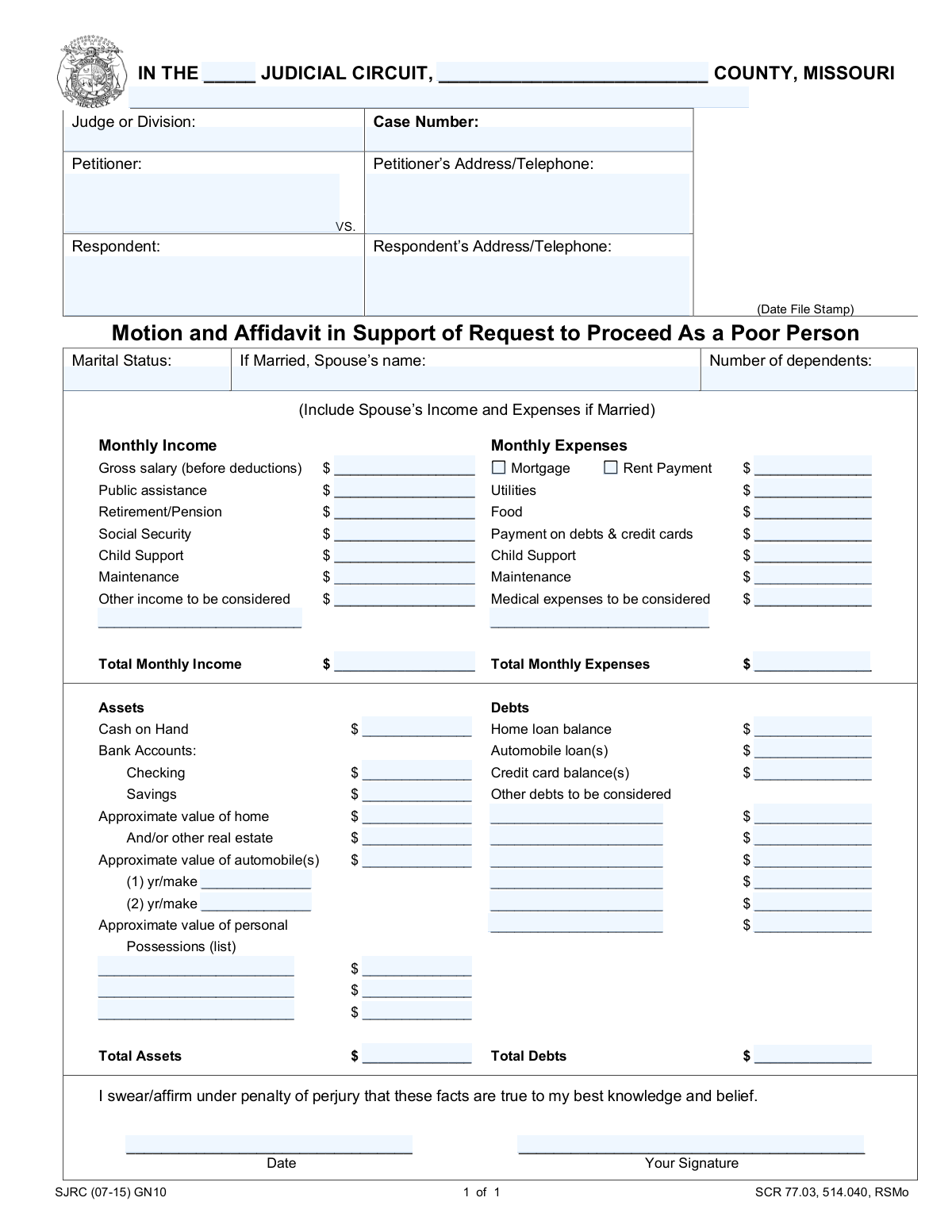
Yes! You can use AI to fill out Missouri Motion and Affidavit in Support of Request to Proceed As a Poor Person
The Missouri Motion and Affidavit in Support of Request to Proceed As a Poor Person is a legal document filed with a Missouri court to ask for permission to proceed with a case without paying the usual court costs and fees, a status known as 'in forma pauperis'. The form requires a detailed declaration of your income, expenses, assets, and debts to prove you cannot afford the costs. Today, this form can be filled out quickly and accurately using AI-powered services like Instafill.ai, which can also convert non-fillable PDF versions into interactive fillable forms.
Our AI automatically handles information lookup, data retrieval, formatting, and form filling.
It takes less than a minute to fill out SJRC (07-15) GN10 using our AI form filling.
Securely upload your data. Information is encrypted in transit and deleted immediately after the form is filled out.
Form specifications
| Form name: | Missouri Motion and Affidavit in Support of Request to Proceed As a Poor Person |
| Number of pages: | 1 |
| Language: | English |
Instafill Demo: How to fill out PDF forms in seconds with AI
How to Fill Out SJRC (07-15) GN10 Online for Free in 2026
Are you looking to fill out a SJRC (07-15) GN10 form online quickly and accurately? Instafill.ai offers the #1 AI-powered PDF filling software of 2026, allowing you to complete your SJRC (07-15) GN10 form in just 37 seconds or less.
Follow these steps to fill out your SJRC (07-15) GN10 form online using Instafill.ai:
- 1 Navigate to Instafill.ai and upload or select the 'Motion and Affidavit in Support of Request to Proceed As a Poor Person' form.
- 2 Provide the court case details, including the Judicial Circuit, County, Case Number, and the names of the Petitioner and Respondent.
- 3 Enter your personal and financial information, such as marital status, number of dependents, and a complete breakdown of your monthly income and expenses.
- 4 Use the guided fields to list all your assets (cash, bank accounts, real estate, vehicles) and debts (loans, credit card balances).
- 5 Carefully review all the information populated by the AI to ensure accuracy and completeness across all sections of the affidavit.
- 6 Electronically sign and date the form in the designated area to swear or affirm under penalty of perjury that the provided facts are true.
- 7 Download the completed, signed document, ready for filing with the appropriate Missouri court.
Our AI-powered system ensures each field is filled out correctly, reducing errors and saving you time.
Why Choose Instafill.ai for Your Fillable SJRC (07-15) GN10 Form?
Speed
Complete your SJRC (07-15) GN10 in as little as 37 seconds.
Up-to-Date
Always use the latest 2026 SJRC (07-15) GN10 form version.
Cost-effective
No need to hire expensive lawyers.
Accuracy
Our AI performs 10 compliance checks to ensure your form is error-free.
Security
Your personal information is protected with bank-level encryption.
Frequently Asked Questions About Form SJRC (07-15) GN10
This form is used to ask a Missouri court to waive court fees and costs because you cannot afford to pay them. It provides the court with a detailed summary of your financial situation to justify your request.
Anyone initiating or involved in a court case in a Missouri Judicial Circuit who cannot afford to pay the required filing fees and other court costs should complete this form.
You will need details about your monthly income, monthly expenses, assets (like bank accounts and property), and debts (like loans and credit card balances). If you are married, you must also provide your spouse's financial information.
Yes, the form explicitly requires you to include your spouse's income and expenses if you are married. This gives the court a complete financial picture of your household.
'Gross salary' is your total pay from a job before any taxes or other deductions are taken out. Other income sources, like Social Security or child support, are separate payments you receive and should be listed in their own fields.
In this section, you should list any significant personal items of value you own, such as valuable electronics, jewelry, or furniture, along with their estimated current worth. You do not need to list every small item.
If you have no monthly income, you should enter '$0' in the income fields. It is crucial to be truthful, as you are signing the form under penalty of perjury.
You must file the signed and dated form with the clerk of the court for the judicial circuit and county where your case is being handled. It is typically submitted with your initial case filing documents.
Signing this form means you are legally swearing that all the information you have provided is true and correct to the best of your knowledge. Intentionally providing false information can lead to serious legal consequences.
Yes, services like Instafill.ai use AI to help you accurately auto-fill form fields, which can save time and help prevent mistakes. The AI can read the form and guide you on where to put your information.
Simply upload the form's PDF to the Instafill.ai website. The platform's AI will identify all the fields, allowing you to easily enter your information online and then download the completed document for printing and signing.
You can use a service like Instafill.ai to make it fillable. Upload the non-fillable PDF, and their technology will convert it into an interactive form that you can complete on your computer.
This information pertains to your specific court case. The Judicial Circuit and County are based on the location where you are filing, and the Case Number is assigned by the court clerk when a case is opened.
Compliance SJRC (07-15) GN10
Validation Checks by Instafill.ai
1
Verifies Total Monthly Income Calculation
This check ensures that the value entered in the 'Total Monthly Income' field is the correct sum of all individual income sources listed (Gross salary, Public assistance, Retirement/Pension, etc.). This is crucial for accurately representing the petitioner's financial situation to the court. If the total is incorrect, the form submission will be flagged for manual review or rejected, requiring the user to correct the calculation before proceeding.
2
Verifies Total Monthly Expenses Calculation
This validation confirms that the 'Total Monthly Expenses' field accurately reflects the sum of all individual monthly expense items. An accurate total is essential for the court to assess the petitioner's net financial status and need. A mismatch will cause a validation error, preventing submission until the user corrects the total to match the sum of the itemized expenses.
3
Ensures Conditional Entry of Spouse's Name
This rule validates that the 'Spouse’s name' field is filled out if and only if the 'Marital Status' is declared as 'Married'. This maintains logical consistency in the personal data and ensures all required information for a married petitioner is provided as instructed. If a user selects 'Married' but leaves the spouse's name blank, they will be prompted to enter the name to continue.
4
Validates Paired 'Other Debt' Fields
This check ensures that if an amount is entered for an 'Other debts to be considered' line item, a corresponding description for that debt is also provided, and vice versa. This prevents ambiguous entries and ensures all declared debts are properly documented for the court's review. If one field is filled without the other, the submission will be blocked with an error message asking the user to complete the pair or clear both fields.
5
Confirms Signature Field is Completed
This validation checks that the 'Your Signature' field is not empty, as it represents a legal affirmation under penalty of perjury. The signature is a mandatory requirement for the affidavit to be legally binding and valid in court. An empty signature field will prevent the form from being submitted, with a clear message indicating that a signature is required to certify the information.
6
Validates Certification Date Format and Recency
This rule checks that the 'Date' field next to the signature is a valid date and is not a future date. The date of signature is legally significant, marking when the affiant swore to the facts presented. An invalid or future date could call the document's authenticity into question, so the system will reject it and require the user to enter a valid, current or past date.
7
Logical Check for Home Loan and Home Value
This validation ensures that if a 'Home loan balance' greater than zero is reported in the Debts section, a corresponding 'Approximate value of home' greater than zero must be reported in the Assets section. It is logically impossible to have a loan on an asset that has no value or does not exist. If a loan balance is entered without a home value, an error will be triggered, prompting the user to provide the home's value.
8
Ensures All Monetary Fields are Numeric
This check iterates through all fields intended for dollar amounts (e.g., 'Gross salary', 'Cash on Hand', 'Utilities') and verifies they contain only valid, non-negative numeric characters. This is fundamental for data integrity and to allow for accurate calculations of totals. Any field containing non-numeric text (like 'None' or '$') will be flagged, and the user must correct the entry to a numerical value.
9
Verifies Completeness of Petitioner Information
This rule confirms that the 'Petitioner Name' and 'Petitioner’s Address/Telephone' fields are both filled out. This contact information is essential for the court to identify and communicate with the party filing the motion. Failure to provide this complete information will result in a validation error, as the form would be legally insufficient for filing.
10
Validates Mutually Exclusive Housing Expense
This check ensures that the petitioner reports an expense for either 'Mortgage' or 'Rent Payment', but not both, as a person typically has one primary housing expense. The form provides a single field for the amount, reinforcing this logic. If entries suggest both are being claimed, the system will prompt the user to clarify and select only the applicable housing expense to ensure the financial picture is accurate.
11
Verifies Total Assets Calculation
This validation confirms that the 'Total Assets' field is the correct sum of all individual asset values, including cash, bank accounts, real estate, automobiles, and personal possessions. An accurate total is critical for the court's assessment of the petitioner's overall financial standing. If the provided total does not match the sum of the itemized assets, the form will be rejected until the calculation is corrected.
12
Requires Automobile Description for Declared Value
This rule ensures that if a value greater than zero is entered in 'Approximate value of automobile(s)', then at least the 'Automobile 1 — Year and Make' field is completed. This links a declared asset value to a specific, identifiable item, which is necessary for verification and transparency. If a value is provided without a description, the user will be prompted to describe the vehicle(s).
13
Validates Number of Dependents Format
This check ensures the 'Number of dependents' field contains a non-negative integer (0, 1, 2, etc.). This number is a key factor in determining financial hardship and eligibility for fee waivers. An invalid entry, such as text or a negative number, will trigger an error and require the user to input a valid whole number.
14
Ensures Case Number is Provided
This validation verifies that the 'Case Number' field is not left empty. The case number is the primary identifier for the legal proceeding and is essential for associating this motion with the correct file at the courthouse. Submitting the form without a case number would make it impossible to process, so the system will block submission and prompt the user to enter it.
Common Mistakes in Completing SJRC (07-15) GN10
Applicants often enter their take-home pay (net income) instead of their gross salary before deductions, as required by the form. This happens because people are more familiar with their net pay. This under-reports income and can be viewed as a misrepresentation, potentially delaying or jeopardizing the approval of the request. To avoid this, refer to your pay stub for the 'gross pay' amount before taxes, insurance, or other deductions are taken out.
The form explicitly states to include the spouse's income and expenses if married, but this is a frequently missed instruction. People may assume only their personal finances are relevant or simply overlook the note. Failing to include this information results in an incomplete and inaccurate financial picture, which is grounds for the court to deny the motion. Always combine your income and expenses with your spouse's if you are married and living together.
In the 'Debts' section, applicants often mistakenly enter their monthly payment amount (e.g., $300 car payment) instead of the total outstanding loan balance (e.g., $15,000 car loan). This significantly understates total liabilities, skewing the financial assessment. To prevent this, review your most recent loan and credit card statements for the 'total balance' or 'principal balance' and enter that figure. AI-powered tools like Instafill.ai can help by providing field-specific guidance to prevent such data entry errors.
Manually adding the columns for 'Total Monthly Income', 'Total Monthly Expenses', 'Total Assets', and 'Total Debts' often leads to mathematical errors. A simple miscalculation can misrepresent your financial situation and cause the court to question the accuracy of the entire affidavit. To avoid this, double-check all your calculations with a calculator before writing the final numbers. Using a digital fillable version of the form, which can sometimes be created by tools like Instafill.ai from a flat PDF, may automate these calculations and eliminate errors.
Applicants sometimes focus only on salary and forget to include other required income sources like public assistance, social security, child support, or pensions. Each of these has a specific line item and must be declared. Omitting them provides an incomplete financial picture and can lead to the request being denied. Carefully review each line in the 'Monthly Income' section and enter a value, even if it is '$0', to show you have considered it.
The form includes several 'Other' fields for income, expenses, and debts that require both a description and a dollar amount. A common mistake is to enter a value but forget to write a description of what it is for. This leaves the court guessing and may cause them to disregard the amount, leading to an inaccurate assessment. Always provide a clear, brief description (e.g., 'Freelance work', 'Medical bill') next to any amount entered in an 'Other' category.
Forgetting to sign and date the form is a simple but critical mistake that completely invalidates the document. An unsigned affidavit is not a sworn statement and will be rejected by the court clerk, causing significant delays. Always perform a final review of the form before submission, paying special attention to the signature and date lines at the bottom. This is your legal affirmation that the information provided is true.
Applicants often leave the top section with the Judicial Circuit, County, and Case Number blank, especially if they are initiating a case. This information is essential for the court clerk to file the document correctly. An incorrectly filed motion can get lost or delayed for weeks. If you are unsure, contact the circuit clerk's office for the correct information before filling out the form.
The form has separate lines for child support received (as income) and child support paid (as an expense). Applicants frequently get these confused, listing payments as income or vice-versa, which drastically alters their net financial status. This can lead to a denial based on a misunderstanding of the applicant's true financial obligations. Carefully check whether you are entering an amount you pay out or an amount you receive and place it in the correct section.
People may undervalue their personal possessions or forget to list all assets, such as secondary bank accounts, real estate, or vehicles. For example, they might list '$100' for all personal possessions without a second thought. This can be perceived as an attempt to hide assets and can damage credibility, leading to an immediate denial of the request to proceed as a poor person. Be thorough and provide a realistic, good-faith estimate for all assets you own.
Saved over 80 hours a year
“I was never sure if my IRS forms like W-9 were filled correctly. Now, I can complete the forms accurately without any external help.”
Kevin Martin Green
Your data stays secure with advanced protection from Instafill and our subprocessors
Robust compliance program
Transparent business model
You’re not the product. You always know where your data is and what it is processed for.
ISO 27001, HIPAA, and GDPR
Our subprocesses adhere to multiple compliance standards, including but not limited to ISO 27001, HIPAA, and GDPR.
Security & privacy by design
We consider security and privacy from the initial design phase of any new service or functionality. It’s not an afterthought, it’s built-in, including support for two-factor authentication (2FA) to further protect your account.
Fill out SJRC (07-15) GN10 with Instafill.ai
Worried about filling PDFs wrong? Instafill securely fills missouri-motion-and-affidavit-in-support-of-request-to-proceed-as-a-poor-person forms, ensuring each field is accurate.