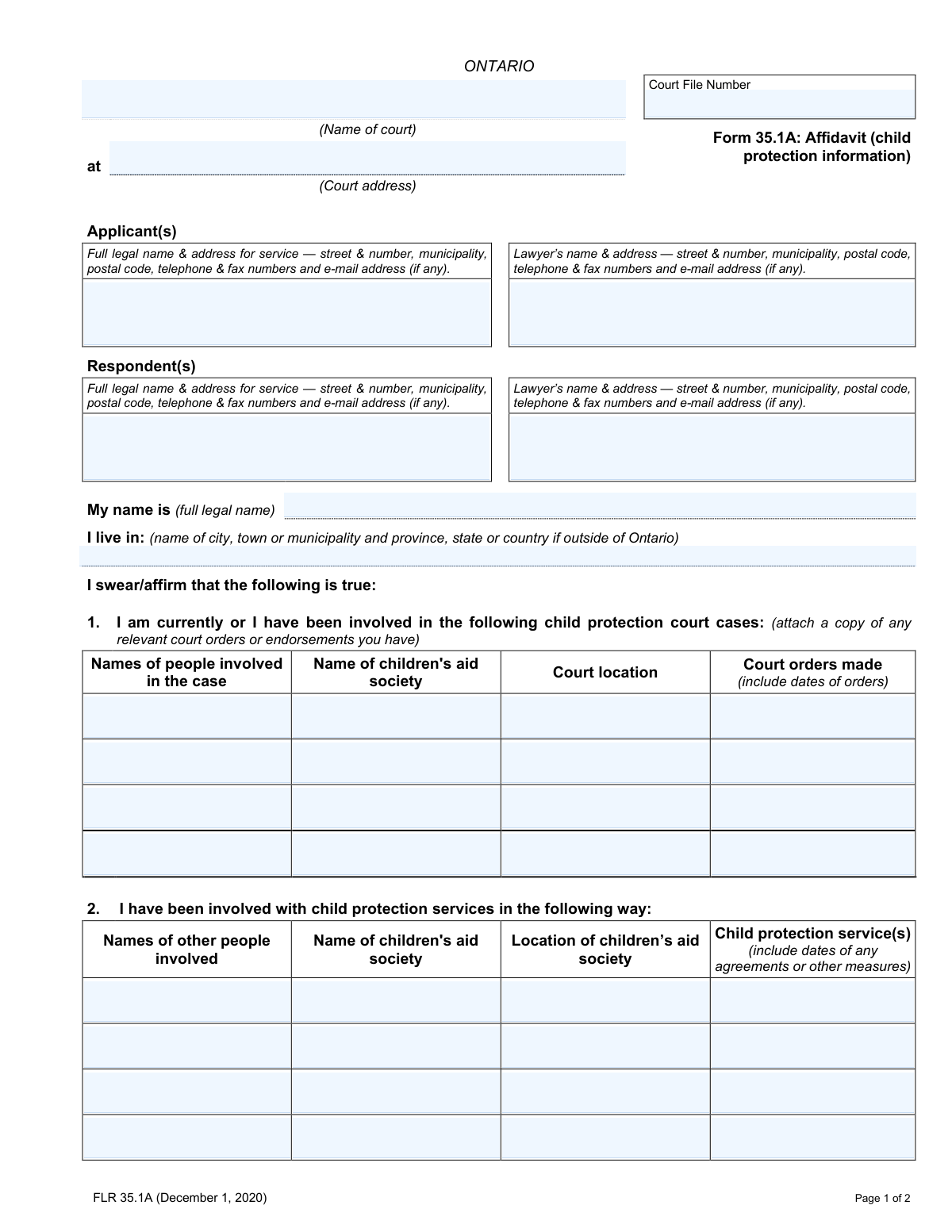
Yes! You can use AI to fill out Form 35.1A: Affidavit (child protection information)
Form 35.1A is an Affidavit of Child Protection Information required in Ontario family law proceedings. It is a sworn legal statement detailing any involvement the parties or children have had with child protection court cases or children's aid societies. This crucial information helps the court make informed decisions regarding the well-being of the children involved. Today, this form can be filled out quickly and accurately using AI-powered services like Instafill.ai, which can also convert non-fillable PDF versions into interactive fillable forms.
Form 35.1A is part of the
affidavit forms category on Instafill.
Our AI automatically handles information lookup, data retrieval, formatting, and form filling.
It takes less than a minute to fill out Form 35.1A using our AI form filling.
Securely upload your data. Information is encrypted in transit and deleted immediately after the form is filled out.
Form specifications
| Form name: | Form 35.1A: Affidavit (child protection information) |
| Number of fields: | 70 |
| Number of pages: | 2 |
| Language: | English |
Instafill Demo: How to fill out PDF forms in seconds with AI
How to Fill Out Form 35.1A Online for Free in 2026
Are you looking to fill out a FORM 35.1A form online quickly and accurately? Instafill.ai offers the #1 AI-powered PDF filling software of 2026, allowing you to complete your FORM 35.1A form in just 37 seconds or less.
Follow these steps to fill out your FORM 35.1A form online using Instafill.ai:
- 1 Navigate to Instafill.ai and upload your Form 35.1A, or select it from their library of official documents.
- 2 Enter the case details, including the court file number, court location, and information for the applicant(s) and respondent(s).
- 3 Complete Section 1 and 2 by providing detailed information about your personal history with child protection court cases and services.
- 4 Fill out Section 3 and 4 with any known information about the other party's or children's involvement with child protection agencies or court cases.
- 5 Carefully review all entered information for accuracy, using the AI's prompts to ensure all sections are complete and correct.
- 6 Download the completed affidavit, then print it to be sworn or affirmed and signed in the presence of a commissioner for taking affidavits before filing with the court.
Our AI-powered system ensures each field is filled out correctly, reducing errors and saving you time.
Why Choose Instafill.ai for Your Fillable Form 35.1A Form?
Speed
Complete your Form 35.1A in as little as 37 seconds.
Up-to-Date
Always use the latest 2026 Form 35.1A form version.
Cost-effective
No need to hire expensive lawyers.
Accuracy
Our AI performs 10 compliance checks to ensure your form is error-free.
Security
Your personal information is protected with bank-level encryption.
Frequently Asked Questions About Form Form 35.1A
This form is used in Ontario family court cases to disclose any past or present involvement with a children's aid society or in child protection court cases. It provides the court with a history relevant to the children's safety and well-being.
Any party in a family law case, such as an applicant or respondent, may be required to complete this affidavit. The person filling it out swears or affirms that the information provided is true to the best of their knowledge.
Sections 1 and 2 are for disclosing your own personal involvement in child protection court cases or with child protection services. Sections 3 and 4 are for disclosing any involvement you are aware of concerning the other party or the children in your case.
The form instructs you to attach a copy of any relevant court orders or endorsements you have that are related to the child protection court cases you list.
If you have no information to report in any of the sections, you should write "None" or "Not Applicable" in the relevant fields. You must still complete, sign, and file the form to confirm this with the court.
This is a legal requirement meaning you must sign the form in the physical presence of a qualified official, such as a lawyer, notary public, or a commissioner for taking affidavits. This person witnesses your signature and confirms you have sworn that the contents are true.
You should provide all information to the best of your knowledge and ability. If you are unsure about specific details, you can indicate that, but it is important to be as accurate and complete as possible.
If you run out of space on the form, you can attach an additional page. Be sure to clearly label the attached page with the corresponding section number and the court file number.
Yes, services like Instafill.ai use AI to help you accurately auto-fill form fields, which can save time and reduce errors. The AI can help populate information based on your case details.
You can use a service like Instafill.ai to complete the form online. Simply upload the PDF, and the platform will make it an interactive, fillable form that you can type into before printing.
Tools like Instafill.ai can convert flat, non-fillable PDFs into interactive forms. This allows you to easily type your information into the fields on your computer instead of writing by hand.
The Applicant is the person who started the court case, and the Respondent is the person who is responding to the case. Your court documents will clearly identify which party you are.
You should briefly describe the nature of the involvement, such as 'voluntary support agreement,' 'safety plan,' or 'investigation.' Remember to also include the dates when these services or measures were in place.
Compliance Form 35.1A
Validation Checks by Instafill.ai
1
Ensures Declarant's Full Legal Name is Provided
This check verifies that the 'My name is (full legal name)' field is not empty. The identity of the declarant (the person swearing the affidavit) is fundamental to the document's validity. If this field is left blank, the submission should be rejected as it's impossible to know who is providing the testimony.
2
Validates Sworn/Affirmed Date
This validation ensures the 'Sworn/Affirmed Date' is a valid calendar date and is not in the future. An affidavit cannot be sworn on a future date, and the date must be logically sound for legal purposes. A failure would prompt the user to enter a valid date that is today or in the past.
3
Verifies Commissioner's Name is Present
This check confirms that the 'Commissioner for taking affidavits' name field has been filled out. An affidavit must be sworn before an authorized individual to be legally binding, and their name is required for verification. A missing commissioner name invalidates the document, so the form cannot be submitted without it.
4
Requires Court File Number
This validation ensures the 'Court File Number' field is not empty. This number is the primary identifier that links the affidavit to the correct legal case file. Without it, the document could be lost or misfiled, causing significant delays and legal complications.
5
Confirms Applicant Information Completeness
This check verifies that the 'Applicant(s) Full legal name & address for service' field is fully completed. The court must be able to identify and contact the party initiating the proceedings. An incomplete submission would be rejected until the applicant's core identifying information is provided.
6
Confirms Respondent Information Completeness
This check verifies that the 'Respondent(s) Full legal name & address for service' field is fully completed. It is legally necessary to identify the party against whom the case is brought so they can be properly served and notified. The form is incomplete and cannot be processed without this essential information.
7
Validates Canadian Postal Code Format
This check ensures that any postal code entered for an Ontario address (for applicants, respondents, or lawyers) follows the correct Canadian format (e.g., A1A 1A1). This is crucial for ensuring the 'address for service' is valid and that legal documents sent by mail will be delivered correctly. An invalid format would trigger an error message requesting correction.
8
Validates Phone Number Format
This validation checks that all telephone number fields contain a valid number of digits, typically 10, and are in a recognizable format. This ensures that the contact information is functional, allowing court staff or other parties to make contact if necessary. An improperly formatted number would prevent submission until corrected.
9
Validates Email Address Structure
This check ensures that any email address provided follows the standard '[email protected]' format. Correctly formatted email addresses are essential for modern legal communication and electronic service of documents. The system should flag any entry that does not meet this format to prevent communication errors.
10
Enforces Row Completeness for Court Case History
For sections 1 and 3, if any field in a row describing a past court case is filled out, this check ensures all other fields in that same row are also completed. This prevents the submission of partial, ambiguous information about a case history. An incomplete row would trigger a validation error, prompting the user to either complete the row or clear it.
11
Enforces Row Completeness for Child Protection Services History
For sections 2 and 4, if a user enters information into one field of a row (e.g., 'Name of children's aid society'), this validation requires all other fields in that row to be filled. This ensures a complete record for each instance of service involvement is provided. The user would be alerted to the incomplete row and required to provide the missing details.
12
Verifies Date Presence in Order and Service Descriptions
This check scans the text fields for 'Court orders made' and 'Child protection service(s)' to ensure a date or date-like pattern is present, as instructed by the form. This is important because the timing of orders and services is a critical piece of information. If no date is detected, a warning could be displayed to remind the user to include the required date information.
13
Checks for Logical Dates in Case History
This validation compares any dates entered in the 'Court orders made' or 'Child protection service(s)' fields against the 'Sworn/Affirmed Date'. All historical dates must be on or before the date the affidavit is sworn. This logical check prevents paradoxical information, such as attesting to an event that has not yet occurred.
14
Ensures Sworn/Affirmed Location is Complete
This check verifies that both the 'Municipality' and the 'province, state, or country' fields are filled in the 'Sworn/Affirmed before me' section. This information establishes the legal jurisdiction in which the oath was taken, which is a critical component of a valid affidavit. Failure to provide the full location would result in a validation error.
Common Mistakes in Completing Form 35.1A
Many individuals sign the affidavit at home before meeting with a commissioner, lawyer, or notary public. This invalidates the document, as the law requires you to swear or affirm the truth of the contents and sign it in the presence of an authorized official. To avoid this, do not sign the form until you are physically in front of the commissioner, who must witness your signature to properly commission the affidavit.
Users often mistype the Court File Number, omit leading zeros, or forget to enter it on the second page. This number is the primary identifier for your case, and an error can lead to the document being misfiled, rejected by the court clerk, or causing significant administrative delays. Always double-check the number against official court documents and ensure it is present on every page as required.
Instead of providing specific details, people often use general phrases like 'dealt with custody' or 'received support.' The form requires a clear description of the court order or child protection service, which is crucial for the court to understand the history. You should describe the specific outcome or action (e.g., 'Supervised access order granted,' 'Temporary care agreement signed') to ensure your affidavit is clear and useful.
The form explicitly asks for dates next to every court order, agreement, or service, but this detail is frequently missed. These dates establish a legal timeline and are not optional; their absence can render the information provided less credible or difficult to verify, potentially weakening your position. Carefully review your records and include the exact date (day, month, and year) for every event you list.
Filers often misinterpret the difference between Sections 1/3 (court cases) and Sections 2/4 (other involvement with child protection services), placing information in the wrong category. A court case involves a formal application to a judge, whereas services can include investigations or voluntary agreements without court action. This error can confuse the legal record; carefully distinguish between judicial proceedings and other agency interactions when filling out the form.
Throughout the form, people may use nicknames, shortened names, or initials for themselves, the other party, or children involved. The form requires 'full legal name' for unambiguous identification, and failing to provide it can create legal uncertainty or require clarification later. Always use the complete name as it appears on official documents like birth certificates or driver's licenses.
The instructions in Section 1 state to 'attach a copy of any relevant court orders or endorsements,' but filers often overlook this step. Submitting the affidavit without the supporting documents forces the court to rely solely on your summary and may lead to requests for more information, causing delays. Always gather and attach copies of all orders mentioned in the affidavit before filing.
When listing the applicant or respondent's address, crucial details like a unit number, postal code, or even the municipality are sometimes omitted. The 'address for service' is the official location where legal documents will be sent, and an incomplete address can result in missed deadlines or failure to receive important notices. AI-powered tools like Instafill.ai can help prevent this by validating address formats and ensuring all necessary components are included.
After the affidavit is signed, the section for the Commissioner for taking affidavits is sometimes left incomplete or features an illegible signature without a printed name. An improperly completed commissioning section can lead to the court rejecting the affidavit. It is your responsibility to ensure the commissioner fills in the date, municipality, and legibly prints their name and title below their signature.
Often, court forms are only available as flat, non-fillable PDFs, leading people to handwrite information illegibly or struggle with clunky PDF editors. This results in submissions that are difficult to read, process, and may contain errors or omissions due to the poor user experience. Tools like Instafill.ai can convert these non-fillable forms into an easy-to-use, fillable format, ensuring the final document is clean, professional, and error-free.
Saved over 80 hours a year
“I was never sure if my IRS forms like W-9 were filled correctly. Now, I can complete the forms accurately without any external help.”
Kevin Martin Green
Your data stays secure with advanced protection from Instafill and our subprocessors

Robust compliance program
Transparent business model
You’re not the product. You always know where your data is and what it is processed for.
ISO 27001, HIPAA, and GDPR
Our subprocesses adhere to multiple compliance standards, including but not limited to ISO 27001, HIPAA, and GDPR.
Security & privacy by design
We consider security and privacy from the initial design phase of any new service or functionality. It’s not an afterthought, it’s built-in, including support for two-factor authentication (2FA) to further protect your account.
Fill out Form 35.1A with Instafill.ai
Worried about filling PDFs wrong? Instafill securely fills form-351a-affidavit-child-protection-information forms, ensuring each field is accurate.