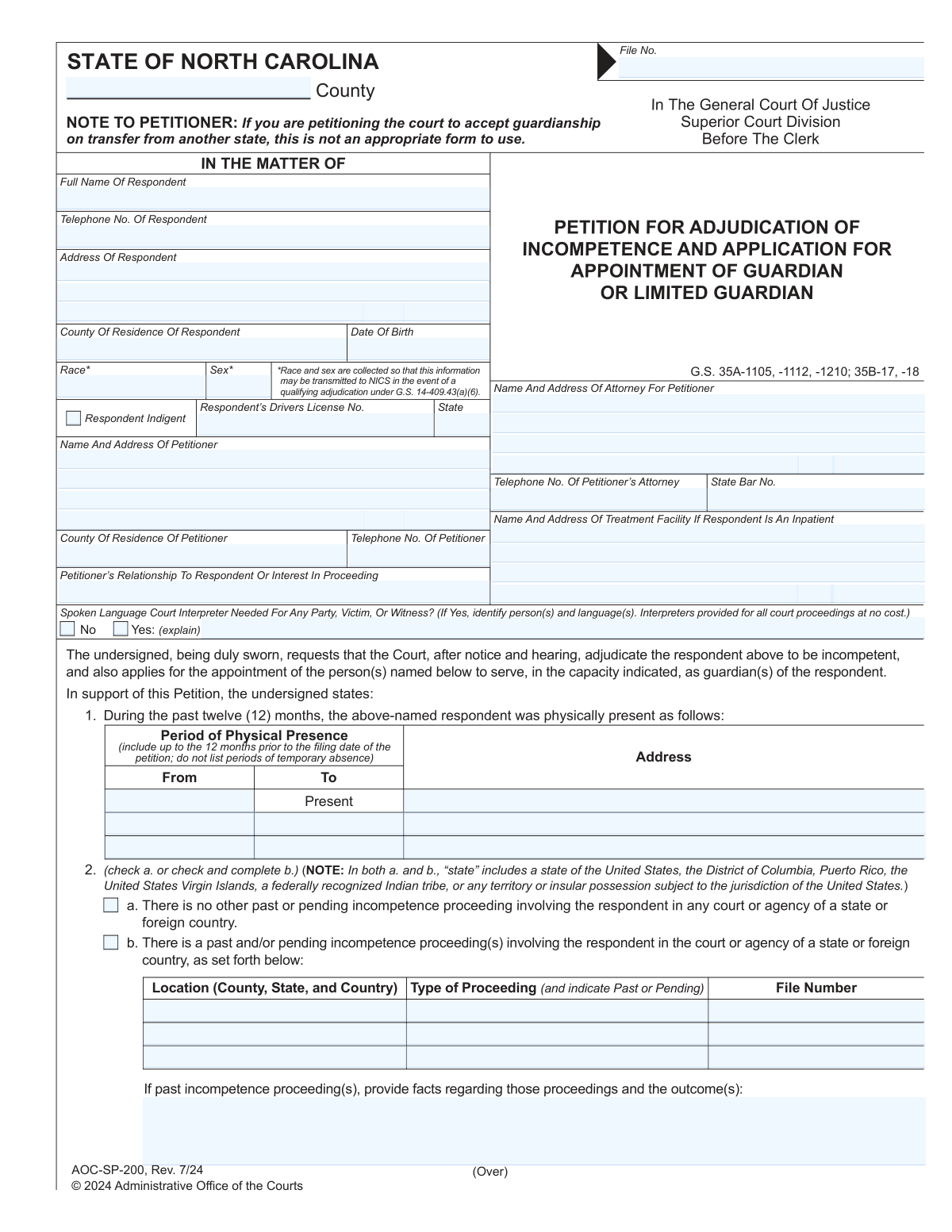
Yes! You can use AI to fill out AOC-SP-200, Petition for Adjudication of Incompetence and Application for Appointment of Guardian or Limited Guardian

AOC-SP-200 is an official North Carolina Administrative Office of the Courts form filed in the Superior Court Division (before the Clerk) to start an incompetency proceeding under G.S. Chapter 35A and to request appointment of a guardian, limited guardian, or general guardian. The petitioner uses it to present facts showing the respondent lacks sufficient capacity to manage affairs or make/communicate important decisions, and to document less restrictive alternatives considered. The form also collects next-of-kin/interested persons, basic financial information, and detailed capacity indicators that help the court determine the scope of any guardianship. It is important because an incompetency adjudication can significantly affect a person’s legal rights and may trigger reporting requirements (e.g., NICS) in qualifying cases.
Our AI automatically handles information lookup, data retrieval, formatting, and form filling.
It takes less than a minute to fill out AOC-SP-200 using our AI form filling.
Securely upload your data. Information is encrypted in transit and deleted immediately after the form is filled out.

Form specifications

Form name: AOC-SP-200, Petition for Adjudication of Incompetence and Application for Appointment of Guardian or Limited Guardian
Number of pages: 4
Filled form examples: Form AOC-SP-200 Examples
Language: English
main-image

Instafill Demo: filling out a legal form in seconds

How to Fill Out AOC-SP-200 Online for Free in 2026

Are you looking to fill out a AOC-SP-200 form online quickly and accurately? Instafill.ai offers the #1 AI-powered PDF filling software of 2026, allowing you to complete your AOC-SP-200 form in just 37 seconds or less.
Follow these steps to fill out your AOC-SP-200 form online using Instafill.ai:
  1. 1 Enter case caption details: county, file number (if assigned), respondent’s full name, address, phone, driver’s license/state (if available), date of birth, and indigency indicator; add petitioner and attorney contact information and treatment facility details if the respondent is an inpatient.
  2. 2 Complete jurisdiction and residency/domicile section: list the respondent’s physical presence for the past 12 months and indicate whether any past or pending incompetence proceedings exist in any state/foreign country (provide court/agency details and outcomes if applicable).
  3. 3 Provide the basis for incompetence: describe specific facts showing lack of capacity (cause and examples), and list less restrictive alternatives considered (e.g., supported decision-making, POA, representative payee, technology) and why they are insufficient.
  4. 4 List required parties and interested persons: identify next of kin and others with an interest in the proceeding, including names, addresses, counties of residence, phone numbers, and relationships to the respondent.
  5. 5 Complete financial overview and existing supports: summarize assets, liabilities, and income/receivables, and indicate whether there is a representative payee, durable power of attorney, healthcare power of attorney, trust, and health insurance coverage (Medicaid/Medicare/private).
  6. 6 Fill out capacity information checklist: mark capacity/lack of capacity across functional areas (communication, nutrition, hygiene, health care, safety, residential, employment, independent living, civil, and financial subparts) and add comments; if the respondent is in a coma/PVS/non-responsive, check the box and proceed as instructed.
  7. 7 Recommend guardian(s) and finalize verification: provide names/addresses of proposed guardian(s) and the type requested (guardian of the person/estate, limited or general), then sign the verification and complete notarization/attestation details before filing with the Clerk.

Our AI-powered system ensures each field is filled out correctly, reducing errors and saving you time.

Why Choose Instafill.ai for Your Fillable AOC-SP-200 Form?

Speed

Complete your AOC-SP-200 in as little as 37 seconds.

Up-to-Date

Always use the latest 2026 AOC-SP-200 form version.

Cost-effective

No need to hire expensive lawyers.

Accuracy

Our AI performs 10 compliance checks to ensure your form is error-free.

Security

Your personal information is protected with bank-level encryption.

Frequently Asked Questions About Form AOC-SP-200

This form is used to ask a North Carolina court to (1) adjudicate a person (the “respondent”) incompetent and (2) appoint a guardian or limited guardian for the respondent. It is filed in the Superior Court Division before the Clerk.

A person with a legitimate relationship to or interest in the respondent’s welfare (the “petitioner”) may file. The form asks you to state your relationship to the respondent or your interest in the proceeding.

For adults, guardianship should be a last resort. The form requires you to consider and list less restrictive alternatives (like supported decision-making, a representative payee, or powers of attorney) and explain why they are insufficient.

You must provide identifying and contact information such as the respondent’s full name, address, date of birth, county of residence, telephone number (if known), and driver’s license number/state (if available). The form also asks for race and sex for potential NICS reporting if there is a qualifying adjudication.

The form states race and sex are collected so the information may be transmitted to NICS if there is a qualifying adjudication under G.S. 14-409.43(a)(6). This is tied to legal reporting requirements, not to determine competency.

“Indigent” generally means the respondent cannot afford legal representation. You should answer this as accurately as you can because it may affect appointment of counsel and other court procedures.

List where the respondent was physically present during the 12 months before filing, including dates and locations (county, state, and country). Do not list temporary absences; the goal is to show where the respondent actually lived or stayed.

You must check the box indicating whether there is any past or pending proceeding and, if there is, provide details such as the court/agency, file number, address, and the outcome. The form also notes that if you are seeking to accept a guardianship transfer from another state, this is not the correct form to use.

You must indicate the basis for jurisdiction and check the option that applies to the respondent (resident, domiciled, inpatient in a named facility, or present in the county when residence/domicile cannot be determined). Provide accurate county and facility information to support the court’s authority to hear the case.

Provide specific facts showing the respondent lacks capacity to manage affairs or make/communicate important decisions, including the cause (e.g., mental illness, dementia/senility, injury, disease, autism, etc.). Examples of concrete incidents, patterns, and functional limitations are more helpful than general statements.

Less restrictive alternatives are arrangements that help the respondent manage decisions while restricting fewer rights than guardianship. The form’s notes list examples such as supported decision-making, technological assistance, a representative payee, and powers of attorney for health care or finances.

For each category, check whether the respondent “has capacity” or “lacks capacity” and add brief comments describing what the respondent can or cannot do. This section helps the court evaluate whether a limited guardianship might be appropriate and what areas of decision-making are affected.

The form instructs you to check the box for coma/vegetative/non-responsive status and then move on to Item 11. This indicates the detailed capacity checklist may not be applicable in that situation.

Yes, you should list the respondent’s next of kin (if any) and anyone else known to have an interest in the proceeding, along with addresses and relationships. This information is important for required notice and to ensure the court knows who may need to be informed.

You must provide a general statement of assets and liabilities (e.g., real property, personal property, loans) and income/receivables (e.g., wages, rents, pensions, SSI/SSDI). The form also asks whether there is a representative payee, powers of attorney, a trust, and whether the respondent has Medicaid/Medicare/private insurance.

Yes, the Verification section requires the petitioner to swear/affirm the contents before a person authorized to administer oaths (such as a notary or clerk/deputy clerk). Sign only in the appropriate place and complete the notarization section as required.

This form notes that to request an interim guardian prior to the adjudication hearing, you must complete and file AOC-SP-198 (Motion For Appointment Of Interim Guardian). AOC-SP-200 alone is not the interim guardian request.

You can recommend a Guardian of the Person, Guardian of the Estate, or a General Guardian (covering both), and the form also references limited guardianship. Choose based on the areas where the respondent lacks capacity (personal decisions, financial decisions, or both) and provide the recommended guardian’s name and address.

Yes, the form asks whether a court interpreter is needed for any party, victim, or witness and states interpreters are provided for all court proceedings at no cost. If you answer “Yes,” identify the person(s) and language(s) needed.

Compliance AOC-SP-200
Validation Checks by Instafill.ai

1
Validates required case header fields (County, File No., Court Division)
Checks that the County, File No., and court context fields (e.g., “In the General Court of Justice / Superior Court Division / Before the Clerk”) are present and not left blank. These fields are required to route the petition to the correct jurisdiction and to associate the filing with the correct case record. If any are missing, the submission should be rejected or flagged as incomplete because the clerk cannot docket or process the petition reliably.
2
Ensures Respondent identity fields are complete and plausible (Full Name, Address, DOB)
Verifies that the respondent’s full legal name, address, county of residence, and date of birth are provided and formatted correctly. Date of birth should be a valid calendar date and not in the future, and the address should include enough detail to support service/notice. If validation fails, the filing should be returned for correction because misidentification can invalidate notice and lead to due process issues.
3
Validates phone number formats for Respondent, Petitioner, and Attorney
Checks that all provided telephone numbers contain valid digits and formatting (e.g., 10-digit NANP numbers with optional separators) and are not obviously invalid (all zeros, too short/long). Reliable phone numbers are important for scheduling, contact, and resolving service issues. If a phone number fails validation, the system should require correction or mark it as unusable and prompt for an alternate contact method.
4
Validates Petitioner information completeness and relationship/interest statement
Ensures the petitioner’s name, address, county of residence, and relationship to the respondent (or interest in the proceeding) are completed. The relationship/interest field should not be blank and should contain meaningful text (not placeholders like “N/A” if a relationship exists). If missing or nonsensical, the petition should be flagged because standing/interest is central to the court’s ability to proceed.
5
Attorney section consistency (Attorney details required when an attorney is listed)
If any attorney fields are populated (name/address, phone, State Bar No.), the validation requires the full attorney block to be completed, including a properly formatted State Bar number. This prevents partial attorney records that impede service, communication, and representation tracking. If inconsistent, the system should prompt the filer to either complete the attorney section or clear it entirely.
6
Treatment facility requirement when respondent is marked as an inpatient
Validates that the “Name and Address of Treatment Facility” is completed if the respondent is indicated as an inpatient (or if the jurisdiction basis includes inpatient status). Facility information is necessary for notice, potential transport arrangements, and confirming the respondent’s location. If inpatient is selected but facility details are missing, the submission should be blocked until corrected.
7
Jurisdiction and residency selection logic (Item 4 must have exactly one applicable basis or a valid combination)
Checks that the jurisdiction statement (Item 3) is acknowledged and that Item 4 includes a clear basis for the respondent’s connection to the county (resident, domiciled, inpatient, or present/unknown residence). The system should enforce that at least one option is selected and prevent contradictory selections (e.g., “resident of this county” and “impossible to determine county of residence”). If invalid, the filing should be flagged because jurisdiction/venue defects can delay or dismiss the proceeding.
8
Physical presence history table validation (Item 1 date ranges and coverage)
Validates that each “From/To” entry is a valid date range (From ≤ To), that ranges fall within the 12 months prior to the filing date, and that “Present” is used correctly (e.g., if “Present” is checked, “To” should be blank or equal to filing date per system rules). This information supports UAGPPJA-style venue/jurisdiction analysis and prevents conflicting timelines. If date ranges overlap illogically or fall outside the allowed window, the system should require correction.
9
Mutual exclusivity and completeness for other proceedings (Item 2a vs 2b)
Ensures the filer selects either “no other past or pending incompetence proceeding” (2a) or “there is a past/pending proceeding” (2b), but not both. If 2b is selected, the form must include the other proceeding’s court/agency address, type (past/pending), and file number, plus outcome facts. If these details are missing, the submission should be rejected because the court must assess competing proceedings and potential transfer issues.
10
Interpreter request validation (language and person identification required when Yes)
If “Court Interpreter Needed” is marked Yes, requires identification of the person(s) needing interpretation and the language(s). This ensures the court can schedule qualified interpreters and protect due process rights. If Yes is selected without details, the system should block submission or prompt for completion because the request is not actionable.
11
Incompetence allegations completeness and specificity (Item 5 narrative)
Validates that Item 5 contains a substantive factual narrative describing the basis for incompetence, including cause (or suspected cause) and specific examples demonstrating lack of capacity. The system should detect empty responses, boilerplate-only text, or extremely short entries that do not provide facts. If insufficient, the petition should be flagged for correction because conclusory statements may be legally inadequate and delay adjudication.
12
Less restrictive alternatives required fields and logical linkage (Items 6 and 7)
Requires that Item 6 lists at least one less restrictive alternative considered (or explicitly states none were available with an explanation), and Item 7 explains why those alternatives are insufficient. This is important because guardianship is intended as a last resort and the court must see that alternatives were evaluated. If Item 6 or 7 is blank or inconsistent (e.g., alternatives listed but no insufficiency explanation), the system should prevent submission or route to a deficiency queue.
13
Capacity information section consistency (Items 10A–10J and coma/non-responsive shortcut)
If the “coma/persistent vegetative state/non-responsive” checkbox is selected, the system should enforce the instruction to skip to Item 11 and prevent contradictory capacity selections in 10A–10J. If the coma checkbox is not selected, each capacity domain should have a clear selection (has capacity vs lacks capacity) and comments should be required when “lacks capacity” is chosen to support the allegation. If inconsistent or incomplete, the filing should be flagged because the capacity assessment is central evidence for the petition.
14
Next of kin / interested persons table validation (Item 8 minimum and contact completeness)
Validates that at least one next of kin or interested person is listed when known, and that each listed person includes a name, address, and relationship/interest. This supports statutory notice requirements and reduces the risk of improper service. If entries are missing key fields or the entire section is blank without an explicit “none known” indicator, the system should require clarification.
15
Assets/liabilities/income numeric formatting and non-negative constraints (Item 9)
Checks that all monetary fields are valid currency numbers (allowing blanks where unknown), disallowing non-numeric text and negative values unless explicitly permitted by business rules. This information informs the type/scope of guardianship and potential appointment of a guardian of the estate. If invalid values are entered, the system should prompt correction to prevent downstream calculation/reporting errors.
16
Binary (Yes/No) selections enforced for benefit/POA/trust/insurance questions
Ensures each Yes/No question (representative payee, Durable POA, Healthcare POA, trust, Medicaid/Medicare/private insurance) has exactly one selection and not both or neither. These answers affect whether less restrictive alternatives already exist and what authority a guardian may need. If not properly selected, the submission should be flagged because ambiguity can lead to incorrect recommendations and court orders.
17
Recommended guardian section completeness and role selection (Item 11)
Validates that at least one recommended guardian is provided with name and address, and that the requested guardianship type is selected (Guardian of the Person, Guardian of the Estate, General Guardian, and/or limited vs full as applicable to the form’s options). This is necessary for the court to evaluate suitability and to issue an appointment consistent with the petition. If guardian details or role selections are missing, the system should block submission because the application for appointment is incomplete.

Common Mistakes in Completing AOC-SP-200

Leaving the county, file number, or court division fields blank or inconsistent

People often skip the header fields (County, File No., Superior Court Division/Before the Clerk) because they look like “court-only” sections, or they copy them from another case. Missing or mismatched header information can delay filing, cause the clerk to reject the petition, or result in the case being opened under the wrong county or division. Use the county where the petition is being filed and ensure the respondent name matches exactly across all pages; if you do not have a file number yet, follow local clerk instructions rather than guessing.

Mixing up petitioner vs. respondent contact information

This form repeats similar fields (names, addresses, telephone numbers) for both petitioner and respondent, and filers frequently enter the petitioner’s phone/address in the respondent section (or vice versa). That can lead to failed service/notice, missed hearing communications, and confusion about who is alleged to be incompetent. Double-check each block label (“Respondent” vs. “Petitioner”) and confirm the respondent’s address is their actual residence/facility location, not the petitioner’s mailing address unless explicitly stated.

Providing incomplete respondent identifiers (DOB, driver’s license number/state, indigency)

Filers often omit the respondent’s date of birth, driver’s license number and issuing state, or the indigency indicator because they don’t have the information readily available. Missing identifiers can slow record matching, create identity confusion, and complicate downstream reporting requirements (including NICS transmission when applicable). If the driver’s license is unknown, indicate “unknown” rather than leaving it blank, and complete the indigency question based on the respondent’s financial situation or as directed by the clerk/attorney.

Skipping or mishandling the race/sex fields and the NICS note

Because the race/sex fields are marked with an asterisk and include a NICS-related explanation, people sometimes leave them blank or enter nonstandard text that doesn’t match typical court categories. Incomplete or unclear entries can trigger follow-up requests and delay processing, especially when the court must transmit qualifying adjudication information. Follow the form’s expected format/categories used by the court, and do not write commentary in these fields—use the narrative sections for explanations.

Incorrectly completing the 12-month physical presence section (Item 1)

A common error is listing only the current address, listing temporary absences (vacations/hospital visits) despite the instruction not to, or failing to include dates (“From/To”). This section supports jurisdiction/venue and helps the court understand where the respondent has been physically present; gaps or contradictions can raise jurisdiction questions and cause delays. Provide a clear timeline covering up to the 12 months before filing, include counties/states/countries, and avoid listing short temporary trips unless they truly changed physical presence.

Checking both 2(a) and 2(b), or failing to provide details about other proceedings

Filers sometimes check “no other proceeding” and also check the box indicating there is a past/pending proceeding, or they check 2(b) but leave the court/agency, address, file number, and outcome blank. This creates credibility issues and can lead to continuances while the court verifies whether another state/court is involved. Choose only one option, and if 2(b) applies, provide the court/agency name, location, file number, type of proceeding, whether it is past or pending, and the outcome.

Using this form for an out-of-state guardianship transfer despite the warning

The form explicitly notes it is not appropriate for petitioning the court to accept guardianship on transfer from another state, but people still use it because it appears similar to what they need. Filing the wrong form can result in rejection, wasted filing fees/time, and missed deadlines. If the matter involves transfer/acceptance from another state, confirm the correct North Carolina procedure/forms (often under UAGPPJA-related processes) with the clerk or an attorney before filing.

Failing to establish North Carolina jurisdiction and the respondent’s status in Item 4

People often leave Item 3/4 as generic statements without selecting the correct basis (resident, domiciled, inpatient, present/unknown residence) or they check multiple inconsistent options. Jurisdiction and venue are foundational; unclear selections can prompt the court to require amendments or additional evidence. Select the single option that best fits the respondent’s situation and ensure it aligns with the physical presence timeline and the inpatient facility information, if applicable.

Writing conclusory statements instead of specific facts for incompetence (Item 5)

A frequent mistake is using vague phrases like “cannot care for self” or listing only diagnoses without describing functional impact, even though the form asks for specific facts showing lack of capacity and the cause. Conclusory allegations can be insufficient for the court to evaluate the claim and may lead to requests for more detail or weaker evidence at hearing. Provide concrete examples tied to decision-making and management (e.g., missed medications, unsafe spending, inability to communicate choices), include dates/instances when possible, and connect them to the alleged cause.

Not listing less restrictive alternatives or not explaining why they are insufficient (Items 6–7)

Many petitioners skip Items 6 and 7 or write “none” without showing they considered supported decision-making, representative payee, POAs, technological supports, or other options described in the notes. Because guardianship is intended as a last resort, failing to address alternatives can undermine the petition and lead to delays or denial. List the alternatives considered (even if attempted and failed) and explain specifically why each does not meet the respondent’s needs (e.g., respondent revokes access, cannot understand POA, ongoing exploitation risk).

Incomplete next-of-kin/interested persons list (Item 8)

People often list only one family member, omit addresses, or fail to include relationships/interest, especially when family dynamics are complicated. Missing interested persons can cause notice/service problems, objections, and continuances if the court determines required parties were not identified. Include all known next of kin and other interested persons with full mailing addresses and clearly state the relationship (e.g., adult child, sibling, spouse, caregiver, DSS) even if you believe they will not participate.

Leaving the assets/liabilities and existing arrangements section blank or internally inconsistent (Item 9)

Filers frequently omit dollar amounts, mix monthly income with total asset values, or check “Yes” for representative payee/POA/trust/insurance but provide no supporting context. Incomplete financial information can affect the type of guardian requested (estate vs. person vs. general) and may trigger follow-up inquiries or an inaccurate guardianship scope. Provide best estimates, label amounts consistently (e.g., approximate totals), and ensure the checkboxes align with the narrative (e.g., if a Durable POA exists, note who holds it and whether it is functioning).

Misusing the capacity checklist (Item 10) and omitting comments

A common error is checking “lacks capacity” across all domains without explanation, leaving the comment lines blank, or failing to use the coma/vegetative-state checkbox when applicable. The court needs functional, domain-specific information; unsupported checkmarks can look boilerplate and may not help the fact-finder. For each domain you mark, add a brief example (what the respondent can/can’t do and how you know), and only mark domains that are actually impaired based on observed behavior or reliable information.

Not completing verification/notarization correctly (signature, dates, seal, county)

People often sign without a notary, forget to date the petition, leave the notarization county blank, or use an expired notary commission, especially when rushing to file. An improper verification can make the filing defective and require re-execution, delaying hearings and service. Sign only in front of an authorized official, ensure all dates are filled in, confirm the notary/clerk completes their section (including commission expiration and seal), and verify the petitioner signature matches the printed name.

Recommending a guardian without selecting the correct guardianship type or providing full contact details (Item 11)

Filers frequently list a recommended guardian but fail to indicate whether the request is for Guardian of the Person, Guardian of the Estate, or General Guardian, or they provide incomplete addresses. This can lead to confusion about the scope of authority sought and may require amendments or additional filings. Clearly identify each recommended guardian with full mailing address and select the appropriate capacity type(s) that match the respondent’s needs and the financial/functional information provided earlier.
Saved over 80 hours a year

“I was never sure if my IRS forms like W-9 were filled correctly. Now, I can complete the forms accurately without any external help.”

Kevin Martin Green

Your data stays secure with advanced protection from Instafill and our subprocessors

Robust compliance program

Transparent business model

You’re not the product. You always know where your data is and what it is processed for.

ISO 27001, HIPAA, and GDPR

Our subprocesses adhere to multiple compliance standards, including but not limited to ISO 27001, HIPAA, and GDPR.

Security & privacy by design

We consider security and privacy from the initial design phase of any new service or functionality. It’s not an afterthought, it’s built-in, including support for two-factor authentication (2FA) to further protect your account.

Fill out AOC-SP-200 with Instafill.ai

Worried about filling PDFs wrong? Instafill securely fills aoc-sp-200-petition-for-adjudication-of-incompeten forms, ensuring each field is accurate.