Yes! You can use AI to fill out Caregiver Stress Assessment Questionnaire
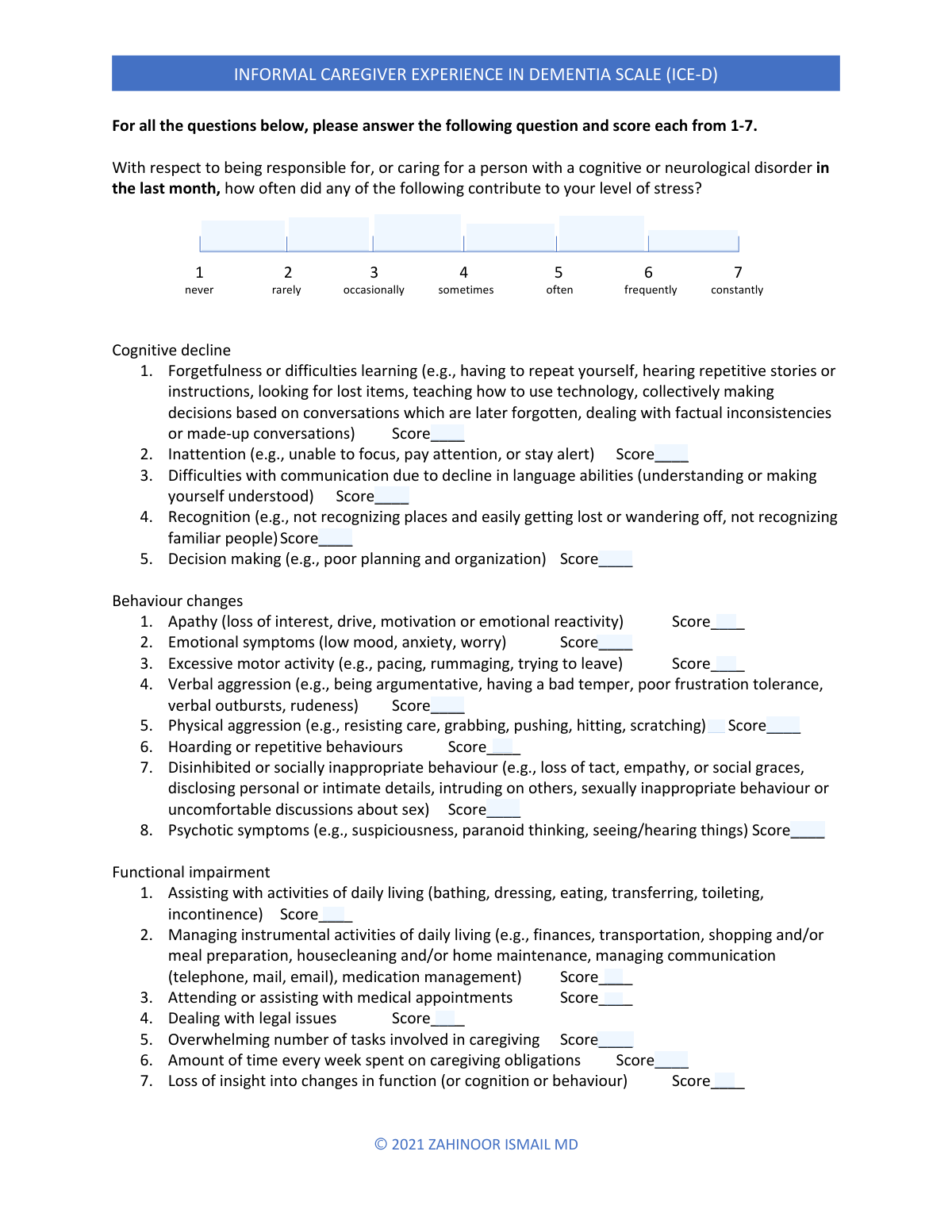
The Caregiver Stress Assessment Questionnaire is a detailed tool used by caregivers, often with healthcare professionals, to evaluate the various sources of stress they experience. It systematically measures the impact of the care recipient's behavioral changes, cognitive decline, and functional impairments on the caregiver's well-being, which is crucial for developing targeted support strategies. Today, this form can be filled out quickly and accurately using AI-powered services like Instafill.ai, which can also convert non-fillable PDF versions into interactive fillable forms.
Our AI automatically handles information lookup, data retrieval, formatting, and form filling.
It takes less than a minute to fill out Caregiver Stress Assessment using our AI form filling.
Securely upload your data. Information is encrypted in transit and deleted immediately after the form is filled out.
Form specifications
| Form name: | Caregiver Stress Assessment Questionnaire |
| Number of fields: | 60 |
| Number of pages: | 2 |
| Language: | English |
| Categories: | CAR forms, L.A. Care forms |
Instafill Demo: How to fill out PDF forms in seconds with AI
How to Fill Out Caregiver Stress Assessment Online for Free in 2026
Are you looking to fill out a CAREGIVER STRESS ASSESSMENT form online quickly and accurately? Instafill.ai offers the #1 AI-powered PDF filling software of 2026, allowing you to complete your CAREGIVER STRESS ASSESSMENT form in just 37 seconds or less.
Follow these steps to fill out your CAREGIVER STRESS ASSESSMENT form online using Instafill.ai:
- 1 Navigate to Instafill.ai and upload or select the Caregiver Stress Assessment Questionnaire.
- 2 Review the form's sections, including Behaviour Changes, Cognitive Decline, and Functional Impairment, to understand the questions.
- 3 Use the AI assistant to accurately fill in the scores (typically on a 1-7 scale) for each stressor based on your experiences over the last month.
- 4 Complete the sections on the emotional, social, and financial impact of caregiving by checking the relevant boxes or entering scores as prompted.
- 5 Carefully review all the entered scores and checked boxes to ensure they accurately reflect your situation and stress levels.
- 6 Securely download, print, or share the completed questionnaire to discuss with a healthcare provider or for your personal records.
Our AI-powered system ensures each field is filled out correctly, reducing errors and saving you time.
Why Choose Instafill.ai for Your Fillable Caregiver Stress Assessment Form?
Speed
Complete your Caregiver Stress Assessment in as little as 37 seconds.
Up-to-Date
Always use the latest 2026 Caregiver Stress Assessment form version.
Cost-effective
No need to hire expensive lawyers.
Accuracy
Our AI performs 10 compliance checks to ensure your form is error-free.
Security
Your personal information is protected with bank-level encryption.
Frequently Asked Questions About Form Caregiver Stress Assessment
This form is a caregiver stress assessment designed to measure the level and sources of stress you experience as a caregiver. It helps identify challenges related to the care recipient's behaviors, cognitive decline, and the overall impact of caregiving on your life.
This form should be completed by the primary caregiver for a person, typically someone with cognitive decline or other significant health issues. It is meant to capture your personal experiences and stress levels over the past month.
All of your answers should be based on your experiences within the last month. This ensures the assessment accurately reflects your current situation and stress levels.
The form uses a 1-7 scale to rate how frequently a specific issue contributed to your stress, where '1' means never and '7' means constantly. You will check the box for the relevant issue and then select or enter the corresponding score.
If an issue listed on the form has not been a source of stress for you in the last month, you should select the score of '1 - never'. This indicates that it was not a contributing factor to your stress during that period.
The 'Behaviour Changes' section focuses on stress caused by the care recipient's actions, such as aggression or apathy. The 'Cognitive Decline' section addresses stress from their mental processing issues, like forgetfulness, poor planning, or communication difficulties.
These are complex tasks required for a person to live independently, such as managing finances, transportation, shopping, preparing meals, and managing medications. The form asks how stressful it is for you to assist with these activities.
This section assesses the personal toll that caregiving is taking on your own well-being. It covers topics like your social life, personal time, and feelings of guilt to provide a complete picture of the emotional impact.
This assessment is often used by healthcare professionals, social workers, or support groups to better understand your challenges. The results can help them work with you to create a support plan and connect you with valuable resources.
Yes, services like Instafill.ai use AI to help you fill out forms more efficiently. These tools can auto-fill fields accurately and help you navigate the form, saving you time and reducing potential errors.
To fill this form online, you can upload it to a platform like Instafill.ai. The service will make the document interactive, allowing you to type your answers, check boxes, and save your progress digitally.
If you have a non-fillable or 'flat' PDF, you can use a tool like Instafill.ai to convert it into an interactive form. This allows you to easily type your answers directly onto the document from your computer.
Compliance Caregiver Stress Assessment
Validation Checks by Instafill.ai
1
Response Scale Score Range and Format
This check ensures that any value entered into a 'Selection above...' field is a whole number between 1 and 7. This validation is crucial for maintaining data integrity, as it ensures all scores conform to the defined 7-point Likert scale. Any submission containing non-numeric characters, decimals, or numbers outside the 1-7 range would be rejected, prompting the user to enter a valid score.
2
Cognitive Decline Score Consistency (Score 1)
This validation verifies that if the 'Difficulties with communication — Score 1' checkbox is checked, the corresponding score entered for that item is exactly '1'. This rule enforces the explicit instruction on the form, preventing data entry errors where the checkbox and the score are mismatched. A mismatch would trigger an error, requiring the user to correct the entry before submission.
3
Cognitive Decline Score Consistency (Score 2)
This check ensures that if the 'Forgetfulness or difficulties learning — Score 2' checkbox is selected, the associated score for that item is '2'. This cross-field validation maintains consistency between the checkbox indicator and the actual score value. A failure to match would indicate a user error and prevent submission until the discrepancy is corrected.
4
Cognitive Decline Score Consistency (Score 5)
This validation confirms that selecting the 'Recognition (getting lost/not recognizing people) — Score 5' checkbox is paired with a score of '5' for that specific item. This rule is essential for maintaining the integrity of the scoring logic built into the form's design. A failed validation would halt submission and highlight the inconsistent fields for user review.
5
Functional Impairment Score Consistency (Score 3)
This check validates that if the 'Managing instrumental activities of daily living' checkbox is checked, the score recorded for this item is '3'. This enforces the explicit '3 = occasionally' instruction tied to the checkbox. Submitting a mismatched score would result in a validation error, ensuring the captured data accurately reflects the user's intended response.
6
Functional Impairment Score Consistency (Score 6)
This validation ensures that if the 'Loss of insight into changes in function' checkbox is selected, the corresponding score is '6'. This rule prevents data entry mistakes where the checkbox indicating a specific score level does not match the actual score entered. The form would be considered invalid until the discrepancy is resolved by the user.
7
Functional Impairment Score Consistency (Score 7)
This check verifies that checking the 'Assisting with activities of daily living' box corresponds to a score of '7'. This is critical for accurately capturing the highest level of stress contribution as defined by the form's instructions. A mismatch would trigger a validation failure, requiring user correction to ensure data accuracy.
8
Unmet Needs Score Format and Range
This validation checks that the value entered for 'Score — Not being able to take care of yourself' is a numeric value within the specified 0-4 range. This ensures the severity score is valid and can be processed correctly for analysis. Any non-numeric or out-of-range entries would be rejected, forcing the user to correct the input.
9
Conditional Requirement for 'Detrimental effect on personal relationships'
This check enforces the rule that the 'Detrimental effect on your personal relationships' checkbox can only be checked if all four prerequisite checkboxes are also checked: 'Not having enough time for your own family', 'Conflict with family over how to provide care', 'Conflict with family over time spent caregiving', and 'Feeling underappreciated by family for caregiving efforts'. This complex dependency check ensures logical consistency within the 'Family interference' section. An attempt to check the box without its prerequisites met would result in an error.
10
Conditional Requirement for 'Work interference section score'
This validation ensures that the 'Work interference / financial strain section score' checkbox can only be selected if all its dependent fields are filled. The dependencies are 'Concerns over how to pay for future caregiving needs', 'Safeguarding the person from financial exploitation or scams', and 'Financial hardship related to current caregiving'. This ensures a section score is only indicated when all items in the section have been answered, preventing incomplete or premature section scoring.
11
Score Presence for 'Behaviour Changes' Items
This check validates that if any checkbox under 'Behaviour Changes Scores' (e.g., 'Psychotic symptoms', 'Physical aggression') is checked, a corresponding numeric score has been entered. The form states 'Check this box when recording the numeric score,' implying a score must be present if the box is checked. This prevents incomplete entries where a symptom is indicated but its severity score is missing, which would make the data unusable.
12
Duplicate Field Entry Consistency
This check identifies fields that appear multiple times with the exact same label, such as 'Concerns over how to pay for future caregiving needs'. It validates that the values entered or selections made for these duplicate fields are identical. If the inputs are inconsistent, it should raise an error prompting the user to provide a single, consistent answer to avoid data ambiguity.
13
Logical Consistency for 'Never' Score
This validation ensures that if a score of '1' (never) is entered for an item, the corresponding checkbox indicating it 'contributed to your stress' is not checked. For example, if the score for 'Psychotic symptoms' is '1', the 'Psychotic symptoms - Score' checkbox should be unchecked. This prevents a logical contradiction where an item is marked as both never contributing to stress and contributing to stress, improving overall data quality.
14
Completeness of 'Unmet needs' Section for Alternate 'Guilt' Check
This check enforces the dependency rule for the alternate 'Feelings of guilt or inadequacy to provide care' checkbox. This field can only be filled if all related items in the section are also filled, including 'Limited social life', 'Not having your own needs met', and the score for 'Not being able to take care of yourself'. This validation ensures that this summary-style checkbox is only used when the entire section has been completed, maintaining the form's intended structure.
Common Mistakes in Completing Caregiver Stress Assessment
The form requires two distinct actions: checking a box (e.g., for 'Psychotic symptoms - Score') and entering a number (e.g., for 'Selection above `1 - never`'). Users often get confused and might try to write a number next to a checkbox or simply check a box where a numeric score is required. This leads to incomplete or un-scorable data, as the intended value is not captured correctly. To avoid this, carefully read whether the instruction is to 'check this box' or 'enter the score' and use the appropriate input type.
Some fields, like 'Overwhelming number of tasks... record a score of 1,' use a checkbox to represent a fixed numeric value. Users may misinterpret this and look for a separate field to enter the number '1', or they might check the box without realizing it assigns a specific score. This can lead to confusion and incorrect data if the user intended a different score. Always assume that if a field says 'Check this box to record a score of X,' the act of checking it is the final entry for that score.
Several fields, such as 'Detrimental effect on your personal relationships,' have strict conditional rules requiring other specific fields to be filled first. People frequently miss these instructions in the fine print, leading them to either fill out a field they shouldn't or, more commonly, skip a field that applies to them because they didn't complete all prerequisites. This results in incomplete data and missed opportunities for accurate assessment. To prevent this, read all instructions for a field, especially those starting with 'Fill only if...'
The form structure is complex, with items like 'Decision making... — Score 3' and a separate 'Selection above `3 - occasionally`' field. A user might check the box for 'Score 3' but then enter a different value (e.g., '4') in the corresponding numeric entry field due to distraction or misunderstanding. This creates contradictory data that is impossible to interpret without clarification, potentially invalidating the entire section. Double-check that the score you enter in a numeric field matches the frequency (e.g., 'occasionally') you are considering for that item.
The form appears to list the exact same question, such as 'Concerns over how to pay for future caregiving needs,' multiple times. This confusing layout can cause users to provide different answers, forget their previous response, or become frustrated and abandon the form. This may lead to data quality issues where the reviewer cannot determine the user's true response. When encountering a repeated question, it's best to provide the same answer consistently unless the context has clearly changed.
The form repeatedly specifies that responses should be based on experiences 'in the last month.' Caregivers under stress may easily recall highly impactful events that occurred longer ago and include them in their assessment, or they may downplay recent events. This skews the data, providing an inaccurate picture of current stress levels. To ensure accuracy, consciously focus only on the events and feelings that occurred within the past 30 days before answering.
Most of the form uses a 1-7 scoring system, but at least one item, 'Score — Not being able to take care of yourself,' explicitly requires a score from 0-4. Users who have become accustomed to the 1-7 scale may automatically enter a number in that range, leading to an invalid entry for the 0-4 question. This error requires manual correction and can invalidate automated scoring. Always check the specific scoring range for each question, as it may differ.
The form lists items with pre-assigned scores in close proximity (e.g., 'Forgetfulness... — Score 2,' 'Decision making... — Score 3'). It is very common for a user to be thinking about one item but accidentally check the box for the item directly above or below it. This simple mistake completely changes the data for two separate items, significantly impacting the validity of the assessment. To avoid this, trace the line from the question text to the corresponding checkbox with your finger or mouse cursor before making a selection.
The instructions for items like 'Psychotic symptoms - Score' say to 'Check this box when recording the numeric score... if they contributed to your stress.' This is a multi-step mental process: 1) Did the symptom occur? 2) Did it cause stress? 3) A score is being recorded elsewhere. A user might just check the box if the symptom occurred, even if it didn't cause stress, or check it without recording a score. This leads to ambiguous data. To avoid this, ensure the symptom caused stress before checking the box and that you enter the corresponding score in its designated field.
If this form is a non-fillable PDF, users are forced to print it and fill it by hand, leading to illegible handwriting, or use PDF editors that can misalign text. This makes data entry difficult and prone to errors. AI-powered tools like Instafill.ai can convert flat PDFs into intelligently labeled, fillable forms, ensuring that you are entering information in the correct place and preventing many of the other data entry mistakes.
Saved over 80 hours a year
“I was never sure if my IRS forms like W-9 were filled correctly. Now, I can complete the forms accurately without any external help.”
Kevin Martin Green
Your data stays secure with advanced protection from Instafill and our subprocessors

Robust compliance program
Transparent business model
You’re not the product. You always know where your data is and what it is processed for.
ISO 27001, HIPAA, and GDPR
Our subprocesses adhere to multiple compliance standards, including but not limited to ISO 27001, HIPAA, and GDPR.
Security & privacy by design
We consider security and privacy from the initial design phase of any new service or functionality. It’s not an afterthought, it’s built-in, including support for two-factor authentication (2FA) to further protect your account.
Fill out Caregiver Stress Assessment with Instafill.ai
Worried about filling PDFs wrong? Instafill securely fills caregiver-stress-assessment-questionnaire forms, ensuring each field is accurate.