
Yes! You can use AI to fill out ABSTUDY Additional information (SY023)
Don't type 688 fields by hand. Tell our AI about yourself, or upload a document you already have, and it fills every field in seconds. You check it, then download, print or sign.
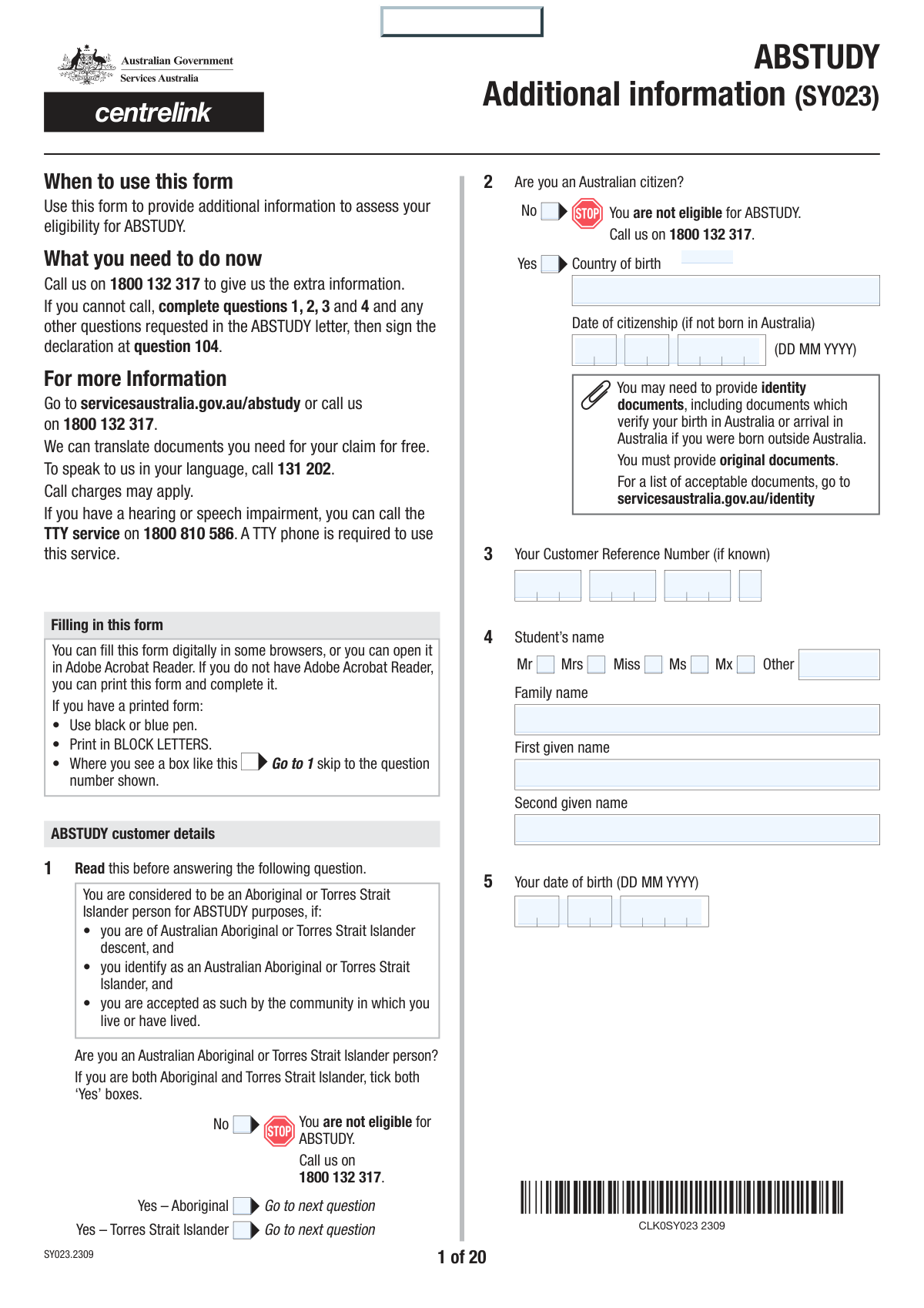
The AI does the filling. You just check it.
No typing into boxes, nothing to install.
What this form asks for
The AI fills all of it, from your answers or your documents.
The AI checks your answers before you download
14 checks built for this form, so a wrong date or a missing answer is caught before anyone else sees it.
This validation checks the response to question 2, 'Are you an Australian citizen?'. If the applicant selects 'No', the system should flag the application as ineligible for ABSTUDY, as Australian citizenship is a primary eligibility requirement. This check prevents the processing of applications that do not meet the fundamental criteria, saving time and resources.
This check ensures that the 'Date of citizenship' provided in question 2 is not earlier than the 'Your date of birth' provided in question 5. It is logically impossible for a person to become a citizen before they are born. If this validation fails, it indicates a data entry error that must be corrected to ensure the applicant's timeline is accurate.
Validates that if an applicant answers 'Yes' to question 6 ('Have you been known by any other name(s)?'), at least one 'Other name' and 'Type of name' entry is completed. This is important for identity verification and cross-referencing records across different systems. Failure to provide details after indicating they exist would result in an incomplete application.
Ensures that for any relationship status selected in question 12 (except 'Never married'), a corresponding valid date is provided. The date must be in the past, after the applicant's date of birth, and logically consistent with the status (e.g., a 'Date of divorce' cannot precede a 'Date married'). This check verifies the applicant's relationship history, which is critical for determining payment rates and independence.
This validation cross-references the applicant's age, calculated from their date of birth (Q5), with the accommodation option selected in question 20. For example, an applicant who is 23 years old cannot select an option designated for those 'younger than 22'. This ensures the applicant's living situation is categorized correctly, which directly impacts their eligibility for rent assistance and the rate of payment.
If an applicant answers 'Yes' to paying board and/or lodgings (Q29), this check ensures that cost details are provided in question 30. The applicant must either fill in the 'Total board and lodgings charged' field or the separate 'Amount paid for board' and 'Amount paid for lodgings' fields. This information is essential for calculating rent assistance eligibility and amounts.
And 8 more checks
- Bank Account Number Format Validation
- Employment Income Declaration Consistency
- Study Start Date Logic
- Previous Study History Completeness
- Travel Time Justification for Living Away
- Age and Independence Claim Consistency
- Dependent Child Age Verification
- Mandatory Signature Based on Age
Let AI fill out your SY023
No typing. Every field filled in seconds, checked, ready to sign.
How to Fill Out SY023 Online for Free in 2026
What the AI walks you through.
- Navigate to Instafill.ai and upload or select the ABSTUDY Additional information (SY023) form.
- Provide your personal details, including your name, Customer Reference Number (CRN), contact information, and citizenship status. The AI can help pre-fill this from your profile.
- Answer questions about your accommodation, financial situation, including income, assets, bank accounts, and any other financial support you receive.
- Enter your study or Australian Apprenticeship details, such as the course title, institution, study load, and previous study history.
- Complete the sections related to independence criteria, providing information about your age, work history, family circumstances, or living situation to determine your status.
- Review all the information populated by the AI for accuracy, make any necessary corrections, and then electronically sign the declaration.
- Download the completed SY023 form and gather all required supporting documents as indicated in the checklist before submitting them to Services Australia.
Common Mistakes in Completing SY023
The ones the AI is built to catch.
Incorrectly Navigating the Complex Accommodation Section
Failing to Disclose All Financial Accounts
Misstating the 'Current Market Value' of Assets
Providing an Incomplete or Inaccurate Study History
Claiming 'Independent' Status Without Providing Specific Proof
Entering a Card Number Instead of a Bank Account Number
Submitting the Form Without All Required Supporting Documents
Reporting Net (After-Tax) Income Instead of Gross (Before-Tax) Income
Ignoring Instructions to Complete Additional 'Mod' Forms
Omitting Previous or Alternative Names
Frequently Asked Questions About SY023
Is it really free for 7 days?
Can I fill other forms too?
How do I cancel?
How does the AI fill out SY023?
What happens to my information?
How complex is SY023 to fill out?
What is the purpose of the ABSTUDY Additional Information (SY023) form?
Who is eligible to apply for ABSTUDY?
How do I submit the completed SY023 form?
What kind of documents do I need to provide with this form?
What does it mean to be 'independent' for ABSTUDY?
I live away from home to study. What information is required?
What financial information do I need to declare?
What happens if I don't provide my Tax File Number (TFN)?
I am an Australian Apprentice, not a student. Which parts of the form apply to me?
Can I use an AI tool to help me fill out this form?
How can I fill out the ABSTUDY SY023 form online?
The PDF version of the form I downloaded is not fillable. What can I do?
I have a disability. Do I need to provide extra information?
What is the difference between 'board' and 'lodgings' in the accommodation section?
Get your SY023 filled out by AI
$0 today. Cancel before Nov 18 and you pay nothing.
Other forms like this one
VA claim forms: Form OWCP-915, Claim for Medical Reimbursement, Form 8862, Information To Claim Certain Credits, Form CA-7, Claim for Compensation, Form CA-5, Claim for Compensation, Form SC-100, Plaintiff's Claim and ORDER to Go to Small Claims Court, Form 20-0995, Decision Review Request: Supplemental Claim, Form 104, List of Creditors 20 Largest Unsecured Claims, Form 941-X (Rev. April 2023), Adjusted Employer’s QUARTERLY Federal Tax Return or Claim for Refund, Judicial Council of California Form SC-104, Proof of Service (Small Claims), Immigration and Refugee Board of Canada (IRB) – Refugee Protection Division (RPD) Basis of Claim Form (for persons claiming refugee protection in Canada) (RPD.02.01), SC-108, Request to Correct or Cancel Judgment and Answer (Small Claims), Judicial Council of California Form SC-105, Request for Court Order and Answer (Small Claims), SC-120, Defendant’s Claim and ORDER to Go to Small Claims Court (Small Claims), Judicial Council of California Form SC-104, Proof of Service (Small Claims), Continental American Insurance Company (CAIC) / Aflac Group Critical Illness Claim Form (with Attending Physician’s Statement, HIPAA Authorization to Obtain Information, and Electronic Funds Transaction Authorization), Judicial Council of California Form SC-108, Request to Correct or Cancel Judgment and Answer (Small Claims), SC-105, Request for Court Order and Answer (Small Claims), Judicial Council of California Form SC-120, Defendant’s Claim and ORDER to Go to Small Claims Court (Small Claims), Small Claim and Notice of Small Claim (ORS 46.425) (OJD Official) (Jan 2026), VA Form 21-4138, Statement in Support of Claim
Let AI fill out your SY023
Your trial starts once a card is added. You pay nothing before Nov 18.
Your bank declined that card, so the trial did not start and nothing was charged. Please try another card.
Our AI already knows this form, all 688 fields of it. Skip the typing: tell it about yourself, or upload what you have, and it fills the whole form in seconds.
- AI fills every field on all 20 pages, tables and checkboxes included
- No typing into boxes: answer a few questions, or upload a document you already have, an old copy of this form, a photo of a document
- The AI checks the answers; you review and change anything before you download
- Download the finished PDF, print it, or sign it online
- Encrypted, and never used to train AI
Cancel before Nov 18 and you pay nothing.
A card is needed to start the trial. We check it with a $19.99 hold that is released right away. Cancel in two clicks from your account.
Terms · Privacy