Yes! You can use AI to fill out Authorization for Release of Information

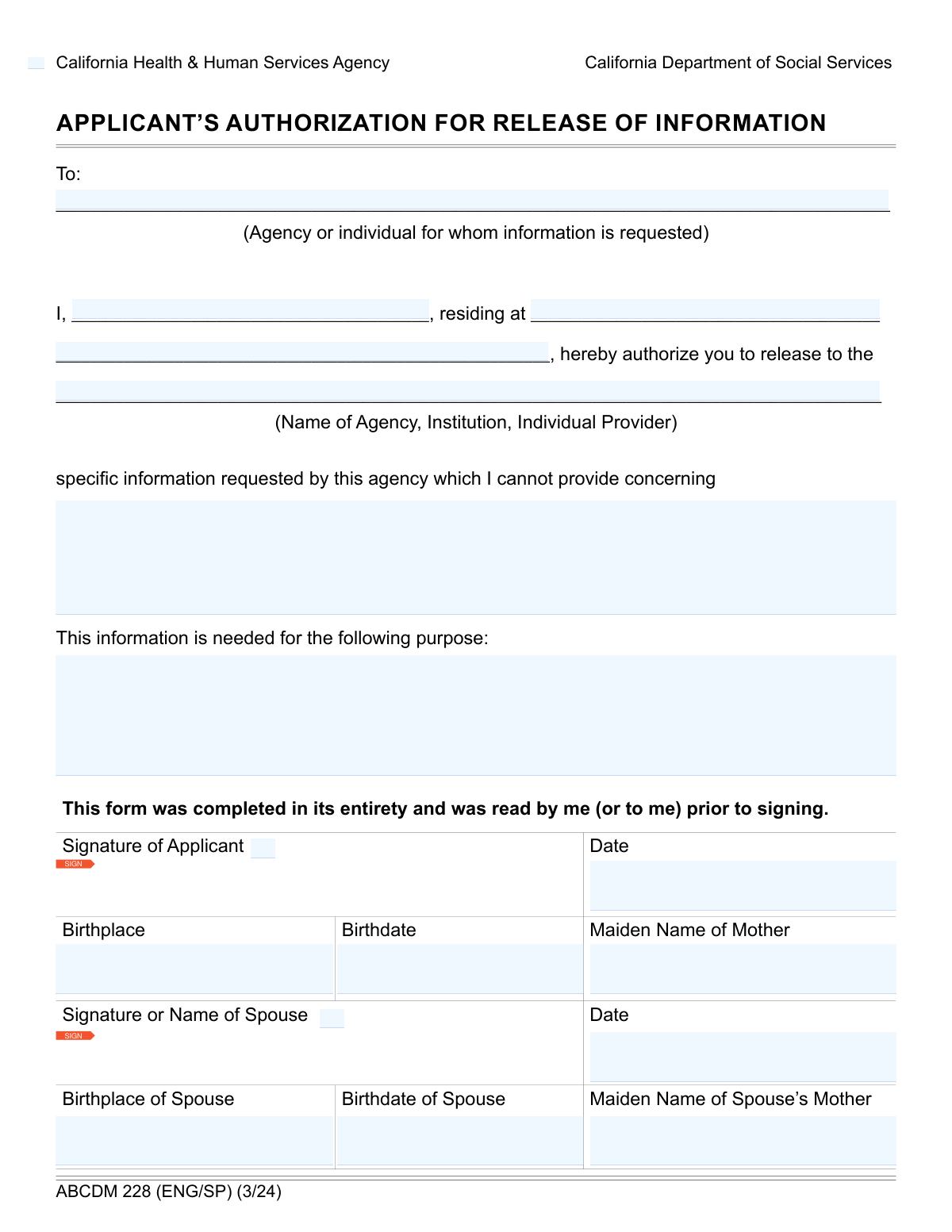
An Authorization for Release of Information is a legal document that grants a person or organization permission to disclose specific private information to a designated third party. This form is essential for controlling the flow of your personal data, whether for medical records, academic transcripts, or employment verification, ensuring your privacy is protected. Today this form can be filled out quickly and accurately using AI-powered services like Instafill.ai, which can also convert non-fillable PDF versions into interactive fillable forms.
Our AI automatically handles information lookup, data retrieval, formatting, and form filling.
It takes less than a minute to fill out Release of Information Form using our AI form filling.
Securely upload your data. Information is encrypted in transit and deleted immediately after the form is filled out.

Form specifications

Form name: Authorization for Release of Information
Number of fields: 20
Number of pages: 1
Language: English
Categories: authorization forms
main-image

Instafill Demo: How to fill out PDF forms in seconds with AI

How to Fill Out Release of Information Form Online for Free in 2026

Are you looking to fill out a RELEASE OF INFORMATION FORM form online quickly and accurately? Instafill.ai offers the #1 AI-powered PDF filling software of 2026, allowing you to complete your RELEASE OF INFORMATION FORM form in just 37 seconds or less.
Follow these steps to fill out your RELEASE OF INFORMATION FORM form online using Instafill.ai:
  1. 1 Navigate to Instafill.ai and upload your Authorization for Release of Information form or select it from their template library.
  2. 2 Use the AI assistant to automatically fill in the applicant's personal details, including name, address, date of birth, and other identifying information.
  3. 3 Clearly specify the information to be released and the exact purpose of the disclosure in the designated fields.
  4. 4 Enter the full name and contact details of the authorized agency, institution, or individual who will receive the information.
  5. 5 If required, provide the necessary details for the applicant's spouse, including their name, birthdate, and signature.
  6. 6 Carefully review all the information entered by the AI for accuracy, then electronically sign and date the form to finalize your authorization.

Our AI-powered system ensures each field is filled out correctly, reducing errors and saving you time.

Why Choose Instafill.ai for Your Fillable Release of Information Form Form?

Speed

Complete your Release of Information Form in as little as 37 seconds.

Up-to-Date

Always use the latest 2026 Release of Information Form form version.

Cost-effective

No need to hire expensive lawyers.

Accuracy

Our AI performs 10 compliance checks to ensure your form is error-free.

Security

Your personal information is protected with bank-level encryption.

Frequently Asked Questions About Form Release of Information Form

This form serves as an authorization to release your specific personal information. By completing and signing it, you grant permission for your data to be shared with a designated person, agency, or institution for a stated purpose.

The applicant, who is the individual whose information is being requested, must complete and sign this form. If the information release also pertains to a spouse, they may need to provide their details and signature as well.

You only need to complete the 'Spouse Details' section if the information being released involves your spouse or requires their consent. If you are not married or your spouse's information is not relevant to the request, you can leave this section blank.

In this section, you must be very clear and detailed about exactly what information you are authorizing to be shared. For example, you might write 'academic transcripts from 2020-2024' or 'complete medical records from January 1, 2021, to present'.

Clearly state the reason why the information is needed. Examples include 'for a background check for employment,' 'to transfer records to a new doctor,' or 'for a university application'.

The 'Information Requester' is the entity for whom the information is being gathered, like a potential employer. The 'Authorized Information Recipient' is the specific provider or person who will directly receive the released information, such as a background check company.

Your mother's maiden name is often used as a security question or an additional data point to verify your identity. This helps ensure your personal information is released accurately and securely to the correct party.

Submission instructions and processing times are typically provided by the agency or institution that requested the information. Please refer to their guidelines to determine where and how to submit the completed form.

Leaving required fields blank can cause significant delays or even rejection of your request. Double-check that all necessary sections, especially your personal identification, the specific information to be released, and your signature, are fully completed.

Yes, you can use AI-powered services like Instafill.ai to help you complete this form. These tools can accurately auto-fill your information, which saves time and helps reduce errors.

To use Instafill.ai, simply upload the form to their platform. The AI will identify the fields, allowing you to either auto-fill your saved personal information or complete the form interactively online.

If you have a non-fillable or 'flat' PDF, you can use a service like Instafill.ai. It can convert the static document into an interactive, fillable form that you can easily complete on your computer.

Yes, a signature from the applicant (and spouse, if applicable) is required to make the authorization legally valid. Remember to also enter the date you signed the form in the 'Signature Date' field.

Compliance Release of Information Form
Validation Checks by Instafill.ai

1
Applicant Name Completeness
Checks that the 'Applicant Name' field is not empty. This field is essential for identifying the individual authorizing the release of information. Without a name, the form is invalid and cannot be processed, leading to rejection of the submission.
2
Applicant Birthdate Format and Range
Validates that the 'Birthdate' is in a recognized format (e.g., MM/DD/YYYY) and falls within a logical range, meaning it is not a future date or an unreasonably distant past date. This ensures data accuracy and prevents processing errors for a key identity verification field. An invalid date will require the user to correct the entry before submission.
3
Applicant Minimum Age Verification
Calculates the applicant's age based on the provided 'Birthdate' to ensure they meet the minimum legal age requirement (e.g., 18 years) to sign an authorization form. This is a critical compliance check to ensure the legal validity of the document. If the applicant is underage, the form submission will be blocked and an error message will explain the age requirement.
4
Applicant Signature Presence
Verifies that the 'Applicant Signature' field contains a signature, which is a legal requirement for authorizing the release of information. A missing signature renders the authorization void and legally non-binding. The system will prevent submission until a signature is provided.
5
Signature Date Logical Consistency
Ensures the 'Signature Date' is a valid date that is not in the future and is on or after the applicant's 'Birthdate'. This check prevents logical impossibilities, such as signing a document before being born or on a future date. An invalid date will halt submission and prompt the user for correction, maintaining the document's integrity.
6
Recipient Name Completeness
This validation confirms that the 'Recipient Name' field is filled out, specifying the authorized party who will receive the information. It is crucial for ensuring the sensitive information is sent only to the intended recipient and prevents unauthorized disclosure. A submission with a blank recipient name will be rejected.
7
Information Release Specificity Check
Validates that the 'Specific Information to be Released' field contains a meaningful description and is not empty or filled with placeholder text. This ensures clarity and prevents overly broad or vague authorizations, protecting the applicant from unintended information disclosure. The form will be rejected if this field lacks sufficient detail, requiring the user to be more specific.
8
Purpose of Request Completeness
Checks that the 'Purpose of Information Request' field is completed, providing necessary context for the data release. This information is often required for compliance and auditing purposes, ensuring the request is legitimate and justified. An empty purpose field will result in a validation error and prevent the form from being submitted.
9
Spouse Details Dependency Check
This check enforces that if any of the spouse-specific fields (e.g., 'Spouse Birthdate', 'Spouse Signature Date') are filled, the 'Spouse Name' field must also be filled. This maintains data integrity by ensuring that supplementary spousal information is correctly associated with a named individual. An error will be triggered if spouse details are present without a corresponding spouse name.
10
Conditional Requirement for Spouse Details
This validation ensures that if the 'Spouse Name' field is populated, then the related fields ('Spouse Birthdate', 'Spouse Signature Date', 'Spouse Birthplace') also become required and must be filled. This rule prevents incomplete records for the spouse, which could cause processing delays or legal issues. The system will prompt the user to complete all required spouse fields before allowing submission.
11
Spouse Birthdate Format and Range
Validates that the 'Spouse Birthdate' is in a proper date format and represents a plausible date (i.e., not in the future). This is important for accurate record-keeping and identity verification if the spouse's consent is also required. An invalid format or date will trigger an error, requiring correction.
12
Spouse Signature Date Consistency
If a 'Spouse Signature Date' is provided, this check verifies it is a valid date that is not in the future and occurs after the 'Spouse Birthdate'. This maintains logical consistency and the legal validity of the spouse's signature. The form will not be accepted if the date is illogical, preventing data quality issues.
13
Applicant Full Address Completeness
Verifies that both 'Applicant Address Line 1' and 'Applicant Address Line 2' are populated to form a complete residential address. A full address is often necessary for identity verification and for mailing physical correspondence if required. Incomplete address information will trigger a validation error, prompting the user to provide the missing details.
14
Mother's Maiden Name Character Validation
This check ensures that the 'Mother's Maiden Name' field only contains valid characters, such as letters, spaces, and hyphens, and excludes numbers or special symbols. This validation helps maintain data cleanliness and prevents data entry errors for a common security and identification question. Invalid characters will result in an error message asking the user to revise the entry.

Common Mistakes in Completing Release of Information Form

Vague Description for Information to be Released

The field 'Specific Information to be Released' requires detail, but applicants often write vague terms like 'all records' or 'any relevant information'. This can be legally insufficient, causing the request to be rejected for being overly broad. To avoid this, be as specific as possible by including date ranges, types of records (e.g., 'lab results from Jan 2023 to March 2023'), and the names of specific documents.

Confusing the Information Requester with the Recipient

This form has separate fields for 'Information Requester Name' and 'Recipient Name', which can be different entities. A common mistake is to enter the same name in both fields, which can lead to information being sent to the wrong party. Carefully identify who is making the request versus who should ultimately receive the documents and fill in each field accordingly to prevent delays and privacy breaches.

Incomplete Conditional Spouse Information

The form requires spouse details like birthdate and birthplace only if the 'Spouse Name' field is completed. Applicants frequently provide the spouse's name but then forget to fill out the other mandatory related fields. This creates an incomplete record and will cause the form to be returned, delaying the entire process. Always double-check that all dependent fields are filled when you provide optional information.

Using Incorrect or Inconsistent Date Formats

Fields like 'Birthdate' and 'Signature Date' can be filled with various formats (e.g., MM/DD/YYYY, DD-MM-YY, Month Day, Year), leading to data entry errors and processing delays. If a specific format isn't requested, using an inconsistent format across the form can also cause confusion. To prevent this, use the standard MM/DD/YYYY format consistently. AI-powered tools like Instafill.ai can automatically format dates correctly, ensuring compliance.

Splitting Address Information Incorrectly

The form separates the address into two lines, with 'Applicant Address Line 2' intended for city, state, and zip code. People often put the city on the first line with the street address or forget to include the ZIP code on the second line. This can lead to failed address verification or returned mail. Ensure the full street address is on Line 1 and the complete city, state, and ZIP code are on Line 2.

Using Inconsistent or Informal Names

Applicants sometimes enter a nickname or an abbreviated version of their name in the 'Applicant Name' field, which then fails to match their legal name on record or their signature. This discrepancy is a common reason for identity verification failure and form rejection. Always use your full, legal name as it appears on official documents. AI form-fillers like Instafill.ai can help by storing and consistently applying your legal name across all forms.

Providing an Unclear Purpose for the Request

When asked for the 'Purpose of Information Request,' users may enter a generic reason like 'personal use' or 'for my records.' This lack of specificity can cause the releasing agency to question the request's validity, leading to delays or denial. It's crucial to state the purpose clearly and professionally, such as 'for continuing care with a new physician,' 'to support a life insurance application,' or 'for a legal proceeding.'

Providing Incomplete Birthplace Details

The 'Birthplace' field specifically requests both the city and country of birth. A frequent error is to only list the city or state, especially for domestic births, omitting the country. This incomplete data can fail identity verification checks that require full location details. To avoid processing delays, always provide the full city and country as requested for both the applicant and spouse.

Omitting Mother's Maiden Name

The 'Mother's Maiden Name' for both the applicant and spouse is a critical piece of information used for identity verification and securely matching records. This field is often left blank or filled with 'N/A', which can cause the request to be rejected if the system requires it for validation. It is essential to provide this information accurately for all individuals listed on the form to ensure successful processing.

Invalid or Missing Signatures

A form can be invalidated by a missing signature, an illegible handwritten signature, or an improperly applied digital one. With multiple signature fields ('Applicant Signature', 'signature of applicant'), it's easy to miss one. Ensure all signature boxes are completed with a clear signature that matches the printed legal name on the form to avoid immediate rejection.

Ignoring Form Navigation and Accessibility Instructions

The form provides specific instructions on how to navigate its fields using a keyboard (e.g., 'use the tab key'). Ignoring these guidelines can lead to a frustrating experience, skipped fields, and incorrect data entry, resulting in an erroneous submission. If a form is only available as a flat, non-fillable PDF, it can be impossible to navigate correctly with assistive tools. Services like Instafill.ai can convert such documents into accessible, fillable versions.
Saved over 80 hours a year

“I was never sure if my IRS forms like W-9 were filled correctly. Now, I can complete the forms accurately without any external help.”

Kevin Martin Green

Your data stays secure with advanced protection from Instafill and our subprocessors

Robust compliance program

Transparent business model

You’re not the product. You always know where your data is and what it is processed for.

ISO 27001, HIPAA, and GDPR

Our subprocesses adhere to multiple compliance standards, including but not limited to ISO 27001, HIPAA, and GDPR.

Security & privacy by design

We consider security and privacy from the initial design phase of any new service or functionality. It’s not an afterthought, it’s built-in, including support for two-factor authentication (2FA) to further protect your account.

Fill out Release of Information Form with Instafill.ai

Worried about filling PDFs wrong? Instafill securely fills authorization-for-release-of-information forms, ensuring each field is accurate.