
Yes! You can use AI to fill out CFS 508-1, Authorization for Background Check
Don't type 139 fields by hand. Tell our AI about yourself, or upload a document you already have, and it fills every field in seconds. You check it, then download, print or sign.
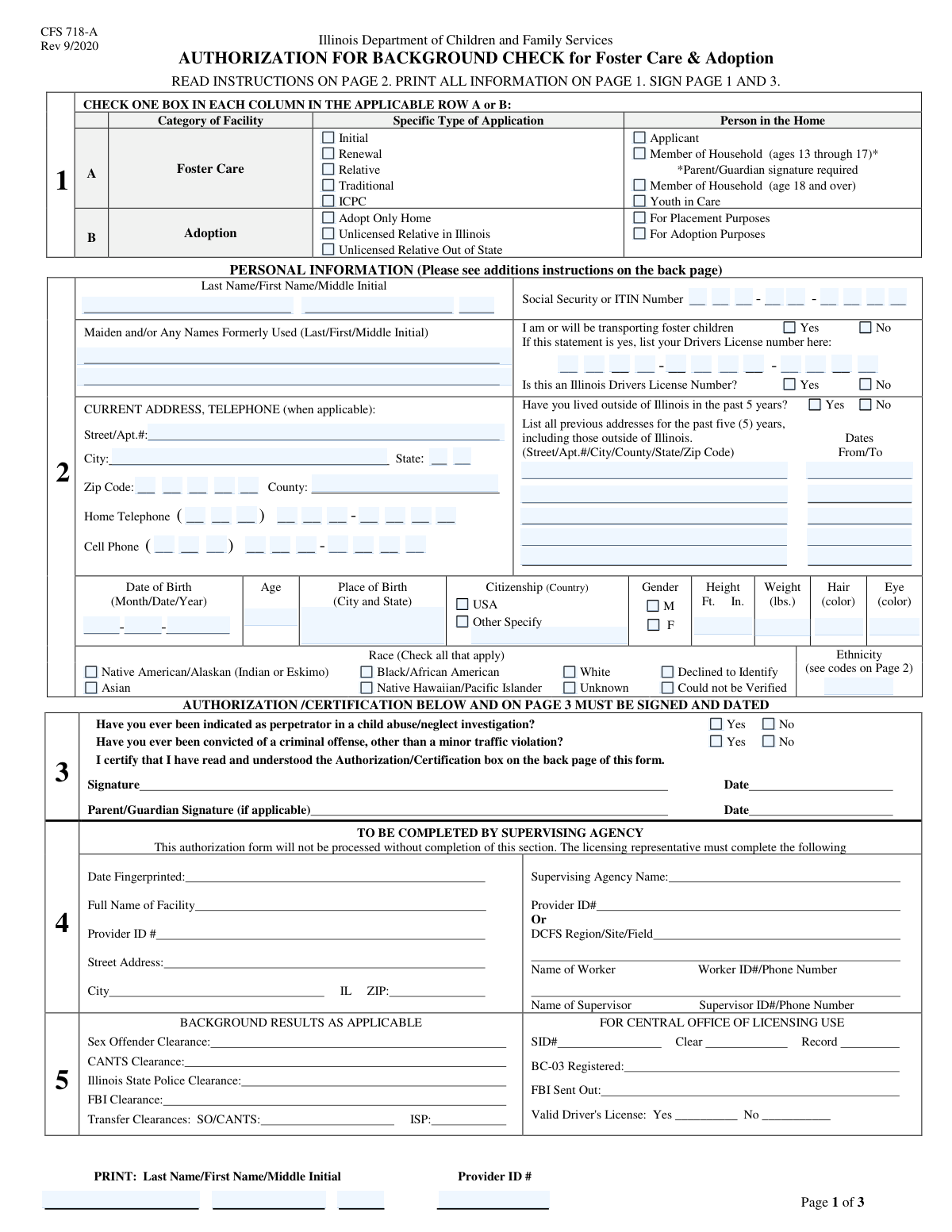
The AI does the filling. You just check it.
No typing into boxes, nothing to install.
What this form asks for
The AI fills all of it, from your answers or your documents.
The AI checks your answers before you download
14 checks built for this form, so a wrong date or a missing answer is caught before anyone else sees it.
This validation ensures that mutually exclusive application types are not selected simultaneously. For example, an application cannot be both an 'Initial Application' and a 'Renewal Application'. This check is crucial for routing the application to the correct processing workflow and preventing administrative confusion. If this validation fails, the user will be prompted to select only one of the conflicting options.
This check verifies that the applicant's stated age is consistent with the 'Person in Home' role they have selected. For instance, if 'Member of Household (ages 13 through 17)' is checked, the system will calculate the age from the date of birth and ensure it falls within that range. This prevents logical inconsistencies in the data which are vital for background checks and eligibility determination. A mismatch would trigger an error asking the user to correct either the date of birth or the selected role.
This validation confirms that the Social Security Number or ITIN is entered completely and in the correct format (XXX-XX-XXXX). It checks that all three parts are filled with the correct number of digits and contain only numeric characters. Since this number is critical for identity verification and background checks, incomplete or malformed data would halt the entire application process. Failure will result in an error message requiring the user to enter a valid 9-digit number.
This check enforces a conditional rule: if the applicant answers 'Yes' to the 'Foster Children Transport Question', then the Driver's License Number fields must be filled. This is a safety and compliance requirement to ensure anyone transporting foster children is a licensed driver. If the transport question is 'Yes' and the license number is missing, the form submission will be blocked until the license information is provided.
This validation ensures that if an applicant checks 'Yes' to the 'Lived Outside Illinois Question', they must provide details for at least one previous address. This is essential for conducting a thorough background check across all relevant jurisdictions from the past five years. If 'Yes' is selected but no previous address is entered, the system will display an error and prevent submission until the required address history is supplied.
This validation cross-references the entered 'Date of Birth' with the entered 'Age'. The system calculates the age based on the birth date and compares it to the value in the 'Age' field. This simple check catches common data entry errors and ensures the accuracy of the applicant's age, which is a fundamental piece of information for eligibility and background screening. If the values do not match, the user will be prompted to review and correct the information.
And 8 more checks
- Previous Address Date Chronology
- Zip Code and State Consistency
- Conditional Citizenship Specification
- Mandatory Response for Screening Questions
- Phone Number Completeness and Format
- Applicant Name Completeness and Format
- Height in Inches Range Validation
- Provider ID Format Validation
Let AI fill out your CFS 508-1
No typing. Every field filled in seconds, checked, ready to sign.
How to Fill Out CFS 508-1 Online for Free in 2026
What the AI walks you through.
- Navigate to Instafill.ai and upload your CFS 508-1 form or select it from the template library.
- Select the appropriate application type (e.g., Foster Care, Adoption) and specify the person's role in the home (e.g., Applicant, Member of Household).
- Enter the applicant's full legal name, any formerly used names, and current contact information, including address and phone numbers.
- Provide key identifying information, including your Social Security Number (SSN), date of birth, place of birth, and physical descriptors like race, ethnicity, and eye color.
- Complete the background history section by providing your address history for the past five years, driver's license details, and answering questions about criminal and child abuse history.
- Carefully review all the information you've entered for accuracy, then use the platform to electronically sign and date the authorization.
- Download your completed, signed CFS 508-1 form, ready for submission to the Illinois DCFS or your licensing agency.
Common Mistakes in Completing CFS 508-1
The ones the AI is built to catch.
Selecting Multiple or Incorrect Application Types
Providing an Incomplete 5-Year Address History
Failing to List All Formerly Used Names
Transposing Digits in Segmented Number Fields
Ignoring or Misunderstanding Conditional Fields
Incorrectly Identifying the 'Person in Home' Role
Mismatched Date of Birth and Age
Leaving the Ethnicity Code Field Blank
Inconsistent Name Information Across the Form
Frequently Asked Questions About CFS 508-1
Is it really free for 7 days?
Can I fill other forms too?
How do I cancel?
How does the AI fill out CFS 508-1?
What happens to my information?
How complex is CFS 508-1 to fill out?
What is the purpose of this form?
Who in my household needs to complete this form?
What is the difference between the 'Foster Care' and 'Adoption' application types?
Do I need to provide my Social Security Number (SSN)?
What if I have lived outside of Illinois in the past 5 years?
I will be driving foster children. What information is required?
Do I have to disclose a past criminal offense?
Why do I need to list my former names?
What is a 'Provider ID'?
What is the difference between 'Relative Placement' and 'Traditional Foster Care'?
Can AI tools help me fill out this form?
How can I use Instafill.ai to complete this form online?
The PDF I have isn't fillable. What should I do?
Get your CFS 508-1 filled out by AI
$0 today. Cancel before Nov 10 and you pay nothing.
Other forms like this one
authorization forms: Form I-765, Application for Employment Authorization, Form CMS-588, EFT Authorization Agreement, Form 8821, Tax Information Authorization, Form 8879, IRS e-file Signature Authorization, Form SSA-827, Authorization to Disclose Information, Form I-905, Application for Authorization to Issue Certification for Health Care Workers, Form G-1650, Authorization for ACH Transactions, Arizona Form 285, General Disclosure/Representation Authorization Form, Arizona Form 285-I, Individual Income Tax Disclosure/Representation Authorization Form, The Department of Medical Assistance Services Applied Behavior Analysis Preservice Service Authorization Request Form (Effective Dates of Service 09/01/2025 and after), Form CH-006: PA-BH-Res-PCS, Oregon Behavioral Health Support Program Plan of Care Authorization (Plan of Care Request for Behavioral Health Residential or Personal Care Services), Continental American Insurance Company (CAIC) / Aflac Group Critical Illness Claim Form (with Attending Physician’s Statement, HIPAA Authorization to Obtain Information, and Electronic Funds Transaction Authorization), HIPAA Authorization Form, Authorization for the Release of Protected Health Information, Form G-1450, Authorization for Credit Card Transactions, Prior Authorization (PA) Request Form – Adult Palliative Care (Alameda Alliance for Health), Alameda Alliance for Health Prior Authorization (PA) Request Form – Adult Palliative Care, Manulife Group Benefits Drug Prior Authorization Form – Mounjaro (Tirzepatide) (GL5197E), Manulife Group Benefits Drug Prior Authorization Form (Ozempic/Semaglutide) – GL5197E, Out-of-Network Pre-Authorization and Exception Request Form, Form SSA-827 (06-2024), Authorization to Disclose Information to the Social Security Administration (SSA)
Let AI fill out your CFS 508-1
Your trial starts once a card is added. You pay nothing before Nov 10.
Our AI already knows this form, all 139 fields of it. Skip the typing: tell it about yourself, or upload what you have, and it fills the whole form in seconds.
- AI fills every field on all 3 pages, tables and checkboxes included
- No typing into boxes: answer a few questions, or upload a document you already have, an old copy of this form, a photo of a document
- The AI checks the answers; you review and change anything before you download
- Download the finished PDF, print it, or sign it online
- Encrypted, and never used to train AI
Cancel before Nov 10 and you pay nothing.
A card is needed to start the trial. Cancel in two clicks from your account.
Terms · Privacy