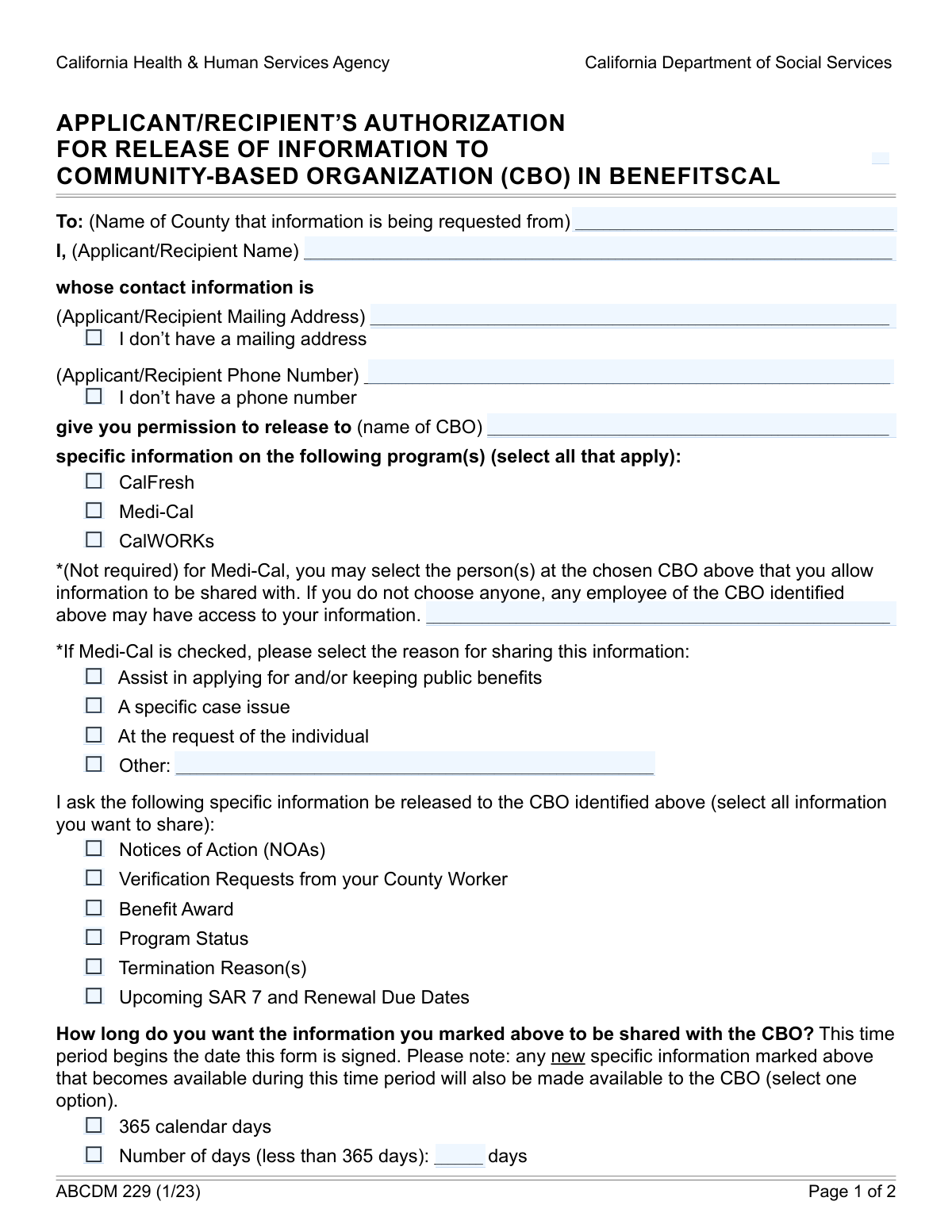
Yes! You can use AI to fill out Form ABCD 228, Authorization for Release of Information

Form ABCD 228 is an official document used in California that grants permission for a county social services agency to share a client's case information with a specific Community-Based Organization (CBO). This authorization is crucial for individuals seeking assistance from CBOs with their applications, renewals, or case issues related to programs such as CalFresh, Medi-Cal, and CalWORKS. By signing this form, clients enable CBOs to effectively advocate on their behalf and provide necessary support. Today, this form can be filled out quickly and accurately using AI-powered services like Instafill.ai, which can also convert non-fillable PDF versions into interactive fillable forms.
Our AI automatically handles information lookup, data retrieval, formatting, and form filling.
It takes less than a minute to fill out ABCD 228 using our AI form filling.
Securely upload your data. Information is encrypted in transit and deleted immediately after the form is filled out.

Form specifications

Form name: Form ABCD 228, Authorization for Release of Information
Number of fields: 34
Number of pages: 2
Language: English
Categories: authorization forms
main-image

Instafill Demo: How to fill out PDF forms in seconds with AI

How to Fill Out ABCD 228 Online for Free in 2026

Are you looking to fill out a ABCD 228 form online quickly and accurately? Instafill.ai offers the #1 AI-powered PDF filling software of 2026, allowing you to complete your ABCD 228 form in just 37 seconds or less.
Follow these steps to fill out your ABCD 228 form online using Instafill.ai:
  1. 1 Navigate to Instafill.ai and upload or select the ABCD 228 form.
  2. 2 Enter the county name and your personal details, such as name, address, and phone number, in the Applicant/Recipient Information section.
  3. 3 Specify the full name of the Community-Based Organization (CBO) and any specific personnel authorized to access your information.
  4. 4 Select the programs (CalFresh, Medi-Cal, CalWORKS) and the exact types of information you consent to release (e.g., Notices of Action, Program Status).
  5. 5 Define the duration for which the authorization is valid (e.g., 365 days) and your preference for sharing past case history.
  6. 6 Carefully review all the entered information for accuracy, then provide your printed name, signature, and the date to finalize the authorization.

Our AI-powered system ensures each field is filled out correctly, reducing errors and saving you time.

Why Choose Instafill.ai for Your Fillable ABCD 228 Form?

Speed

Complete your ABCD 228 in as little as 37 seconds.

Up-to-Date

Always use the latest 2026 ABCD 228 form version.

Cost-effective

No need to hire expensive lawyers.

Accuracy

Our AI performs 10 compliance checks to ensure your form is error-free.

Security

Your personal information is protected with bank-level encryption.

Frequently Asked Questions About Form ABCD 228

This form authorizes your county to release your confidential benefit information for programs like CalFresh, Medi-Cal, and CalWORKS to a specific Community-Based Organization (CBO) that is assisting you.

You should fill out this form if you are an applicant or recipient of public benefits and you want a Community-Based Organization (CBO) to have access to your case information to help you.

A Community-Based Organization, or CBO, is typically a non-profit group that provides assistance to people in the community, such as helping them apply for or manage their public benefits.

No, you only need to check the boxes for the specific programs that the CBO is helping you with. You are only authorizing the release of information for the programs you select.

Due to stricter privacy laws protecting health information, you must specify the reason for sharing Medi-Cal data and name the individual CBO personnel who are authorized to access it.

Yes, you can control the exact information being shared by checking the boxes under the 'Information to be Released' section, such as 'Program Status' or 'Benefit Award'.

The authorization is valid for up to 365 days by default. However, you can choose to specify a shorter duration by entering a specific number of days.

The form includes checkboxes for 'I don't have a mailing address' and 'I don't have a phone number'. Simply check the appropriate box and leave the corresponding field blank.

If the applicant or recipient is a minor, their parent or legal guardian must also sign and date the form in the designated 'Parent/Guardian Signature' section.

This allows the CBO to view recent activity on your case from the last 60 days, which helps them understand your current situation and provide better assistance.

You should submit the completed and signed form to the county office that handles your benefits. The CBO assisting you can also provide guidance on the correct submission process.

Yes, services like Instafill.ai use AI to help you accurately auto-fill form fields with your information, which can save time and prevent errors.

To fill this form online, you can upload it to a platform like Instafill.ai. The service will make the form interactive and help you complete the required fields quickly and easily.

If you have a non-fillable or 'flat' PDF, you can use a tool like Instafill.ai to convert it into an interactive, fillable form that you can complete on your computer or mobile device.

Compliance ABCD 228
Validation Checks by Instafill.ai

1
Program Selection Requirement
This check ensures that at least one program checkbox (CalFresh, Medi-Cal, or CalWORKS) is selected. The form's purpose is to authorize information release for specific programs, so a selection is mandatory for the form to have any meaning. If no program is selected, the submission should be rejected as incomplete.
2
Information Release Specificity
Verifies that at least one checkbox under 'Information to be Released' is selected. The authorization must be specific about what data can be shared to be legally compliant and useful. A failure to select any information type would make the authorization void, as the county would not know what to release.
3
Conditional Mailing Address Logic
Ensures the 'Applicant/Recipient Mailing Address' field is filled out if the 'I don't have a mailing address' checkbox is unchecked. This prevents incomplete submissions where a contact address is expected but not provided. If the box is checked, the address field must be empty to avoid contradictory data.
4
Conditional Phone Number Logic
Validates that the 'Applicant/Recipient Phone Number' is provided unless the 'I don't have a phone number' checkbox is selected. If the box is not checked, the phone number is a required contact method and should be validated for a proper format. This check ensures data completeness and prevents submissions with conflicting information.
5
Medi-Cal Personnel Authorization Requirement
This check confirms that the 'Authorized CBO Personnel' field is completed if the 'Medi-Cal' program is selected. Due to the sensitive nature of health information, it is a strict requirement to name the specific individuals who can access Medi-Cal data. An empty field would halt the processing of the Medi-Cal authorization.
6
Medi-Cal Sharing Reason Requirement
If the 'Medi-Cal' program is selected, this validation ensures at least one 'Reason for Sharing Medi-Cal Information' is checked. This is a legal requirement to document the purpose of sharing protected health information (PHI). Without a specified reason, the release of information would be non-compliant and cannot be processed.
7
Conditional 'Other Reason' Field
Verifies that the 'Other Reason' text field is filled in if and only if the 'Other' checkbox is selected in the 'Reason for Sharing Medi-Cal Information' section. This prevents submissions with a selected 'Other' option but no explanation, which would require manual follow-up. It also keeps the data clean by ensuring the text field is empty if 'Other' is not chosen.
8
Exclusive Duration Selection
Ensures that the user selects exactly one option for the 'Information Sharing Duration': either '365 calendar days' or 'Number of days (less than 365 days)'. Selecting both or neither creates ambiguity about the authorization's expiration date. This validation is critical for defining the legal time frame of the data sharing agreement.
9
Valid Custom Duration Input
If the 'Number of days (less than 365 days)' option is chosen, this check validates that the 'Number of days' field contains a whole number between 1 and 364. This prevents invalid inputs like zero, negative numbers, text, or values exceeding the maximum allowed. An invalid entry would make the authorization's duration unclear and legally void.
10
Exclusive Case History Selection
This validation confirms that exactly one of the 'Case History Sharing Preference' options ('The past 60 days' or 'No case history') is selected. This choice dictates whether historical data can be shared, and ambiguity is not permissible. A failed validation means the user's preference is unclear, preventing the CBO from knowing the scope of their access.
11
Birth Date Validity
Checks that the 'Birth Date' field contains a valid, properly formatted date that is in the past. This is essential for verifying the applicant's identity and determining if they are a minor. An invalid or future date would be a critical data error, potentially requiring rejection of the entire form.
12
Guardian Signature for Minors
This check is triggered based on the 'Birth Date'. If the calculated age of the applicant is under 18, it validates that the 'Parent/Guardian Signature' and the corresponding 'Signature Date' fields are completed. This is a legal requirement for obtaining consent for minors, and failure to provide it would render the authorization invalid.
13
Signature Date Plausibility
Validates that the 'Signature Date' is a real date that is not in the future and is on or after the applicant's birth date. This check confirms the form was signed at a logical time and prevents post-dating or other errors that could invalidate the document. A failed check would require the user to correct the date before submission.
14
County Name Consistency
This check ensures that the value entered in the first 'County Name' field is identical to the value in the second 'County Name (County Information)' field. Inconsistent county names could lead to the request being sent to the wrong jurisdiction or causing processing delays. This validation enforces data integrity across the form.

Common Mistakes in Completing ABCD 228

Using an Acronym for the CBO Name

Applicants often enter an acronym or a shortened name for the Community-Based Organization (CBO) instead of its full legal name, usually because they are more familiar with the common name. This can cause delays or rejection as the county office may not be able to identify the correct organization, preventing the release of information. To avoid this, always write out the complete, official name of the CBO; AI-powered form filling tools like Instafill.ai can help by suggesting full organization names from a database, reducing this error.

Missing Required Medi-Cal Authorization Details

When an applicant selects 'Medi-Cal' for information release, they often forget to complete the subsequent required sections, such as 'Authorized CBO Personnel' and 'Reason for Sharing Medi-Cal Information.' This oversight renders the authorization for Medi-Cal incomplete and legally invalid, preventing the CBO from assisting with Medi-Cal issues. To avoid this, immediately look for and complete all related fields after checking 'Medi-Cal'; smart form fillers can highlight these dependent fields automatically.

Selecting Conflicting Authorization Durations

The form provides two mutually exclusive options for the authorization period: '365 calendar days' or a custom number of days. A common error is checking both boxes, or checking the custom option without specifying the number of days. This ambiguity invalidates the authorization period, forcing the county to reject the form. To avoid this, choose only one option and ensure you enter a number if selecting the custom duration.

Failing to Select Any Program for Information Release

Applicants sometimes complete their personal information but forget to check any of the program boxes (CalFresh, Medi-Cal, CalWORKS). This is a critical error as it fails to specify which program's information is being authorized for release, making the entire form useless. To avoid this, double-check that you have selected at least one program; tools like Instafill.ai can validate the form and flag such critical missing selections before finalization.

Not Selecting Any 'Information to be Released'

Users may neglect to check any boxes in the 'Information to be Released' section (e.g., Notices of Action, Program Status), even after selecting a program. This means there is no authorization for what specific data can be shared, halting the process. To ensure the CBO can effectively assist you, carefully review and select all relevant types of information you consent to share.

Incomplete Signature Section

A form is not legally valid without a signature, the date of signing, and the printed name of the signatory. Applicants frequently leave one or more of these fields blank, which results in an automatic rejection of the authorization. Always ensure you have signed the form, written the current date, and clearly printed your full name to match the applicant name provided at the top.

Entering a City Instead of a County Name

The form specifically asks for the 'County Name,' but applicants often mistakenly enter their city of residence. Since public benefits are administered at the county level, providing the wrong jurisdiction sends the request to the incorrect office, causing significant delays. To avoid this, confirm the official name of the county you reside in; tools like Instafill.ai can auto-populate the correct county based on your address, eliminating this error.

Contradictory Contact Information Entries

Users sometimes check a box like 'I don't have a mailing address' but then proceed to enter an address in the corresponding field. This contradictory input confuses the processing agent and can lead to delays as they seek clarification. To prevent this, only fill in the contact detail fields if you have not checked the box indicating you lack that information. Smart form fillers like Instafill.ai can prevent this by automatically disabling the text field when the checkbox is ticked.

Missing or Unnecessary Parent/Guardian Signature

The form requires a parent or guardian's signature only if the applicant is a minor, based on the 'Birth Date' field. A common mistake is for a parent to forget to sign for a minor, invalidating the form, or to sign unnecessarily for an adult applicant, causing confusion. To prevent this, carefully enter the birth date to determine if a parental signature is required. Advanced form-filling tools can automatically calculate the age and show the parent signature section only when necessary.

Checking 'Other' Without Providing an Explanation

In the 'Reason for Sharing Medi-Cal Information' section, applicants may check the 'Other' box but fail to write a description in the 'Other Reason' text field. This leaves the reason for the request unknown, making the authorization incomplete and likely to be rejected. If the form is a non-fillable PDF, a tool like Instafill.ai can convert it to a smart, fillable version that makes the 'Other Reason' field required only when 'Other' is checked.
Saved over 80 hours a year

“I was never sure if my IRS forms like W-9 were filled correctly. Now, I can complete the forms accurately without any external help.”

Kevin Martin Green

Your data stays secure with advanced protection from Instafill and our subprocessors

Robust compliance program

Transparent business model

You’re not the product. You always know where your data is and what it is processed for.

ISO 27001, HIPAA, and GDPR

Our subprocesses adhere to multiple compliance standards, including but not limited to ISO 27001, HIPAA, and GDPR.

Security & privacy by design

We consider security and privacy from the initial design phase of any new service or functionality. It’s not an afterthought, it’s built-in, including support for two-factor authentication (2FA) to further protect your account.

Fill out ABCD 228 with Instafill.ai

Worried about filling PDFs wrong? Instafill securely fills form-abcd-228-authorization-for-release-of-information forms, ensuring each field is accurate.