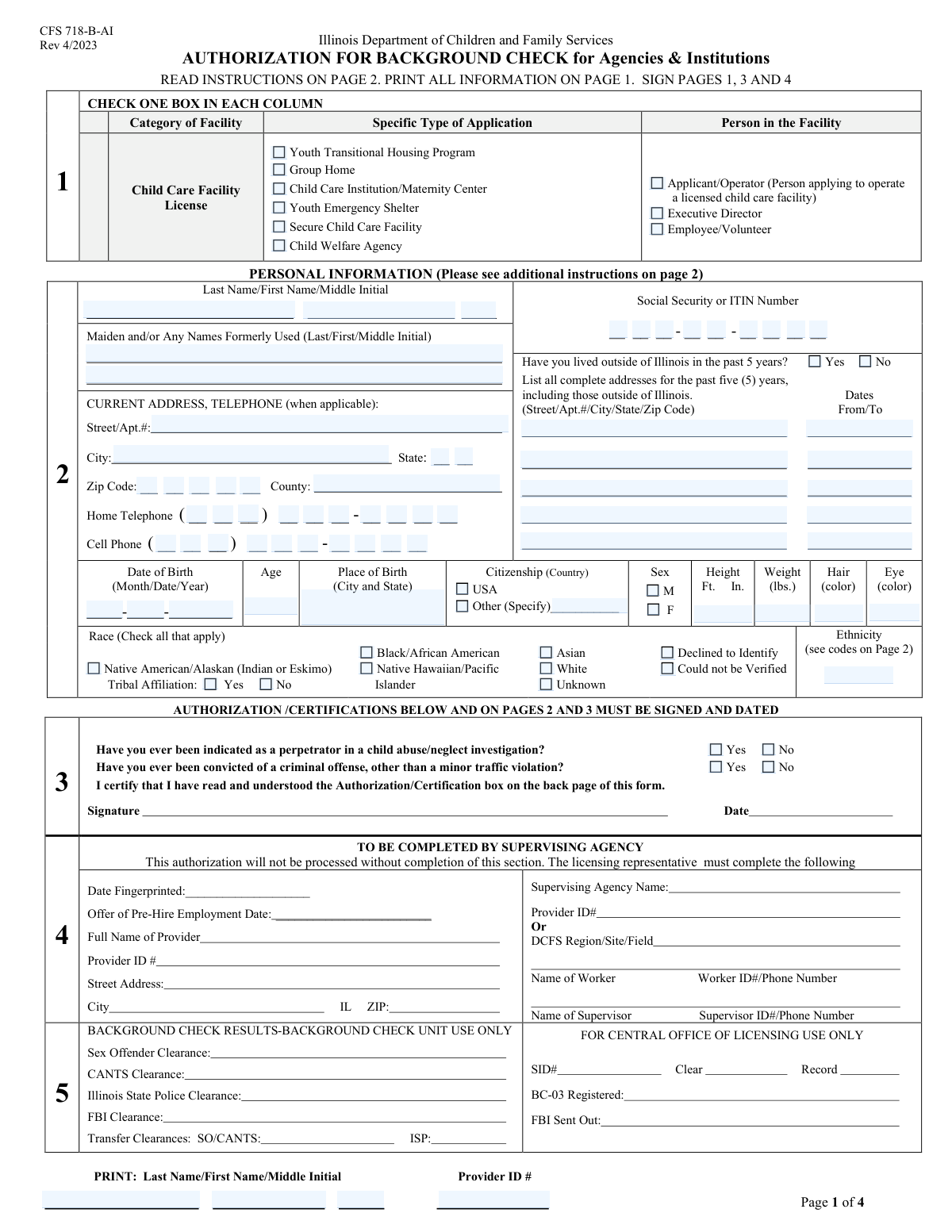
Yes! You can use AI to fill out Form CFS 718, Authorization for Background Check

Form CFS 718, Authorization for Background Check, is a document required by the Illinois Department of Children and Family Services (DCFS). It grants permission for the department to conduct a thorough background investigation on individuals seeking to work or volunteer in roles with access to children. This process, which includes checking criminal records and child abuse registries, is crucial for ensuring the safety and well-being of children in care. Today, this form can be filled out quickly and accurately using AI-powered services like Instafill.ai, which can also convert non-fillable PDF versions into interactive fillable forms.
CFS 718 is part of the authorization forms category on Instafill.
Our AI automatically handles information lookup, data retrieval, formatting, and form filling.
It takes less than a minute to fill out CFS 718 using our AI form filling.
Securely upload your data. Information is encrypted in transit and deleted immediately after the form is filled out.

Form specifications

Form name: Form CFS 718, Authorization for Background Check
Number of fields: 120
Number of pages: 4
Filled form examples: Form CFS 718 Examples
Language: English
main-image

Instafill Demo: How to fill out PDF forms in seconds with AI

How to Fill Out CFS 718 Online for Free in 2026

Are you looking to fill out a CFS 718 form online quickly and accurately? Instafill.ai offers the #1 AI-powered PDF filling software of 2026, allowing you to complete your CFS 718 form in just 37 seconds or less.
Follow these steps to fill out your CFS 718 form online using Instafill.ai:
  1. 1 Navigate to Instafill.ai and upload or select Form CFS 718, Authorization for Background Check.
  2. 2 Check the boxes that correspond to the specific type of application (e.g., Group Home, Child Welfare Agency) and your role (e.g., Applicant, Employee).
  3. 3 Use the AI assistant to accurately fill in your personal information, including your full name, any formerly used names, current address, and contact details.
  4. 4 Securely provide your Social Security Number (SSN) or ITIN, date of birth, place of birth, and physical description as required for identification.
  5. 5 Answer the questions regarding your residency history, race/ethnicity, and disclose any past child abuse/neglect indications or criminal convictions.
  6. 6 Carefully review all the information you have entered for accuracy, then print your name and provide the Provider ID number as indicated.
  7. 7 Sign and date the form to provide your official consent for the background check, then submit it to the appropriate agency or employer.

Our AI-powered system ensures each field is filled out correctly, reducing errors and saving you time.

Why Choose Instafill.ai for Your Fillable CFS 718 Form?

Speed

Complete your CFS 718 in as little as 37 seconds.

Up-to-Date

Always use the latest 2026 CFS 718 form version.

Cost-effective

No need to hire expensive lawyers.

Accuracy

Our AI performs 10 compliance checks to ensure your form is error-free.

Security

Your personal information is protected with bank-level encryption.

Frequently Asked Questions About Form CFS 718

This form is used to collect personal information for a background check required for individuals applying to operate, work, or volunteer in various licensed child care and youth facilities.

This form must be completed by any applicant, operator, executive director, employee, or volunteer associated with a child care institution, group home, youth shelter, or other listed child welfare programs.

The Provider ID is a unique number assigned to the facility or agency where you will be working or volunteering. You should get this number from your employer or the program administrator.

Yes, your SSN or Individual Taxpayer Identification Number (ITIN) is required for identification purposes and to conduct a complete and accurate background check.

This information is required only if you have lived outside of Illinois in the past 5 years. It is used to conduct a comprehensive background check in all jurisdictions where you have resided.

This means a child protective services agency conducted an investigation and found credible evidence of child abuse or neglect. You must disclose this if it has ever happened.

You must report any criminal convictions, but you can exclude minor traffic violations. If you are uncertain whether an offense is considered minor, it is best to disclose it.

The form has space for two formerly used names. List the two most recent ones, and if you have more, attach a separate sheet with the additional information or contact the agency for guidance.

Yes, services like Instafill.ai use AI to accurately auto-fill form fields from your saved profile, which can save you time and help prevent errors.

You can use a service like Instafill.ai, which can convert flat, non-fillable PDFs into interactive forms. Simply upload the document to their platform to begin filling it out on your computer.

The form includes options like 'Declined to Identify' for race, suggesting it may not be mandatory. However, providing this information can assist with statistical reporting and identification.

Select the box that best describes the facility or program you are applying to, such as 'Group Home' or 'Child Care Institution'. If you are unsure, ask the program director or your point of contact for clarification.

After submission, the information will be used to conduct a comprehensive background check. The results will be used to determine your eligibility for employment or licensure.

Compliance CFS 718
Validation Checks by Instafill.ai

1
Application Type Completeness
This check ensures that at least one checkbox under 'Specific Type of Application' is selected. This information is critical for correctly categorizing and routing the application to the appropriate department or workflow. If no application type is selected, the form submission will be rejected with a message prompting the user to choose a program type.
2
Person Role Completeness
Validates that at least one role under 'Person in the Facility' (e.g., Applicant/Operator, Employee/Volunteer) has been checked. This defines the relationship of the individual to the facility and is essential for determining the correct background check procedures and requirements. A failure to select a role will prevent form submission, as the applicant's context is unknown.
3
SSN/ITIN Format and Completeness
This validation ensures that the Social Security or ITIN Number fields, when combined, contain exactly 9 digits and that all characters are numeric. This number is a primary identifier for background checks and identity verification, making its accuracy paramount. An incomplete or improperly formatted number will trigger an error, requiring the user to correct the entry before proceeding.
4
Conditional Past Address Requirement
This is a logical check that verifies if the user has indicated they lived outside of Illinois in the past 5 years. If the 'Yes' box is checked for 'Outside Illinois Residence Inquiry', the system will then require that at least the 'First Past Address' and 'First Past Address Dates' fields are filled. This ensures that necessary address history for out-of-state background checks is collected when applicable.
5
Date of Birth and Age Consistency
This check cross-references the 'Date of Birth' fields with the 'Age' field. The system will calculate the age based on the entered date of birth and verify that it matches the number entered in the 'Age' field. This prevents simple data entry errors and ensures the applicant meets any minimum age requirements for the role. A mismatch will result in an error message asking the user to review and correct the information.
6
Conditional Citizenship Specification
This validation enforces a rule on the citizenship fields. If the 'Other' checkbox is selected for citizenship, the 'Other Citizenship Country' text field becomes a required field. This ensures that when an applicant is not a USA citizen, their specific country of citizenship is captured for record-keeping and verification purposes. The form cannot be submitted without this information if 'Other' is selected.
7
Zip Code Format Validation
Ensures the 'Zip Code' field contains a valid United States postal code format, either 5 digits (NNNNN) or 9 digits (NNNNN-NNNN). Correctly formatted zip codes are essential for mail delivery, address verification, and accurate geographic data analysis. An invalid format will prompt the user to correct the entry to match a standard zip code structure.
8
Phone Number Component Validation
This check verifies that the separate fields for telephone numbers ('Area Code', 'Prefix', 'Line Number') are correctly formatted. It ensures the area code and prefix are each 3 digits long and the line number is 4 digits long, and all entries are numeric. This prevents incomplete or invalid phone numbers from being entered, ensuring the facility or agency has a reliable means of contact.
9
Mandatory History Declaration
This validation confirms that a 'Yes' or 'No' answer has been provided for both the 'Child Abuse/Neglect Investigation History' and 'Criminal Offense History' questions. These declarations are legally required and are a critical part of the screening process for individuals working with vulnerable populations. The form will be considered incomplete and cannot be submitted until both questions are answered.
10
Conditional Tribal Affiliation
This is a logical check tied to the 'Race' selection. If the 'Native American/Alaskan' checkbox is selected, this validation ensures that the user must also select either 'Yes' or 'No' for 'Tribal Affiliation'. This rule ensures that more specific, required data is collected when a user's initial selection necessitates it. The form will show an error if 'Native American/Alaskan' is checked but the tribal affiliation question is left unanswered.
11
Printed Name and Applicant Name Consistency
This check verifies that the 'Printed Last Name', 'Printed First Name', and 'Printed Middle Initial' fields at the end of the form match the corresponding name fields at the beginning. This serves as a confirmation that the person completing the form is the same individual identified at the start. A mismatch would indicate a potential data entry error or discrepancy that needs to be resolved before submission.
12
Past Address Date Logic
For any past addresses entered, this validation ensures that the 'To' date is chronologically after the 'From' date. This check prevents illogical date ranges that would make the address history invalid. An error in this logic would render the background check information unreliable, so the system will flag any inverted or impossible date ranges for correction.

Common Mistakes in Completing CFS 718

Incomplete or Inaccurate Address History

Applicants who have lived outside Illinois in the past five years often fail to list all previous addresses as required. This mistake occurs when an applicant checks 'Yes' to living outside the state but then provides incomplete addresses, misses date ranges, or forgets an address entirely. Incomplete address history can significantly delay the background check process or lead to application rejection. To avoid this, carefully gather all addresses from the last five years before starting the form, and ensure every field, including dates, is filled for each address. AI-powered tools like Instafill.ai can help by saving your address history and ensuring all required fields for each past residence are completed.

Incorrect Social Security or ITIN Number Entry

The form splits the Social Security or ITIN Number into two parts (five digits and four digits), which often leads to data entry errors. Applicants may transpose numbers, accidentally enter only the last four digits, or miscount the digits for the first field. An incorrect SSN or ITIN will halt the identity verification and background check process, causing significant delays. To avoid this, always double-check the numbers entered in each box against your card before submitting. Using a tool like Instafill.ai can prevent this by securely storing and accurately populating sensitive information, while its validation features can flag formatting errors.

Omitting Formerly Used Names

Applicants frequently forget or intentionally omit formerly used names, such as maiden names, previous married names, or legal name changes. This information is critical for conducting a thorough background check across all associated identities. Failure to disclose all names can be seen as an attempt to hide information and may result in immediate disqualification. To prevent this, list all legal names you have ever used. An autofill tool like Instafill.ai can store a complete profile, including all former names, and ensure they are consistently and correctly applied to forms.

Misinterpreting Conditional Fields

The form contains several conditional questions, such as the 'Tribal Affiliation' question that appears only after selecting 'Native American/Alaskan.' Applicants often overlook these follow-up questions, leaving required information blank. This leads to an incomplete application that must be returned for correction. To avoid this, pay close attention to the form's logic; when you check a box, scan the surrounding area for any new questions that may have become applicable. Advanced form-filling software like Instafill.ai can automatically reveal and highlight conditional fields based on your answers, ensuring you don't miss required information.

Incorrect Telephone Number Formatting

The form breaks telephone numbers into three separate fields (Area Code, Prefix, Line Number), a format that is prone to errors. Users often transpose the prefix and area code or enter digits in the wrong boxes, making it impossible for reviewers to contact them. An unreachable phone number can cause critical delays. To avoid this, carefully enter each part of your phone number in its designated field and review it for accuracy. AI form fillers like Instafill.ai can parse complex fields and correctly place the area code, prefix, and line number into the appropriate boxes, eliminating manual entry errors.

Failure to Select Application or Person Type

The form begins with crucial checkboxes to identify the 'Specific Type of Application' and the 'Person in the Facility' (e.g., Applicant, Employee). Applicants, in a hurry to get to the main fields, sometimes skip this section entirely. Without this context, the processing agency cannot categorize the application correctly, leading to it being returned or delayed. Always start at the top of the form and complete every section in order. If the form is a non-fillable PDF, a service like Instafill.ai can convert it into an interactive, fillable version, making it easier to navigate and ensuring no checkboxes are missed.

Inconsistent Name and Provider ID Entry

The form asks for the applicant's printed name and a 'Provider ID' in multiple locations, some of which are split into confusing separate boxes. Applicants may enter this information inconsistently, use a nickname in one field and a legal name in another, or enter the Provider ID incorrectly due to the fragmented fields. This inconsistency creates confusion and can cause data matching errors in the system. To avoid this, ensure your legal name and Provider ID are entered identically in every field where they are requested. Using an AI tool like Instafill.ai ensures consistency by autocompleting your name and ID number with the exact same information across all relevant fields.

Using Written Ethnicity Instead of Required Code

The 'Ethnicity' field specifically instructs the applicant to enter a code 'as referenced on Page 2.' Many applicants miss this instruction and write out their ethnicity (e.g., 'Hispanic') instead of finding the corresponding numeric or alphanumeric code. This results in invalid data that requires manual correction, slowing down processing. To avoid this, always read field instructions carefully and refer to other pages or appendices as directed to find the correct codes. Using a tool like Instafill.ai to fill the rest of the form can free up mental energy to focus on these specific, instruction-heavy fields.

Incorrect Height Measurement Unit

The 'Height' field asks for the measurement in total inches, but many people are accustomed to thinking of their height in feet and inches. A common mistake is to write '5\'10"' or just '510' instead of the correct value, which is 70 inches. This incorrect data can cause errors in the system or require manual correction. To avoid this, convert your height to total inches (e.g., 5 feet * 12 inches/foot + 10 inches = 70 inches) before filling out the field. Intelligent form fillers like Instafill.ai can be designed to perform these conversions automatically or flag entries that don't match the expected format.

Failing to Disclose Required History

The form asks direct 'Yes/No' questions about past child abuse/neglect indications and criminal offense convictions. Some applicants may answer 'No' dishonestly, hoping a past issue will not be found, or they may misinterpret the question's scope. Since a background check is performed, any discrepancy will be discovered, which can lead to automatic denial and potential legal consequences for falsifying an application. It is crucial to answer these questions truthfully and accurately. While an AI tool cannot answer this for you, using a service like Instafill.ai to handle repetitive data entry allows you to focus your full attention on answering these critical questions correctly.
Saved over 80 hours a year

“I was never sure if my IRS forms like W-9 were filled correctly. Now, I can complete the forms accurately without any external help.”

Kevin Martin Green

Your data stays secure with advanced protection from Instafill and our subprocessors

Robust compliance program

Transparent business model

You’re not the product. You always know where your data is and what it is processed for.

ISO 27001, HIPAA, and GDPR

Our subprocesses adhere to multiple compliance standards, including but not limited to ISO 27001, HIPAA, and GDPR.

Security & privacy by design

We consider security and privacy from the initial design phase of any new service or functionality. It’s not an afterthought, it’s built-in, including support for two-factor authentication (2FA) to further protect your account.

Fill out CFS 718 with Instafill.ai

Worried about filling PDFs wrong? Instafill securely fills form-cfs-718-authorization-for-background-check forms, ensuring each field is accurate.