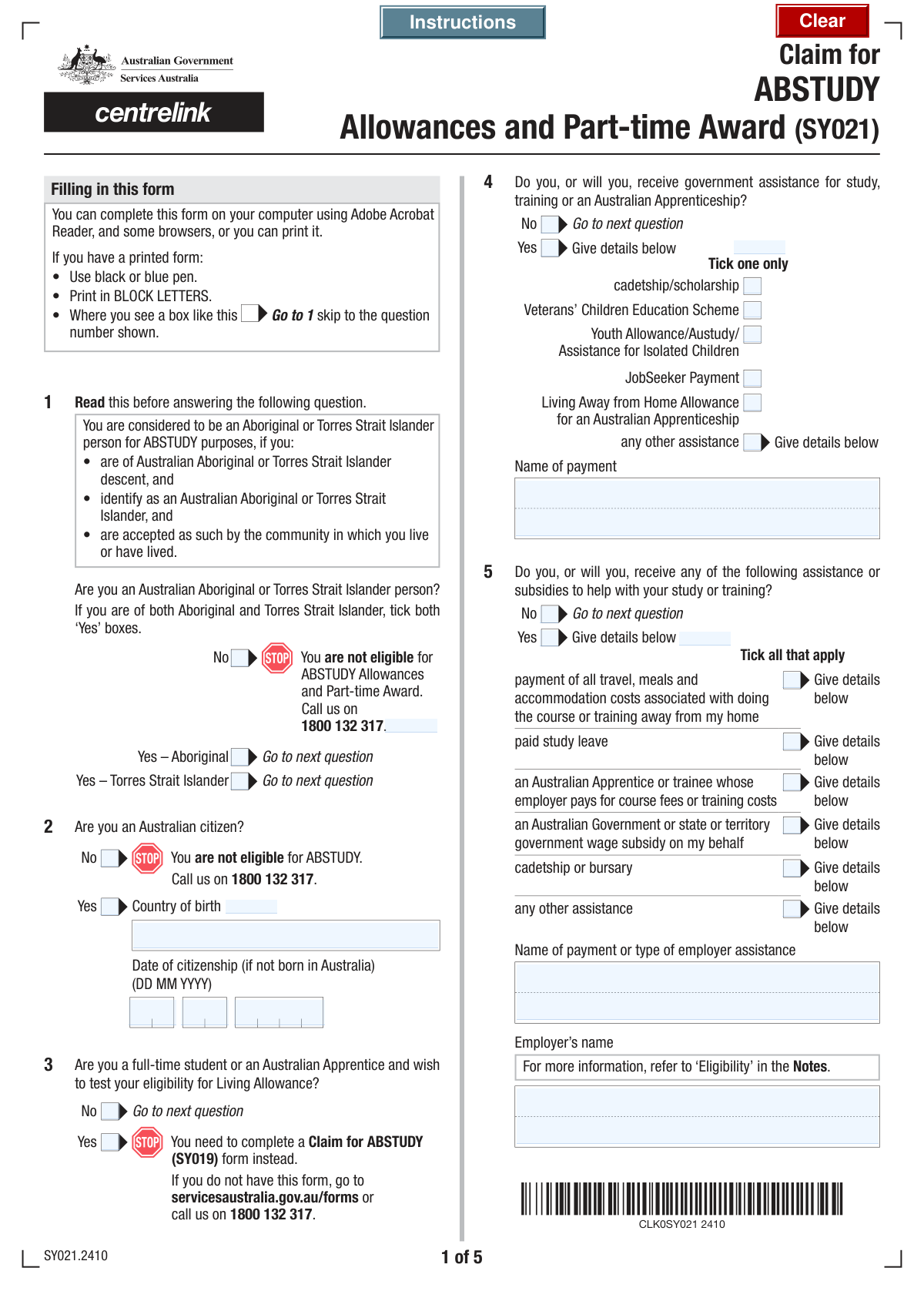
Yes! You can use AI to fill out Form SY019, Claim for ABSTUDY

Form SY019, Claim for ABSTUDY, is a document provided by Services Australia for Aboriginal and Torres Strait Islander people to apply for payments that help with the costs of studying or training. This financial support is crucial for enabling access to education and apprenticeships by covering expenses like course fees, living costs, and travel. Today, this form can be filled out quickly and accurately using AI-powered services like Instafill.ai, which can also convert non-fillable PDF versions into interactive fillable forms.
SY019 is part of the VA claim forms category on Instafill.
Our AI automatically handles information lookup, data retrieval, formatting, and form filling.
It takes less than a minute to fill out SY019 using our AI form filling.
Securely upload your data. Information is encrypted in transit and deleted immediately after the form is filled out.

Form specifications

Form name: Form SY019, Claim for ABSTUDY
Number of fields: 160
Number of pages: 9
Filled form examples: Form SY019 Examples
Language: English
main-image

Instafill Demo: How to fill out PDF forms in seconds with AI

How to Fill Out SY019 Online for Free in 2026

Are you looking to fill out a SY019 form online quickly and accurately? Instafill.ai offers the #1 AI-powered PDF filling software of 2026, allowing you to complete your SY019 form in just 37 seconds or less.
Follow these steps to fill out your SY019 form online using Instafill.ai:
  1. 1 Navigate to Instafill.ai and upload or select the SY019 Claim for ABSTUDY form.
  2. 2 Use the AI assistant to fill in your personal details, including your name, date of birth, contact information, and Customer Reference Number (CRN).
  3. 3 Provide your citizenship details and confirm your Aboriginal or Torres Strait Islander status.
  4. 4 Enter comprehensive details about your course of study or Australian Apprenticeship, including the institution, course title, and dates.
  5. 5 Declare any other government assistance, subsidies, or income you receive to determine your eligibility for specific allowances.
  6. 6 Input your bank account details for payment processing and provide your Tax File Number (TFN).
  7. 7 Carefully review all entered information for accuracy, complete the declaration, and submit the form as per the instructions.

Our AI-powered system ensures each field is filled out correctly, reducing errors and saving you time.

Why Choose Instafill.ai for Your Fillable SY019 Form?

Speed

Complete your SY019 in as little as 37 seconds.

Up-to-Date

Always use the latest 2026 SY019 form version.

Cost-effective

No need to hire expensive lawyers.

Accuracy

Our AI performs 10 compliance checks to ensure your form is error-free.

Security

Your personal information is protected with bank-level encryption.

Frequently Asked Questions About Form SY019

This form is used to claim student and apprentice assistance, such as ABSTUDY allowances, by collecting your personal, study, and financial details to assess your eligibility.

This form is for students and Australian Apprentices, particularly those identifying as Aboriginal or Torres Strait Islander, who wish to apply for government financial assistance for their studies or training.

The form provides separate checkboxes for 'Yes - Aboriginal' and 'Yes - Torres Strait Islander'. You should check both boxes if you identify as both.

You should check 'Yes' for being an Australian citizen, enter your country and city of birth, and then provide the date you officially became a citizen in the fields provided.

You may need to provide proof of enrolment in your course, proof of selection for a STARTUP-HELP loan, or an authorisation form (SS313). The checklist near the end of the form will guide you on what specific documents are required for your situation.

Yes, in the 'Government Assistance for Study' section, you must indicate that you receive other government assistance and check the box for 'JobSeeker Payment'.

The form allows you to indicate that you do not have a TFN. However, payments may be taxed at a higher rate without one, so it is recommended to apply for a TFN with the Australian Taxation Office.

Your permanent address is the address of the home where you live. Your postal address is where you want to receive mail, which could be a PO Box or a different location.

You will need to provide the course title, the institution name, the location and dates of the interview, and declare if you are receiving any other financial assistance to attend.

This allows another person or organisation to make enquiries, update your details, and manage your payments for you. If you select 'Yes', you will need to submit the 'Authorising a person or organisation to enquire or act on your behalf (SS313)' form.

Yes, services like Instafill.ai use AI to accurately auto-fill form fields from your saved profile, which can save you significant time and help reduce errors.

Simply upload the form to Instafill.ai, and its AI will identify the fields and automatically populate them with your information. You can then review, edit, and complete the rest of the form digitally.

You can use a service like Instafill.ai, which can convert flat, non-fillable PDFs into interactive, fillable forms for you to complete easily on your computer or mobile device.

Compliance SY019
Validation Checks by Instafill.ai

1
Mutually Exclusive Aboriginal or Torres Strait Islander Status
This check ensures that the applicant does not select 'No' for Aboriginal or Torres Strait Islander Status while also selecting 'Yes - Aboriginal' or 'Yes - Torres Strait Islander'. These options are mutually exclusive and selecting both creates a logical contradiction. If validation fails, the user must correct their selection to reflect a single, clear status, as this is critical for determining eligibility for specific programs like ABSTUDY.
2
Conditional Citizenship Date Requirement and Validity
This validation verifies that the 'Citizenship Date' fields are completed only if the 'Country of Birth' is not 'Australia'. It also confirms the entered day, month, and year form a valid, logical date that is not in the future and occurs after the applicant's date of birth. This is important for establishing the timeline of citizenship for non-Australian born citizens. Failure will prompt the user to either remove the date if born in Australia or correct the invalid date.
3
Government Assistance Specification
This check ensures that if an applicant indicates 'Yes' to receiving 'Government Assistance for Study', they must select at least one specific type of assistance from the provided list. Furthermore, if 'Any other assistance' is checked, the 'Name of Payment' text field must be completed. This prevents incomplete data submission and ensures the agency knows exactly what other benefits are being received, which is crucial for calculating entitlements. A failure would require the user to provide the missing details.
4
Date of Birth Validity and Plausibility
This validation confirms that the 'Day of Birth', 'Month of Birth', and 'Year of Birth' fields combine to form a valid calendar date. It also checks that the date is in the past and falls within a reasonable age range for a student or apprentice (e.g., older than 14 and younger than 100). This is a fundamental identity check required for all processing and eligibility calculations. An invalid or implausible date will block submission until corrected.
5
Study Period Chronology
This check validates that the 'Study Finish Date' is chronologically after the 'Study Start Date'. It is illogical for a course to end before it begins, and this check prevents data entry errors. Correct study dates are essential for determining the period for which allowances are payable. If the finish date is before the start date, the user will be prompted to correct one or both dates.
6
Australian BSB Number Format
This validation ensures that the 'Branch Number (BSB)' for the bank account is exactly six digits and contains only numbers. The BSB is a critical component for routing payments correctly to the applicant's bank account. An incorrectly formatted BSB will result in payment failure. The system should reject any input that does not meet the 6-digit numeric format.
7
Tax File Number (TFN) Format
This check verifies that the combined Tax File Number segments ('Segment 1' through 'Segment 4') form a valid 9-digit number. A TFN is required for the Australian Taxation Office (ATO) and affects the tax rate on government payments. Submitting an incorrectly formatted TFN can cause payment and tax complications. The validation will fail if the total number of digits is not nine.
8
Conditional Requirement for Other Names
This validation ensures that if the applicant selects 'Yes' for the 'Other Names Inquiry', they must provide details in the 'First Other Name' and 'Type of First Other Name' fields. This information is vital for identity verification and cross-referencing records across different systems or life events (e.g., name before marriage). If 'Yes' is checked but no names are provided, the form submission will be blocked until the details are entered.
9
Email Address Format Validation
This check verifies that the value entered in the 'Email Address' field follows the standard format for an email address (e.g., '[email protected]'). A valid email is a primary method of communication for sending notifications, requests for information, and confirmations. An invalid email address would prevent the applicant from receiving important correspondence, so the system must enforce the correct format.
10
Australian Postcode Format
This validation ensures that the 'Postcode' fields for both the permanent and postal addresses contain exactly four digits. Australian postcodes are a standard 4-digit format, and this is essential for mail delivery and geographic-based eligibility assessments. Any entry that is not four numeric digits will be flagged as an error, requiring the user to correct it for the address to be considered valid.
11
Mandatory Declaration and Valid Date
This check ensures the 'I have read, understood and agree to the above' declaration checkbox is ticked before the form can be submitted. It also validates that the provided 'Declaration Date' is a valid calendar date that is not in the future. The declaration is a legal requirement confirming the accuracy of the provided information, and an undated or future-dated declaration is invalid. Submission is blocked until the declaration is checked and a valid date is entered.
12
Conditional Employer Details for Assistance
This validation rule ensures that if an applicant checks any box under 'Other Study Assistance or Subsidies' (e.g., 'Paid Study Leave', 'Employer Pays Course/Training Costs'), the 'Employer's Name' field must be filled out. This information is necessary to verify the source of the assistance and may impact the applicant's eligibility for government benefits. Failure to provide the employer's name when assistance is indicated will result in an error message.
13
Apprenticeship Date Chronology
This check validates that the 'Apprenticeship/Traineeship Expected End Date' occurs after the 'Apprenticeship/Traineeship Start Date'. This ensures the entered timeline for the apprenticeship is logical and prevents simple data entry mistakes. Accurate dates are critical for calculating the duration of eligibility for related allowances. If the end date is not after the start date, the user must correct the dates before proceeding.
14
Conditional Financial Assistance Details
This validation ensures that if an applicant answers 'Yes' to receiving 'Financial Assistance For Interview', the 'Financial Assistance Details' field must be completed. This information is required to assess whether the applicant's need is already being met by another source, which affects eligibility for ABSTUDY assistance for the same purpose. The form will be considered incomplete if 'Yes' is selected without providing the corresponding details.

Common Mistakes in Completing SY019

Ignoring Conditional Field Logic

Many fields on this form have instructions like 'Fill only if Yes is Yes'. Applicants frequently miss these instructions, either filling out sections that don't apply to them or skipping sections that are required based on a previous answer. This creates conflicting or incomplete data, leading to processing delays or rejection. To avoid this, read each field's instructions carefully. AI-powered tools like Instafill.ai can automatically show or hide relevant fields based on your answers, preventing this type of error.

Incomplete Government Assistance Details

A common error is checking 'Yes' for receiving government assistance but then failing to select the specific type of assistance from the sub-list (e.g., JobSeeker Payment, Youth Allowance). Similarly, if an applicant selects 'Any other assistance', they often forget to provide the name of the payment in the designated text field. This omission creates ambiguity and requires the processing agency to follow up, delaying the application. Always ensure that after a 'Yes' response, all subsequent required details are fully provided.

Confusing Bank Account Number with Card Number

Applicants often incorrectly enter their 16-digit debit or credit card number in the 'Account Number' field instead of their actual bank account number. This happens because people are more familiar with their card number for daily transactions, despite the form's warning. This mistake guarantees payment failure and will significantly delay receiving any approved funds until the correct details are provided. To prevent this, locate your BSB and Account Number on a bank statement or by logging into your online banking.

Forgetting to Attach Required Checklist Documents

The form includes a checklist for essential supporting documents, such as 'proof of enrolment' or the 'Authorising a person... (SS313)' form. Applicants frequently overlook this section and submit the form without the necessary attachments. This is a critical error that halts the assessment process entirely, as the claim cannot be verified without the required proof. Before submitting, always review the checklist section and ensure all relevant documents are included with your application.

Incorrectly Splitting Numbered Identifiers

Fields for the Customer Reference Number (CRN) and Tax File Number (TFN) are broken into multiple smaller boxes. Users often make errors by entering the entire number in the first box, misaligning the digits across the boxes, or making simple transcription errors. This can prevent the system from identifying the applicant correctly or validating their TFN, leading to processing failures. It is crucial to carefully enter the digits in their corresponding segments as shown on your official documents.

Providing Vague Course and Institution Details

In the 'Primary Study Details' section, applicants may provide a generic 'Course Title' (e.g., 'Business') instead of the exact title (e.g., 'Bachelor of Business Administration'). They might also use an abbreviation for the 'Institution Name' or forget to include the suburb. This lack of specificity makes it difficult for the agency to verify the course and institution eligibility, often requiring a follow-up call and delaying the claim. Always use the full, official titles and names as they appear on your enrolment documents.

Incomplete or Missing Declaration

The final declaration is one of the most critical parts of the form, yet it is commonly left incomplete. Applicants may forget to check the 'I have read...' box, enter the date, or provide a signature for paper submissions. An incomplete declaration legally invalidates the entire application, meaning it cannot be processed under any circumstances. Always triple-check that the declaration box is ticked, dated correctly, and signed (if required) before considering the form complete.

Incorrectly Filling Citizenship Details

Applicants born in Australia often mistakenly fill out the 'Citizenship Date' fields, which are explicitly marked to be filled only by applicants born outside of Australia. This error occurs from not reading the conditional instructions carefully and can lead to unnecessary data entry and potential confusion during processing. To avoid this, applicants should pay close attention to 'Fill only if...' prompts, ensuring they only complete sections relevant to their specific circumstances.

Misunderstanding the 'Other Names' Section

Applicants who have been known by other names (e.g., name at birth, previous married name) sometimes check 'Yes' but then fail to provide the details in the subsequent fields. Conversely, some may misunderstand the scope and not declare a legally used previous name, causing issues with identity verification. It's essential to declare all previous names and specify their type to ensure a smooth identity check and prevent delays.

Failing to Specify 'Other' Assistance Types

The form contains multiple sections for 'Other Study Assistance' and 'Government Assistance' where users can check 'Any Other Assistance'. A frequent mistake is ticking this box but failing to provide the required explanation in the corresponding text field, such as 'Name of Payment' or 'Payment or Employer Assistance Type'. This leaves the application incomplete and requires manual follow-up. Always provide a clear and concise description whenever you select an 'Other' category.
Saved over 80 hours a year

“I was never sure if my IRS forms like W-9 were filled correctly. Now, I can complete the forms accurately without any external help.”

Kevin Martin Green

Your data stays secure with advanced protection from Instafill and our subprocessors

Robust compliance program

Transparent business model

You’re not the product. You always know where your data is and what it is processed for.

ISO 27001, HIPAA, and GDPR

Our subprocesses adhere to multiple compliance standards, including but not limited to ISO 27001, HIPAA, and GDPR.

Security & privacy by design

We consider security and privacy from the initial design phase of any new service or functionality. It’s not an afterthought, it’s built-in, including support for two-factor authentication (2FA) to further protect your account.

Fill out SY019 with Instafill.ai

Worried about filling PDFs wrong? Instafill securely fills form-sy019-claim-for-abstudy forms, ensuring each field is accurate.