Yes! You can use AI to fill out Form SY042 - Claim for Mobility Allowance
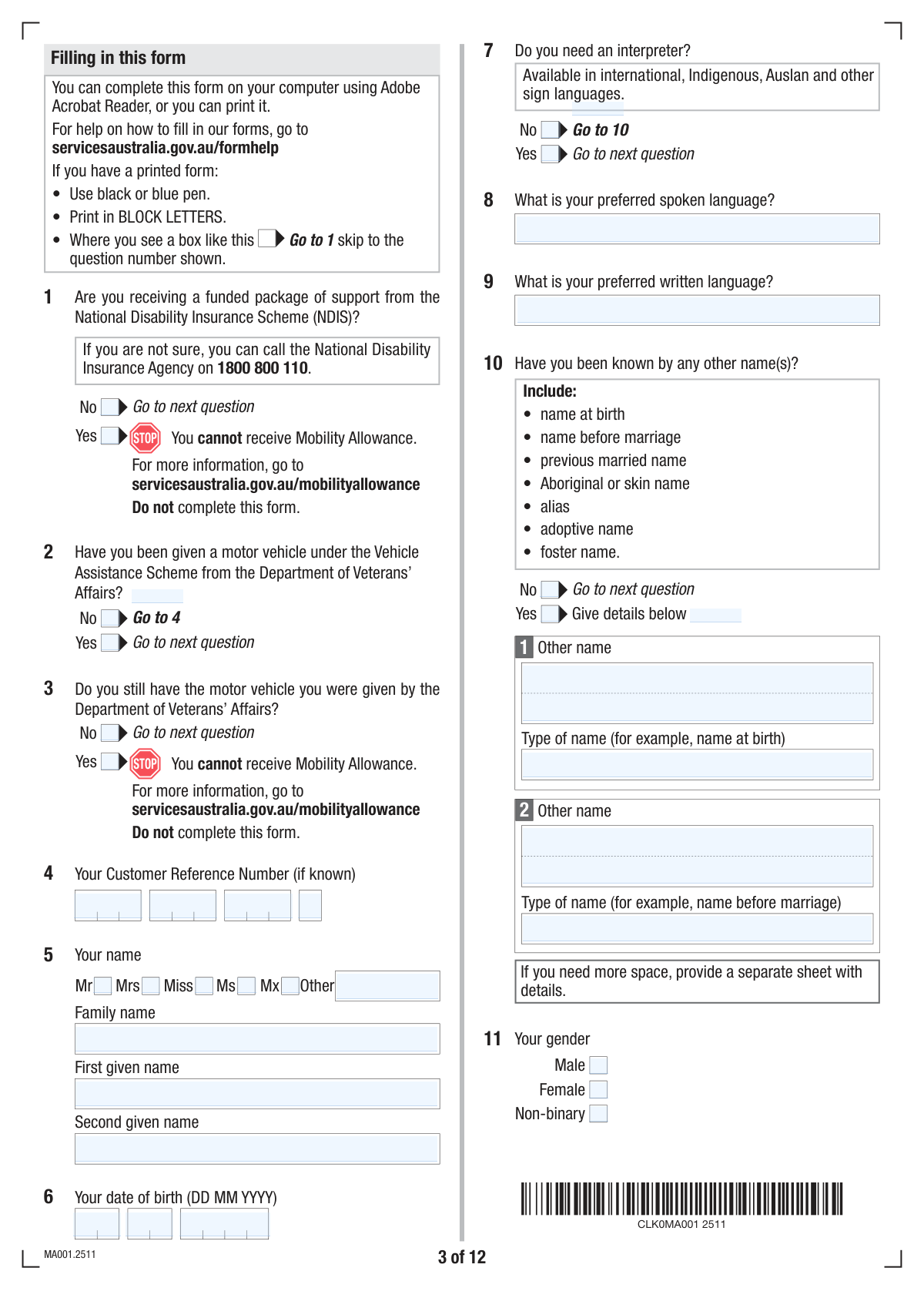
Form SY042, Claim for Mobility Allowance, is an official document from Services Australia used to apply for a payment that helps eligible individuals with the costs of travel for work, study, or job searching. It is intended for people with a disability, illness, or injury who cannot use public transport without substantial assistance and are engaged in approved activities. Completing this comprehensive form accurately is crucial for accessing this support. Today, this form can be filled out quickly and accurately using AI-powered services like Instafill.ai, which can also convert non-fillable PDF versions into interactive fillable forms.
SY042 is part of the
VA claim forms category on Instafill.
Our AI automatically handles information lookup, data retrieval, formatting, and form filling.
It takes less than a minute to fill out SY042 using our AI form filling.
Securely upload your data. Information is encrypted in transit and deleted immediately after the form is filled out.
Form specifications
| Form name: | Form SY042 - Claim for Mobility Allowance |
| Number of fields: | 381 |
| Number of pages: | 22 |
| Filled form examples: | Form SY042 Examples |
| Language: | English |
More forms in VA claim forms
Instafill Demo: How to fill out PDF forms in seconds with AI
How to Fill Out SY042 Online for Free in 2026
Are you looking to fill out a SY042 form online quickly and accurately? Instafill.ai offers the #1 AI-powered PDF filling software of 2026, allowing you to complete your SY042 form in just 37 seconds or less.
Follow these steps to fill out your SY042 form online using Instafill.ai:
- 1 Navigate to Instafill.ai and upload or select the 'Claim for Mobility Allowance (SY042)' form.
- 2 Provide your personal details, including your name, date of birth, contact information, and Customer Reference Number (CRN).
- 3 Answer questions about your residency and citizenship status, including any travel history and visa details if applicable.
- 4 Detail your participation in approved activities, such as employment, self-employment, vocational training, or job searching, providing employer or provider information as required.
- 5 Input your bank account details for payment and indicate your preference for receiving the allowance.
- 6 Review all the information pre-filled by the AI for accuracy, make any necessary corrections, and check the required document boxes.
- 7 Sign the declaration electronically and submit the completed form as instructed.
Our AI-powered system ensures each field is filled out correctly, reducing errors and saving you time.
Why Choose Instafill.ai for Your Fillable SY042 Form?
Speed
Complete your SY042 in as little as 37 seconds.
Up-to-Date
Always use the latest 2026 SY042 form version.
Cost-effective
No need to hire expensive lawyers.
Accuracy
Our AI performs 10 compliance checks to ensure your form is error-free.
Security
Your personal information is protected with bank-level encryption.
Frequently Asked Questions About Form SY042
This form is used to collect comprehensive personal, residency, financial, and activity information to assess your eligibility for Australian government payments, support, or services.
Individuals applying for or updating their details for government support, such as those involved in job seeking, vocational training, or who have specific residency or disability support circumstances, need to complete this form.
Yes, you still need to answer them. Simply check the 'No' box for the relevant questions to indicate that these circumstances do not apply to you.
This information is essential for the agency to verify that you meet the residency requirements for the payment or service you are claiming. Your citizenship status, visa type, and time spent in Australia are key eligibility criteria.
Refer to the checklist at the end of the form. You may need to provide identity documents, proof of employment, details of vocational training, or evidence of your job search activities, depending on your answers.
The form has space for two employers. You should fill in the details for your primary two jobs and attach a separate sheet with the same required information for any additional employers.
By checking 'Yes' for third-party authorization and submitting the required SS313 form, you permit a nominated person or organization to inquire, make updates, and act for you regarding your claim, which can be helpful if you need assistance.
This option allows you to receive an advance payment equivalent to six months of your benefit in one go. Carefully consider this, as accepting a lump sum will affect your future periodic payments.
Your Customer Reference Number (CRN) is a unique ID typically found on letters, statements, or cards from the issuing government agency (e.g., Centrelink). If you cannot locate it, you should contact the agency directly.
Yes, services like Instafill.ai use AI to accurately auto-fill form fields with your information, which can save you significant time and help reduce errors.
To use Instafill.ai, upload the form to their platform. The service will make the form fillable online, and you can use its features to auto-populate your details before downloading the completed document.
If you have a non-fillable or 'flat' PDF, you can use a service like Instafill.ai. It can convert the static document into an interactive, fillable form, allowing you to type your answers directly into the fields.
Your permanent address is your main residential address where you live. Your postal address is where you wish to receive mail, which can be the same as your permanent address or different, such as a P.O. Box.
Compliance SY042
Validation Checks by Instafill.ai
1
Ensures Mutually Exclusive Options are not Co-selected
This validation checks that for any question with opposing 'Yes' and 'No' options, only one can be selected at a time. For example, a user cannot select both 'Yes' and 'No' for the 'NDIS Support Status'. This prevents contradictory data entry and ensures the form logic can proceed correctly. If both are selected, an error message should prompt the user to choose only one option.
2
Verifies Date of Birth is a Valid and Plausible Date
This validation combines the 'Date of Birth Day', 'Month', and 'Year' fields to ensure they form a valid calendar date. It also checks that the date is in the past and that the applicant's age is within a reasonable range (e.g., over 16 and under 120 years old). This prevents data entry errors and ensures eligibility criteria related to age can be accurately assessed.
3
Validates Conditional Completion of 'Other Names' Details
This check ensures that if the user selects 'Yes' for 'Known By Other Names', they must provide details in at least the 'Other Name 1' and 'Other Name Type' fields. This is important for identity verification and cross-referencing records. If 'Yes' is selected but no details are provided, the submission should be blocked with a message requiring the information.
4
Ensures BSB Number is in Valid Australian Format
This check validates that the 'BSB Number' field contains exactly 6 digits, which is the standard for Australian bank branch identifiers. It is critical for ensuring payments can be processed correctly by financial institutions. An invalid BSB will result in a failed transaction, delaying payments to the applicant, so the validation should reject any input that is not a 6-digit number.
5
Validates Australian Business Number (ABN) Format and Checksum
This validation ensures the combined ABN segments form a valid 11-digit number and pass the official ABN checksum algorithm. This confirms the ABN is a legitimately structured number, which is crucial for verifying employer details. An invalid ABN could indicate a data entry error or a non-existent business, requiring correction before the form can be processed.
6
Ensures Finish Dates are After Start Dates
This check applies to multiple sections, such as 'Vocational Training', 'Employment', and 'Voluntary Work'. It verifies that the 'Expected Finish Date' is chronologically after the 'Start Date'. This maintains logical data integrity and prevents nonsensical date ranges. If the finish date is before the start date, an error should be displayed, prompting the user to correct the dates.
7
Validates Interpreter Details are Provided when Required
This validation rule checks that if a user selects 'Yes' for 'Interpreter Requirement', they must provide information in either the 'Preferred Spoken Language' or 'Preferred Written Language' field. This ensures that the agency can arrange the correct support for the applicant. If 'Yes' is checked without specifying a language, the form should prompt the user to provide the necessary details.
8
Enforces Citizenship Grant Date for Citizens Born Overseas
This check is triggered if the user selects 'No' for 'Australian Citizen Born in Australia Check' but 'Australia' for their country of citizenship. It makes the 'Australian Citizenship Granted Day/Month/Year' fields mandatory. This logic is essential for verifying the applicant's citizenship status and history. Failure to provide this date when required would result in an incomplete application.
9
Validates 'Current Motor Vehicle Status' Dependency
This validation ensures that the 'Current Motor Vehicle Status' question is only answered if the user has first indicated 'Yes' to receiving a vehicle under the 'Vehicle Assistance Scheme'. This enforces a logical flow and prevents users from providing irrelevant information. The system should hide or disable the dependent question until the prerequisite is met.
10
Ensures Declaration is Agreed to Before Signing
This validation confirms that the 'Declaration Day', 'Declaration Month', 'Declaration Year', and 'Signature' fields are only completed after the user has checked the 'I have read, understood and agree to the above.' box. This is a critical legal step to ensure the applicant's consent is captured correctly. The date and signature fields should remain disabled until the agreement checkbox is ticked.
11
Validates Australian Postcode Format
This check verifies that the 'Postcode' fields for all Australian addresses (permanent, postal, employer, etc.) contain a valid 4-digit number. Correct postcodes are essential for mail delivery and for demographic or service area analysis. The system should flag any entry that is not four digits as an error.
12
Validates 'Last Entry Details' are Provided After Indicating Travel
This check ensures that if a user answers 'Yes' to 'Travel Outside Australia Check', the subsequent fields for 'Year of Last Entry', 'Passport Number', and 'Passport Country of Issue' become mandatory. This information is vital for assessing residency status and eligibility for certain benefits. If 'Yes' is selected but the details are missing, the form submission should be blocked until the information is provided.
13
Ensures Work Hours Consistency
This validation applies to employment sections where both 'Bi-weekly Work Hours' and 'Four-weekly Work Hours' are requested. The four-weekly total should be approximately double the bi-weekly total. This check helps catch data entry errors and ensures the reported work hours are logical and consistent. A significant discrepancy should trigger a warning or require confirmation from the user.
14
Validates Email Address Syntax
This check verifies that the value entered in the 'Email Address' field conforms to the standard format for email addresses (e.g., [email protected]). A valid email address is crucial for sending notifications, confirmations, and other important communications to the applicant. The validation should reject entries that lack an '@' symbol or a valid domain structure.
Common Mistakes in Completing SY042
This form contains many fields with conditional logic, such as 'Fill only if Yes is Yes'. A frequent error is either filling out a detailed section after selecting 'No', or selecting 'Yes' and then forgetting to provide the required follow-up information. This leads to contradictory or incomplete data, causing processing delays while the agency requests clarification. To avoid this, carefully read the instructions for each question and only fill in the fields that apply to your answer. AI-powered tools like Instafill.ai can help by automatically showing or hiding relevant sections based on your answers, preventing this error.
Fields like the 'Customer Reference Number' and 'Australian Business Number (ABN)' are split into multiple smaller boxes. Applicants often try to enter the entire number into the first box, which can cause data truncation or validation errors. This mistake happens due to haste or not noticing the segmented format. The consequence is that critical identifying numbers are recorded incorrectly, potentially leading to a rejection or misdirection of the application. Always enter the number segments exactly as they appear on your source documents, one segment per box.
The form requests both a 'permanent address' and a 'postal address'. People sometimes fill in only one, assuming they are interchangeable, or incorrectly copy the permanent address into the postal address fields even when they use a PO Box. This can result in important correspondence being sent to the wrong location and missed deadlines or information. Carefully provide both addresses if they are different, and double-check that the postal address is where you want to receive mail regarding your application.
The 'Known By Other Names' section is critical for identity verification but is often overlooked or incompletely filled out. Applicants may forget to include maiden names, names from previous marriages, legal name changes, or aliases. This omission can cause a mismatch with other government records, flagging the application for a manual review and requiring the applicant to provide additional identity documents, thereby delaying the process. It is crucial to list all names you have been legally known by.
The section on citizenship and visa history is complex, with nested questions about country of birth, visa subclass, and changes since arrival. Common mistakes include guessing the visa subclass number, providing an incorrect visa grant date, or misunderstanding the difference between a temporary and permanent visa. These errors can seriously impact the assessment of your eligibility and residency status, potentially leading to a denial. It is vital to refer to your official immigration documents (passport, visa grant notices) to ensure every detail is accurate.
Several sections ask for work, study, or training hours over a '2-week' or '4-week' period. A common mistake is to provide a weekly average instead of the requested total, or to provide conflicting numbers between different sections of the form. This happens when people estimate rather than calculate. Inaccurate reporting of hours can affect eligibility for certain payments or support levels. To prevent this, calculate the total hours for the specified period before filling out the form.
The form makes clear distinctions between paid employment, self-employment, voluntary work, vocational training, and job search activities. Applicants may misclassify their activities, for example, listing court-ordered community service as 'voluntary work' or not realizing their job falls under the 'Supported Wage System'. Such misclassification can lead to being assessed under the wrong criteria, affecting obligations and payment eligibility. Carefully read the definitions for each category before selecting your answer.
Many questions provide an 'Other' checkbox followed by a text field for explanation (e.g., 'Other Title', 'Other Country of Residence'). A frequent oversight is to check the 'Other' box but then neglect to fill in the required clarification in the corresponding text field. This leaves the form incomplete and forces the processing agent to guess or follow up for the missing information, causing delays. If you select 'Other', always ensure you provide the specific details in the space provided.
The checklist at the end of the form is a final confirmation of the supporting documents being submitted. Applicants often rush this section and either forget to tick the boxes for the documents they have included or, more critically, forget to attach the required documents themselves. An application submitted without the necessary proof (e.g., identity documents, proof of employment) is considered incomplete and will not be processed until all required items are received. Always use the checklist to ensure your submission is complete.
The form consistently breaks dates into separate 'Day', 'Month', and 'Year' fields, often requiring a two-digit format for day and month (e.g., '07' for July). Common errors include entering a single digit (e.g., '7'), putting the full date in the 'Day' field, or transposing the day and month. These formatting errors can cause data entry failure in digital systems or lead to significant misinterpretation of key dates like birth, arrival, or employment start dates. Advanced form-filling tools like Instafill.ai can automatically format dates correctly, and if the form is a non-fillable PDF, Instafill.ai can convert it into an interactive version to guide proper entry.
Saved over 80 hours a year
“I was never sure if my IRS forms like W-9 were filled correctly. Now, I can complete the forms accurately without any external help.”
Kevin Martin Green
Your data stays secure with advanced protection from Instafill and our subprocessors

Robust compliance program
Transparent business model
You’re not the product. You always know where your data is and what it is processed for.
ISO 27001, HIPAA, and GDPR
Our subprocesses adhere to multiple compliance standards, including but not limited to ISO 27001, HIPAA, and GDPR.
Security & privacy by design
We consider security and privacy from the initial design phase of any new service or functionality. It’s not an afterthought, it’s built-in, including support for two-factor authentication (2FA) to further protect your account.
Fill out SY042 with Instafill.ai
Worried about filling PDFs wrong? Instafill securely fills form-sy042-claim-for-mobility-allowance forms, ensuring each field is accurate.



