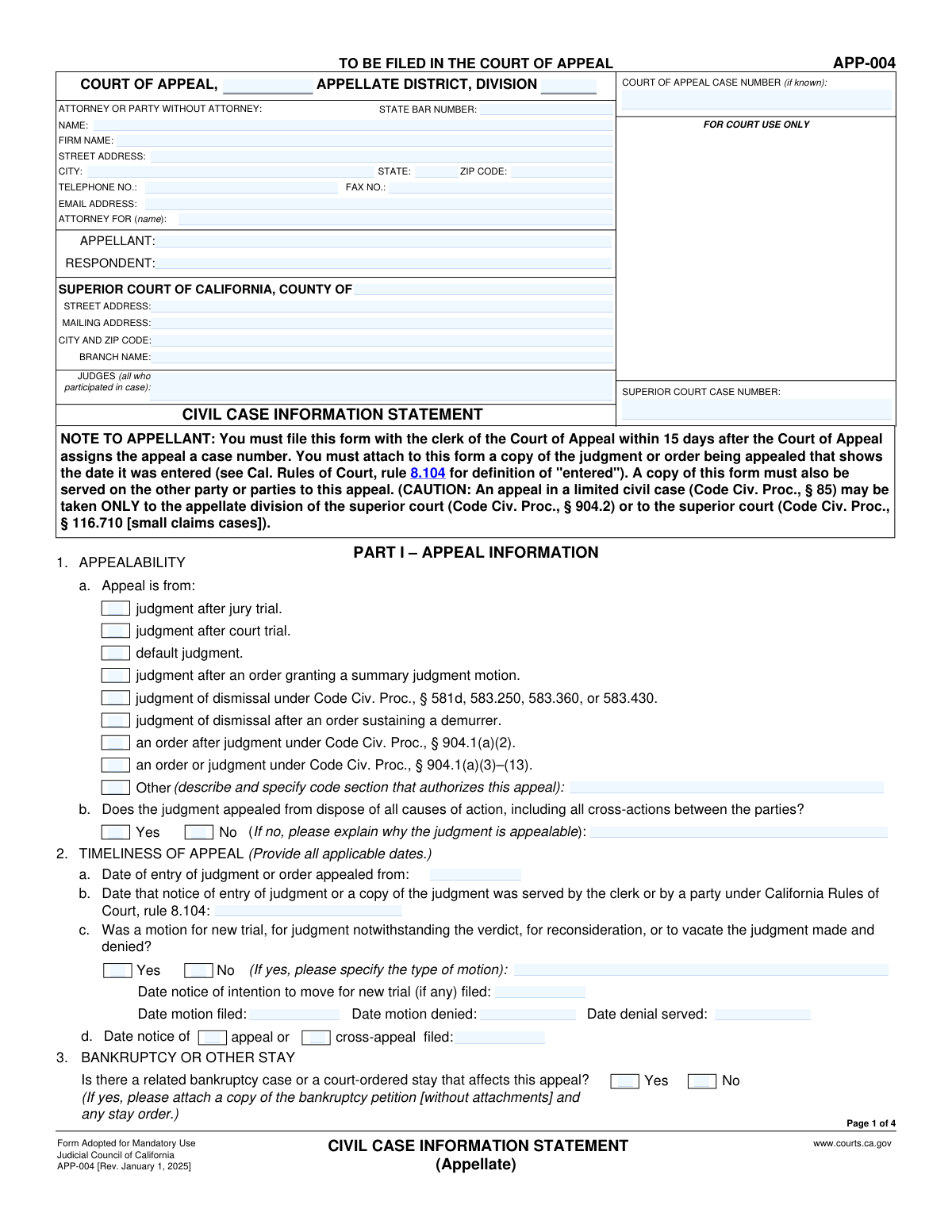
Yes! You can use AI to fill out Form APP-004, Civil Case Information Statement (Appellate)
Form APP-004, the Civil Case Information Statement (Appellate), is a mandatory document filed in the California Court of Appeal at the beginning of a civil appeal. It provides the court with a summary of the case, including the parties involved, the nature of the judgment or order being appealed, and procedural history, which helps the court manage its docket and identify any potential issues early on. Today, this form can be filled out quickly and accurately using AI-powered services like Instafill.ai, which can also convert non-fillable PDF versions into interactive fillable forms.
Our AI automatically handles information lookup, data retrieval, formatting, and form filling.
It takes less than a minute to fill out APP-004 using our AI form filling.
Securely upload your data. Information is encrypted in transit and deleted immediately after the form is filled out.
Form specifications
| Form name: | Form APP-004, Civil Case Information Statement (Appellate) |
| Number of fields: | 215 |
| Number of pages: | 4 |
| Language: | English |
| Categories: | NJ state forms, PA state forms |
Instafill Demo: How to fill out PDF forms in seconds with AI
How to Fill Out APP-004 Online for Free in 2026
Are you looking to fill out a APP-004 form online quickly and accurately? Instafill.ai offers the #1 AI-powered PDF filling software of 2026, allowing you to complete your APP-004 form in just 37 seconds or less.
Follow these steps to fill out your APP-004 form online using Instafill.ai:
- 1 Navigate to Instafill.ai and upload or select Form APP-004, the Civil Case Information Statement.
- 2 Provide the case details, including the Court of Appeal and Superior Court case numbers, and information about the attorneys and parties involved.
- 3 Specify the reason for the appeal by selecting the type of judgment or order being appealed from the provided list.
- 4 Enter key dates related to the judgment, notice of entry, and any post-judgment motions that were filed.
- 5 Describe the nature of the underlying action (e.g., contract, tort, family law) and disclose any related appellate cases.
- 6 Complete the Proof of Service section to declare that all parties have been properly served with the statement.
- 7 Review all AI-populated fields for accuracy, then download, print, or e-file the completed Form APP-004 as required by the court.
Our AI-powered system ensures each field is filled out correctly, reducing errors and saving you time.
Why Choose Instafill.ai for Your Fillable APP-004 Form?
Speed
Complete your APP-004 in as little as 37 seconds.
Up-to-Date
Always use the latest 2026 APP-004 form version.
Cost-effective
No need to hire expensive lawyers.
Accuracy
Our AI performs 10 compliance checks to ensure your form is error-free.
Security
Your personal information is protected with bank-level encryption.
Frequently Asked Questions About Form APP-004
This form provides the California Court of Appeal with essential information about your civil case, including the parties involved, the reason for the appeal, and the case history. It helps the court manage the appeal process efficiently.
The appellant, who is the party initiating the appeal, must complete and file this form. A copy must also be served on all other parties involved in the case.
The Superior Court case number is on all documents from the original trial. The Court of Appeal will assign its case number after you file the Notice of Appeal, which you should then add to this form.
Review the final judgment or order from the Superior Court and select the box that accurately describes the decision you are appealing. If your reason isn't listed, check 'Other' and provide the specific code section that authorizes your appeal.
This means the lower court's decision is final and resolves all claims between the parties in the lawsuit. If the judgment is not final, you must provide a detailed legal explanation for why the order is still appealable.
Your 'Trial Court Designation' was your role in the original case (e.g., Plaintiff, Defendant). Your 'Appellate Court Designation' is your role in the appeal (e.g., Appellant, Respondent).
In the party information sections, check the 'Self-represented' box. You can then leave the fields for Attorney Name, State Bar Number, and Firm Name blank and fill in your own contact information.
The Proof of Service must be completed and signed by a person who is over 18 and not a party to the case. This person is the one who mails, personally delivers, or electronically serves the form on the other parties.
You must serve a public agency if your case involves specific issues listed in the 'Service Requirements' section, such as a constitutional challenge or claims under the False Claims Act. If you are unsure, consult the listed statutes or seek legal advice.
The form has sections for up to four parties. If your case involves more, check the 'Additional pages attached' box and provide the required information for the other parties on a separate sheet of paper.
Yes, services like Instafill.ai use AI to accurately auto-fill form fields from your case documents. This can save you significant time and help prevent common errors.
You can use a service like Instafill.ai to upload the form and fill it out digitally. Instafill.ai provides an easy-to-use interface to complete, sign, and manage your legal forms online.
If you have a non-fillable or 'flat' PDF, you can upload it to a service like Instafill.ai. The platform can convert it into an interactive, fillable form that you can easily complete on your computer.
This means your case may be heard by the court sooner than others due to a specific law, for example, in cases involving minors or elections. If you believe your case qualifies, check the box and provide the specific legal authority.
Compliance APP-004
Validation Checks by Instafill.ai
Common Mistakes in Completing APP-004
Users often incorrectly place the Superior Court case number in the field for the Court of Appeal case number, or vice versa. This happens because both numbers are prominent on case documents, and filers can be in a hurry. This error can cause significant administrative delays, lead to misfiling of the document, and require corrective filings, as the case numbers are the primary identifiers used by the court clerks to route documents.
This form contains numerous conditional fields, such as the 'Explanation for Appealability' required if a user selects 'No' for 'Judgment Disposition'. People frequently check the 'Yes' or 'No' box but overlook the subsequent field that requires a detailed explanation or specific information. This omission can render the form incomplete and may lead to the court issuing a notice of defect or even striking the document, jeopardizing the appeal's standing. AI-powered tools like Instafill.ai can prevent this by automatically highlighting or requiring completion of dependent fields based on user selections.
The 'Reason for Appeal' section requires selecting the precise legal ground for the appeal, often tied to a specific Code of Civil Procedure section. Filers, especially those without legal training, may select the wrong type of judgment or order, or check 'Other' without providing the mandatory statutory authorization. An incorrect basis can lead to a challenge to the court's jurisdiction and potential dismissal of the appeal before the merits are even considered. It is crucial to review the trial court's final judgment or order to identify the correct basis.
Fields like 'Date of Entry of Judgment or Order' and 'Date Notice of Entry of Judgment Served' are critical for determining if an appeal is timely filed. Users may mistakenly enter the date the judge signed the order instead of the date it was officially entered by the clerk, or confuse it with the date of service. An incorrect date can make a timely appeal appear late, potentially leading to its dismissal for lack of jurisdiction. These dates must be verified from the official court record or the notice of entry.
The form requires specifying a party's role in both the trial court (e.g., Plaintiff, Defendant) and the appellate court (e.g., Appellant, Respondent). Users sometimes confuse these roles, especially in complex cases with multiple parties or cross-appeals. This creates confusion and can lead to errors in the court's records and official notices. To avoid this, carefully map each party's original trial court status to their current status on appeal.
Several sections, including 'Reason for Appeal' and 'Nature of Action', provide an 'Other' checkbox. A common mistake is to check 'Other' but then fail to provide the required written description or statutory citation in the corresponding text field. This leaves the court without necessary information to process the case. An incomplete 'Other' entry is equivalent to not answering the question at all and will likely result in a notice of deficiency from the court clerk.
The 'Service Requirements' section lists numerous statutes that mandate serving non-party public officers or agencies, like the Attorney General. Attorneys and self-represented litigants are often unaware of these specific requirements, which apply in cases involving constitutional challenges, unfair competition, or the False Claims Act. Failure to provide the required service can be a fatal procedural defect, leading to motions to dismiss or reversal of a favorable judgment.
The 'Nature of Action' section uses nested checkboxes (e.g., a main 'Tort' category with sub-categories like 'Medical malpractice'). Filers sometimes check only the sub-category (e.g., 'Product liability') without checking the parent category ('Tort'), or vice versa. This provides an incomplete or ambiguous classification of the case, which can affect how it is categorized and assigned by the court. It is important to select both the general category and the most specific sub-category that applies.
The Proof of Service is a critical component, yet it is prone to errors. Common mistakes include having a party to the action sign the declaration, entering an incorrect date of service, or failing to fill out the details corresponding to the method of service (Mail, Personal, Electronic). An invalid Proof of Service can nullify the entire filing, causing missed deadlines and potentially leading to the appeal being dismissed. Using a tool like Instafill.ai can help ensure all required fields for the selected service method are completed correctly.
When a court provides a form only as a non-fillable PDF, users are forced to print and complete it by hand. This often results in illegible entries for critical information like case numbers, names, and addresses. Illegible information can cause processing delays, misdirected mail, and rejection of the form by the clerk's office. Tools like Instafill.ai can convert these flat PDFs into fillable forms, allowing users to type their information clearly and professionally, thus avoiding these preventable errors.
Saved over 80 hours a year
“I was never sure if my IRS forms like W-9 were filled correctly. Now, I can complete the forms accurately without any external help.”
Kevin Martin Green
Your data stays secure with advanced protection from Instafill and our subprocessors

Robust compliance program
Transparent business model
You’re not the product. You always know where your data is and what it is processed for.
ISO 27001, HIPAA, and GDPR
Our subprocesses adhere to multiple compliance standards, including but not limited to ISO 27001, HIPAA, and GDPR.
Security & privacy by design
We consider security and privacy from the initial design phase of any new service or functionality. It’s not an afterthought, it’s built-in, including support for two-factor authentication (2FA) to further protect your account.
Fill out APP-004 with Instafill.ai
Worried about filling PDFs wrong? Instafill securely fills form-app-004-civil-case-information-statement-appellate forms, ensuring each field is accurate.