
Yes! You can use AI to fill out Form FW-001, Request to Waive Court Fees (Rev. March 1, 2026)
Don't type 132 fields by hand. Tell our AI about yourself, or upload a document you already have, and it fills every field in seconds. You check it, then download, print or sign.
The AI does the filling. You just check it.
No typing into boxes, nothing to install.
What this form asks for
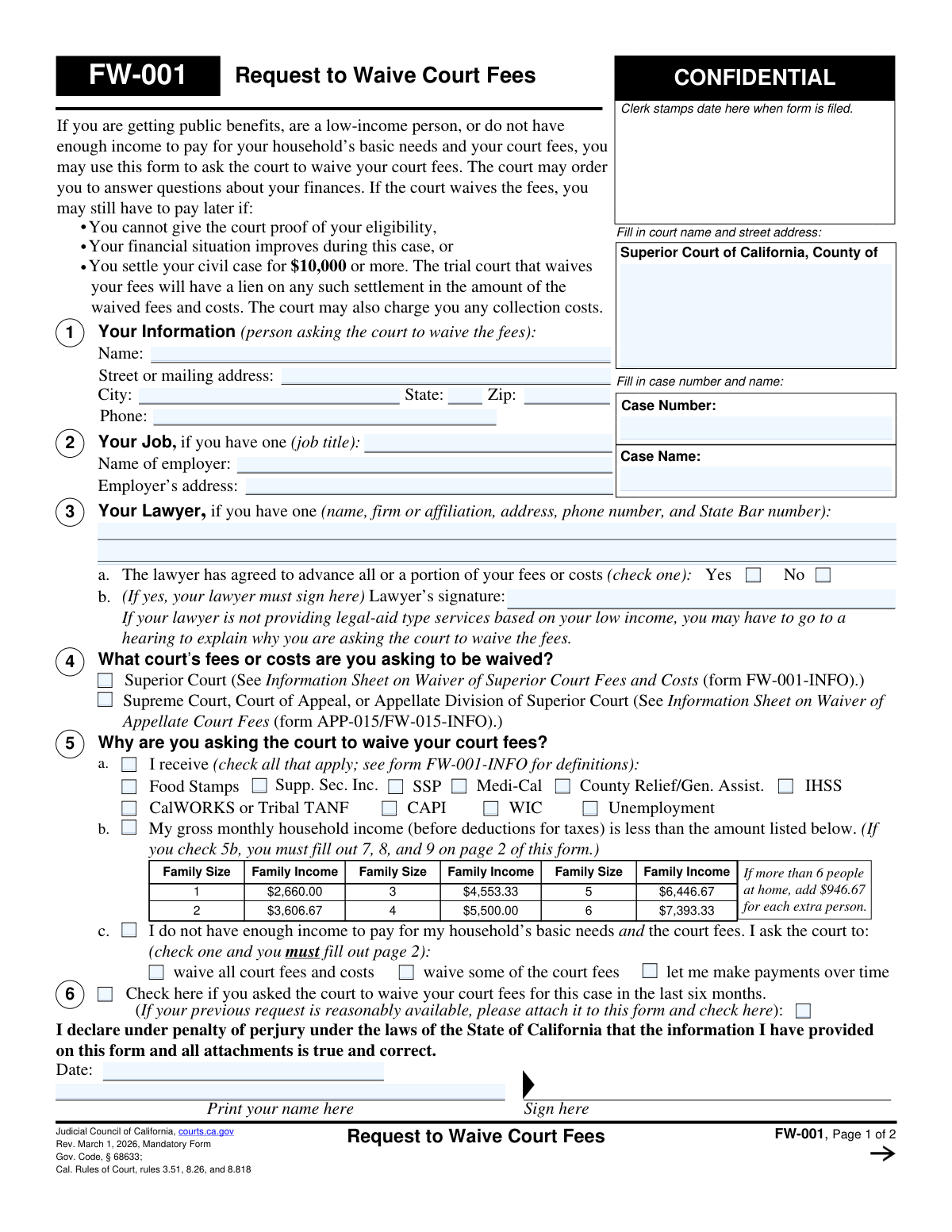
The AI fills all of it, from your answers or your documents.
The AI checks your answers before you download
15 checks built for this form, so a wrong date or a missing answer is caught before anyone else sees it.
This check ensures that the financial information on page 2 is filled out according to the reason selected in section 5. If box 5b is checked, sections 7, 8, and 9 must be completed. If box 5c is checked, the entire page 2 must be completed. This is critical for ensuring the court has the necessary information to evaluate the request based on the applicant's claimed reason for waiver. If the required sections are not completed, the form is considered incomplete and cannot be processed.
Validates that the applicant has selected at least one of the primary reasons for the fee waiver request in section 5 (5a, 5b, or 5c). This is the core justification for the request, and without it, the court has no basis to grant the waiver. A failure in this check would mean the form is fundamentally incomplete and must be returned to the applicant for correction.
If the applicant checks box 5a, indicating they receive public benefits, this validation ensures that at least one of the specific benefit checkboxes (e.g., Food Stamps, Medi-Cal, WIC) is also checked. This provides the specific grounds for the waiver under the public benefits category. An incomplete selection prevents the clerk from verifying eligibility and would require clarification from the applicant.
If box 5b is checked, this validation compares the calculated 'Total monthly income and household income' from page 2 against the income limits provided in the table in section 5b. The household size is calculated as 1 (the applicant) plus the number of dependents listed in section 9. This check is crucial to confirm that the applicant's stated income actually qualifies them under the low-income guideline. If their income exceeds the limit, they do not qualify under this reason.
When an applicant checks box 5c, indicating they do not have enough income for basic needs and court fees, this validation ensures they have also checked one of the three sub-options. The applicant must specify whether they are asking the court to 'waive all court fees,' 'waive some of the court fees,' or 'let me make payments over time.' Failure to select a specific request leaves the court uncertain of the desired outcome and makes the application incomplete.
This check verifies that if the 'Yes' box is checked in section 3a, indicating the lawyer has agreed to advance fees, the 'Lawyer's signature' field is not empty. The lawyer's signature is a required attestation for this arrangement. An absent signature when 'Yes' is checked invalidates that part of the form and may require a hearing or rejection of the form until it is properly signed.
And 9 more checks
- Declaration Date and Name Validation
- Page 2 Header Consistency Check
- Applicant's Gross Monthly Income Calculation
- Total Household Income Calculation
- Total Monthly Expenses Calculation
- Asset Value and Debt Consistency
- ZIP Code Format Validation
- Phone Number Format Validation
- Monetary Field Numeric Validation
Let AI fill out your FW-001
No typing. Every field filled in seconds, checked, ready to sign.
How to Fill Out FW-001 Online for Free in 2026
What the AI walks you through.
- Navigate to Instafill.ai and upload your FW-001 form or select it from their template library.
- Provide your personal details, including your name, address, and the relevant court and case information.
- Select the reason for your waiver request by checking the appropriate boxes, such as receipt of public benefits or having an income below the state's threshold.
- If required based on your selection, provide detailed financial information about your monthly income, assets, and expenses for yourself and your household.
- Review all the information automatically populated by the AI to ensure it is accurate and complete.
- Electronically sign and date the declaration under penalty of perjury.
- Download the completed FW-001 form and file it with the appropriate California court as instructed.
Common Mistakes in Completing FW-001
The ones the AI is built to catch.
Incomplete Financial Information on Page 2
Reporting Net Income Instead of Gross Income
Forgetting the Signature and Date
Incorrectly Calculating Income and Expense Totals
Missing Lawyer's Signature for Advanced Fees
Failing to List All Required Household Income
Confusing Fair Market Value with Amount Owed for Assets
Omitting Case Number and Name on Page 2
Failing to Select a Specific Request in Section 5c
Providing Incomplete Court or Case Information
Frequently Asked Questions About FW-001
Is it really free for 7 days?
Can I fill other forms too?
How do I cancel?
How does the AI fill out FW-001?
What happens to my information?
How complex is FW-001 to fill out?
What is the purpose of Form FW-001, Request to Waive Court Fees?
Who is eligible to apply for a court fee waiver using this form?
Do I need to fill out the detailed financial information on page 2?
What is the difference between the options in section 5?
My income changes a lot from month to month. How should I report it?
What happens after I submit the FW-001 form?
What should I do if my financial situation improves after my fees are waived?
Do I have to pay back the waived fees if I settle my case?
What documents do I need to attach to this form?
Where do I file the completed Form FW-001?
Can I use an AI tool to help me fill out this form?
How can I use Instafill.ai to complete my FW-001 form online?
The PDF version of the form I found is not fillable. What can I do?
What does 'household income' in section 9 include?
Get your FW-001 filled out by AI
$0 today. Cancel before Nov 18 and you pay nothing.
Other forms like this one
court forms: Form Summons, Supreme Court of New York, Form SC-100, Plaintiff's Claim and ORDER to Go to Small Claims Court, Form AO 240, Application to Proceed in District Court Without Prepaying Fees or Costs, Form AO 239, Application to Proceed in District Court Without Prepaying Fees or Costs, Affidavit for Service by Publication/Posting (Circuit Court of Cook County, Illinois) (CCG 0013 A/B), Petition for Leave to Proceed In Forma Pauperis (Court of Common Pleas of Lehigh County, Pennsylvania, Civil Division), In Forma Pauperis Affidavit/Petition (AOPC 622A) – Pennsylvania Magisterial District Court, Judicial Council of California Form SC-105, Request for Court Order and Answer (Small Claims), SC-120, Defendant’s Claim and ORDER to Go to Small Claims Court (Small Claims), SC-105, Request for Court Order and Answer (Small Claims), Judicial Council of California Form SC-120, Defendant’s Claim and ORDER to Go to Small Claims Court (Small Claims), In Forma Pauperis Affidavit Petition (AOPC 622A) — Pennsylvania Magisterial District Court, Florida Supreme Court Approved Family Law Form 12.901(b)(3), Petition for Dissolution of Marriage with No Dependent or Minor Child(ren) or Property (02/18), Illinois Supreme Court Approved Form E-O 3500.3, Eviction Order, Form P3 (Rule 25-3(2)) — Affidavit of Applicant for Grant of Probate or Grant of Administration with Will Annexed (Short Form) (Supreme Court of British Columbia), Form SC-100, Plaintiff’s Claim and ORDER to Go to Small Claims Court, Designation of Record on Appeal (Civil) (Maricopa County Justice Courts, Arizona) (Form APP 8150-702), FW-003, Order on Court Fee Waiver (Superior Court), Judicial Council of California Form SER-001, Request for Sheriff to Serve Court Papers, FW-003, Order on Court Fee Waiver (Superior Court)
UK court forms: Form Summons, Supreme Court of New York, Form SC-100, Plaintiff's Claim and ORDER to Go to Small Claims Court, Form AO 240, Application to Proceed in District Court Without Prepaying Fees or Costs, Form AO 239, Application to Proceed in District Court Without Prepaying Fees or Costs, Affidavit for Service by Publication/Posting (Circuit Court of Cook County, Illinois) (CCG 0013 A/B), Petition for Leave to Proceed In Forma Pauperis (Court of Common Pleas of Lehigh County, Pennsylvania, Civil Division), In Forma Pauperis Affidavit/Petition (AOPC 622A) – Pennsylvania Magisterial District Court, Judicial Council of California Form SC-105, Request for Court Order and Answer (Small Claims), SC-120, Defendant’s Claim and ORDER to Go to Small Claims Court (Small Claims), SC-105, Request for Court Order and Answer (Small Claims), Judicial Council of California Form SC-120, Defendant’s Claim and ORDER to Go to Small Claims Court (Small Claims), In Forma Pauperis Affidavit Petition (AOPC 622A) — Pennsylvania Magisterial District Court, Florida Supreme Court Approved Family Law Form 12.901(b)(3), Petition for Dissolution of Marriage with No Dependent or Minor Child(ren) or Property (02/18), Illinois Supreme Court Approved Form E-O 3500.3, Eviction Order, Form P3 (Rule 25-3(2)) — Affidavit of Applicant for Grant of Probate or Grant of Administration with Will Annexed (Short Form) (Supreme Court of British Columbia), Form SC-100, Plaintiff’s Claim and ORDER to Go to Small Claims Court, Designation of Record on Appeal (Civil) (Maricopa County Justice Courts, Arizona) (Form APP 8150-702), FW-003, Order on Court Fee Waiver (Superior Court), Judicial Council of California Form SER-001, Request for Sheriff to Serve Court Papers, FW-003, Order on Court Fee Waiver (Superior Court)
Let AI fill out your FW-001
Your trial starts once a card is added. You pay nothing before Nov 18.
Your bank declined that card, so the trial did not start and nothing was charged. Please try another card.
Our AI already knows this form, all 132 fields of it. Skip the typing: tell it about yourself, or upload what you have, and it fills the whole form in seconds.
- AI fills every field on both pages, tables and checkboxes included
- No typing into boxes: answer a few questions, or upload a document you already have, an old copy of this form, a photo of a document
- The AI checks the answers; you review and change anything before you download
- Download the finished PDF, print it, or sign it online
- Encrypted, and never used to train AI
Cancel before Nov 18 and you pay nothing.
A card is needed to start the trial. We check it with a $19.99 hold that is released right away. Cancel in two clicks from your account.
Terms · Privacy