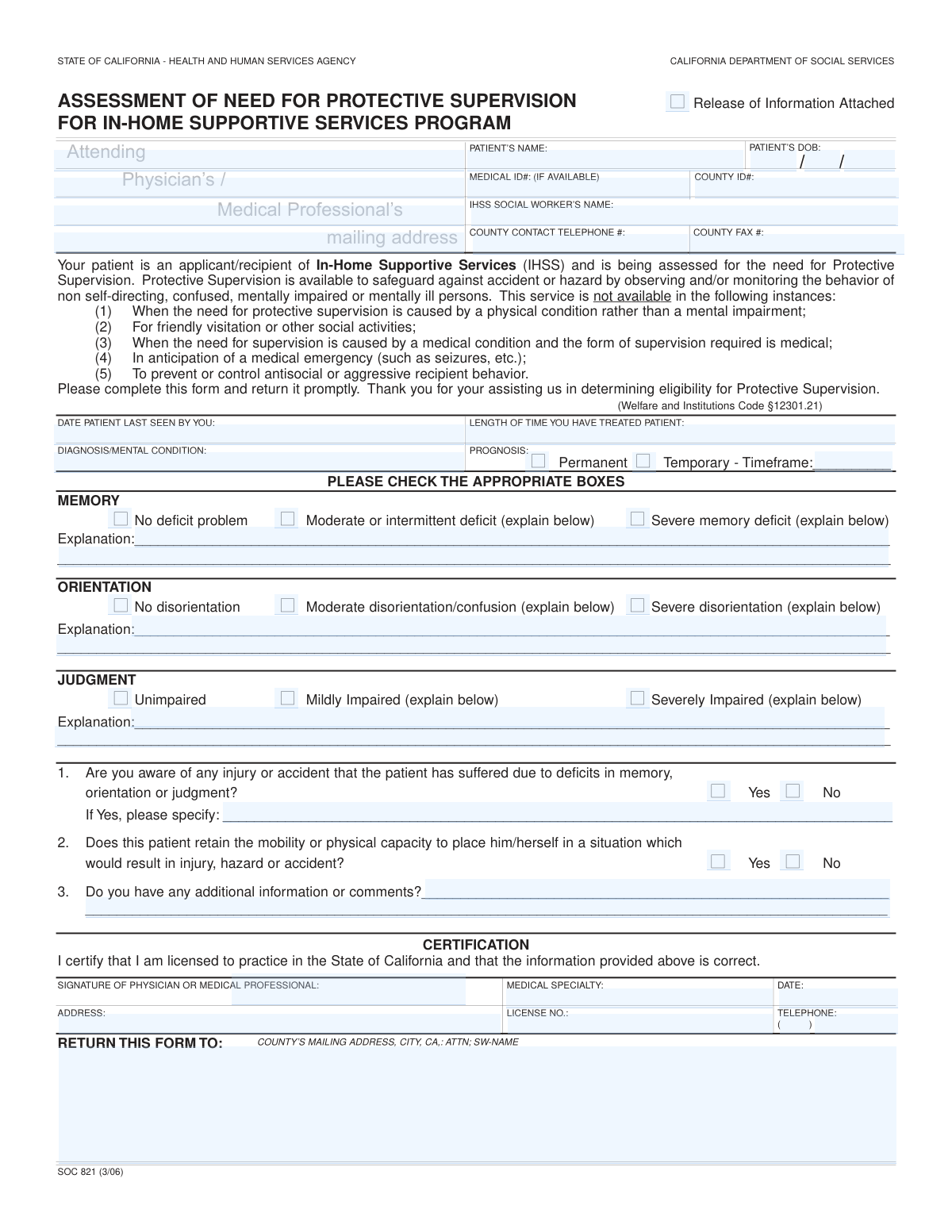
Yes! You can use AI to fill out Form SOC 821, Assessment of Need for Protective Supervision for In-Home Supportive Services Program
Form SOC 821, the Assessment of Need for Protective Supervision, is a crucial document for California's In-Home Supportive Services (IHSS) program. A physician or medical professional completes this form to evaluate a patient's mental condition, specifically their memory, orientation, and judgment, to determine if they require supervision to prevent injury or accidents. This assessment helps the county decide if the patient is eligible for Protective Supervision services. Today, this form can be filled out quickly and accurately using AI-powered services like Instafill.ai, which can also convert non-fillable PDF versions into interactive fillable forms.
Our AI automatically handles information lookup, data retrieval, formatting, and form filling.
It takes less than a minute to fill out SOC 821 using our AI form filling.
Securely upload your data. Information is encrypted in transit and deleted immediately after the form is filled out.
Form specifications
| Form name: | Form SOC 821, Assessment of Need for Protective Supervision for In-Home Supportive Services Program |
| Number of fields: | 53 |
| Number of pages: | 1 |
| Language: | English |
Instafill Demo: How to fill out PDF forms in seconds with AI
How to Fill Out SOC 821 Online for Free in 2026
Are you looking to fill out a SOC 821 form online quickly and accurately? Instafill.ai offers the #1 AI-powered PDF filling software of 2026, allowing you to complete your SOC 821 form in just 37 seconds or less.
Follow these steps to fill out your SOC 821 form online using Instafill.ai:
- 1 Navigate to Instafill.ai and upload or select Form SOC 821.
- 2 Enter the patient's identification details, including their name, date of birth, and any relevant medical or county ID numbers.
- 3 Provide the medical professional's information, including the date the patient was last seen, diagnosis, and prognosis.
- 4 Use the AI-powered tools to check the appropriate boxes assessing the patient's memory, orientation, and judgment, and type in the required explanations for any impairments.
- 5 Answer the specific questions regarding any past injuries due to cognitive deficits and the patient's physical mobility.
- 6 Review all the information entered on the form for accuracy and completeness before finalizing.
- 7 Certify the form by providing a signature, date, and license number, then download the completed document to return to the specified county office.
Our AI-powered system ensures each field is filled out correctly, reducing errors and saving you time.
Why Choose Instafill.ai for Your Fillable SOC 821 Form?
Speed
Complete your SOC 821 in as little as 37 seconds.
Up-to-Date
Always use the latest 2026 SOC 821 form version.
Cost-effective
No need to hire expensive lawyers.
Accuracy
Our AI performs 10 compliance checks to ensure your form is error-free.
Security
Your personal information is protected with bank-level encryption.
Frequently Asked Questions About Form SOC 821
This form is used by a medical professional to assess if an In-Home Supportive Services (IHSS) recipient needs Protective Supervision. The assessment helps the county determine eligibility for this service, which is for individuals who are non-self-directing or mentally impaired and need monitoring to prevent accidents.
A licensed physician or other qualified medical professional who treats the patient is responsible for completing, signing, and certifying the information on this form. The process is typically initiated by the patient's IHSS Social Worker.
No, the form explicitly states that Protective Supervision is not available when the need is caused by a physical condition. It is intended only for individuals with a mental impairment, confusion, or disorientation.
In these sections, provide brief, specific examples that illustrate the patient's impairment. For instance, you could mention if the patient wanders, forgets to turn off appliances, is unable to identify familiar people, or makes unsafe decisions.
The completed form should be sent to the county office at the address listed in the 'RETURN THIS FORM TO' section. This information is typically pre-filled by the IHSS Social Worker who requested the assessment.
Select 'Permanent' if the patient's mental condition is not expected to improve. Choose 'Temporary' if the condition may improve, and be sure to provide an estimated timeframe for how long the supervision will be needed.
No, the form clearly states that Protective Supervision is not available in anticipation of a medical emergency, such as seizures. It is also not for providing medical-level supervision.
This question assesses if the patient is physically able to move around and place themselves in a dangerous situation. For Protective Supervision to be granted, the patient must have both a mental impairment and the physical ability to act on poor judgment.
Yes, services like Instafill.ai use AI to accurately auto-fill form fields with patient and provider information from your records. This can save time and help ensure accuracy.
You can use a service like Instafill.ai, which can convert flat, non-fillable PDFs into interactive forms. This allows you to easily type your answers, check boxes, and sign the document electronically.
You must attach a signed 'Release of Information' form from the patient or their legal representative. There is a checkbox at the top of the form to confirm that this release is attached.
To fill out this form online, you can upload it to a platform like Instafill.ai. The service will make the form fillable, allowing you to type information directly into the fields and sign it before downloading or printing.
Compliance SOC 821
Validation Checks by Instafill.ai
1
Patient Date of Birth Validity
This check ensures that the 'Patient's DOB' is a complete and valid date in the past. It prevents the submission of forms with future or nonsensical dates, which would invalidate the patient's record. If the date is invalid, incomplete, or in the future, the system should reject the entry and prompt the user for a valid past date.
2
Date Last Seen Logical Consistency
Validates that the 'Date Patient Last Seen' is a valid date that occurs on or before the current date but on or after the patient's date of birth. This is crucial for establishing a credible and recent medical assessment timeline. A failure would indicate a data entry error, and the system should flag the field for correction before submission.
3
Prognosis Selection Completeness
Ensures that one of the two prognosis options, 'Permanent' or 'Temporary', is selected. This information is fundamental to determining the duration and type of services needed. If neither option is selected, the form is considered incomplete, and the user must be prompted to make a selection to proceed.
4
Conditional Prognosis Timeframe Requirement
This validation checks that if the 'Prognosis - Temporary' box is checked, the corresponding 'Prognosis Timeframe' text field is not empty. This is a critical logical check to ensure that a temporary prognosis is properly qualified with an expected duration. If 'Temporary' is selected and the timeframe is blank, the submission should be blocked until the timeframe is provided.
5
Mutually Exclusive Assessment Selection (Memory)
Verifies that for the 'MEMORY' assessment category, exactly one of the three options ('No deficit', 'Moderate deficit', 'Severe deficit') is selected. This prevents ambiguous or contradictory information about the patient's condition. If zero or more than one option is selected, the system should display an error and require the user to select only one.
6
Conditional Explanation for Memory Deficit
This check ensures that if 'Moderate or intermittent deficit' or 'Severe memory deficit' is selected, the corresponding 'Explanation' field is filled out. The explanation is required by the form to justify the assessment and is vital for the eligibility determination. A failure to provide an explanation for a noted deficit should prevent form submission.
7
Conditional Explanation for Disorientation
Validates that if 'Moderate disorientation/confusion' or 'Severe disorientation' is selected, the 'Orientation Explanation' field is not empty. This context is essential for the social worker to understand the nature and severity of the patient's condition. If the explanation is missing for a selected deficit, the user should be prompted to provide it.
8
Conditional Explanation for Impaired Judgment
Ensures that if 'Mildly Impaired' or 'Severely Impaired' is selected for the 'JUDGMENT' assessment, the 'Judgment — Explanation' field is completed. The details in the explanation are necessary to substantiate the claim of impaired judgment. The system should block submission if this rule is violated, forcing the user to provide the required details.
9
Conditional Injury/Accident Details Requirement
This validation rule checks that if 'Yes' is selected for Question 1 ('Are you aware of any injury or accident...'), the 'If Yes, please specify' field is filled in. This ensures that an affirmative answer is supported by necessary details about the incident. If 'Yes' is checked but the details are missing, the form submission should be halted until the information is provided.
10
Certification Date Chronology
Verifies that the 'Signature Date' in the certification section is on or after the 'Date Patient Last Seen'. A signature date preceding the last examination date is logically impossible and indicates a data entry error. The system should flag this inconsistency and require correction.
11
Physician License Number Presence
This check confirms that the 'License No.' field for the certifying medical professional is not empty. The license number is essential for verifying the professional's credentials and the legitimacy of the assessment. A missing license number should trigger an error, as it is a mandatory field for certification.
12
Physician Telephone Number Format
Validates that the 'Physician Telephone' fields (Area Code and Number) combine to form a valid 10-digit U.S. phone number. This ensures that the county can contact the physician for follow-up questions. An invalid format should result in an error message prompting the user to enter a correct 10-digit number.
13
Required Patient and Case Information
Ensures that critical identifying fields such as 'Patient's Name', 'IHSS Social Worker's Name', and 'Diagnosis / Mental Condition' are not left blank. This information is the foundation of the case file and is necessary for processing the form correctly. If any of these fields are empty, the submission should be blocked.
14
Required Physician Certification Information
This check verifies that the 'Signature of Physician', 'Medical Specialty', and 'Address' fields in the certification section are all completed. This information is required to validate the identity and location of the certifying professional. Missing information in this section would render the certification invalid and should prevent submission.
15
Mobility/Risk Question Completeness
Ensures that either 'Yes' or 'No' is selected for Question 2, which asks if the patient has the physical capacity to place themselves in a hazardous situation. This answer is critical for assessing the level of risk and the need for supervision. The form should not be considered complete until this question is answered.
Common Mistakes in Completing SOC 821
Medical professionals often check a box for a 'Moderate' or 'Severe' deficit in Memory, Orientation, or Judgment but neglect to write the required explanation. This omission occurs due to time constraints or overlooking the prompt, but it makes it impossible for the county to evaluate the need for supervision. This leads to processing delays or denial of services. To avoid this, always provide specific, concrete examples of the patient's behavior that demonstrate the checked deficit.
A common error is listing a diagnosis that is purely physical (e.g., 'mobility issues') or too general (e.g., 'old age') without specifying the underlying mental impairment. The form explicitly states that Protective Supervision is for needs caused by a mental, not physical, condition. This mistake can lead to an immediate denial, as the reason for supervision falls outside the program's scope. Ensure the diagnosis clearly identifies a cognitive impairment like dementia, Alzheimer's, or a traumatic brain injury.
Question 2 asks if the patient has the physical ability to get into a dangerous situation. Providers sometimes mistakenly check 'No,' thinking it helps the case by highlighting the patient's frailty. However, a 'No' answer can lead to denial, as the program requires the individual to be physically capable of causing self-harm for supervision to be deemed necessary. The answer should be 'Yes' if the patient can walk, crawl, or otherwise move into harm's way.
When a patient's condition is marked as 'Temporary,' the form requires a specific timeframe, but this field is frequently left blank. This happens when the provider is unsure of the exact duration or simply forgets to fill it in. An incomplete prognosis section can halt the application process, as the county needs this information to determine the potential duration of services. Always provide an estimated timeframe, such as '3-6 months' or 'until post-op recovery is complete'.
The form is often submitted with a missing physician's signature, license number, or date in the certification section. This oversight renders the entire document invalid, as it cannot be officially verified by the county. This leads to significant delays, as the form must be sent back to the medical office for completion. Always double-check that all fields in the 'CERTIFICATION' box are filled and the license number is written correctly.
If the provider checks 'Yes' to Question 1, indicating awareness of a past accident, they must specify the details in the space provided. This crucial step is often skipped, leaving the reviewer without the context needed to understand the severity of the patient's judgment or memory deficits. A 'Yes' without an explanation weakens the application, as it provides no verifiable evidence of the danger the patient poses to themselves. Always describe the incident, linking it directly to the patient's cognitive impairment.
Many medical professionals complete this form by hand, and illegible writing can make critical information like the diagnosis, explanations, or contact details impossible to read. This forces the county social worker to contact the office for clarification, delaying the patient's access to services. If the form is a non-fillable PDF, AI-powered tools like Instafill.ai can convert it into a fillable version, allowing for typed, clear, and legible responses that eliminate this problem.
The 'Medical ID#' and 'County ID#' fields are essential for linking the form to the correct patient file, but they are often left blank or filled with transposed or incorrect numbers. This data entry error can cause the form to be misfiled or rejected, creating significant administrative delays. It is vital to carefully copy these numbers from the patient's records. AI-powered form-filling tools like Instafill.ai can help prevent these errors by storing and accurately auto-filling correct ID numbers.
Providers sometimes describe the need for supervision in anticipation of a medical emergency, such as a seizure or diabetic shock. However, the form explicitly states this type of medical monitoring does not qualify for Protective Supervision. The focus of all explanations must be on the dangers caused by the patient's cognitive impairment and poor judgment, such as wandering, leaving the stove on, or ingesting harmful substances.
Saved over 80 hours a year
“I was never sure if my IRS forms like W-9 were filled correctly. Now, I can complete the forms accurately without any external help.”
Kevin Martin Green
Your data stays secure with advanced protection from Instafill and our subprocessors

Robust compliance program
Transparent business model
You’re not the product. You always know where your data is and what it is processed for.
ISO 27001, HIPAA, and GDPR
Our subprocesses adhere to multiple compliance standards, including but not limited to ISO 27001, HIPAA, and GDPR.
Security & privacy by design
We consider security and privacy from the initial design phase of any new service or functionality. It’s not an afterthought, it’s built-in, including support for two-factor authentication (2FA) to further protect your account.
Fill out SOC 821 with Instafill.ai
Worried about filling PDFs wrong? Instafill securely fills form-soc-821-assessment-of-need-for-protective-supervision-for-in-home-supportive-services-program forms, ensuring each field is accurate.