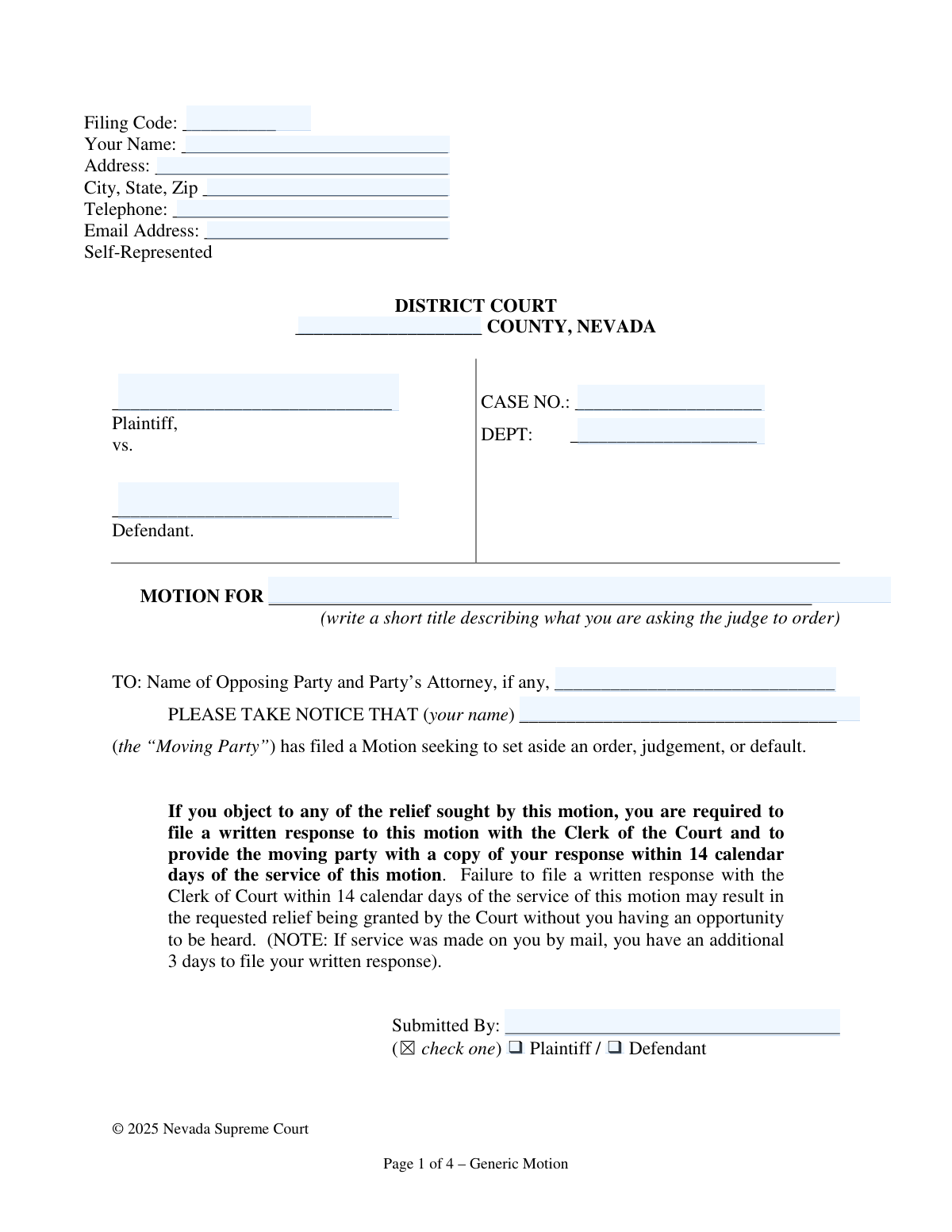
Yes! You can use AI to fill out Nevada Supreme Court Generic Motion

The Nevada Supreme Court Generic Motion is a standardized legal document that allows a party in a court case to formally request a specific order or ruling from a judge. It provides a structured format for presenting personal information, case details, factual arguments, and legal authorities to support the request. Today, this form can be filled out quickly and accurately using AI-powered services like Instafill.ai, which can also convert non-fillable PDF versions into interactive fillable forms.
Generic Motion is part of the court forms and UK court forms categories on Instafill.
Our AI automatically handles information lookup, data retrieval, formatting, and form filling.
It takes less than a minute to fill out Generic Motion using our AI form filling.
Securely upload your data. Information is encrypted in transit and deleted immediately after the form is filled out.

Form specifications

Form name: Nevada Supreme Court Generic Motion
Number of fields: 26
Number of pages: 4
Language: English
main-image

Instafill Demo: How to fill out PDF forms in seconds with AI

How to Fill Out Generic Motion Online for Free in 2026

Are you looking to fill out a GENERIC MOTION form online quickly and accurately? Instafill.ai offers the #1 AI-powered PDF filling software of 2026, allowing you to complete your GENERIC MOTION form in just 37 seconds or less.
Follow these steps to fill out your GENERIC MOTION form online using Instafill.ai:
  1. 1 Navigate to Instafill.ai and upload or select the Nevada Generic Motion form.
  2. 2 Use the AI assistant to automatically populate your personal contact information, including your name, address, and email.
  3. 3 Enter the case caption details, such as the county, plaintiff and defendant names, case number, and department.
  4. 4 Clearly write the title of your motion and identify the opposing party and their attorney.
  5. 5 Carefully draft and input your legal arguments, citing relevant laws, and provide a detailed explanation of the facts supporting your motion in the appropriate sections.
  6. 6 Complete the declaration section, list any attached exhibits, and then review and e-sign the document with the current date.
  7. 7 Download the completed, signed motion, ready for filing with the appropriate Nevada District Court and service to the opposing party.

Our AI-powered system ensures each field is filled out correctly, reducing errors and saving you time.

Why Choose Instafill.ai for Your Fillable Generic Motion Form?

Speed

Complete your Generic Motion in as little as 37 seconds.

Up-to-Date

Always use the latest 2026 Generic Motion form version.

Cost-effective

No need to hire expensive lawyers.

Accuracy

Our AI performs 10 compliance checks to ensure your form is error-free.

Security

Your personal information is protected with bank-level encryption.

Frequently Asked Questions About Form Generic Motion

This form is used to formally ask a judge in a Nevada District Court to make a specific order or ruling in your case. It is a general template that can be adapted for many different types of requests.

This form is intended for individuals who are representing themselves (Self-Represented) in a court case, whether they are the Plaintiff or the Defendant.

You will need your personal contact information, the court case number and department number, the names of all parties, and the specific facts and legal reasons for your request.

In this section, write a short, descriptive title of what you are asking the judge to do. For example, 'Motion to Continue Hearing' or 'Motion to Set Aside Default Judgment'.

The 'LEGAL ARGUMENT' section is where you cite specific laws or prior court cases that support your request. The 'FACTS AND ARGUMENT' section is where you explain the specific details and events of your situation.

This is your sworn statement, made under penalty of perjury, confirming that the information you have provided in the motion is true and correct. It gives legal weight to your statements.

After you file the motion with the court and serve it on the other party, they have 14 days to file a response. The court may then schedule a hearing or make a decision based on the written arguments.

Exhibits are supporting documents, like contracts, emails, or photos, that help prove your case. You should list a brief description of each exhibit on page 4 and attach copies to your motion when you file it.

The Case Number and Department Number are assigned by the court and can be found on any previously filed documents in your case, such as the original complaint or summons.

The form notes that you can attach additional pages if needed. Simply write or type your additional information on a separate sheet, label it clearly, and attach it to the motion.

Yes, services like Instafill.ai use AI to accurately auto-fill form fields with your case and personal information, which saves time and helps avoid errors. However, AI cannot provide the legal advice needed for the 'Legal Argument' section.

You can upload the PDF of the Generic Motion to the Instafill.ai platform. The service will make the form interactive, allowing you to easily type your information into the fields and then download the completed document.

If you have a non-fillable or 'flat' PDF, you can use a service like Instafill.ai. It can convert the non-fillable PDF into an interactive form that you can complete on your computer.

Compliance Generic Motion
Validation Checks by Instafill.ai

1
Ensures Filer's Name is Provided
This check verifies that the 'Your Name' field is not empty. The filer's name is a fundamental piece of information required to identify the party submitting the motion. If the name is missing, the court cannot process the document or associate it with the correct individual in the case record.
2
Validates Completeness of Filer's Contact Information
This validation ensures that the 'Address', 'City, State, Zip', 'Telephone', and 'Email Address' fields are all filled out. Complete contact information is legally required for proper service and communication from the court and opposing parties. A failure to provide this information can result in missed notices and potential dismissal of the motion.
3
Verifies Standard Email Address Format
This check confirms that the value entered in the 'Email Address' field conforms to a standard email format, such as '[email protected]'. This is critical for electronic service and official court communications. An invalid email format would cause communication failures, potentially jeopardizing the filer's case.
4
Validates Case Number Presence and Format
This check ensures the 'CASE NO.' field is not blank and follows the expected format for the jurisdiction. The case number is the primary identifier for a legal action, and an incorrect or missing number will cause the document to be misfiled or rejected. This prevents delays and ensures the motion is docketed to the correct case file.
5
Ensures a Valid Nevada County is Specified
This validation checks the 'County' field against a predefined list of Nevada's counties. Filing in the correct district court and county is a matter of jurisdiction, and a mistake can render the filing void. This check prevents filings from being sent to the wrong court, which would cause significant delays and require refiling.
6
Requires Selection of a Single Party Role
This check verifies that exactly one of the 'Plaintiff' or 'Defendant' checkboxes under 'Submitted By' is selected. The filer must clearly identify their role in the litigation for the court to understand the context of the motion. If neither or both are checked, the submission is ambiguous and will be rejected for clarification.
7
Ensures Filer's Name is Consistent Throughout the Form
This validation compares the name in the header ('Your Name'), the notice section ('PLEASE TAKE NOTICE THAT...'), and the printed name in the signature blocks. All instances of the filer's name must match to ensure there is no ambiguity about who is filing and attesting to the motion. Discrepancies could call the document's authenticity into question.
8
Verifies the Motion Title is Provided
This check ensures that the 'MOTION FOR' field contains a descriptive title. The title is the first thing the judge and court staff see, and it must clearly state the purpose of the motion. A missing title makes the document's purpose unclear and will likely lead to rejection by the clerk.
9
Confirms Argument Sections are Not Empty
This validation checks that the 'LEGAL ARGUMENT' and 'FACTS AND ARGUMENT' text areas contain content. A motion must be supported by factual and legal arguments to be considered by the court. Submitting a motion with empty argument sections would be pointless and would be summarily denied or rejected.
10
Validates Presence and Consistency of Submission Dates
This check verifies that the 'DATED' fields on page 3 and page 4 are both filled out and that they contain the same date. The date of signature is legally significant for calculating deadlines and establishing when the declaration was made. Inconsistent or missing dates create ambiguity and can invalidate the document.
11
Ensures Plaintiff and Defendant are Named in Caption
This validation confirms that both the 'Plaintiff' and 'Defendant' fields in the case caption are filled. The case caption formally identifies the parties to the dispute. A filing with an incomplete caption is defective and cannot be properly docketed by the court clerk.
12
Verifies Identification of Opposing Party for Service
This check ensures the field 'TO: Name of Opposing Party and Party’s Attorney' is not empty. Proper service on the opposing side is a cornerstone of due process and is required for the motion to be heard. Failure to identify the party to be served makes the notice defective and would prevent the court from considering the motion.

Common Mistakes in Completing Generic Motion

Incorrect or Incomplete Case Caption Information

Filers often mistype the case number, omit the department number, or misspell the names of the Plaintiff and Defendant. These details must match court records exactly, as any discrepancy can lead to the court clerk rejecting the filing or the document being lost in the system. To avoid this, meticulously copy the information from a previous official court document for the case.

Using a Vague or Improper Motion Title

In the 'MOTION FOR' field, many self-represented individuals write a narrative or a vague request like 'Help from the Judge.' The title must be a short, precise legal description of the action requested, such as 'Motion to Set Aside Default Judgment.' An improper title can cause confusion and may result in the judge not understanding the core request of the filing.

Incomplete or Missing Signatures and Dates

This form requires two separate, dated signatures: one on page 3 for the motion and another on page 4 for the declaration. A very common and critical error is forgetting to sign or date one or both sections. An unsigned motion or declaration is legally invalid and will be rejected by the court, nullifying the entire effort.

Confusing Factual Narrative with Legal Argument

The form distinctly separates 'LEGAL ARGUMENT' from 'FACTS AND ARGUMENT,' yet filers often blend them into a single emotional story. The legal section should cite relevant laws or statutes, while the facts section should present a clear, chronological account of events. Failing to separate these weakens the motion by not showing the judge how the specific facts apply to the supporting law.

Failing to Properly Identify Opposing Party and Counsel

On the 'TO:' line, filers must name the opposing party and, crucially, their attorney if they are represented. Many people forget to include the attorney's name, which is a procedural flaw for legal service. This can lead to the opposing side claiming they were not properly notified, potentially invalidating the motion.

Omitting Party Status Identification

Forgetting to check the 'Plaintiff' or 'Defendant' box is a simple but frequent oversight that creates ambiguity. This small detail is essential for the court clerk and judge to immediately understand the filer's role in the case. Leaving it blank can cause processing delays while the clerk attempts to clarify the information.

Improperly Describing or Attaching Exhibits

When listing exhibits, filers may provide vague descriptions like 'pictures' or forget to list them altogether, even if they are attached. Each exhibit must be clearly described and labeled (e.g., 'Exhibit A: Copy of email dated May 10, 2024') and physically attached. If the judge cannot identify and locate the evidence you are referencing, it cannot be considered.

Submitting an Illegible Handwritten Form

Since this form is a non-fillable PDF, many users print and complete it by hand, often with illegible writing. If the case number, names, or arguments are unreadable, the clerk may reject the filing or the judge may be unable to comprehend the request, leading to a denial. AI-powered tools like Instafill.ai can convert such PDFs into fillable versions, allowing you to type responses for maximum clarity.

Leaving Critical Identifier Fields Blank

Filers, when uncertain, sometimes leave essential fields like 'County' or 'Case No.' blank, assuming the clerk will fill them in. Court clerks are not permitted to complete legal documents for filers, and a form missing such critical identifiers will be rejected. AI-powered form-filling tools like Instafill.ai can help prevent this by highlighting required fields and validating data formats to ensure completeness.

Failing to Complete Both Argument Sections

Some filers provide a detailed factual story in the 'Facts and Argument' section but leave the 'Legal Argument' section completely blank. They assume the facts speak for themselves, but a motion requires a legal basis to be granted. Leaving the legal argument empty tells the judge you have no legal authority to support your request, making it highly likely to be denied.
Saved over 80 hours a year

“I was never sure if my IRS forms like W-9 were filled correctly. Now, I can complete the forms accurately without any external help.”

Kevin Martin Green

Your data stays secure with advanced protection from Instafill and our subprocessors

Robust compliance program

Transparent business model

You’re not the product. You always know where your data is and what it is processed for.

ISO 27001, HIPAA, and GDPR

Our subprocesses adhere to multiple compliance standards, including but not limited to ISO 27001, HIPAA, and GDPR.

Security & privacy by design

We consider security and privacy from the initial design phase of any new service or functionality. It’s not an afterthought, it’s built-in, including support for two-factor authentication (2FA) to further protect your account.

Fill out Generic Motion with Instafill.ai

Worried about filling PDFs wrong? Instafill securely fills nevada-supreme-court-generic-motion forms, ensuring each field is accurate.