Yes! You can use AI to fill out RBT Recertification Competency Assessment
The RBT Recertification Competency Assessment is a standardized evaluation tool used by the Behavior Analyst Certification Board (BACB) to ensure Registered Behavior Technicians (RBTs) maintain their practical skills. A qualified assessor, typically a BCBA or BCaBA, uses this form to observe and document an RBT's performance on a variety of tasks, confirming their competence for annual recertification. Today, this form can be filled out quickly and accurately using AI-powered services like Instafill.ai, which can also convert non-fillable PDF versions into interactive fillable forms.
Our AI automatically handles information lookup, data retrieval, formatting, and form filling.
It takes less than a minute to fill out RBT Competency Assessment using our AI form filling.
Securely upload your data. Information is encrypted in transit and deleted immediately after the form is filled out.
Form specifications
| Form name: | RBT Recertification Competency Assessment |
| Number of fields: | 86 |
| Number of pages: | 5 |
| Language: | English |
| Categories: | certification forms |
Instafill Demo: How to fill out PDF forms in seconds with AI
How to Fill Out RBT Competency Assessment Online for Free in 2026
Are you looking to fill out a RBT COMPETENCY ASSESSMENT form online quickly and accurately? Instafill.ai offers the #1 AI-powered PDF filling software of 2026, allowing you to complete your RBT COMPETENCY ASSESSMENT form in just 37 seconds or less.
Follow these steps to fill out your RBT COMPETENCY ASSESSMENT form online using Instafill.ai:
- 1 Navigate to Instafill.ai and upload or select the RBT Recertification Competency Assessment form.
- 2 Use the AI assistant to automatically populate the RBT's information, such as their name, certification number, and organization.
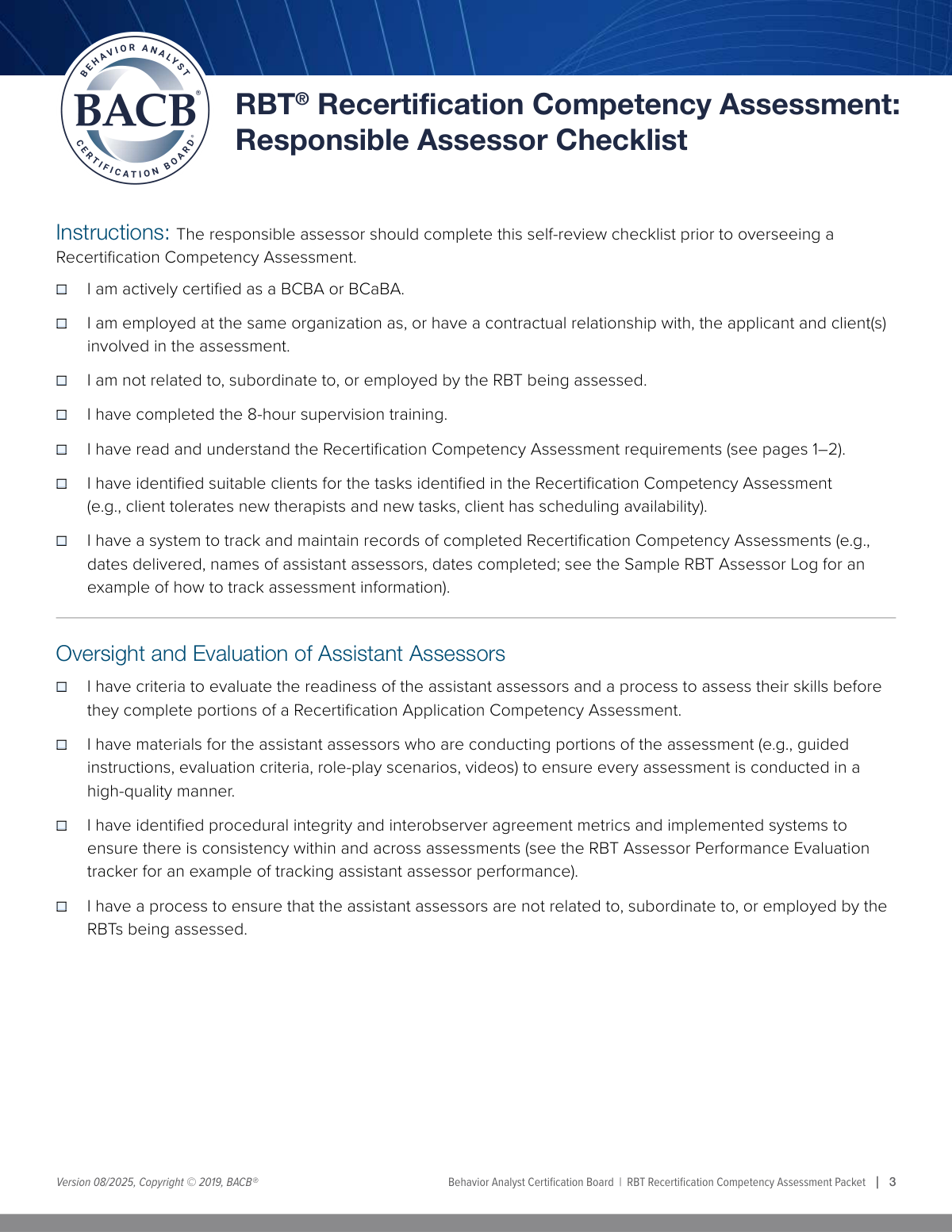
- 3 Complete the 'Responsible Assessor Checklist' by checking the boxes to confirm your qualifications and readiness to conduct the assessment.
- 4 As you observe the RBT perform each required task (e.g., Measurement, Skill Acquisition), check the corresponding boxes and enter your initials for verification.
- 5 Indicate the assessment method for each task (e.g., 'With a Client', 'Role-Play', 'Interview') as prompted by the smart fields.
- 6 Enter your own certification details, organization information, and provide a secure digital signature to finalize the assessment.
- 7 Review the completed form for accuracy and download, print, or securely share the finalized assessment record with the RBT and for your own records.
Our AI-powered system ensures each field is filled out correctly, reducing errors and saving you time.
Why Choose Instafill.ai for Your Fillable RBT Competency Assessment Form?
Speed
Complete your RBT Competency Assessment in as little as 37 seconds.
Up-to-Date
Always use the latest 2026 RBT Competency Assessment form version.
Cost-effective
No need to hire expensive lawyers.
Accuracy
Our AI performs 10 compliance checks to ensure your form is error-free.
Security
Your personal information is protected with bank-level encryption.
Frequently Asked Questions About Form RBT Competency Assessment
This form is used by a certified Responsible Assessor, such as a BCBA or BCaBA, to evaluate and document a Registered Behavior Technician's (RBT's) competence in various tasks required for their annual recertification.
A Responsible Assessor must be an actively certified BCBA, BCBA-D, or BCaBA who has completed the 8-hour supervision training. They must also confirm they are not related to, subordinate to, or employed by the RBT being assessed.
An Assistant Assessor is someone who helps conduct parts of the assessment under the direct supervision of the Responsible Assessor. You can only use them if you have established systems for their training, oversight, and evaluation, as detailed in the 'Oversight and Evaluation of Assistant Assessors' section.
You must select the method that was actually used to assess the RBT's competency for that specific task. Direct observation with a client is often required, but role-play and interviews are acceptable alternatives for certain tasks as specified in the assessment requirements.
You will need the RBT's full name and RBT certification number, your own BACB certification number, and the names of the organizations involved. You should also have your assessment notes and the date of the assessment ready.
An RBT's certification number starts with 'RBT,' while a supervisor's (BCBA/BCaBA) number typically starts with a '0' or '1.' Both can be found in the respective individual's BACB account portal and are different from the BACB ID number.
Yes, you must be able to attest to all the statements in this initial checklist to proceed as the Responsible Assessor. This section confirms you meet all the prerequisite qualifications and understand the assessment requirements.
After completing and signing the assessment, you should provide a copy to the RBT. The RBT is responsible for submitting it as part of their recertification application, and you must maintain a record of it for your own files.
Providing your initials next to each assessed task serves as your official confirmation that you have personally observed and verified the RBT's competence for that specific item. It is a critical part of the documentation and attestation process.
For tasks where direct implementation with a client would be unsafe or unethical, such as crisis procedures, assessment via role-play is the appropriate method. You would check the 'Role-Play' box for that specific task.
Yes, services like Instafill.ai use AI to help you accurately auto-fill repetitive information like names, dates, and certification numbers, which can save time and reduce errors. However, you are still responsible for the actual competency evaluation and verification for each task.
Simply upload the RBT Recertification Competency Assessment PDF to the Instafill.ai platform. The tool will make the form fillable online, and you can use its AI-powered features to quickly populate fields before you review, sign, and download the completed document.
You can use a service like Instafill.ai, which can convert flat, non-fillable PDFs into interactive, fillable forms. This allows you to easily type your information directly into the fields, check boxes, and sign electronically without needing to print the form.
Compliance RBT Competency Assessment
Validation Checks by Instafill.ai
1
Mandatory Assessor Checklist Completion
This validation ensures that all six checkboxes in the 'Responsible Assessor Checklist' section are checked before submission. These attestations are critical prerequisites confirming the assessor's eligibility and understanding of the assessment process. Failure to check all boxes would indicate the assessor does not meet the minimum requirements, thus invalidating the assessment and preventing form submission.
2
RBT Certification Number Format
This check verifies that the 'RBT Certification Number' field begins with the literal string 'RBT' as specified in the field's help text. This is crucial for ensuring the identifier is a valid certification number and not a different ID, which aids in accurate record-keeping and data integration. If the format is incorrect, the system will display an error and require the user to correct the number.
3
Assessor BACB Certification Number Format
This validation confirms that the 'BACB Certification Number' for the responsible assessor starts with either a '0' or a '1'. This rule helps differentiate the certification number from other identifiers like a BACB ID, ensuring the correct credential is recorded. An entry that does not match this format will be flagged as invalid, preventing submission until corrected.
4
Exclusive Assessment Method Selection
For each assessment task, this validation ensures that only one assessment method ('With a Client', 'Role-Play', or 'Interview') is selected. This prevents contradictory or ambiguous data by enforcing a single, clear method of evaluation for each completed task. If a user selects more than one method for the same task, an error will be triggered, forcing them to choose only one.
5
Conditional RBT Information Visibility
This check ensures that the 'RBT Information' section, including 'RBT Name' and 'RBT Certification Number', is only enabled and required if the 'Actively Certified' checkbox is checked. This enforces the form's logic, as RBT details are only relevant if the assessor is certified to conduct the assessment. If the prerequisite is not met, these fields will remain disabled to prevent erroneous data entry.
6
Conditional Assistant Assessor Fields Logic
This validation verifies that the fields under 'Oversight and Evaluation of Assistant Assessors' and the 'Assistant Assessors' Names' field are only active if the 'Assessment Record Tracking System' checkbox is checked. This enforces a logical dependency, as details about assistant assessors are only relevant if a formal system to manage them exists. If the prerequisite box is unchecked, these dependent fields will be disabled.
7
Exclusive Assessor Certification Type
This check ensures that only one checkbox from the 'Certification Information' section ('BCaBA', 'BCBA', 'BCBA-D', 'FL-CBA') is selected. An assessor holds a single primary certification, so this rule prevents the submission of conflicting or inaccurate credential information. If more than one certification type is selected, the form will show an error and require the user to select only one.
8
Valid and Historical Assessment Date
This validation confirms that the 'Assessment Date' field contains a validly formatted date and that the date is not in the future. This is essential for ensuring the integrity of the record, as the assessment must have already occurred to be documented. A future date or an invalid format would block submission and prompt the user for a correction.
9
Task Completion Consistency Check
For every task on the form, this validation ensures that if an 'Initials' field is filled out, a corresponding assessment method checkbox ('With a Client', 'Role-Play', etc.) must also be selected. This guarantees that every task marked as complete also has a documented method of evaluation, preventing incomplete records. An initialed task without a selected method would be flagged as an error.
10
Signature and Printed Name Requirement
This check confirms that the 'Responsible Assessor's Signature' and 'Responsible Assessor Printed Name' fields are not empty upon final submission. These fields are legally required to authenticate the document and attribute responsibility for the assessment's validity. The form cannot be considered complete or be submitted until both the signature and printed name are provided.
11
Conditional BACB Number Requirement
This validation ensures that the 'BACB Certification Number' field is mandatory if any of the certification type checkboxes ('BCaBA', 'BCBA', 'BCBA-D', 'FL-CBA') are selected. This rule creates a necessary link between the claimed certification and its verifiable number. If a certification type is chosen but the number is left blank, the form will prompt the user to enter it before submission is allowed.
12
Assessor Initials Format Validation
This check validates that all fields requiring assessor initials (e.g., 'Continuous Measurement Initials') contain only alphabetic characters and are within a standard length, such as 2-4 characters. This maintains data cleanliness and consistency across the form, preventing users from entering notes or incorrect data into fields meant for simple identification. An invalid entry would trigger a format error message.
Common Mistakes in Completing RBT Competency Assessment
Users often mistakenly enter the RBT's general BACB ID instead of their specific RBT Certification Number. The form explicitly states the RBT number begins with 'RBT-', a detail that is easily missed, leading to data validation errors and processing delays. To avoid this, assessors should carefully reference the RBT's official certification documents and double-check that the number starts with the 'RBT' prefix before submission.
This form requires the assessor to initial numerous individual tasks to verify their completion. It is very common for assessors to overlook one or more of these initial fields, especially in a long document. An incomplete set of initials can invalidate the entire competency assessment, requiring the form to be sent back for correction. Using a tool that highlights all required fields can help ensure no initial is missed.
The checklist at the beginning of the form acts as a set of prerequisites for the assessor. Failing to check all applicable boxes, such as 'Actively Certified' or 'Completed Supervision Training', suggests the assessor may not be qualified to conduct the assessment. This fundamental error will likely lead to an immediate rejection of the form and could trigger a compliance review. Assessors must confirm they meet every requirement before proceeding.
For most tasks, the assessor must specify how it was evaluated by choosing 'With a Client,' 'Role-Play,' or 'Interview.' A common mistake is selecting more than one method for a single task or choosing a method that isn't appropriate for the skill being demonstrated. This creates ambiguity and can invalidate that portion of the assessment. Assessors should select only one, most accurate method for each task.
The form requires two different certification numbers: the RBT's (starting with 'RBT') and the Assessor's (starting with '0' or '1'). Users frequently enter their own number in the RBT's field or vice versa, causing record-matching failures. This mistake can halt the recertification process until the correct information is provided. Carefully reading field labels and instructions is crucial to prevent this mix-up.
The entire 'Oversight and Evaluation of Assistant Assessors' section is conditional and should only be filled out if the assessor uses assistants and has a system to track them. People either miss these fields when they are required or fill them out when they are not, creating confusion. This can lead to incomplete submissions or unnecessary scrutiny. AI-powered tools like Instafill.ai can help by dynamically showing or hiding these fields based on previous answers.
The 'Responsible Assessor's Signature' and 'Assessment Date' fields are critical for authenticating the document but are often left blank because they appear at the end of the form. An unsigned or undated form is legally invalid and will be rejected, forcing the entire submission process to be repeated. It is essential to perform a final review of the entire form, paying special attention to the signature block before submission.
If the assessor indicates they have a system for assistant assessors and checks any of the related 'Oversight' boxes, they must also list the names of those assistants in the designated field. This dependent field is often overlooked, resulting in an incomplete record of who participated in the assessment. This omission can cause delays and require follow-up communication to clarify who was involved. To avoid this, always complete the names field if you indicate assistants were used.
The form asks for the organization name in multiple places (for the RBT, the assessor, and the client). Users often use inconsistent abbreviations or leave one of the fields blank, creating ambiguity about the relationships between the parties. This can complicate audits and record-keeping. To prevent this, use the full, official organization name consistently across all relevant fields.
The 'RBT Information' section, including the RBT's name, certification number, and organization, is only required if the 'Actively Certified' box is checked. However, assessors sometimes check the box to affirm their status but then forget to fill out the RBT details that subsequently become mandatory. This leaves critical information missing and renders the form incomplete. If this form is a non-fillable PDF, a tool like Instafill.ai can convert it to a smart, fillable version that helps prevent such errors by validating required fields.
Saved over 80 hours a year
“I was never sure if my IRS forms like W-9 were filled correctly. Now, I can complete the forms accurately without any external help.”
Kevin Martin Green
Your data stays secure with advanced protection from Instafill and our subprocessors

Robust compliance program
Transparent business model
You’re not the product. You always know where your data is and what it is processed for.
ISO 27001, HIPAA, and GDPR
Our subprocesses adhere to multiple compliance standards, including but not limited to ISO 27001, HIPAA, and GDPR.
Security & privacy by design
We consider security and privacy from the initial design phase of any new service or functionality. It’s not an afterthought, it’s built-in, including support for two-factor authentication (2FA) to further protect your account.
Fill out RBT Competency Assessment with Instafill.ai
Worried about filling PDFs wrong? Instafill securely fills rbt-recertification-competency-assessment forms, ensuring each field is accurate.