
Instafill.ai
7 days free
AI form filling · 65 fields · 4 pages · done in seconds

Yes! You can use AI to fill out Addendum to Juvenile Plea Agreement - Mandated Questions for Certain Sexual Offenses

Don't type 65 fields by hand. Tell our AI about yourself, or upload a document you already have, and it fills every field in seconds. You check it, then download, print or sign.
7 days free, then $19.99/month · Cancel anytime
AI fills it, no typingEncrypted, never used to train AICancel in two clicks
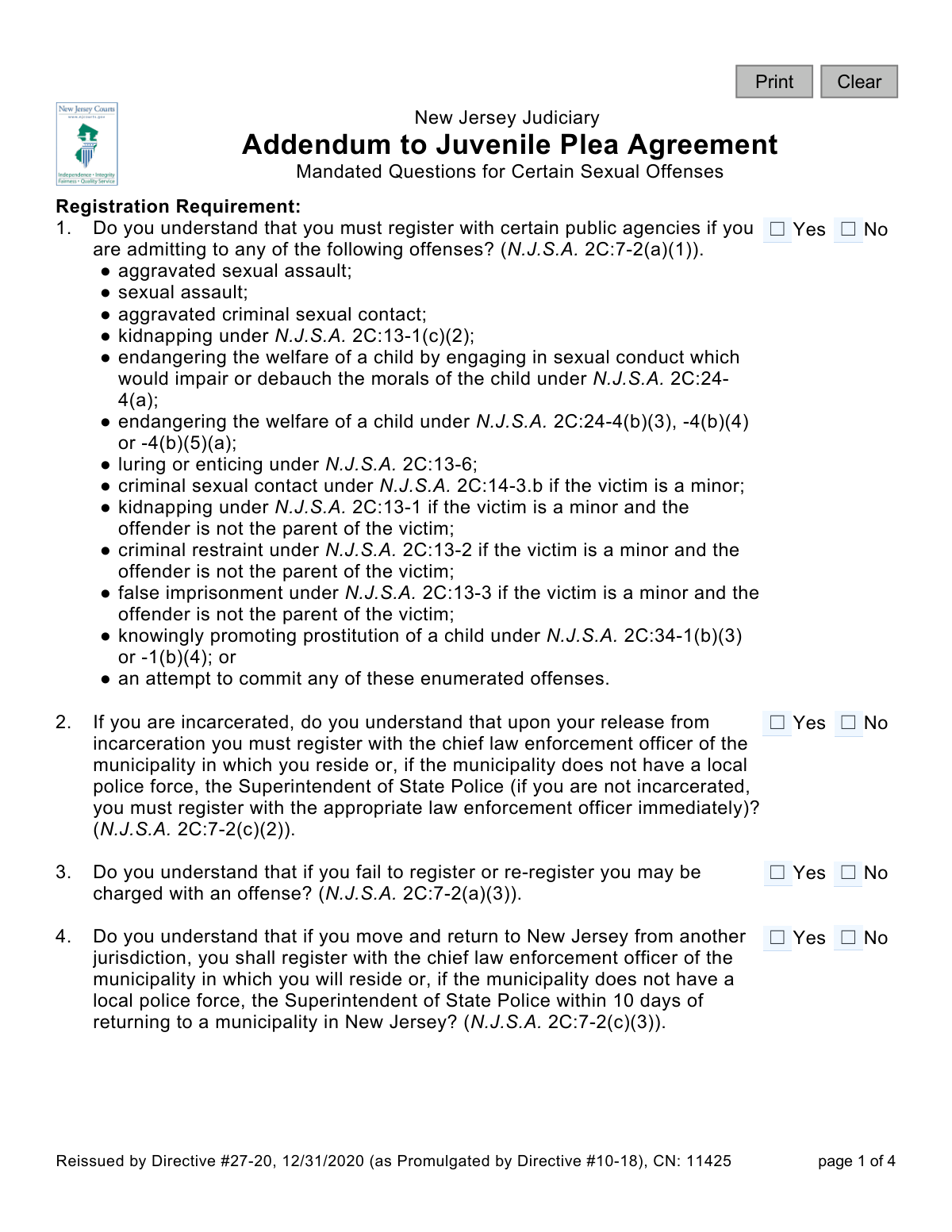
Addendum to Juvenile Plea Agreement - Mandated Questions for Certain Sexual Offenses, page 1
Basic · 36/100Form Complexity Index

The AI does the filling. You just check it.

No typing into boxes, nothing to install.

Tell the AI about youAnswer a few questions in plain words, or upload a document you already have. That is all the typing there is.
AI fills every field in secondsIt puts each answer in the right box on every page, checkboxes included.
Check it and downloadReview every field, change anything, then download, print or sign the PDF.

What this form asks for

The AI fills all of it, from your answers or your documents.

The Addendum to Juvenile Plea Agreement (CN 11425) is a crucial legal document used by the New Jersey Judiciary. It ensures that a juvenile entering a plea agreement for specific sexual offenses is fully aware of and acknowledges the mandatory long-term consequences, such as sex offender registration, community notification, and internet posting requirements. Today, this form can be filled out quickly and accurately using AI-powered services like Instafill.ai, which can also convert non-fillable PDF versions into interactive fillable forms.
Fillable fields65
Pages4
Form Complexity IndexBasic, 36/100

The AI checks your answers before you download

12 checks built for this form, so a wrong date or a missing answer is caught before anyone else sees it.

Mandatory Response for All Questions

Verifies that a response (Yes, No, or N/A where applicable) is selected for every question from 1 to 23. It is legally critical that the juvenile acknowledges their understanding of every point before a plea is accepted. An incomplete form is legally deficient and cannot be processed.

Ensures All Required Signatures are Present

This check verifies that the signature fields for the Juvenile, Parent/Guardian, and Defense Attorney have all been completed. The absence of any of these three signatures renders the agreement legally non-binding and invalid. The form cannot be accepted or processed without all parties' signed acknowledgments.

Valid Date Required for All Signatures

This validation ensures that each of the three signature fields is accompanied by a corresponding date in its adjacent field. The date establishes the precise time of acknowledgment, which is crucial for legal record-keeping. A missing date makes the signature's timing ambiguous and can compromise the document's legal standing.

Prohibit 'No' Responses Indicating Lack of Understanding

This validation flags any 'No' response to a question asking 'Do you understand...'. A 'No' answer signifies a failure in comprehension that must be immediately addressed by legal counsel before the plea process can continue. This check acts as a critical stop-gap to ensure the plea is knowing, voluntary, and intelligent.

Signature Date Format and Plausibility

This check validates that the dates entered next to the signatures are in a valid format (e.g., MM/DD/YYYY) and represent a real, logical date. The system should reject dates that are in the future or in the unreasonably distant past. This maintains data integrity and ensures the legal record of when the document was executed is accurate.

Signature Date Consistency

This validation compares the three signature dates to ensure they are reasonably close to one another, flagging any significant discrepancies (e.g., more than 7 days apart). While dates may differ slightly, a large gap could indicate a procedural issue or that the parties were not in agreement at the same time. This check helps ensure a contemporaneous signing process.

And 6 more checks
  • Conditional Validation for Internet Use Questions (Q16 & Q17)
  • Conditional Validation for AIDS/HIV Testing Question (Q21)
  • Minimum One Distribution Recipient Selected
  • Complete Response for Change of Address Sub-questions (Q8)
  • Document Page Count Verification
  • N/A Response Logic for Standard Questions

Let AI fill out your CN 11425

No typing. Every field filled in seconds, checked, ready to sign.

7 days free, then $19.99/month · Cancel anytime

How to Fill Out CN 11425 Online for Free in 2026

What the AI walks you through.

  1. Navigate to Instafill.ai and upload or select the 'Addendum to Juvenile Plea Agreement - Mandated Questions for Certain Sexual Offenses' form.
  2. Use the AI-powered tool to guide you through the form, which consists of a series of yes/no questions regarding the juvenile's understanding of their legal obligations.
  3. Carefully read each question with the juvenile, their parent/guardian, and defense attorney to ensure complete comprehension of requirements like registration, address changes, and community notification.
  4. Mark the appropriate 'Yes' or 'No' checkbox for each of the 23 mandated questions to formally record the juvenile's acknowledgment.
  5. Once all questions are answered, the juvenile, parent or guardian, and defense attorney must electronically sign and date the document in their respective fields.
  6. Review the entire completed form to ensure all questions have been answered and all signatures are present.
  7. Securely download, print, and distribute the final document to the required parties, such as the prosecutor and the County Probation Division, as indicated on the form.

Common Mistakes in Completing CN 11425

The ones the AI is built to catch.

Skipping Mandatory Yes/No Questions
Individuals often rush or get overwhelmed by the number of questions and accidentally leave some checkboxes blank. On a legal document like a plea addendum, every question must be answered to confirm full understanding of the terms. An incomplete form can be rejected by the court, delaying the legal process and potentially invalidating the plea agreement.
Inappropriately Answering 'No' to Understanding
Each question is phrased as 'Do you understand...'. Answering 'No' indicates a lack of comprehension of a critical consequence of the plea, which a judge cannot accept. This mistake often happens when a juvenile or parent disagrees with a condition but doesn't realize that answering 'No' will halt the plea proceeding until the matter is clarified. The purpose is to affirm understanding, not to contest the condition; any concerns should be discussed with the defense attorney before checking a box.
Misusing the 'Not Applicable' (N/A) Option
Questions 16, 17, and 21 include an 'N/A' option tied to specific conditions, such as the date or type of offense. A common error is selecting 'N/A' without carefully reading these conditions, leading to an inaccurate declaration. For example, marking 'N/A' for AIDS/HIV testing (Q21) when the offense was aggravated sexual assault would be incorrect and could cause legal complications.
Missing Signatures from Required Parties
The form requires signatures from the juvenile, their parent or guardian, and the defense attorney to be legally binding. It's a frequent oversight for one of the parties to forget to sign, especially when multiple people are handling the document. An unsigned or partially signed form is invalid and will be rejected, requiring it to be re-executed and causing significant delays.
Omitting the Date of Signature
Each signature line has a corresponding date field that is often left blank. The date is legally crucial as it establishes the exact moment the terms were acknowledged, which can be vital for future legal proceedings or deadlines. An undated signature can call the document's timeline and validity into question, so it is essential to fill in the date in MM/DD/YYYY format immediately after signing.
Providing Illegible Information on a Printed Form
When this form is printed and filled out by hand, information in the signature or date fields can be illegible, and checkboxes can be marked ambiguously. This can cause issues with record-keeping and verification, potentially requiring the form to be redone. Since this is a critical legal document, all entries must be clear. If the form is a non-fillable PDF, AI-powered tools like Instafill.ai can convert it into a fillable version, allowing you to type directly into the fields for perfect clarity.
Ignoring the Document Distribution Checklist
At the end of the form, there is a checklist to indicate who received a copy (e.g., Juvenile, Prosecutor). This section is frequently ignored as it seems like a minor administrative task. However, failing to mark these boxes creates an incomplete record of who was formally provided with the executed agreement, which could lead to disputes later. It is essential to check the appropriate boxes to maintain a clear and complete procedural record.
Affirming Understanding of Unexplained Legal Codes
The form is filled with references to New Jersey Statutes (e.g., N.J.S.A. 2C:7-2). A significant mistake is for the juvenile and their parent to check 'Yes' to understanding these provisions without a thorough explanation from their defense attorney. This can lead to future non-compliance simply because the person never truly understood the complex legal obligations they were accepting. Before checking any box, the juvenile and guardian must insist on a clear, plain-language explanation of each statute from their attorney.
Signing on the Incorrect Signature Line
The form has distinct signature lines for the Juvenile, Parent or Guardian, and Defense Attorney. In the stress of the moment, a parent might accidentally sign on the juvenile's line or vice versa. This simple error invalidates the signature and requires the form to be corrected and re-signed, adding unnecessary friction to the legal process. To avoid this, carefully read the label next to each signature line before signing.
Narrowly Interpreting 'Internet Capability'
Questions 16 and 17 ask about access to a 'computer or device with Internet capability.' People may mistakenly think this only refers to a personal laptop, forgetting to consider smartphones, tablets, gaming consoles, or school/library computers. This underreporting can lead to a violation of registration terms and new charges. It is crucial to interpret this requirement broadly and disclose any and all means of routine internet access.

Frequently Asked Questions About CN 11425


Is it really free for 7 days?
Yes. You pay $0 today. Cancel before Nov 5 and you are never charged. Keep it, and it is $19.99 a month for 5 fills of your CN 11425.
Can I fill other forms too?
This plan is for your CN 11425: your own AI agent fills it as often as 5 times a month. To fill other forms and upload your own, choose a Professional plan from your account.
How do I cancel?
From your account, in two clicks, any time. No email, no call.
How does the AI fill out CN 11425?
You answer a few questions in plain words, or upload a document you already have. The AI reads what you give it and puts each answer into the right field of CN 11425, on every page, in seconds. It checks the answers against the form's own rules, and you review and change anything before you download, print or sign.
What happens to my information?
It is encrypted in transit and at rest, and it is never used to train AI.
How complex is CN 11425 to fill out?
CN 11425 has a Form Complexity Index of 36 out of 100, in the basic tier: 65 fillable fields across 4 pages. Instafill.ai's AI fills it in under a minute, with every field there for you to review before you download.
What is the purpose of the 'Addendum to Juvenile Plea Agreement' form?
This form is a required supplement to a plea agreement for certain juvenile sexual offenses in New Jersey. Its purpose is to ensure the juvenile fully understands the long-term consequences, such as sex offender registration, before finalizing their plea.
Who is required to fill out and sign this form?
This form must be completed by a juvenile who is pleading guilty to one of the specific offenses listed. It requires signatures from the juvenile, their parent or guardian, and their defense attorney to acknowledge understanding of the conditions.
What does it mean that I have to register with public agencies?
If you plead to one of the listed offenses, you must provide your personal information, including your address, to the chief law enforcement officer in your town. This information is kept in a state registry and is used for public safety and notification purposes.
What happens if I fail to register or update my address after I move?
Failing to register as required, or failing to notify law enforcement of a change of address, is a separate criminal offense. You can be charged with a new crime for not complying with these rules.
Will my information be posted on the internet?
Yes, the form states that your name, photograph, address, physical description, and offense details may be made publicly available on the internet as part of the New Jersey Sex Offender Registry.
What do I need to do if I move to a different state?
You must notify the law enforcement agency where you are currently registered at least 10 days before you move. You will then be subject to the sex offender registration laws of the state you are moving to.
Can I ever get off the sex offender registry?
Possibly. If you were under 14 at the time of the offense, you can apply to terminate registration at age 18. If you were 14 or older, you can apply 15 years after your adjudication or release from a correctional facility, whichever is later.
What is 'civil commitment' as mentioned in question 22?
Civil commitment is a separate legal process where, after completing your sentence, a court could order you to be confined in a treatment facility if you are deemed a 'sexually violent predator' in need of involuntary commitment.
Why does the form ask about my internet access?
For certain offenses, the law requires you to report your internet access to law enforcement. This is because the court may order periodic, unannounced examinations of your computer and other internet-capable devices as a condition of your supervision.
What happens after this form is signed?
Once signed, copies of the form are distributed to the juvenile and their parent/guardian, the prosecutor, the defense attorney, and the County Probation Division. It becomes an official part of the court record for the plea agreement.
Can I use an AI tool to help me with this form?
While you must personally understand and agree to each question with your attorney, AI services like Instafill.ai can help by accurately auto-filling personal details like names and dates, which saves time and reduces errors.
How can I fill this form out online if it's a PDF?
You can use a service like Instafill.ai to upload the PDF. The platform makes the document interactive, allowing you to easily check the boxes and type in information before printing it for the required physical signatures.
The PDF I have isn't fillable. What can I do?
If you have a flat, non-fillable PDF, tools like Instafill.ai can convert it into an interactive, fillable form. This allows you to easily complete it on your computer, ensuring it is neat and legible before printing.
Encrypted in transit and at restNever used to train AIDelete your forms any time

Get your CN 11425 filled out by AI

$0 today. Cancel before Nov 5 and you pay nothing.

7 days free, then $19.99/month · Cancel anytime