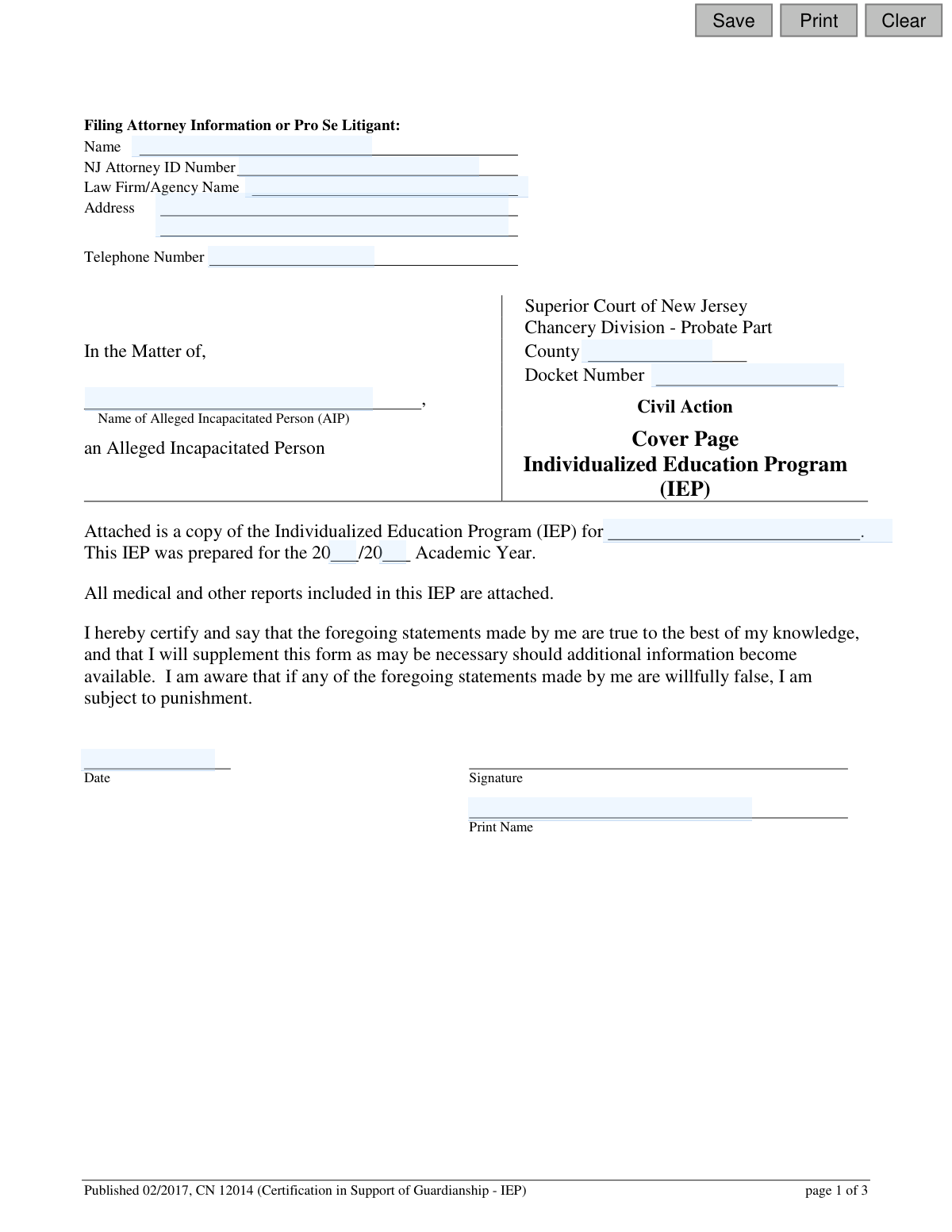
Yes! You can use AI to fill out Adult Guardianship - Certification in Support of Guardianship
This form, officially titled 'Certification in Support of Guardianship,' is a legal document filed in the Superior Court of New Jersey, Chancery Division - Probate Part. It is completed by a qualified professional, such as a physician, psychologist, or a representative from the Division of Developmental Disabilities, to provide an expert opinion on an alleged incapacitated person's ability to manage their own affairs. This certification is critical evidence in legal proceedings to determine if a guardian should be appointed. Today, this form can be filled out quickly and accurately using AI-powered services like Instafill.ai, which can also convert non-fillable PDF versions into interactive fillable forms.
CN 12014 is part of the
New Jersey forms category on Instafill.
Our AI automatically handles information lookup, data retrieval, formatting, and form filling.
It takes less than a minute to fill out CN 12014 using our AI form filling.
Securely upload your data. Information is encrypted in transit and deleted immediately after the form is filled out.
Form specifications
| Form name: | Adult Guardianship - Certification in Support of Guardianship |
| Number of fields: | 50 |
| Number of pages: | 1 |
| Language: | English |
Instafill Demo: How to fill out PDF forms in seconds with AI
How to Fill Out CN 12014 Online for Free in 2026
Are you looking to fill out a CN 12014 form online quickly and accurately? Instafill.ai offers the #1 AI-powered PDF filling software of 2026, allowing you to complete your CN 12014 form in just 37 seconds or less.
Follow these steps to fill out your CN 12014 form online using Instafill.ai:
- 1 Navigate to Instafill.ai and upload or select the New Jersey 'Certification in Support of Guardianship' form.
- 2 Enter the information for the filing attorney or pro se litigant, including name, address, and NJ Attorney ID if applicable.
- 3 Provide the court case details, such as the county, docket number, and the full name of the Alleged Incapacitated Person (AIP).
- 4 As the certifier, identify your professional role and describe the basis for your knowledge of the AIP's functional capacity.
- 5 State your professional opinion on the AIP's ability to manage their affairs, specifying any areas where they may still have capacity (e.g., medical, financial, legal decisions).
- 6 Indicate whether the AIP is capable of attending the court hearing and provide a detailed explanation if they are not.
- 7 Carefully review all the information provided, then electronically sign and date the certification to attest to its truthfulness before filing.
Our AI-powered system ensures each field is filled out correctly, reducing errors and saving you time.
Why Choose Instafill.ai for Your Fillable CN 12014 Form?
Speed
Complete your CN 12014 in as little as 37 seconds.
Up-to-Date
Always use the latest 2026 CN 12014 form version.
Cost-effective
No need to hire expensive lawyers.
Accuracy
Our AI performs 10 compliance checks to ensure your form is error-free.
Security
Your personal information is protected with bank-level encryption.
Frequently Asked Questions About Form CN 12014
This form is used by qualified professionals to provide the New Jersey Superior Court with an expert opinion on an individual's functional capacity. It serves as key evidence in a legal proceeding to determine if a guardian should be appointed for that person.
This form must be completed by a specific professional, such as a licensed physician, psychologist, or a licensed care professional with personal knowledge of the individual. It can also be completed by certain officials from the Division of Developmental Disabilities.
An 'Alleged Incapacitated Person' or AIP is the legal term for the individual who is the subject of the guardianship proceeding. This is the person who is claimed to be unable to manage their own affairs.
The first page of this form acts as a cover sheet for submitting the person's Individualized Education Program (IEP). You must attach the full IEP document and any associated reports when filing this certification with the court.
In section 3, you must provide your professional opinion on the individual's ability to govern themselves and manage their affairs. You will either certify that they are unfit in all areas or specify which areas (like medical or financial decisions) they still have capacity to handle.
In section 5, you must state whether the individual is capable of attending the court hearing. If you believe they are not, you must provide the specific medical or other reasons for their inability to attend.
No, you cannot. Section 6 requires you to certify that you are not related by blood or marriage to the individual and that you do not have certain financial or professional conflicts of interest.
No, the form includes a notice stating that it is not a public document. The personal and medical information you provide will be kept confidential by the court.
A 'Pro Se Litigant' is a person who is representing themselves in a legal matter without an attorney. If you are filing this form without a lawyer, you would enter your own information in the 'Filing Attorney Information or Pro Se Litigant' section.
The certification on page 1 is a simple statement confirming that the attached IEP is a true copy. The main certification begins on page 2, where you provide your detailed professional assessment of the person's functional capacity.
Yes, services like Instafill.ai use AI to help you accurately auto-fill form fields, which can save time and reduce errors. However, the professional opinions and certifications must be your own.
You can use a service like Instafill.ai to upload the PDF and fill it out on your computer. The platform allows you to type directly into the fields and then save or print the completed document for submission.
If your PDF is a non-fillable scan, you can use a tool like Instafill.ai to make it interactive. The service can convert the 'flat' document into a fillable form that you can easily complete online.
Compliance CN 12014
Validation Checks by Instafill.ai
1
AIP Name Consistency Across Sections
This check ensures the 'Name of Alleged Incapacitated Person (AIP)' is identical on both the IEP Cover Page (page 1) and the Certification in Support of Guardianship (page 2). Consistent naming is critical to ensure all documents pertain to the same individual, preventing legal and administrative errors. If the names do not match, the submission is considered ambiguous and will be rejected until corrected.
2
IEP Academic Year Sequence
Validates the '20__/20__' academic year fields on the IEP Cover Page. The second year (`schoolYr2IEP`) must be exactly one year greater than the first year (`schoolYr1IEP`). This ensures the academic period is logical and correctly recorded, which is essential for establishing the timeliness and relevance of the educational records. An invalid sequence would call the document's context into question.
3
Mandatory Certifier Role Selection
Verifies that exactly one role has been selected from the list of options under 'I am (check one)'. The certifier's authority is based on their professional role, and this information is legally required to establish their standing to make the certification. Failure to select a role makes the entire certification invalid as the source's qualification is unknown.
4
Incapacity Opinion Completeness
Ensures that one of the two primary opinions in section 3 ('unfit... in all areas' OR 'unfit... in some areas') is selected. This is the core conclusion of the certification, and the form is incomplete and meaningless without this declaration. The system must reject a submission where neither option is chosen.
5
Conditional Requirement for Capacity Areas
This is a logical check tied to the incapacity opinion. If the certifier selects 'unfit and unable... in some areas', then at least one checkbox from the list of capacities (medical, legal, financial, etc.) must also be selected. This is crucial for defining the specific scope of the proposed guardianship, as failing to specify areas of capacity would contradict the chosen opinion.
6
Conditional Requirement for 'Other' Capacity Description
If the 'other (please describe)' checkbox is selected within the list of capacities in section 3, this validation ensures the corresponding text field ('otherDesc') is not empty. An empty description makes the 'other' selection meaningless and fails to provide the court with necessary specific information. The submission should be blocked until a description is provided.
7
Mandatory Justification for Non-Attendance at Hearing
This check is triggered if the certifier indicates the AIP 'is not' capable of attending the court hearing in section 5. The corresponding text field for the reasons must be filled out. An individual's right to be present at their own hearing is fundamental, so any claim of inability to attend must be substantiated with a clear explanation.
8
NJ Attorney ID Format Validation
Validates that the 'NJ Attorney ID Number' field, if provided, conforms to the expected format for New Jersey attorneys. This helps ensure that the attorney information is accurate and can be verified against the state bar's records. An incorrectly formatted ID could indicate a typo or an invalid entry, leading to processing delays.
9
Signature Date Validity
Ensures the 'Date' fields next to the signatures on pages 1 and 3 contain a valid date that is not in the future. A signature date is required to establish when the certification was made. Post-dating is not permissible, and an invalid date format would render the attestation's timing unclear, potentially invalidating the document.
10
Completeness of Justification Text Fields
Verifies that the free-text fields for section 2 ('My knowledge... is based upon:') and section 4 ('My opinion is based upon:') are not empty. These narrative sections provide the evidentiary basis for the certifier's entire opinion. Without this justification, the certification is merely a conclusory statement and lacks the substance required for a court to make a determination.
11
Header Data Consistency
This validation compares the header information (Filing Attorney Name, County, Docket Number) between the IEP Cover Page (page 1) and the Certification (page 2). All fields must be identical to ensure the pages are part of a single, consistent filing for the correct case. Mismatched data suggests a clerical error that could lead to the documents being filed incorrectly.
12
Signature and Printed Name Presence
Confirms that the 'Signature' and 'Print Name' fields are both completed on page 1 and page 3. A legal certification requires a clear indication of who made the statements. While a system cannot validate the cursive signature itself, it can ensure the printed name field is filled and that the signature field has been marked as signed (e.g., via a digital signature action).
Common Mistakes in Completing CN 12014
The form requires the 'Filing Attorney Information or Pro Se Litigant' section to be filled out on both page 1 and page 2. A common mistake is entering conflicting information, such as different phone numbers or addresses, or leaving one section blank entirely. This can cause confusion and delays in processing as the court clerk must determine the correct contact information. To avoid this, carefully fill out both sections identically or use a tool like Instafill.ai, which can auto-populate recurring information consistently across a document.
The name of the Alleged Incapacitated Person (AIP) is required in multiple fields across all three pages. People often make typos or use a nickname instead of the person's full legal name, leading to inconsistencies. This is a critical error that can create legal ambiguities and may require the forms to be amended and refiled, delaying the guardianship proceedings. Always use the full legal name as it appears on official documents like a birth certificate or driver's license.
Page 1 is a cover page certifying that a copy of the AIP's Individualized Education Program (IEP) is attached. A frequent and significant error is submitting this certification form without the actual IEP document. This renders the submission incomplete and defeats the purpose of the certification, leading to immediate rejection or a request for more information from the court. Always double-check that all referenced attachments are included with the filing.
Sections 2 and 4 ask for the basis of the certifier's knowledge and opinion regarding the AIP's functional capacity. Many filers provide vague, unhelpful answers like 'personal observation' or 'my professional opinion.' These statements lack the specific, factual basis the court needs to make a determination, which can weaken the application or lead to it being questioned. To avoid this, provide concrete details such as dates of examinations, specific behaviors observed, and records reviewed.
In Section 3, the filer must state their opinion on the AIP's capacity. A common logical error is checking both 'unfit and unable to govern... in all areas' AND then also selecting specific areas of capacity (e.g., 'medical decision making') in the section below it. These contradictory statements make the certifier's opinion legally unclear and will likely result in the form being returned for clarification. Carefully select only one of the two main options and ensure any sub-selections are consistent.
Section 5 requires the certifier to state whether the AIP is capable of attending the court hearing. If the certifier checks 'is not' capable, they must provide the reasons in the space provided. A common oversight is to leave this explanation blank, which makes the assertion unsupported and may lead the judge to question the opinion or even compel the AIP's attendance. Always provide a clear, specific medical or functional reason if you believe the individual cannot attend.
The form requires a signature and date on both page 1 (for the IEP certification) and page 3 (for the main certification). Forgetting to sign or date the document is one of the most common and critical errors, as it renders the certification legally invalid. An undated or unsigned form will be rejected outright, causing significant delays. Before submitting, perform a final review specifically to check that all signature and date fields are complete.
On page 2, the certifier must check one box to identify their professional relationship to the AIP (e.g., physician, DDD designee). Some individuals mistakenly check multiple boxes or select a role that doesn't accurately reflect their qualifications. This can undermine the credibility of the certification and may lead to it being disqualified. Ensure you select the single most accurate description of your professional capacity to make the certification.
The top of the form includes fields for 'County' and 'Docket Number,' which are essential for the court to file the document correctly. Pro se litigants, in particular, may be unsure of this information and leave it blank. Submitting a form without a county and docket number will result in it being rejected or lost, as the clerk's office will not know which case file it belongs to. If you are unsure, contact the county's Probate Part clerk's office for guidance before filing.
Below each signature line is a field to 'Print Name.' While a signature can be stylized, the printed name must be clearly legible to identify the certifier. An unreadable printed name makes it difficult for the court to verify the identity and credentials of the person signing the legal document. To prevent this, print your name clearly in block letters. AI-powered tools like Instafill.ai can help by typing this information, ensuring perfect legibility every time.
Saved over 80 hours a year
“I was never sure if my IRS forms like W-9 were filled correctly. Now, I can complete the forms accurately without any external help.”
Kevin Martin Green
Your data stays secure with advanced protection from Instafill and our subprocessors

Robust compliance program
Transparent business model
You’re not the product. You always know where your data is and what it is processed for.
ISO 27001, HIPAA, and GDPR
Our subprocesses adhere to multiple compliance standards, including but not limited to ISO 27001, HIPAA, and GDPR.
Security & privacy by design
We consider security and privacy from the initial design phase of any new service or functionality. It’s not an afterthought, it’s built-in, including support for two-factor authentication (2FA) to further protect your account.
Fill out CN 12014 with Instafill.ai
Worried about filling PDFs wrong? Instafill securely fills adult-guardianship-certification-in-support-of-guardianship forms, ensuring each field is accurate.