Yes! You can use AI to fill out Adult Guardianship - Certification of Examining Professional
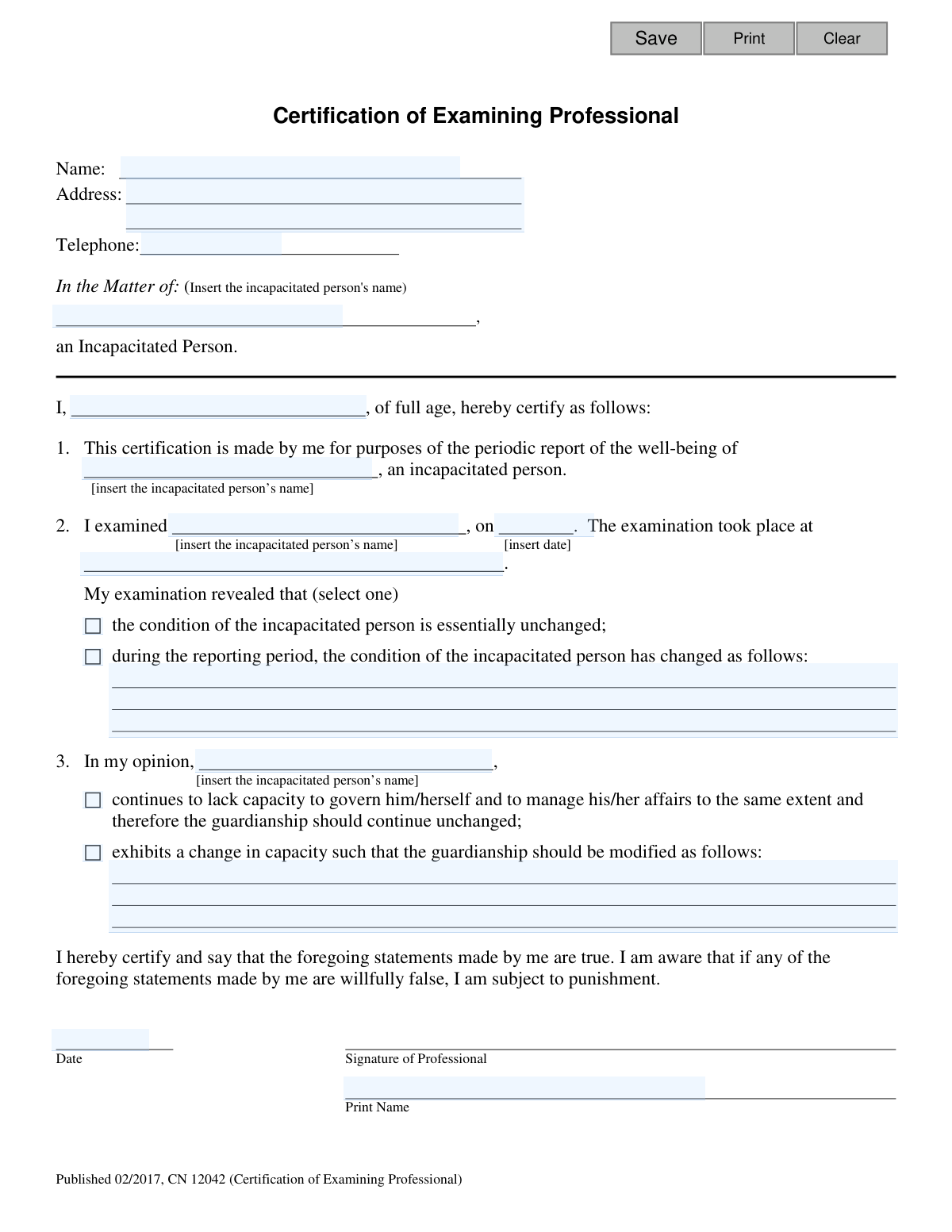
This form, officially titled 'Adult Guardianship - Certification of Examining Professional', is a required component of a guardian's periodic 'Report of Well-Being'. A medical professional, such as an M.D. or D.O., completes this certification after examining the incapacitated person to provide an expert opinion on their current condition and capacity. This assessment helps the court determine if the guardianship should continue as is or be modified. Today, this form can be filled out quickly and accurately using AI-powered services like Instafill.ai, which can also convert non-fillable PDF versions into interactive fillable forms.
CN 12042 is part of the
New Jersey forms category on Instafill.
Our AI automatically handles information lookup, data retrieval, formatting, and form filling.
It takes less than a minute to fill out CN 12042 using our AI form filling.
Securely upload your data. Information is encrypted in transit and deleted immediately after the form is filled out.
Form specifications
| Form name: | Adult Guardianship - Certification of Examining Professional |
| Number of fields: | 21 |
| Number of pages: | 1 |
| Language: | English |
Instafill Demo: How to fill out PDF forms in seconds with AI
How to Fill Out CN 12042 Online for Free in 2026
Are you looking to fill out a CN 12042 form online quickly and accurately? Instafill.ai offers the #1 AI-powered PDF filling software of 2026, allowing you to complete your CN 12042 form in just 37 seconds or less.
Follow these steps to fill out your CN 12042 form online using Instafill.ai:
- 1 Navigate to Instafill.ai and upload or select the Certification of Examining Professional form.
- 2 The guardian uses the AI-powered fields to enter their name, address, phone number, and the full name of the incapacitated person.
- 3 The guardian securely provides the interactive form to the designated examining medical professional.
- 4 The medical professional enters their name, the examination date, and the location of the examination.
- 5 The professional indicates their findings by selecting whether the incapacitated person's condition is unchanged or has changed, providing a detailed description if necessary.
- 6 The professional provides their opinion on whether the guardianship should continue unchanged or be modified, adding specific recommendations if applicable.
- 7 The professional completes the form by digitally signing and dating the certification before returning it to the guardian for submission.
Our AI-powered system ensures each field is filled out correctly, reducing errors and saving you time.
Why Choose Instafill.ai for Your Fillable CN 12042 Form?
Speed
Complete your CN 12042 in as little as 37 seconds.
Up-to-Date
Always use the latest 2026 CN 12042 form version.
Cost-effective
No need to hire expensive lawyers.
Accuracy
Our AI performs 10 compliance checks to ensure your form is error-free.
Security
Your personal information is protected with bank-level encryption.
Frequently Asked Questions About Form CN 12042
This form is used to document a recent medical evaluation of an incapacitated person. It serves as an official certification from a medical professional about the person's condition and is required as part of a guardian's periodic Report of Well-Being.
The guardian starts the form by entering their information and the incapacitated person's name. The guardian then gives the form to a medical professional (like an M.D. or D.O.) who completes the evaluation details, signs, and certifies the information.
Before giving the form to the doctor, you must enter your name, address, and phone number at the top left. You also need to write the full legal name of the incapacitated person on the line above 'In the Matter of:'.
The form must be completed by a medical professional, such as a medical doctor (M.D.) or a doctor of osteopathic medicine (D.O.), who has performed a recent medical evaluation of the incapacitated person.
Once the examining professional has completed and signed the certification, you must attach it to your Report of Well-Being. This completed certification is a required part of the report you file with the court.
If the examining professional wishes to use their own form, you must ensure their statement addresses all the same information. This includes the date of examination, findings on the person's condition, and an opinion on whether the guardianship should continue or be modified.
The professional must provide the date and location of the exam, state if the person's condition has changed, and give their opinion on the person's capacity and whether the guardianship should continue or be modified. They must also print their name, sign, and date the form.
Yes, AI-powered services like Instafill.ai can help you accurately pre-fill your information and the incapacitated person's name onto the form. This saves time and reduces errors before you provide it to the medical professional.
You can use a service like Instafill.ai to fill out your portion of the form online. Simply upload the PDF, and the tool will allow you to type your information directly into the fields before printing it for the doctor.
If you have a non-fillable or 'flat' PDF, you can upload it to a platform like Instafill.ai. Their technology can convert it into an interactive, fillable form, allowing you to easily type in the required information online.
If the professional indicates that the person's capacity has changed, they must describe the recommended modifications on the form. This information will be reviewed by the court as part of your Report of Well-Being to determine if changes to the guardianship are needed.
No, the guardian does not sign this specific form. The 'Certification of Examining Professional' must be signed by the medical professional who conducted the evaluation to certify their findings.
The form specifies that a 'recent' medical evaluation is required. While a specific timeframe isn't listed, the exam should be current enough to accurately reflect the person's condition for the reporting period.
Compliance CN 12042
Validation Checks by Instafill.ai
1
Logical Date Sequence
This validation confirms that the signature date (`sigDrDt`) is on or after the examination date (`aipExamDt`). A professional cannot certify the results of an examination before it has occurred, so this check prevents logical impossibilities and ensures the integrity of the report's timeline. If the signature date precedes the exam date, an error message will be displayed, requiring the user to correct one or both dates.
2
Conditional Requirement for Examination Findings
If the professional selects the option indicating the 'condition of the incapacitated person has changed' (`examResults`), this validation ensures the corresponding text field (`examFindings`) is not empty. This is crucial for providing necessary details about the change in the person's condition for the guardian's report. Failure to provide this explanation would render the selection meaningless and trigger a validation error.
3
Conditional Requirement for Guardianship Modification
This check is triggered if the professional recommends that the 'guardianship should be modified' (`guardContinue`). It verifies that the text field explaining the proposed modifications (`guardContinueDesc`) is filled out. Without this explanation, the court or guardian has no information on how to proceed with the recommendation. The validation ensures that a recommendation for modification is always accompanied by a detailed description.
4
Valid Examination Date
This check ensures the examination date (`aipExamDt`) is not only present but also a valid date in a recognized format (e.g., MM/DD/YYYY) and is not a future date. The date of examination is fundamental to understanding the timeliness of the report. An invalid or future date would be rejected, and the user would be prompted to enter a valid, past or present date.
5
Professional Name Consistency
This validation compares the name entered in the certification body ('I, [certDrName], ...') with the printed name at the signature line (`sigDrName`). These two names should refer to the same individual. This check helps prevent clerical errors and ensures the person certifying the document is the same person signing it. A mismatch would prompt the user to review and correct the names.
6
Incapacitated Person's Name Required
Verifies that the name of the incapacitated person (`aipName`) has been entered in the 'In the Matter of' section. This name is the primary subject of the certification and must be present to identify who the report concerns. If the name is missing, the form is incomplete and cannot be processed, so the user will be required to enter it.
7
Professional Name Required for Certification
Checks that the name of the examining professional (`certDrName`) is provided in the certification statement ('I, ____, of full age...'). This is a critical field as it identifies the individual making the professional assessment and is required for the document to be legally valid. A failure in this validation would prevent form submission and prompt the user to fill in the professional's name.
8
Valid Signature Date
Validates that the signature date (`sigDrDt`) is provided, is in a proper date format (e.g., MM/DD/YYYY), and is not a date in the future. This date legally attests to when the professional certified the statements. The form cannot be considered complete or valid without a proper signature date, so an error would require correction before submission.
9
Examination Location Required
Verifies that the location of the medical examination (`aipExamLoc`) has been specified. This information provides context for the examination, indicating whether it took place at a clinic, hospital, or residence, which can be relevant information. This field is mandatory for the report to be considered complete.
10
Examination Results Selection Required
Ensures that the professional has made a selection for the `examResults` field, choosing either that the person's condition is 'essentially unchanged' or 'has changed'. This is a primary finding of the examination and is a required element of the certification. The form cannot be submitted until one of the options is selected.
11
Guardianship Recommendation Selection Required
This validation confirms that a selection has been made for the `guardContinue` field, indicating whether the guardianship should 'continue unchanged' or 'be modified'. This recommendation is the core purpose of the professional's certification. A missing selection would make the form incomplete and require the user to choose an option.
12
Printed Signature Name Required
This check ensures the printed name of the professional (`sigDrName`) is provided alongside the signature. While a physical signature is applied offline, the printed name is crucial for legibly identifying the signer. This field is mandatory for the legal validity and clarity of the document.
13
Valid Professional's Phone Number Format
This check validates that the professional's telephone number (`certDrPh`) is entered in a standard, recognizable format (e.g., 10 digits with optional formatting like parentheses or hyphens). A valid phone number is important for any follow-up questions. The validation helps ensure the data is clean and usable, rejecting incorrectly formatted entries.
14
Incapacitated Person Name Consistency
The form requires the incapacitated person's name (`aipName`) to be entered in multiple locations. This validation ensures that the name is entered identically in all instances. This prevents confusion and ambiguity about the subject of the report. If inconsistencies are found, the user will be alerted to correct the entries to ensure they all match.
Common Mistakes in Completing CN 12042
The guardian mistakenly fills out the entire form, including the medical sections, or the professional fills in their own contact details at the top instead of the guardian's. This happens because of a failure to read the instructions detailing the two-part process. An invalid certification can lead to court rejection and delays. The guardian must only fill in their info and the incapacitated person's name before giving the form to the professional.
The full legal name of the incapacitated person is entered with typos, variations (e.g., using a middle initial in one spot but not another), or as a nickname across the form's multiple fields. This creates legal ambiguity and can cause processing delays or rejection by the court clerk. To avoid this, use the person's full, official legal name consistently in every field where it is requested.
The examining professional checks the box indicating the incapacitated person's condition has changed but then fails to provide a detailed written explanation in the space provided. This omission leaves the court without the necessary information to make an informed decision about the person's well-being. The professional must always elaborate on any noted changes to fulfill the reporting requirement.
The professional checks the box to recommend that the guardianship be modified but does not describe the specific modifications needed in the text area. The court cannot act on a vague recommendation and will likely reject the form or require a follow-up. When suggesting a modification, the professional must clearly state how the guardianship should be changed, such as restoring certain rights or altering the scope of the guardian's authority.
The examining professional provides a signature that is difficult to read and forgets to print their name clearly on the 'Print Name' line. This makes it difficult or impossible for the court to verify the professional's identity and credentials, potentially invalidating the entire certification. Always ensure the printed name is clear and legible alongside the signature to ensure authenticity.
The professional omits the date of the examination or the date of their signature. These dates are critical as they establish that the evaluation is recent and relevant to the current reporting period. A missing date can lead to the form being rejected for being untimely, causing significant delays in the guardianship review process.
In sections 2 and 3, the professional provides written details but forgets to check the corresponding box (e.g., 'condition... has changed' or 'guardianship should be modified'). This creates ambiguity and forces the court to interpret the professional's intent, which can lead to errors or rejection of the form. Always ensure one box in each selection group is clearly checked to reflect the written opinion.
The instructions allow the professional to use their own form, but they often submit a standard report that lacks all the required elements, such as the specific certification language or the explicit opinion on continuing/modifying the guardianship. This results in an incomplete filing that will be rejected. If using an alternative form, it must be carefully cross-referenced to ensure it addresses every point in the official certification.
The form is often filled out by hand with handwriting that is difficult to read, especially in the sections for the examination location or the detailed findings. This can lead to data entry errors by court clerks and may require the form to be resubmitted. Using a fillable PDF version prevents this; AI-powered tools like Instafill.ai can convert flat, non-fillable PDFs into fillable forms to ensure all entries are typed and legible.
Dates for the examination or signature are written in ambiguous formats like '02/03/24,' which could be interpreted as either February 3rd or March 2nd. This can cause confusion regarding the timeline of the evaluation. To avoid this, write out the month (e.g., 'February 3, 2024'). AI form-filling tools like Instafill.ai can help prevent this by automatically standardizing date formats.
Saved over 80 hours a year
“I was never sure if my IRS forms like W-9 were filled correctly. Now, I can complete the forms accurately without any external help.”
Kevin Martin Green
Your data stays secure with advanced protection from Instafill and our subprocessors

Robust compliance program
Transparent business model
You’re not the product. You always know where your data is and what it is processed for.
ISO 27001, HIPAA, and GDPR
Our subprocesses adhere to multiple compliance standards, including but not limited to ISO 27001, HIPAA, and GDPR.
Security & privacy by design
We consider security and privacy from the initial design phase of any new service or functionality. It’s not an afterthought, it’s built-in, including support for two-factor authentication (2FA) to further protect your account.
Fill out CN 12042 with Instafill.ai
Worried about filling PDFs wrong? Instafill securely fills adult-guardianship-certification-of-examining-professional forms, ensuring each field is accurate.