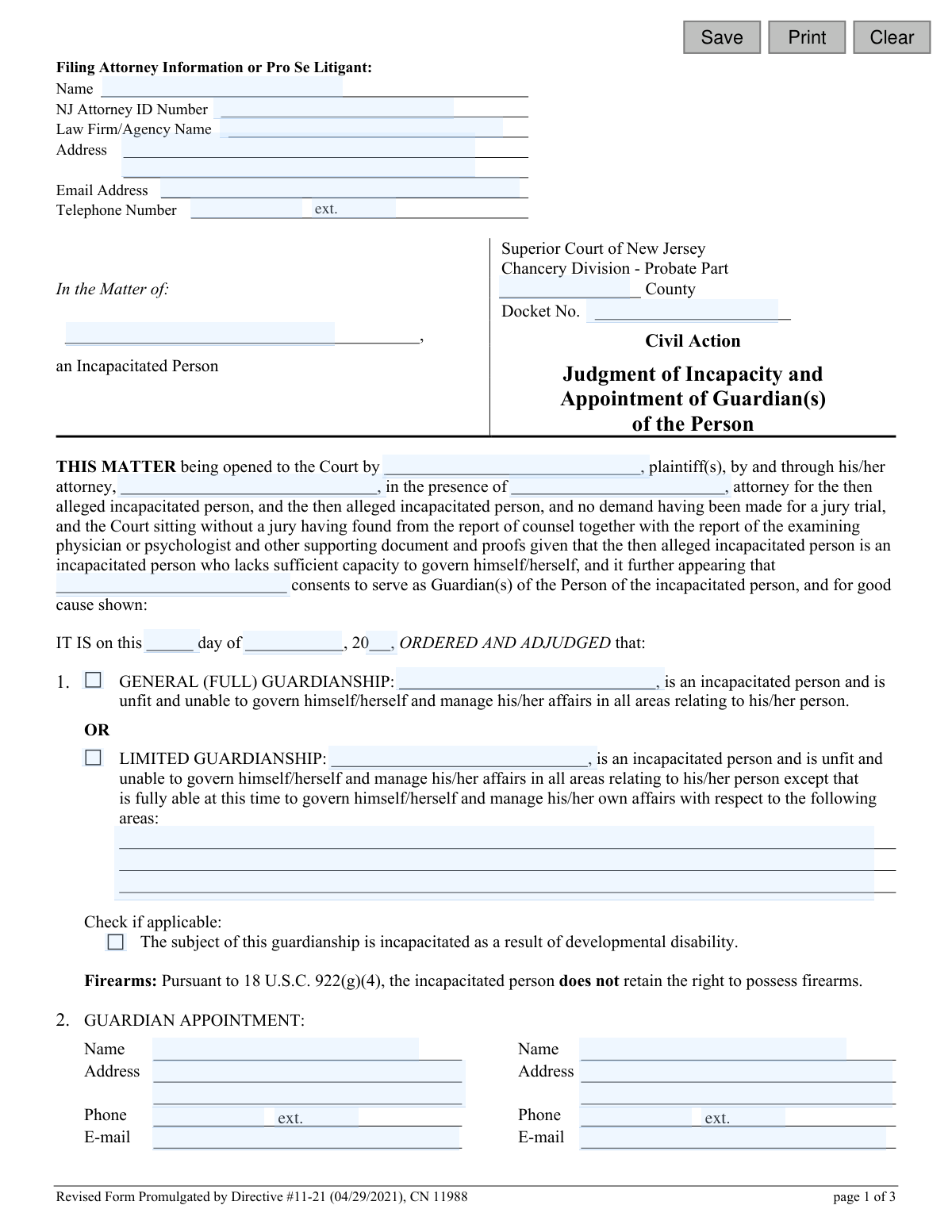
Yes! You can use AI to fill out Adult Guardianship - Judgment of Incapacity and Appointment of Guardian(s) of the Person

This form is a legal judgment issued by the Superior Court of New Jersey, Chancery Division - Probate Part, to officially declare an adult as incapacitated and appoint one or more guardians to manage their personal affairs. It details the scope of the guardian's authority, whether full or limited, and outlines their duties and reporting responsibilities to the court. Today, this form can be filled out quickly and accurately using AI-powered services like Instafill.ai, which can also convert non-fillable PDF versions into interactive fillable forms.
CN 11988 is part of the New Jersey forms category on Instafill.
Our AI automatically handles information lookup, data retrieval, formatting, and form filling.
It takes less than a minute to fill out CN 11988 using our AI form filling.
Securely upload your data. Information is encrypted in transit and deleted immediately after the form is filled out.

Form specifications

Form name: Adult Guardianship - Judgment of Incapacity and Appointment of Guardian(s) of the Person
Number of fields: 46
Number of pages: 1
Language: English
main-image

Instafill Demo: How to fill out PDF forms in seconds with AI

How to Fill Out CN 11988 Online for Free in 2026

Are you looking to fill out a CN 11988 form online quickly and accurately? Instafill.ai offers the #1 AI-powered PDF filling software of 2026, allowing you to complete your CN 11988 form in just 37 seconds or less.
Follow these steps to fill out your CN 11988 form online using Instafill.ai:
  1. 1 Navigate to Instafill.ai and upload or select the 'Judgment of Incapacity and Appointment of Guardian(s) of the Person' form.
  2. 2 Enter the information for the filing attorney or pro se litigant, including name, NJ Attorney ID, address, and contact details.
  3. 3 Input the case details into the appropriate fields, such as the county, docket number, and the names of the plaintiff and the incapacitated person.
  4. 4 Specify the details of the guardianship, selecting between 'General (Full) Guardianship' or 'Limited Guardianship' and providing the full name, address, and contact information for the appointed guardian(s).
  5. 5 Complete the sections regarding guardian limitations, reporting requirements, and any fees to be paid to the court-appointed attorney for the incapacitated person.
  6. 6 Use the AI-powered review feature to check all entered information for accuracy and completeness, ensuring all names, dates, and legal selections are correct.
  7. 7 Download the completed judgment, ready for the judge's signature, and follow the instructions for serving and filing it with the appropriate court and parties.

Our AI-powered system ensures each field is filled out correctly, reducing errors and saving you time.

Why Choose Instafill.ai for Your Fillable CN 11988 Form?

Speed

Complete your CN 11988 in as little as 37 seconds.

Up-to-Date

Always use the latest 2026 CN 11988 form version.

Cost-effective

No need to hire expensive lawyers.

Accuracy

Our AI performs 10 compliance checks to ensure your form is error-free.

Security

Your personal information is protected with bank-level encryption.

Frequently Asked Questions About Form CN 11988

This form is a legal court order issued by a New Jersey Superior Court judge. It officially declares an individual as 'incapacitated' and appoints one or more guardians to make decisions about their personal well-being.

This form is a judgment prepared by an attorney or plaintiff and signed by a Superior Court Judge. It is the final order resulting from a legal proceeding, not a form that an individual fills out to start a case.

A General Guardianship means the person is found unable to manage all of their personal affairs. A Limited Guardianship specifies certain areas where the person can still make their own decisions, while the guardian handles the rest.

The guardian must act in the best interest of the incapacitated person, encourage their participation in decisions, and protect them from harm. They must also comply with court reporting, background screening, and training requirements.

The appointed guardian must qualify with the Surrogate's office within 30 days. This involves completing required training and background checks before official 'Letters of Guardianship' are issued, granting them legal authority.

Yes, unless waived by the court, the guardian must file an annual report on the well-being of the incapacitated person with the County Surrogate. This report is due within 14 days of the anniversary of the judgment date.

This section designates the guardian as the incapacitated person's personal representative for healthcare matters. This gives the guardian full access to the person's medical records and the authority to make healthcare decisions.

This judgment automatically revokes any previously executed power of attorney related to personal (non-financial) affairs. Any advance directive for healthcare remains for expressing preferences, but the proxy designation is voided.

The guardian is required to notify the County Surrogate in writing of any change in their own address or the incapacitated person's address within ten days of the change.

This judgment formalizes that, pursuant to federal law, the person who has been adjudicated as incapacitated loses the right to possess firearms.

Yes, the judgment states that the guardian must acknowledge to the Surrogate that they have completed guardianship training and received the official training guides before Letters of Guardianship can be issued.

Yes, services like Instafill.ai use AI to help legal professionals accurately populate form fields by extracting information from case files. This saves time and reduces the risk of clerical errors when preparing the judgment for the court.

You can upload the form to the Instafill.ai platform, which will make all fields interactive. You can then either fill it out manually or use the AI-powered features to automatically populate information like names, addresses, and docket numbers from your case documents.

If you have a flat, non-fillable PDF, you can use a service like Instafill.ai. It can convert the non-fillable PDF into an interactive, fillable form that you can easily complete, save, and print online.

Compliance CN 11988
Validation Checks by Instafill.ai

1
NJ Attorney ID Format Validation
This check ensures the 'NJ Attorney ID Number' field is entered in the correct format. The ID is a unique identifier for attorneys in New Jersey, and validating its format helps prevent data entry errors and ensures the attorney can be correctly identified in the system. If the format is incorrect, the user should be prompted to enter a valid, typically numeric, ID.
2
Docket Number Format Validation
Validates that the 'Docket No.' field conforms to the Superior Court's standard format, which typically includes county codes, action types, sequence numbers, and year (e.g., 'C-12345-21'). This is critical for ensuring the judgment is filed correctly against the existing civil action and can be retrieved later. An invalid format could lead to filing rejection or misfiling.
3
Incapacitated Person Name Consistency
This validation verifies that the name of the incapacitated person is entered identically in all relevant fields throughout the document (e.g., 'In the Matter of', Section 1 'GENERAL GUARDIANSHIP', Section 1 'LIMITED GUARDIANSHIP'). Maintaining consistency is crucial for the legal validity and clarity of the judgment. A mismatch could create ambiguity about the subject of the order.
4
Conditional Requirement for Limited Guardianship Description
If the 'LIMITED GUARDIANSHIP' option is selected in Section 1, this check ensures that the corresponding text area describing the areas where the person retains capacity is not empty. This description is legally essential as it defines the scope and limits of the guardian's power. Failure to provide this detail would make the limited guardianship order incomplete and unenforceable.
5
Conditional Requirement for Attorney Fee Details
This check is triggered if the option to pay the court-appointed attorney is selected in Section 12. It validates that the numeric fields for 'fee for professional services', 'expenses incurred', and the number of days for payment are all filled out. Without these values, the order to pay the attorney is incomplete and cannot be executed.
6
Minimum Guardian Appointment
Ensures that the name, address, and phone number for at least one guardian are provided in Section 2. The entire purpose of the judgment is to appoint a guardian, so this information is fundamental. If no guardian details are entered, the form submission should be blocked as it fails to fulfill its primary function.
7
Valid Judgment Date
Verifies that the day, month, and year entered for the judgment date form a valid, existing calendar date. It should also check that the date is not in the future or unreasonably far in the past. An invalid date would render the legal document void or questionable, so ensuring its accuracy is paramount.
8
Filer Information Completeness
This validation ensures that the name and address fields for the 'Filing Attorney Information or Pro Se Litigant' are completed. This information is mandatory for court records to identify who submitted the document and to whom correspondence should be sent. The form cannot be processed without knowing the identity of the filer.
9
Valid Email Address Format
Checks that any email address entered (for the attorney or guardians) follows the standard '[email protected]' format. This is important for ensuring that electronic communications and notifications from the court system are deliverable. An invalid email format would lead to failed communication attempts.
10
Valid Telephone Number Format
Ensures that all telephone number fields are entered in a recognizable format (e.g., 10 digits, with or without hyphens or parentheses). Correctly formatted phone numbers are essential for the court or other parties to be able to contact the filer and the appointed guardians. The validation should prevent entry of non-numeric characters or an incorrect number of digits.
11
Exclusive Selection for Guardianship Type
This check ensures that the user selects either 'GENERAL (FULL) GUARDIANSHIP' or 'LIMITED GUARDIANSHIP' in Section 1, but not both. These two options are mutually exclusive, and selecting both would create a logical contradiction in the legal order. The system should enforce the selection of exactly one of these two types.
12
Exclusive Selection for Reporting Requirement
Validates that one and only one option is chosen in Section 8 regarding the 'REPORTING' of the incapacitated person's well-being (either filing annually or waiving the report). These are mutually exclusive directives. The system must prevent the user from selecting both or neither, as this would leave the guardian's reporting duty ambiguous.
13
Numeric and Non-Negative Fee Validation
This check verifies that the values entered for the attorney's 'fee for professional services' and 'expenses incurred' in Section 12 are valid, non-negative numeric values. Entering text or a negative number would be invalid and prevent proper calculation and processing of the payment order. This ensures the financial details of the judgment are sound.
14
County Name Validation
Ensures the 'County' field contains a valid New Jersey county name. This can be implemented as a dropdown list or a text field validated against a known list of the 21 NJ counties. Correct county information is critical for proper filing, jurisdiction, and record-keeping by the correct county Surrogate's office.

Common Mistakes in Completing CN 11988

Incorrectly Selecting Guardianship Type

Users often mistakenly check both 'General (Full) Guardianship' and 'Limited Guardianship' boxes in Section 1, or they fail to check either one. This creates a legal contradiction, as the type of guardianship fundamentally defines the scope of the guardian's power. An ambiguous or unselected type will cause the court to reject the judgment, leading to significant delays in appointing a guardian. To avoid this, carefully determine the appropriate level of authority needed and select only one option that accurately reflects the court's finding.

Vague Description for Limited Guardianship

When selecting 'Limited Guardianship' in Section 1, filers frequently fail to provide a clear and specific list of the rights the incapacitated person retains. Using vague language like 'can handle personal shopping' is insufficient and can lead to future disputes over the guardian's authority. This ambiguity requires further court clarification, delaying the finalization of the guardianship. It is crucial to explicitly list each specific area where the individual can still make their own decisions, such as 'manage a personal bank account with a balance under $500' or 'make independent decisions regarding daily social activities'.

Inconsistent Naming of Individuals

A common data entry error is spelling the names of the incapacitated person, plaintiff(s), or guardian(s) differently across the form. For example, using 'Johnathan Doe' in one section and 'John Doe' in another creates legal ambiguity and can invalidate the document. This often happens due to haste or multiple people contributing to the form. To prevent this, double-check every name entry for consistency before filing. AI-powered form-filling tools like Instafill.ai can help prevent this by autocompleting names consistently after the first entry.

Incomplete Guardian Contact Information

In Section 2, filers often leave the appointed guardian's address, phone number, or email address blank or provide outdated information. The court and Surrogate's office rely on this information for official correspondence, including sending the Letters of Guardianship and notifications about required training and reporting. Missing or incorrect information can delay the guardian's official appointment and ability to act. Always verify that the contact details for each guardian are complete, current, and legible.

Omitting Key Parties in Narrative Text

The main introductory paragraph of the judgment contains several blanks for naming the plaintiff(s), their attorney, and the attorney for the incapacitated person. Filers frequently overlook these blanks, resulting in an incomplete and legally deficient court order. The judgment must accurately reflect who was present and who brought the matter to the court. Carefully read this paragraph and fill in every required name to ensure the judgment is a complete and accurate record of the proceedings.

Failing to Specify Attorney Fee Details

In Section 12, if the court-appointed attorney is to be paid from the incapacitated person's estate, filers often check the box but forget to fill in the specific dollar amounts for services and expenses, or the number of days for payment. This omission makes the payment order unenforceable and creates a financial and administrative burden for the attorney who provided services. If payment is ordered, ensure the exact fee amounts and the payment deadline are clearly stated as determined by the court.

Incorrectly Filling Pro Se Litigant Information

Individuals representing themselves (pro se) are often confused by the 'Filing Attorney Information' section at the top of the form. They may leave it blank or try to enter 'N/A', which can cause filing issues. A pro se litigant should enter their own name, address, email, and phone number in this section and can leave the 'NJ Attorney ID Number' and 'Law Firm/Agency Name' fields blank. This ensures the court has the correct contact information for the person filing the action.

Missing Docket and County Information

The 'County' and 'Docket No.' fields are critical for routing the document to the correct court and case file. These fields are frequently left blank or filled with incorrect information, especially on draft versions of the judgment. A judgment submitted without a valid docket number cannot be filed, halting the entire guardianship process. Always confirm the correct county and full docket number from previous court filings and ensure they are clearly entered at the top of the form.

Forgetting to List Additional Interested Parties

Section 9 provides a space to list additional parties who should receive copies of the guardian's annual reports, but this is often left blank. Failing to list other family members or relevant individuals can lead to a lack of transparency, causing suspicion and potential future legal challenges. To promote communication and avoid conflict, list all relevant parties (e.g., siblings, adult children) who have a legitimate interest in the well-being of the incapacitated person.

Illegible Handwriting on Non-Fillable PDFs

This official form is often distributed as a non-fillable PDF, forcing users to print and fill it out by hand. This frequently results in illegible entries, which can cause court clerks to misinterpret names, addresses, or dollar amounts, leading to rejection or the issuance of a legally flawed order. To avoid this, use a tool like Instafill.ai, which can convert flat PDFs into fillable forms, allowing you to type directly into the fields for a clean, legible, and professional submission.
Saved over 80 hours a year

“I was never sure if my IRS forms like W-9 were filled correctly. Now, I can complete the forms accurately without any external help.”

Kevin Martin Green

Your data stays secure with advanced protection from Instafill and our subprocessors

Robust compliance program

Transparent business model

You’re not the product. You always know where your data is and what it is processed for.

ISO 27001, HIPAA, and GDPR

Our subprocesses adhere to multiple compliance standards, including but not limited to ISO 27001, HIPAA, and GDPR.

Security & privacy by design

We consider security and privacy from the initial design phase of any new service or functionality. It’s not an afterthought, it’s built-in, including support for two-factor authentication (2FA) to further protect your account.

Fill out CN 11988 with Instafill.ai

Worried about filling PDFs wrong? Instafill securely fills adult-guardianship-judgment-of-incapacity-and-appointment-of-guardians-of-the-person forms, ensuring each field is accurate.