Yes! You can use AI to fill out Adult Guardianship - Judgment of Incapacity and Appointment of Guardian(s) of the Person and Estate (CN 11802)
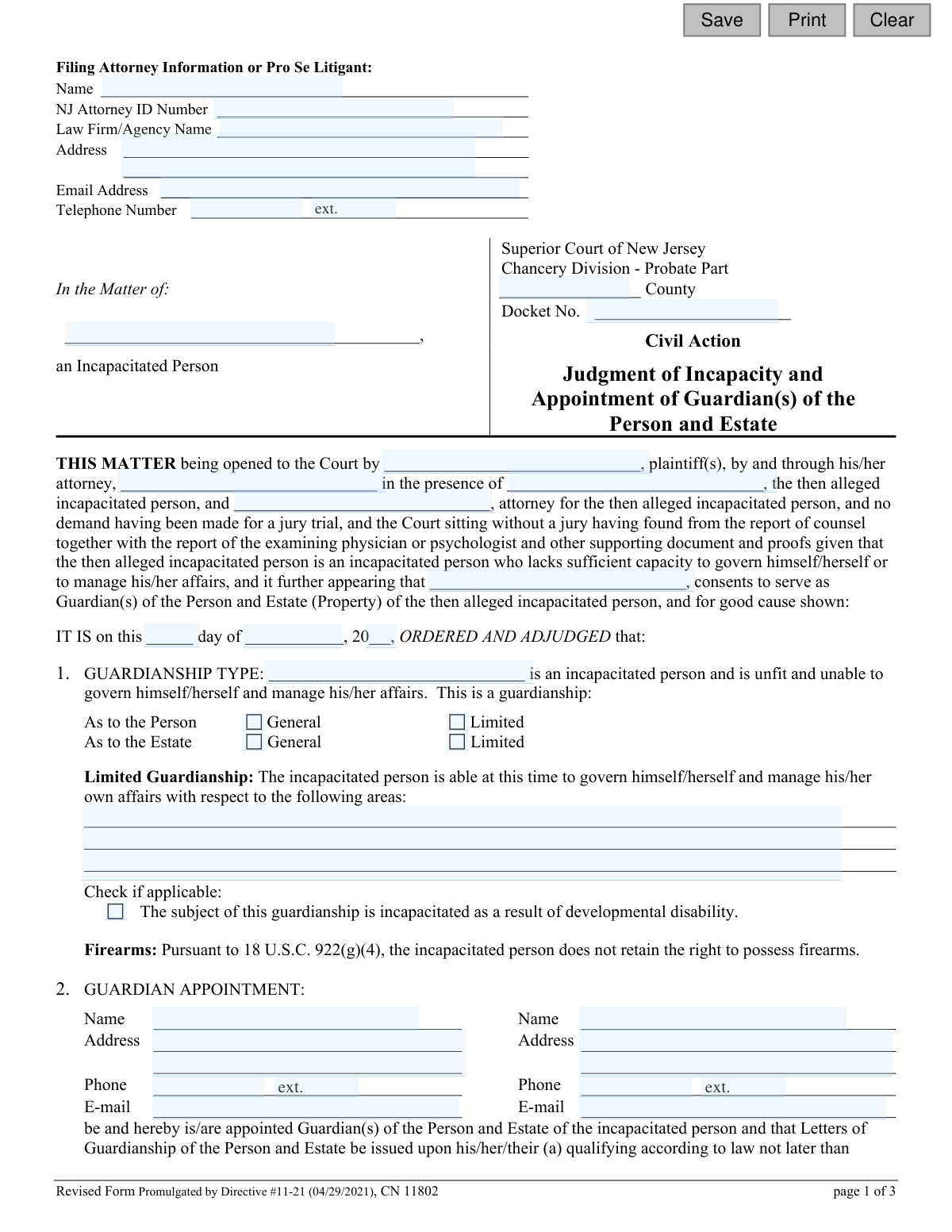
This form is a legal judgment issued by the Superior Court of New Jersey, Chancery Division - Probate Part, to officially declare an adult as incapacitated and appoint a guardian to manage their personal and/or financial affairs. It outlines the specific powers, duties, and limitations of the appointed guardian, as well as the required reporting to the court. Today, this form can be filled out quickly and accurately using AI-powered services like Instafill.ai, which can also convert non-fillable PDF versions into interactive fillable forms.
CN 11802 is part of the
New Jersey forms category on Instafill.
Our AI automatically handles information lookup, data retrieval, formatting, and form filling.
It takes less than a minute to fill out CN 11802 using our AI form filling.
Securely upload your data. Information is encrypted in transit and deleted immediately after the form is filled out.
Form specifications
| Form name: | Adult Guardianship - Judgment of Incapacity and Appointment of Guardian(s) of the Person and Estate (CN 11802) |
| Number of fields: | 59 |
| Number of pages: | 1 |
| Language: | English |
Instafill Demo: How to fill out PDF forms in seconds with AI
How to Fill Out CN 11802 Online for Free in 2026
Are you looking to fill out a CN 11802 form online quickly and accurately? Instafill.ai offers the #1 AI-powered PDF filling software of 2026, allowing you to complete your CN 11802 form in just 37 seconds or less.
Follow these steps to fill out your CN 11802 form online using Instafill.ai:
- 1 Navigate to Instafill.ai and upload or select the 'Judgment of Incapacity and Appointment of Guardian(s) of the Person and Estate' form.
- 2 Use the AI assistant to input case information, including the court county, docket number, and the names of the plaintiff, incapacitated person, and attorneys.
- 3 Provide the full details for the appointed guardian(s), including their name, address, and contact information.
- 4 Specify the type of guardianship (General or Limited for Person and/or Estate) and clearly define any limitations on the guardian's authority.
- 5 Enter financial details as ordered by the court, such as the surety bond amount and any monetary limits on the guardian's power over the estate.
- 6 Indicate the required reporting schedule for the guardian regarding the person's well-being and the estate's financial accounting.
- 7 Review all the information populated by the AI for accuracy, make any final adjustments, and then download or print the completed judgment for filing with the court.
Our AI-powered system ensures each field is filled out correctly, reducing errors and saving you time.
Why Choose Instafill.ai for Your Fillable CN 11802 Form?
Speed
Complete your CN 11802 in as little as 37 seconds.
Up-to-Date
Always use the latest 2026 CN 11802 form version.
Cost-effective
No need to hire expensive lawyers.
Accuracy
Our AI performs 10 compliance checks to ensure your form is error-free.
Security
Your personal information is protected with bank-level encryption.
Frequently Asked Questions About Form CN 11802
This form is a legal court document, known as a Judgment, that officially declares an adult incapacitated and appoints one or more guardians to manage their personal and/or financial affairs. It is the final order signed by a judge after a guardianship hearing.
This form is typically prepared by the plaintiff's attorney and submitted to the court for the judge's signature. It is not a form that a guardian or family member fills out on their own; it is part of a formal legal proceeding.
A Guardian of the Person makes decisions about the incapacitated person's healthcare, housing, and general well-being. A Guardian of the Estate manages the person's finances, property, and other assets. A person can be appointed as one or both.
General guardianship grants the guardian broad authority over all aspects of the person's life or estate. Limited guardianship specifies certain areas where the incapacitated person can still make their own decisions, restricting the guardian's power to only what is necessary.
A surety bond is a type of insurance that protects the incapacitated person's assets from mismanagement or fraud by the Guardian of the Estate. The court sets the bond amount, and it is a mandatory requirement for the guardian to qualify unless specifically waived by the judge.
You must qualify with the County Surrogate within 30 days, which includes completing guardianship training, passing any required background checks, and securing a surety bond if ordered. You must also file an inventory of the incapacitated person's property and income with the court within 90 days.
Guardians are typically required to file annual reports with the County Surrogate. This includes a report on the well-being of the incapacitated person and a financial accounting of their estate, with the type of accounting depending on the estate's value.
Not without specific court approval. Section 5 of the judgment explicitly states that the Guardian of the Estate may not sell, mortgage, or transfer real property without obtaining a separate court order.
According to Section 15 of this judgment, any Power of Attorney previously executed by the incapacitated person is automatically revoked once the guardianship is established. The guardian's authority supersedes that of the agent named in the Power of Attorney.
Yes, AI-powered services like Instafill.ai can help attorneys and their staff accurately auto-fill form fields with information from a case file, saving significant time and reducing the risk of clerical errors.
You can upload the form to the Instafill.ai platform, which will make it an interactive, fillable document. The AI can then pull information from your client data or case management system to automatically populate the fields for the plaintiff, incapacitated person, and proposed guardian(s).
Services like Instafill.ai can convert flat, non-fillable PDFs into fully interactive and fillable forms. Simply upload your document, and the platform will make all the fields editable, allowing you to complete it digitally.
You will need the full names and addresses of the incapacitated person and the appointed guardian(s), the court docket number, the county, and the specific terms of the guardianship, including any limitations and the required bond amount.
The Report of Guardian Cover Page is a separate document that must be filed along with your annual reports and initial inventory. It is used to disclose any changes to your criminal or civil judgment history, ensuring ongoing compliance with court background screening policies.
You must notify the County Surrogate in writing within 10 days of any change in your address or the incapacitated person's address. If the incapacitated person dies, you must notify the Surrogate within 30 days and provide a copy of the death certificate.
Compliance CN 11802
Validation Checks by Instafill.ai
1
Ensures NJ Attorney ID Number Format
Verifies that the 'NJ Attorney ID Number' field contains a value that conforms to the expected format for state-issued attorney IDs. This is crucial for correctly identifying the filing attorney within the state's bar association records. An invalid or incorrectly formatted ID could lead to the rejection of the filing or misidentification of counsel.
2
Validates Docket Number Presence
Checks that the 'Docket Number' field is not empty. The docket number is the unique identifier for this civil action within the court system. Its absence would make it impossible to file or track the judgment correctly, leading to an immediate rejection by the court clerk.
3
Validates Judgment Date is a Real Date
Ensures the combination of 'orderDay', 'orderMo', and 'orderYr' fields forms a valid calendar date that is not in the future. This prevents impossible dates like February 30th and ensures the legal document has a correct and enforceable date of order. An invalid date would render the judgment legally defective.
4
Requires Description for Limited Guardianship
If 'Limited' is selected for 'Guardianship As to the Person' or 'As to the Estate', this check ensures the corresponding description text box is filled out. This description is legally essential as it defines the specific powers the guardian does not have and where the incapacitated person retains rights. An order for a limited guardianship without this specification is ambiguous and unenforceable.
5
Ensures Complete Guardian Contact Information
If a guardian's name is entered, this check validates that the corresponding address, phone, and e-mail fields are also completed. Complete and accurate contact information is legally required for serving notices and for the court to communicate with the appointed guardian. Incomplete information can delay the issuance of Letters of Guardianship.
6
Validates Surety Bond Amount is a Valid Number
Verifies that the value entered in the surety bond amount field is a valid, non-negative number. The surety bond protects the incapacitated person's estate from financial mismanagement. An invalid or non-numeric entry would prevent the court from setting the correct bond requirement, halting the guardian's appointment.
7
Requires Amount for Guardian Monetary Limitation
If the checkbox limiting the guardian's authority over property is checked, this validation ensures the corresponding amount field contains a valid, positive numeric value. This amount is a critical term of the judgment, defining the threshold for transactions requiring court approval. An empty or invalid field would render the limitation meaningless.
8
Ensures Accounting Type Selection for Estate Reporting
If the option to file an annual 'Report as to Estate' is selected, this check validates that one of the specific accounting types (e.g., Formal, Comprehensive, EZ) is also chosen. This selection dictates the level of financial detail the guardian must report to the court. Failure to specify the accounting type leaves the guardian's reporting obligations unclear and can lead to non-compliance.
9
Validates Mutually Exclusive Person Reporting Selection
This check ensures that for 'Reporting as to Person', either the 'file annually' option or the 'waived' option is selected, but not both. These are mutually exclusive choices that define the guardian's duty to report on the person's well-being. Selecting both or neither creates an ambiguous and contradictory court order.
10
Requires Payment Details for Attorney Fees
If the option to pay the court-appointed attorney is selected, this validation confirms that the 'days', 'fee', and 'expenses' fields are all filled with valid numeric data. These fields specify the deadline and amounts for payment from the estate. Missing information would prevent the proper and timely payment of counsel as ordered by the court.
11
Ensures Consistent Naming of Incapacitated Person
This validation compares the name of the incapacitated person entered in multiple fields throughout the document to ensure they are identical. Consistency is critical for the legal validity of the document, as any discrepancy could create ambiguity about the subject of the judgment. This check prevents clerical errors that could challenge the enforceability of the order.
12
Requires County of Jurisdiction
This check verifies that the 'County' field is filled out, as it specifies the proper venue and jurisdiction of the Superior Court handling the case. A missing county name makes the judgment legally deficient because it is unclear which court's authority is being exercised. The filing would be rejected without this crucial information.
13
Validates Email Address Format
This check verifies that any value entered into an email address field conforms to the standard '[email protected]' format. Correct email formatting is essential for electronic communication and service of documents as permitted by court rules. An invalid email address could result in failed communication and missed legal deadlines.
14
Validates Guardian Type Selection
Ensures that for both 'Guardianship as to the Person' and 'Guardianship as to the Estate', one of the sub-options ('General' or 'Limited') is selected. This choice is the core of the judgment, defining the scope of the guardian's authority. Leaving it blank would make the order fundamentally incomplete and invalid.
Common Mistakes in Completing CN 11802
Filers often omit or incorrectly enter the County and Docket Number at the top of the form. These identifiers are critical for the court to correctly file the judgment and link it to the existing case file. An error here can lead to significant delays, misfiling, or outright rejection of the document, requiring resubmission and potentially delaying the guardian's appointment. To avoid this, always double-check the case information provided by the court and enter it exactly as it appears on other case documents.
Section 2 requires the full name, address, phone number, and email for each appointed guardian. It is common for filers to leave one or more of these fields blank, especially if appointing a co-guardian. This missing information hinders the court's ability to communicate with the guardian and can delay the issuance of Letters of Guardianship. Ensure every field is completed for each guardian, as this information is vital for official notices and ongoing case management.
In Section 1, filers must specify the guardianship type by checking boxes for 'Person' and 'Estate' and indicating whether each is 'General' or 'Limited'. People frequently forget to check all necessary boxes, creating ambiguity about the scope of the guardian's authority. This can lead to legal challenges and require a court hearing to clarify the judgment. Carefully review and select the appropriate option for both the Person and the Estate to ensure the court order is clear and enforceable.
When a 'Limited' guardianship is selected in Section 1, the form requires a specific description of the areas where the incapacitated person retains decision-making rights. A common mistake is to leave this section blank or provide a vague, unenforceable description. This defeats the purpose of a limited guardianship and can cause confusion for the guardian, the incapacitated person, and third parties. Clearly list all specific rights the person retains, such as the right to vote, choose their residence, or manage a small personal allowance.
The judgment requires specifying the surety bond amount in Section 2, which protects the incapacitated person's assets from mismanagement. Filers, often unsure of the correct figure, may leave this field blank. The bond amount is determined by the court based on the value of the estate's personal property, and leaving it blank makes the judgment incomplete and will prevent the Surrogate from issuing Letters. This amount must be obtained from the court's ruling and entered accurately before the judgment is signed.
Sections 9 and 10 mandate the guardian's future reporting duties, but filers must select the specific type of report required for the 'Person' and 'Estate'. A frequent error is neglecting to check any of the boxes, leaving the guardian's obligations undefined. This can result in non-compliance and potential court sanctions. It is crucial to select one option in each section (or the waiver option, if applicable) to formally establish the annual reporting schedule and format.
In Section 10, the form provides three tiers of accounting (EZ, Comprehensive, Formal) based on the estate's value. A common mistake is selecting an accounting type that does not correspond to the presumptive value thresholds listed. For example, choosing 'EZ accounting' for an estate valued at $2 million would be incorrect. This error can lead to the rejection of future annual accountings and require costly refiling. Carefully match the estate's value to the correct accounting type to ensure compliance.
This legal document refers to the incapacitated person and guardian(s) multiple times. Filers sometimes use inconsistent names, abbreviations, or spellings (e.g., 'John Smith' in one place, 'J. Smith' in another). Such inconsistencies can create legal ambiguity and may be questioned by financial institutions or medical providers. To prevent this, use the full, correct legal name for each individual every time it is required. AI-powered form filling tools like Instafill.ai can help ensure consistency by auto-populating names correctly across the entire document.
Section 14 details the payment and discharge of the court-appointed attorney for the incapacitated person. Filers often forget to select one of the two options or, if payment is ordered, fail to fill in the fee amounts and deadline. This leaves the attorney's status and compensation in limbo, potentially requiring another court motion to resolve. Ensure the correct option is checked and all associated fields for fees, expenses, and payment deadlines are completed as per the court's decision.
This form is often distributed as a non-fillable PDF, leading people to print and fill it by hand or use inadequate software to type over the fields. This results in illegible handwriting, misaligned text, and an unprofessional appearance that can cause processing errors. Using a tool like Instafill.ai can convert the flat PDF into an interactive, fillable form, ensuring all entries are neat, legible, and correctly placed, which significantly reduces the risk of rejection due to poor quality.
Saved over 80 hours a year
“I was never sure if my IRS forms like W-9 were filled correctly. Now, I can complete the forms accurately without any external help.”
Kevin Martin Green
Your data stays secure with advanced protection from Instafill and our subprocessors

Robust compliance program
Transparent business model
You’re not the product. You always know where your data is and what it is processed for.
ISO 27001, HIPAA, and GDPR
Our subprocesses adhere to multiple compliance standards, including but not limited to ISO 27001, HIPAA, and GDPR.
Security & privacy by design
We consider security and privacy from the initial design phase of any new service or functionality. It’s not an afterthought, it’s built-in, including support for two-factor authentication (2FA) to further protect your account.
Fill out CN 11802 with Instafill.ai
Worried about filling PDFs wrong? Instafill securely fills adult-guardianship-judgment-of-incapacity-and-appointment-of-guardians-of-the-person-and-estate-cn-11802 forms, ensuring each field is accurate.