Yes! You can use AI to fill out Adult Guardianship - Report of the Guardian Cover Page (CN 11797)

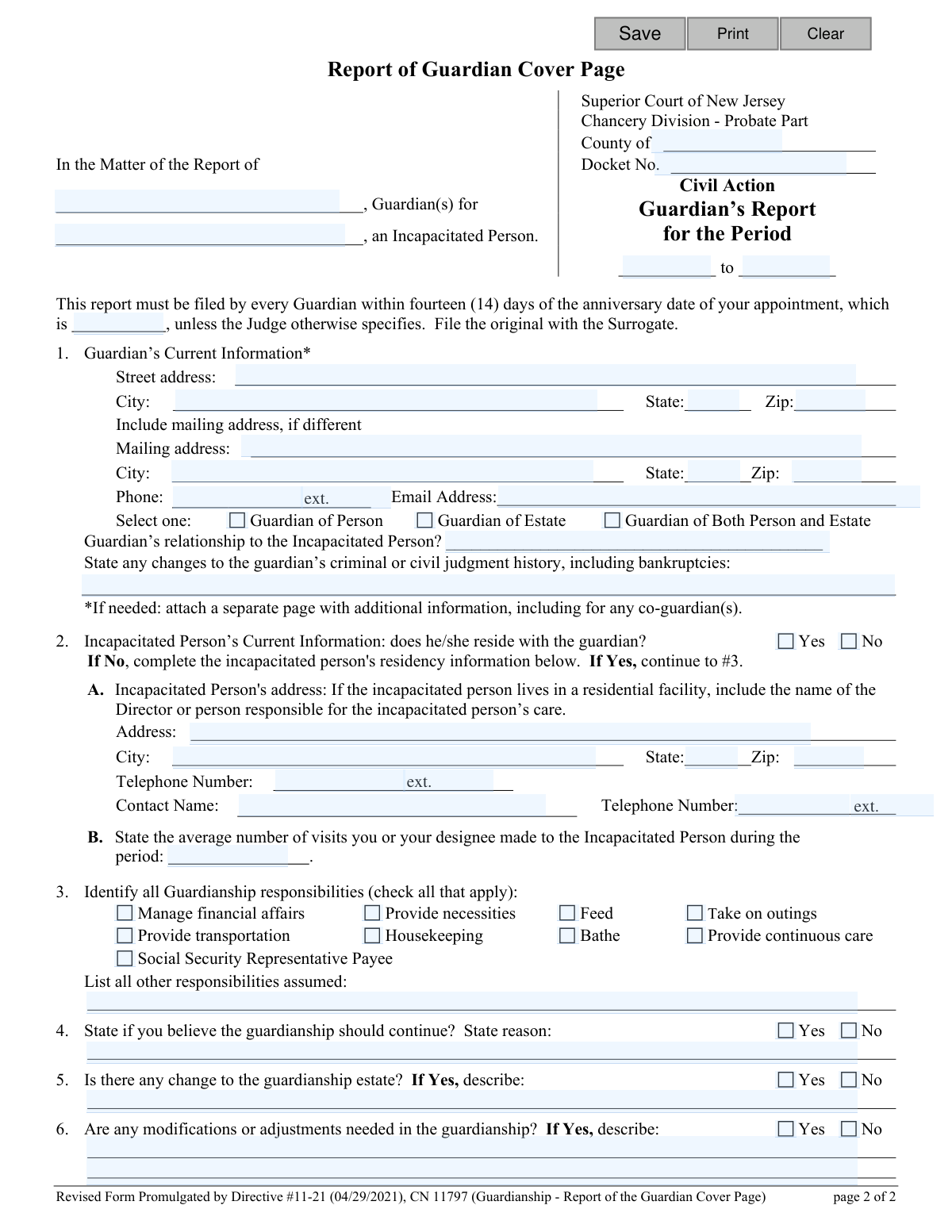
This form, officially known as the Report of Guardian Cover Page (CN 11797), is a mandatory cover sheet for all periodic reports filed by guardians with the Superior Court of New Jersey. It summarizes essential information about the guardian, the incapacitated person, and the status of the guardianship for a specific reporting period. Today, this form can be filled out quickly and accurately using AI-powered services like Instafill.ai, which can also convert non-fillable PDF versions into interactive fillable forms.
CN 11797 is part of the New Jersey forms category on Instafill.
Our AI automatically handles information lookup, data retrieval, formatting, and form filling.
It takes less than a minute to fill out CN 11797 using our AI form filling.
Securely upload your data. Information is encrypted in transit and deleted immediately after the form is filled out.

Form specifications

Form name: Adult Guardianship - Report of the Guardian Cover Page (CN 11797)
Number of fields: 57
Number of pages: 1
Language: English
main-image

Instafill Demo: How to fill out PDF forms in seconds with AI

How to Fill Out CN 11797 Online for Free in 2026

Are you looking to fill out a CN 11797 form online quickly and accurately? Instafill.ai offers the #1 AI-powered PDF filling software of 2026, allowing you to complete your CN 11797 form in just 37 seconds or less.
Follow these steps to fill out your CN 11797 form online using Instafill.ai:
  1. 1 Navigate to Instafill.ai and upload or select the 'Report of Guardian Cover Page' form.
  2. 2 Provide the court and case details, including the county, docket number, and the specific reporting period.
  3. 3 Enter the guardian's current contact information, relationship to the incapacitated person, and any changes to your legal or financial history.
  4. 4 Input the current residency information for the incapacitated person and state the average number of visits made during the reporting period.
  5. 5 Identify all guardianship responsibilities by checking the appropriate boxes and listing any other duties assumed.
  6. 6 Indicate whether the guardianship should continue and if any modifications are needed, providing brief explanations for your answers.
  7. 7 Review the AI-populated form for accuracy, make any final adjustments, and then download the completed cover page to attach to your full report for filing.

Our AI-powered system ensures each field is filled out correctly, reducing errors and saving you time.

Why Choose Instafill.ai for Your Fillable CN 11797 Form?

Speed

Complete your CN 11797 in as little as 37 seconds.

Up-to-Date

Always use the latest 2026 CN 11797 form version.

Cost-effective

No need to hire expensive lawyers.

Accuracy

Our AI performs 10 compliance checks to ensure your form is error-free.

Security

Your personal information is protected with bank-level encryption.

Frequently Asked Questions About Form CN 11797

This form is a mandatory cover page for the periodic reports that all guardians must file. It summarizes key information about the guardian, the incapacitated person, and the guardianship for a specific reporting period.

All guardians of an incapacitated person in New Jersey who are required to file periodic reports must complete and submit this cover page along with their detailed report(s).

The report must be filed with the Surrogate's Court within 14 days of the anniversary of your appointment date, unless a judge has specified a different schedule.

You must attach the appropriate detailed report(s) based on your role, such as the Report of Guardian of Person or Report of Guardian of Estate. The type of guardianship you select on the cover page will determine which reports are necessary.

You must file the original report with the Surrogate's Court. Yes, there is a filing fee of $5 per page for all documents filed, including this cover page.

No, co-guardians can file a single, joint cover page. If you live at different addresses, you may need to attach a separate page with the contact information for each additional guardian.

The reporting period covers the time since your last report, which is typically one year. The start and end dates for this period must be clearly stated in the caption section at the top of the form.

You must provide the person's full address, the name of the residential facility if applicable, and contact information for the person responsible for their care. You also need to state the average number of visits you made during the reporting period.

Generally, no, as interested parties can review the report at the Surrogate's Court. However, you should always check your specific judgment order to see if you are required to send copies to anyone else.

You are required to disclose any changes to your criminal or civil judgment history, including bankruptcies, in the designated section on the form.

Yes, services like Instafill.ai use AI to accurately auto-fill form fields from your saved information, which can save you significant time and help prevent errors.

You can use a service like Instafill.ai to fill out the form online. Simply upload the PDF, and the tool will allow you to type directly into the fields, save your progress, and print.

If you have a non-fillable or 'flat' PDF, you can upload it to a platform like Instafill.ai. The service can convert it into an interactive, fillable form that you can complete and print easily.

Compliance CN 11797
Validation Checks by Instafill.ai

1
Reporting Period Logical Order
This check ensures the 'reportDtTo' (end date) of the reporting period is on or after the 'reportDtFrom' (start date). This is crucial for maintaining logical and chronological accuracy in legal reporting. If the end date precedes the start date, the system should display an error message prompting the user to correct the invalid date range before submission.
2
Mandatory Core Case Identifiers
Validates that the core case identification fields ('guardianName', 'aipName', 'typeCounty', 'docketNo') are not empty. These fields are essential for correctly identifying the case and the parties involved for court filing and record-keeping. A failure would prevent form submission and highlight the required fields for the user to complete.
3
Guardian Type Selection Required
This check ensures that one of the three 'typeGuardian' options (Guardian of Person, Guardian of Estate, or Guardian of Both) has been selected. This selection determines which subsequent reports are required and defines the scope of the guardian's authority being reported on. If no selection is made, the user must be prompted to choose one before proceeding.
4
Conditional Incapacitated Person's Address
This validation enforces a rule based on the 'aipReside' field. If the user selects 'No' (indicating the incapacitated person does not reside with the guardian), then the address fields for the incapacitated person ('aipAddrStr', 'aipAddrCity', 'aipAddrSt', 'aipAddrZip') become mandatory. This is vital for the court to know the location and living situation of the incapacitated person. Failure to provide the address will block submission until the information is entered.
5
Conditional Explanation for Guardianship Estate Change
This check verifies that if the user answers 'Yes' to the 'change' field (Are there any changes to the guardianship estate?), the corresponding 'changeDesc' text field is filled out. A simple 'Yes' is insufficient for the court; a description of the changes is necessary for proper oversight. If 'changeDesc' is empty after a 'Yes' answer, an error should require the user to provide details.
6
Conditional Explanation for Guardianship Modification
This validation ensures that if the user answers 'Yes' to the 'modify' field (Are any modifications or adjustments needed?), the 'modifyDesc' text field must contain an explanation. This is critical for petitioning the court for changes to the guardianship order. The system should prevent submission if 'modify' is 'Yes' but the description is missing.
7
Mandatory Rationale for Guardianship Continuation
This check requires the 'reasonDesc' field to be completed regardless of whether 'Yes' or 'No' is selected for the 'reason' field (State if you believe the guardianship should continue?). The court requires a justification for the guardian's opinion on continuing or terminating the guardianship. If this field is left blank, the form submission should be halted with a message indicating that a reason is required.
8
Valid Guardian Email Format
This validation checks that the value entered into the 'gdnEmail' field conforms to a standard email address format (e.g., [email protected]). This ensures the court has a valid electronic means of contacting the guardian. If the format is invalid, the user should be notified with a clear error message next to the field.
9
Valid Guardian Phone Number Format
This check ensures the 'guardianPh' field contains a valid phone number, typically formatted as a 10-digit number (e.g., NNN-NNN-NNNN). This is a primary method of contact for the court and must be accurate. The system should reject entries with incorrect character types or lengths and prompt the user for a valid phone number.
10
Anniversary Date Presence and Format
This validation confirms that the 'anniDt' (anniversary date of appointment) field is not empty and contains a valid date. This date is the anchor for the reporting deadline and is a key piece of information for the court to verify timely filing. An invalid or missing date should trigger an error, requiring the user to input a correct date in a recognized format (e.g., MM/DD/YYYY).
11
Numeric and Non-Negative Visit Count
This check ensures the 'numberVisits' field contains only a non-negative numerical value. This field quantifies the guardian's contact with the incapacitated person, so it cannot be text or a negative number. The system should reject invalid entries and prompt the user to enter a whole number (0 or greater).
12
Valid County Selection
This validation checks the 'typeCounty' field against a predefined list of official New Jersey counties. This prevents misspellings or the entry of invalid counties, ensuring data integrity and proper routing within the court system. If the entry does not match a valid county, the system should display an error and potentially offer a dropdown list of correct options.

Common Mistakes in Completing CN 11797

Failing to Attach Required Reports

This form is only a cover page. A frequent and critical error is submitting this page alone, without the corresponding detailed reports (e.g., Report of Guardian of the Person, Report of Guardian of the Estate). This happens because filers misunderstand the purpose of the cover page. Submitting an incomplete filing will result in an automatic rejection by the court, leading to non-compliance and significant delays. To avoid this, carefully check which type of guardian you are in Section 1 and ensure the correct, fully completed report(s) are attached before filing.

Incorrect or Missing Reporting Period Dates

Guardians often confuse the filing deadline with the reporting period, entering incorrect start and end dates in the caption. The reporting period is a specific interval, usually one year, for which the guardian's activities are being reported. An incorrect period can lead to the report's rejection or a request for clarification from the court, delaying the approval process. To prevent this, refer to your previous report or the original court order to determine the correct start and end dates for the current reporting cycle.

Omitting the Anniversary Date of Appointment

The form explicitly requires the 'anniversary date of your appointment' to verify timely filing, but this field is often left blank or filled with an incorrect date. Guardians may not have this information readily available and forget to look it up. Without this date, the court cannot confirm if the report was filed within the required 14-day window, which could result in a notice of delinquency and potential court sanctions. Always reference the original 'Judgment of Guardianship' to find the exact date and enter it correctly.

Incorrect Docket Number or County Name

Simple data entry errors, such as transposing digits in the docket number or writing the wrong county, are common but have serious consequences. This mistake often happens due to haste or carelessness when copying information. An incorrect docket number can cause the report to be misfiled or not linked to the case at all, making it appear as though the guardian failed to report. To avoid this, meticulously double-check the docket number and county against official court documents. Using a tool like Instafill.ai can prevent this by saving and accurately auto-filling case information across all related forms.

Incomplete Information for Co-Guardians

The form provides space for only one guardian's information, yet the instructions state all co-guardians must report. A common oversight is for co-guardians to submit a single form without attaching the contact and address details for the second guardian. This results in an incomplete filing, as the court requires information for all appointed fiduciaries. To avoid rejection, always attach a separate, clearly labeled page with the full name, address, and contact information for any co-guardian not listed on the main form.

Vague Descriptions for 'Yes' Answers

In sections 4, 5, and 6, the form asks for a description if 'Yes' is checked regarding the continuation of, changes to, or modifications of the guardianship. Filers often check 'Yes' but provide a vague, one-word answer or leave the description field blank entirely. This forces the court to guess the context or issue a deficiency notice, delaying case progress. When answering 'Yes', always provide a clear, concise, and detailed explanation to give the court the necessary information to make an informed decision.

Forgetting to Include the Filing Fee

The instructions specify a $5 per page filing fee, which applies to the cover page and any attached reports. Guardians frequently overlook this requirement and submit their documents without payment. The Surrogate's office will not process or file any documents until the correct fee is paid, causing the submission to be marked as late and putting the guardian in a state of non-compliance. Before mailing or dropping off your report, calculate the total page count and include a check or money order for the full amount payable to the County Surrogate.

Omitting Facility Contact Information

When an incapacitated person resides in a care facility, the form requires the name and phone number of a director or responsible person. Guardians may not know who to list or may feel the address is sufficient, leaving these fields blank. This information is crucial for the court to independently verify the person's well-being. To avoid a request for more information, contact the facility beforehand to get the name and direct number of the administrator, social worker, or case manager responsible for the individual's care.

Submitting a Photocopy Instead of the Original

The instructions clearly state to 'File the original with the Surrogate,' but guardians sometimes submit a photocopy to keep the originally signed document for their records. Courts require original ink signatures to prevent fraud and ensure authenticity, so a photocopy will be rejected. This mistake requires the guardian to resubmit the documents, wasting time and risking a late filing. Always sign the final document in ink, submit that original to the court, and make a photocopy for your own records before filing.

Illegible Handwriting on a Printed Form

Since this form is a non-fillable PDF, many will print and complete it by hand, but poor handwriting can render critical information unreadable. This forces court clerks to guess at names, addresses, or docket numbers, leading to data entry errors, returned mail, or outright rejection of the form. To ensure clarity, print neatly in block letters. A better solution is to use a service like Instafill.ai, which can convert the PDF into a fillable version, allowing you to type your answers for a clean, professional, and error-free submission.
Saved over 80 hours a year

“I was never sure if my IRS forms like W-9 were filled correctly. Now, I can complete the forms accurately without any external help.”

Kevin Martin Green

Your data stays secure with advanced protection from Instafill and our subprocessors

Robust compliance program

Transparent business model

You’re not the product. You always know where your data is and what it is processed for.

ISO 27001, HIPAA, and GDPR

Our subprocesses adhere to multiple compliance standards, including but not limited to ISO 27001, HIPAA, and GDPR.

Security & privacy by design

We consider security and privacy from the initial design phase of any new service or functionality. It’s not an afterthought, it’s built-in, including support for two-factor authentication (2FA) to further protect your account.

Fill out CN 11797 with Instafill.ai

Worried about filling PDFs wrong? Instafill securely fills adult-guardianship-report-of-the-guardian-cover-page-cn-11797 forms, ensuring each field is accurate.