Yes! You can use AI to fill out Adult Guardianship - Report of Well-Being

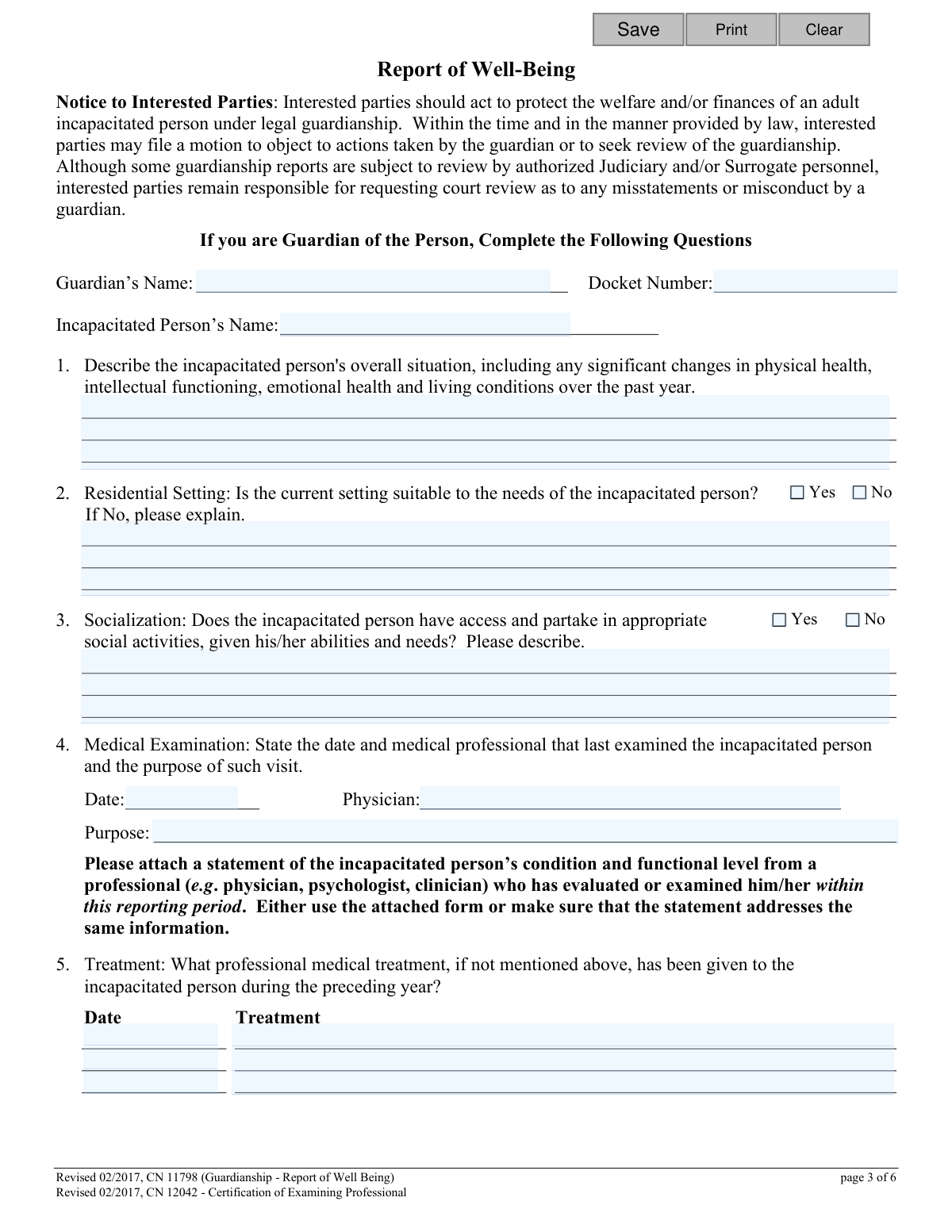
This form is a mandatory report for guardians of an incapacitated person, detailing their physical health, living conditions, social activities, and medical treatments over the reporting period. It serves as a crucial oversight tool for the court to ensure the well-being and proper care of the individual under guardianship. Today, this form can be filled out quickly and accurately using AI-powered services like Instafill.ai, which can also convert non-fillable PDF versions into interactive fillable forms.
CN 11798 is part of the New Jersey forms category on Instafill.
Our AI automatically handles information lookup, data retrieval, formatting, and form filling.
It takes less than a minute to fill out CN 11798 using our AI form filling.
Securely upload your data. Information is encrypted in transit and deleted immediately after the form is filled out.

Form specifications

Form name: Adult Guardianship - Report of Well-Being
Number of fields: 88
Number of pages: 1
Language: English
main-image

Instafill Demo: How to fill out PDF forms in seconds with AI

How to Fill Out CN 11798 Online for Free in 2026

Are you looking to fill out a CN 11798 form online quickly and accurately? Instafill.ai offers the #1 AI-powered PDF filling software of 2026, allowing you to complete your CN 11798 form in just 37 seconds or less.
Follow these steps to fill out your CN 11798 form online using Instafill.ai:
  1. 1 Navigate to Instafill.ai and upload or select the 'Adult Guardianship - Report of Well-Being' form.
  2. 2 Use the AI assistant to automatically populate your name as the guardian, the incapacitated person's name, and the court docket number.
  3. 3 Answer the series of questions regarding the incapacitated person's overall situation, residential setting, social activities, and medical history.
  4. 4 Attach the required 'Certification of Examining Professional' (CN 12042) after it has been completed by the relevant medical professional.
  5. 5 Complete the guardian's assessment section, rating the person's physical health, emotional health, intellectual functioning, and living situation.
  6. 6 Review all entered information for accuracy, then digitally sign and date the certification section.
  7. 7 Download the completed report for your records and submit it to the appropriate court as required.

Our AI-powered system ensures each field is filled out correctly, reducing errors and saving you time.

Why Choose Instafill.ai for Your Fillable CN 11798 Form?

Speed

Complete your CN 11798 in as little as 37 seconds.

Up-to-Date

Always use the latest 2026 CN 11798 form version.

Cost-effective

No need to hire expensive lawyers.

Accuracy

Our AI performs 10 compliance checks to ensure your form is error-free.

Security

Your personal information is protected with bank-level encryption.

Frequently Asked Questions About Form CN 11798

This form is used to report on the status of an incapacitated person to the court. If you are a court-appointed guardian of the person, you may be required to complete and file this report periodically.

You must attach a written statement from a medical professional who has recently examined the incapacitated person. You can use the 'Certification of Examining Professional' form included or a similar statement from the professional that covers the same information.

You should affirmatively state that there has been no substantial change in the person's physical health, intellectual functioning, emotional health, or living conditions. This section should not be left blank even if there are no changes.

You need to complete the top portion with your information and the incapacitated person's name. Then, provide the form to the professional who recently examined the person for them to complete, sign, and return to you.

If the person is not prescribed any medication, you should state that in your response. If there has been no substantial change to their medications, you can simply write 'no change to prescriptions'.

You must provide a detailed explanation for your 'No' answer. You should specify if the unsuitability is a temporary issue being addressed or an ongoing problem where a solution is still being sought.

You should answer 'Yes' if you have investigated eligibility for the listed programs, such as Social Security or Medicaid. This is true even if the incapacitated person was ultimately determined to be ineligible for some or all of the benefits.

If you cannot fully answer a question in the space provided, you should attach additional sheets. Make sure to write or type on only one side of the page and clearly indicate which question the information pertains to.

The form must be filed with the court that appointed you as guardian. You should check with the specific court for their filing procedures, deadlines, and any associated fees.

Yes, services like Instafill.ai use AI to help you accurately auto-fill form fields with your saved information, which can save you time. This is especially useful for repetitive information like names, addresses, and docket numbers.

You can use a service like Instafill.ai to upload the PDF and complete it in your web browser. The platform allows you to easily type into fields, check boxes, and add your signature before printing or saving.

If you have a flat, non-fillable PDF, you can upload it to a service like Instafill.ai. The platform can convert the document into an interactive, fillable form that you can complete and sign online.

The certification section at the end of the report provides signature lines for a primary guardian and up to two co-guardians. All appointed guardians should review and sign the report before it is filed.

Compliance CN 11798
Validation Checks by Instafill.ai

1
Mandates Overall Situation Description
Validates that the text field for Item #1, describing the incapacitated person's overall situation, is not empty. The form instructions explicitly state this item must be answered even if there has been no substantial change. Failure to complete this field would result in an incomplete report and prevent a full assessment of the person's well-being over the reporting period.
2
Requires Explanation for Unsuitable Residence
Checks if the 'Residential Setting' (Item #2) is marked as 'No'. If it is, this validation ensures that the corresponding explanation text field is filled out. This is crucial for the court to understand the issues with the current living situation and what steps are being taken to address them. An incomplete explanation would leave a critical gap in the report.
3
Requires Description for Socialization
Validates that the description field for Item #3 (Socialization) is filled out, regardless of whether 'Yes' or 'No' is selected. The prompt 'Please describe' implies a narrative is required to give context to the binary answer about access to and participation in social activities. This detail helps the court assess the quality of life and social integration of the incapacitated person.
4
Validates Medical Examination Date
Verifies that the date provided for the last medical examination (Item #4) is a valid date format (e.g., MM/DD/YYYY) and falls within the current reporting period, typically the last year. This ensures the medical information is recent and relevant to the current assessment of the incapacitated person's health. An invalid or out-of-period date would undermine the credibility of the report.
5
Confirms Medical Examination Attachment
This check verifies that a document has been attached to the submission corresponding to the medical examination mentioned in Item #4. The form requires a statement from a professional, and without it, the report is incomplete and lacks the necessary third-party medical validation of the person's condition. The system should flag submissions missing this critical attachment.
6
Requires Explanation for Medication Changes
This validation triggers if the answer to 'Has there been any substantial change in the incapacitated person’s medication?' (Item #6) is 'Yes'. It then confirms that the explanation text box is not empty. This information is vital for tracking medical care and ensuring the court is aware of significant health management changes.
7
Ensures All Assessment Categories are Rated
Validates that for the Guardian's Assessment (Item #8), a rating has been selected for each of the four categories: Physical Health, Emotional Health, Intellectual Functioning, and Living Situation. Leaving any category unrated creates an incomplete picture of the guardian's assessment. This check ensures a comprehensive overview is provided as intended by the form.
8
Requires Reason for Not Investigating Benefits
Checks if the answer to investigating eligibility for public benefits (Item #9) is 'No'. If so, it validates that a reason has been provided in the corresponding text field. This is important to ensure the guardian is fulfilling their duty to secure all potential resources for the incapacitated person, and if not, to provide a justifiable reason to the court.
9
Requires Description of Needed Assistance
If the guardian indicates that assistance is required from the court or a community agency by selecting 'Yes' for Item #10, this check ensures the description field is filled out. A 'Yes' answer without a specific description is not actionable and fails to communicate the need for support to the court or relevant agencies.
10
Verifies Guardian's Signature and Date
Confirms that the primary guardian's signature date and printed name fields in the Certification section are both completed. The signature and date legally certify the truthfulness of the report's contents. A missing signature or date invalidates the certification, making the entire report legally insufficient and subject to rejection.
11
Ensures Header Information Consistency
Verifies that the Guardian's Name, Docket Number, and Incapacitated Person's Name are consistent across all pages where they appear (pages 3, 4, 5, and 6). Inconsistent data could indicate an error, potentially leading to the report being filed under the wrong case. This check maintains data integrity and ensures the report is correctly associated with the proper legal case.
12
Requires Explanation for Change in Condition
On the 'Certification of Examining Professional' form, if the professional selects the option indicating the incapacitated person's condition has changed, this validation ensures the corresponding text area for explaining the changes is filled. This detailed explanation from a medical expert is critical for the court to understand the evolving needs of the person. A missing explanation would render the 'changed' status useless.
13
Requires Description for Guardianship Modification
This validation applies to the 'Certification of Examining Professional' form. If the professional recommends that the guardianship should be modified, the check ensures that the text area describing the proposed modifications is completed. This recommendation carries significant weight, and the court needs the professional's specific input to make informed decisions about the scope of the guardianship.
14
Verifies Professional's Certification and Date
Confirms that the examining professional's signature date and printed name fields on the 'Certification of Examining Professional' form are both completed. This signature legally attests to the professional's medical findings. An incomplete certification would invalidate the required medical component of the well-being report.

Common Mistakes in Completing CN 11798

Forgetting the Required Medical Professional's Certification

A common and critical error is failing to attach the 'Certification of Examining Professional' (CN 12042) as required by Item #4. Guardians may fill out the date and physician's name on the main form but forget to have the professional complete and sign the separate certification page. This omission makes the filing incomplete and can lead to its rejection by the court, delaying the review process and potentially requiring a re-filing.

Leaving 'No Change' Sections Blank

For Item #1 (Overall Situation) and Item #6 (Medication), the instructions explicitly state to write 'no substantial change' or 'no change to prescriptions' if that is the case. Many filers leave these sections blank, assuming that no entry implies no change. This ambiguity can cause the court to question the report's thoroughness, as it's unclear if the question was missed or intentionally answered as 'no change'.

Providing Incomplete Explanations for Yes/No Answers

Several questions (e.g., #2, #3, #6, #9, #10) require a narrative explanation after a 'Yes' or 'No' is selected. Guardians often check the box but fail to provide the necessary context, such as explaining why a residential setting is unsuitable or describing the social activities available. This lack of detail prevents the court from getting a full picture of the incapacitated person's well-being and the guardian's actions.

Inconsistent or Missing Repetitive Information

The form requires the Guardian's Name and Docket Number to be entered at the top of pages 3, 4, and 5. It is easy to make a typo on one page, use a slightly different name format, or forget to fill it in on subsequent pages. These inconsistencies can cause administrative delays and confusion during processing. AI-powered form-filling tools like Instafill.ai can prevent this by auto-populating repetitive fields consistently across all pages.

Improperly Handling 'Not Applicable' Fields

In Item #7 (Treatment Plan), the instructions specify using 'N/A' for any treatment area that does not apply. A frequent mistake is to leave these sub-sections blank. This creates ambiguity, as a blank field could mean 'not applicable,' 'forgotten,' or 'no plan exists.' Using 'N/A' provides a clear and definitive answer, ensuring the report is interpreted correctly.

Failing to Explain a 'Don't Know' Assessment

In Item #8, when assessing the incapacitated person's functioning, the instructions require an explanation if the 'Don't Know' box is checked. Guardians may select this option without providing the required context, leaving the court to wonder why the guardian lacks this information. Explaining the 'Don't Know' (e.g., 'Recent change in living situation, still assessing') is crucial for transparency.

Misinterpreting the Public Benefits Investigation Question

Item #9 asks if eligibility for public benefits has been investigated. Guardians sometimes answer 'No' if the incapacitated person was found ineligible for benefits. The correct answer is 'Yes' if an investigation was performed, regardless of the outcome. This mistake misrepresents the guardian's diligence and fails to accurately report the actions taken on the person's behalf.

Incomplete or Missing Guardian Certification

The certification section on page 5 is legally binding and must be completed perfectly. Common errors include forgetting to sign, failing to print the name clearly below the signature, or omitting the date. Any of these mistakes can invalidate the entire report, requiring the guardian to correct and resubmit the document.

Mishandling the 'Certification of Examining Professional' Form

The guardian is responsible for pre-filling their contact information and the incapacitated person's name on the professional certification form (page 6) before giving it to the doctor. Mistakes include forgetting to pre-fill this information, which can cause confusion for the medical office, or incorrectly trying to fill out the medical assessment portion themselves. This two-step process is often a point of failure in the submission.

Using Vague Language Instead of Specific Details

In descriptive sections like Item #1 (Overall Situation) or Item #10 (Assistance Required), guardians may use vague phrases like 'He is fine' or 'Need help'. The court requires specific, actionable information to properly assess the situation. For example, instead of 'He is fine,' a better answer is 'Physical health is stable, but he has shown increased short-term memory loss over the past three months.' Since this form is a non-fillable PDF, tools like Instafill.ai can convert it into a fillable version, making it easier to type and edit detailed, specific responses.
Saved over 80 hours a year

“I was never sure if my IRS forms like W-9 were filled correctly. Now, I can complete the forms accurately without any external help.”

Kevin Martin Green

Your data stays secure with advanced protection from Instafill and our subprocessors

Robust compliance program

Transparent business model

You’re not the product. You always know where your data is and what it is processed for.

ISO 27001, HIPAA, and GDPR

Our subprocesses adhere to multiple compliance standards, including but not limited to ISO 27001, HIPAA, and GDPR.

Security & privacy by design

We consider security and privacy from the initial design phase of any new service or functionality. It’s not an afterthought, it’s built-in, including support for two-factor authentication (2FA) to further protect your account.

Fill out CN 11798 with Instafill.ai

Worried about filling PDFs wrong? Instafill securely fills adult-guardianship-report-of-well-being forms, ensuring each field is accurate.