Yes! You can use AI to fill out Agency Registration Form for Inclusion in the Registry of Interpreting Resources
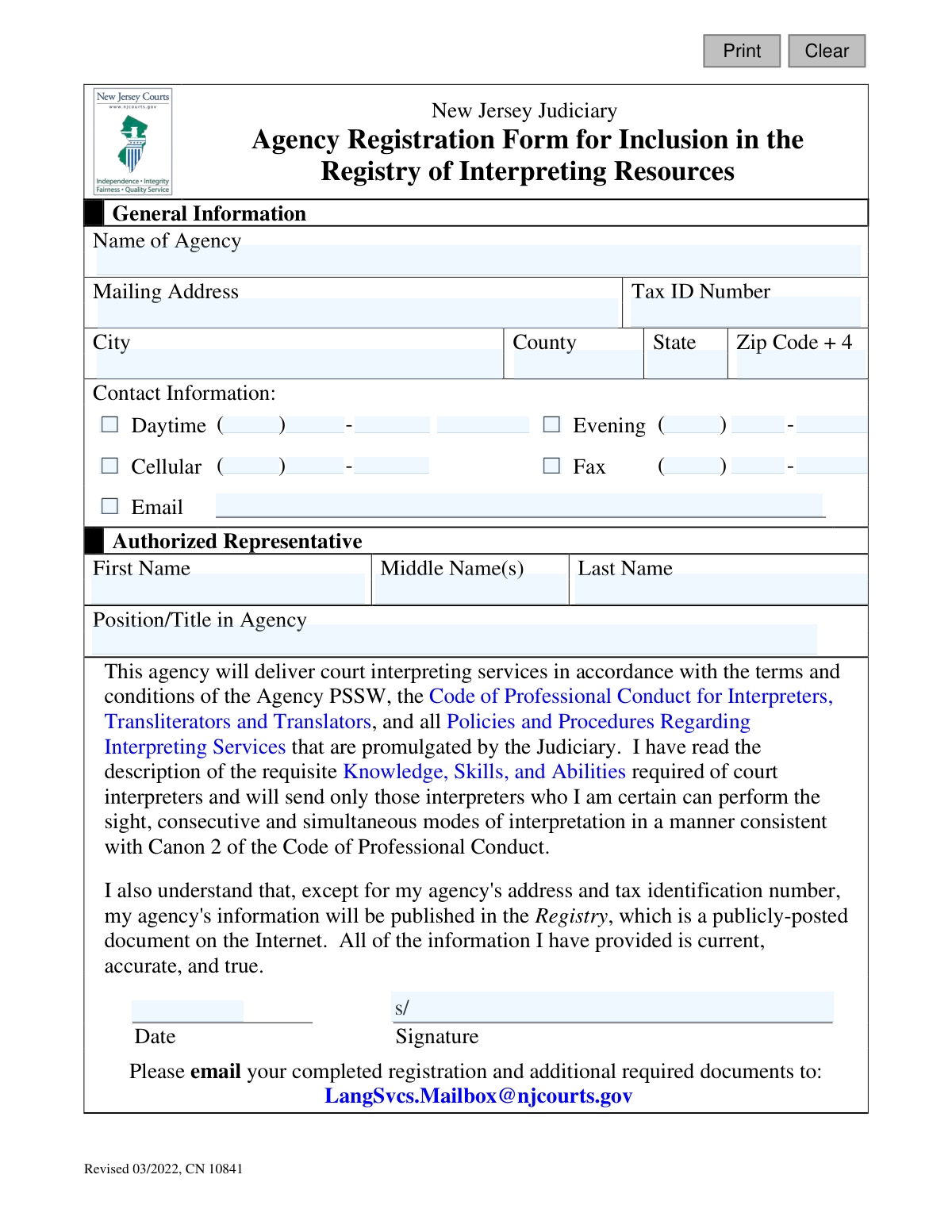
Form CN 10841 is an official document from the New Jersey Judiciary for interpreting agencies wishing to be listed in the public Registry of Interpreting Resources. By completing this form, an agency provides its general information, contact details, and certifies its agreement to adhere to the Judiciary's professional standards and code of conduct. Today, this form can be filled out quickly and accurately using AI-powered services like Instafill.ai, which can also convert non-fillable PDF versions into interactive fillable forms.
CN 10841 is part of the
New Jersey forms category on Instafill.
Our AI automatically handles information lookup, data retrieval, formatting, and form filling.
It takes less than a minute to fill out CN 10841 using our AI form filling.
Securely upload your data. Information is encrypted in transit and deleted immediately after the form is filled out.
Form specifications
| Form name: | Agency Registration Form for Inclusion in the Registry of Interpreting Resources |
| Number of fields: | 34 |
| Number of pages: | 1 |
| Language: | English |
Instafill Demo: How to fill out PDF forms in seconds with AI
How to Fill Out CN 10841 Online for Free in 2026
Are you looking to fill out a CN 10841 form online quickly and accurately? Instafill.ai offers the #1 AI-powered PDF filling software of 2026, allowing you to complete your CN 10841 form in just 37 seconds or less.
Follow these steps to fill out your CN 10841 form online using Instafill.ai:
- 1 Navigate to Instafill.ai and upload the Agency Registration Form or select it from their template library.
- 2 Use the AI assistant to automatically populate your agency's general information, including its name, mailing address, and Tax ID number.
- 3 Enter the primary contact information for the agency, such as daytime, evening, cellular, fax, and email details.
- 4 Provide the full name and title of the agency's authorized representative.
- 5 Carefully review the certification statement, acknowledging your agency's commitment to the Judiciary's terms, conditions, and Code of Professional Conduct.
- 6 Electronically sign and date the form to attest that all provided information is current, accurate, and true.
- 7 Download the completed form and email it, along with any other required documents, to the New Jersey Judiciary at [email protected].
Our AI-powered system ensures each field is filled out correctly, reducing errors and saving you time.
Why Choose Instafill.ai for Your Fillable CN 10841 Form?
Speed
Complete your CN 10841 in as little as 37 seconds.
Up-to-Date
Always use the latest 2026 CN 10841 form version.
Cost-effective
No need to hire expensive lawyers.
Accuracy
Our AI performs 10 compliance checks to ensure your form is error-free.
Security
Your personal information is protected with bank-level encryption.
Frequently Asked Questions About Form CN 10841
This form is used by interpreting agencies to register with the New Jersey Judiciary. Completing it allows your agency to be included in the official Registry of Interpreting Resources for court assignments.
This form must be completed by an authorized representative of an interpreting agency that wishes to provide court interpreting services for the New Jersey Judiciary.
You will need to provide your agency's name, mailing address, Tax ID number, and contact information. You must also name an authorized representative and have them sign and date the form.
Yes, the form instructions state that you must email your 'completed registration and additional required documents.' You should contact the Judiciary's Language Services unit to confirm exactly which documents are required.
You must email the completed registration form and all required additional documents to [email protected].
Most of your agency's information will be published in the Registry, which is a public document on the internet. However, your agency's mailing address and tax identification number will be kept confidential.
By signing, you agree to abide by the Judiciary's terms, conditions, and Code of Professional Conduct. You also certify that you will only assign interpreters who are fully qualified to perform sight, consecutive, and simultaneous interpretation.
An authorized representative is a person who has the authority to legally bind the agency to the terms on the form. This is typically an owner, director, or senior manager within the agency.
If you have a non-fillable PDF, you can use a service like Instafill.ai. It can convert flat PDFs into interactive, fillable forms that you can complete and sign electronically.
Yes, services like Instafill.ai use AI to help you accurately auto-fill form fields with your saved information. This can save time and help prevent common errors.
Simply upload the Agency Registration Form to the Instafill.ai platform. The AI will make the fields fillable, and you can use the auto-fill feature to instantly populate your agency's details before downloading the completed document.
After you email your form and documents, the New Jersey Judiciary will review your submission. Upon approval, your agency will be added to the Registry of Interpreting Resources.
The Tax ID Number is your agency's federal Employer Identification Number (EIN). This number is used for tax purposes and will be kept confidential by the Judiciary.
The form provides options for daytime, evening, and cellular numbers. You should provide the most reliable contact numbers for your agency to ensure the Judiciary can reach you when needed.
Compliance CN 10841
Validation Checks by Instafill.ai
1
Agency Name Required
This check ensures the 'Name of Agency' field is not empty. The agency's name is a primary identifier and is required for inclusion in the registry. If this validation fails, the form cannot be processed as the registering entity is unknown.
2
Tax ID Format Validation
Validates that the 'Tax ID Number' is entered in the standard XX-XXXXXXX format for a Federal Employer Identification Number (EIN). This is critical for official records and financial processing. A failure indicates a malformed ID, which would prevent proper identification and registration of the agency.
3
Complete Mailing Address
Ensures that the 'Mailing Address', 'City', 'State', and 'Zip Code' fields are all filled out. A complete and valid address is essential for official correspondence and location verification. An incomplete address will cause the submission to be rejected until all parts of the address are provided.
4
ZIP Code Format
This check verifies that the 'agcyAddrZip' field contains a valid 5-digit or 9-digit (ZIP+4) US postal code. Correct formatting is necessary for mail deliverability and data standardization. An invalid ZIP code will trigger an error, prompting the user to correct the entry before submission.
5
State Abbreviation Validation
Validates that the 'agcyAddrSt' field contains a valid 2-letter US state abbreviation. This ensures data consistency and accuracy for the agency's location. If an invalid state code is entered, the system will return an error and require the user to provide a recognized abbreviation.
6
Minimum Contact Method Selection
This validation ensures that at least one contact method (Daytime, Evening, Cellular, or Email) is selected and its corresponding details are provided. It is crucial that the Judiciary has a reliable way to communicate with the agency. If no contact method is provided, the form submission will be blocked.
7
Email Address Format
If the 'Email' checkbox is selected, this check verifies that the 'contactEmailAddr' field contains a string in a valid email format (e.g., '[email protected]'). This is essential for ensuring electronic communications are successfully delivered. An invalid format will result in an error message asking the user to correct the email address.
8
Phone Number Numeric Validation
This check confirms that all entered phone number components (area code, prefix, and line number) consist only of numeric digits. This maintains data integrity and ensures the phone numbers are functional for communication. Non-numeric characters will cause the validation to fail, requiring the user to correct the entry.
9
Contact Information Consistency
Verifies that if a contact method checkbox is ticked (e.g., 'Daytime' phone), the associated phone number fields are completely filled out. This prevents submissions where a contact method is indicated but the necessary details are missing. The form will prompt the user to either complete the details or uncheck the box.
10
Authorized Representative Name Completeness
Ensures that the 'First Name' and 'Last Name' fields for the 'Authorized Representative' are not empty. A named representative is required for accountability and as a point of contact. Failure to provide a full name will prevent the form from being submitted.
11
Representative Title Required
This check validates that the 'Position/Title in Agency' field is filled out. Knowing the representative's role is important for understanding their authority to sign on behalf of the agency. The submission will be considered incomplete if this field is left blank.
12
Signature Date Validity
Validates that the 'Date' field contains a valid date that is not in the future. The signature date legally marks when the agreement was made and must be accurate. An invalid or future date will result in an error, requiring the user to enter the current date.
13
Signature Presence
This check ensures that the 'Signature' field is not empty, confirming that the authorized representative has provided a digital or scanned signature. The signature is a legal requirement, signifying agreement with the form's terms. A missing signature will render the entire submission invalid.
Common Mistakes in Completing CN 10841
Applicants often enter their Tax ID (EIN) with incorrect formatting, transpose digits, or mistakenly provide a personal Social Security Number (SSN) instead of the agency's EIN. This critical error will delay or prevent registration as the ID is used for verification and payment processing. To avoid this, double-check the EIN against official business documents and ensure it is entered in the correct XX-XXXXXXX format.
A common error is omitting suite numbers or failing to provide the full nine-digit 'Zip Code + 4'. An incomplete address can lead to returned mail and significant delays in communication from the Judiciary. Always provide the full, official mailing address as recognized by the USPS. AI-powered tools like Instafill.ai can help by auto-completing and validating addresses to ensure accuracy.
The form separates phone numbers into three distinct fields (Area Code, Prefix, Suffix), but applicants often enter the entire number into one field. This makes the contact information unusable and hinders communication. Carefully enter each part of the phone number into its designated box. Using a form-filling tool can help automatically parse and place the numbers in the correct fields.
Forgetting to sign and date the form is one of the most frequent reasons for rejection, as an unsigned form is legally invalid. This simple oversight will halt the registration process and require the applicant to resubmit everything. Always perform a final review before submission, specifically checking that the authorized representative has signed and dated the form in the designated fields.
Applicants sometimes provide a vague job title like 'Manager' or leave the 'Position/Title' field blank. This makes it difficult for the Judiciary to verify if the person signing has the authority to bind the agency to the agreement. Use a specific, official title, such as 'President' or 'Director of Operations,' to confirm the representative's authority and avoid processing delays.
A simple typo in the email address, such as '.con' instead of '.com,' will prevent the agency from receiving crucial electronic communications, including registration confirmation. Since the registry information is public and email is a primary contact method, this is a critical field. Carefully proofread the email address, or use a tool like Instafill.ai which can help validate the format of the email address to catch common errors.
The submission instructions explicitly mention sending 'additional required documents' along with the form via email. Applicants often overlook this and only send the registration form, resulting in an incomplete application package. This will cause the application to be rejected or put on hold, so it is vital to create a checklist and ensure all necessary attachments are included in the submission email.
An agency might be entered under its 'Doing Business As' (DBA) name instead of its official legal name, or vice versa. This can create a mismatch with the Tax ID number and other official records, leading to verification failures and rejection. Ensure the agency name entered on the form is the exact legal name associated with the provided Tax ID number.
If the form is printed and filled out by hand, illegible handwriting can cause data entry errors by Judiciary staff, resulting in an incorrect registry listing. This can affect everything from the agency's name to its contact details. To prevent this, it is best to fill out the form digitally. If the form is a non-fillable PDF, tools like Instafill.ai can convert it into a fillable version, ensuring all entries are clear and legible.
The form provides checkboxes for Daytime, Evening, Cellular, and Email contact methods, but applicants sometimes forget to check any of them. This leaves the Judiciary guessing as to the best way to reach the agency, potentially delaying important communications. It is crucial to check at least one box, preferably for the most reliable contact method, to ensure seamless communication.
Saved over 80 hours a year
“I was never sure if my IRS forms like W-9 were filled correctly. Now, I can complete the forms accurately without any external help.”
Kevin Martin Green
Your data stays secure with advanced protection from Instafill and our subprocessors

Robust compliance program
Transparent business model
You’re not the product. You always know where your data is and what it is processed for.
ISO 27001, HIPAA, and GDPR
Our subprocesses adhere to multiple compliance standards, including but not limited to ISO 27001, HIPAA, and GDPR.
Security & privacy by design
We consider security and privacy from the initial design phase of any new service or functionality. It’s not an afterthought, it’s built-in, including support for two-factor authentication (2FA) to further protect your account.
Fill out CN 10841 with Instafill.ai
Worried about filling PDFs wrong? Instafill securely fills agency-registration-form-for-inclusion-in-the-registry-of-interpreting-resources forms, ensuring each field is accurate.