
Instafill.ai
7 days free
AI form filling · 72 fields · 1 page · done in seconds

Yes! You can use AI to fill out Alternative Dispute Resolution (ADR) Information Form

Don't type 72 fields by hand. Tell our AI about yourself, or upload a document you already have, and it fills every field in seconds. You check it, then download, print or sign.
7 days free, then $19.99/month · Cancel anytime
AI fills it, no typingEncrypted, never used to train AICancel in two clicks
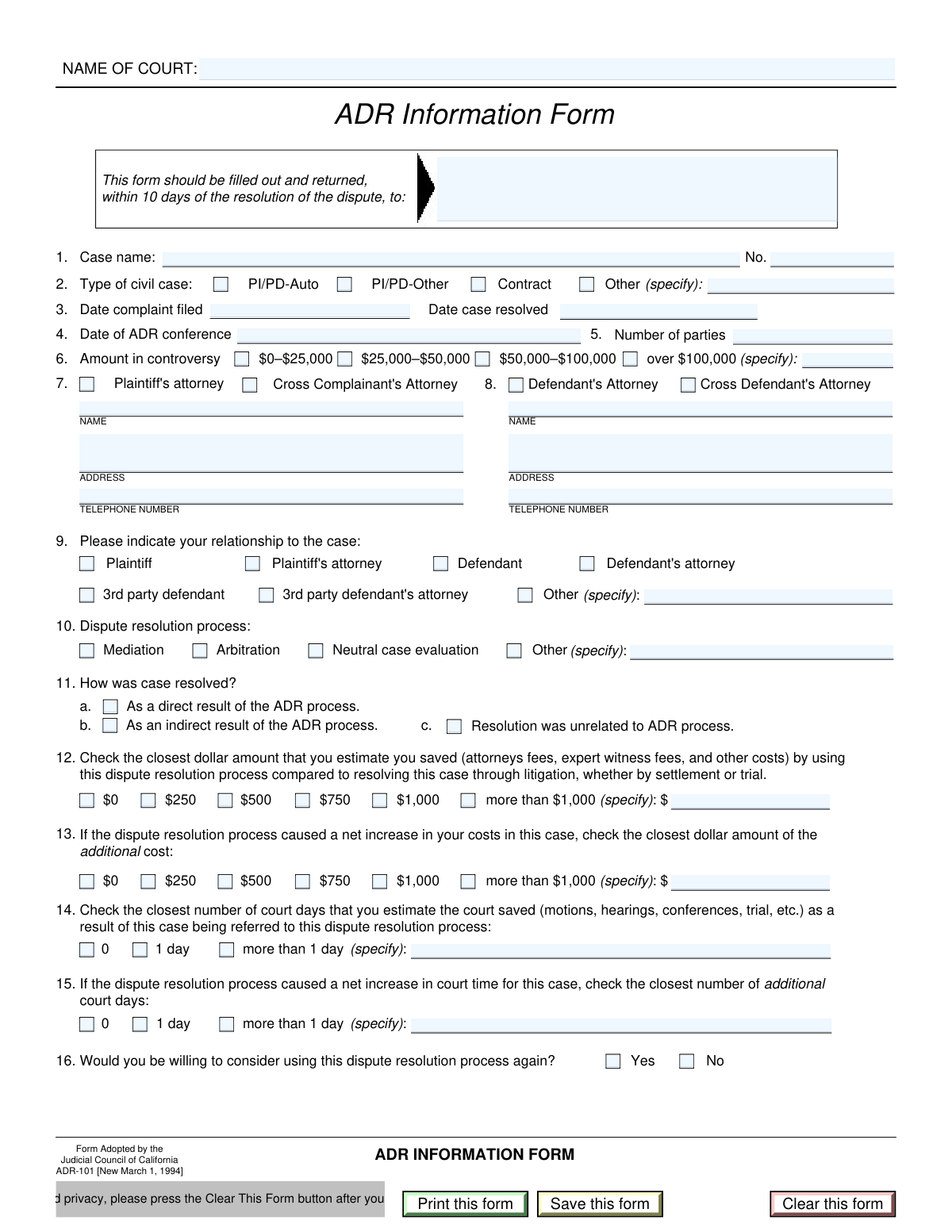
Alternative Dispute Resolution (ADR) Information Form, page 1
Moderate · 58/100Form Complexity Index

The AI does the filling. You just check it.

No typing into boxes, nothing to install.

Tell the AI about youAnswer a few questions in plain words, or upload a document you already have. That is all the typing there is.
AI fills every field in secondsIt puts each answer in the right box on every page, tables and checkboxes included.
Check it and downloadReview every field, change anything, then download, print or sign the PDF.

What this form asks for

The AI fills all of it, from your answers or your documents.

This form is a court document used by parties in a civil lawsuit to provide detailed information about the Alternative Dispute Resolution (ADR) process they participated in. It captures data on the type of ADR, case resolution outcomes, and estimated savings in time and money, helping courts assess the efficacy of their ADR programs. Today this form can be filled out quickly and accurately using AI-powered services like Instafill.ai, which can also convert non-fillable PDF versions into interactive fillable forms.
Fillable fields72
Pages1
Sections18
Tables and lists1
Questions that depend on earlier answers8
Form Complexity IndexModerate, 58/100

Let AI fill out your ADR Information Form

No typing. Every field filled in seconds, checked, ready to sign.

7 days free, then $19.99/month · Cancel anytime

How to Fill Out ADR Information Form Online for Free in 2026

What the AI walks you through.

  1. Navigate to Instafill.ai and upload or select the ADR Information Form to begin.
  2. Enter the basic case identification details, including the court name, case name, and case number.
  3. Specify the type of civil case and provide information about the ADR conference, such as the date and the resolution process used (e.g., mediation, arbitration).
  4. Fill in the information for the attorneys involved and clarify your relationship to the case (e.g., plaintiff, defendant's attorney).
  5. Report on the outcome of the case as it relates to the ADR process, and provide your estimates for any cost and time savings.
  6. Indicate your willingness to use a similar dispute resolution process in the future.
  7. Carefully review all the information you have provided for accuracy before saving, printing, or submitting the completed form to the court.

Common Mistakes in Completing ADR Information Form

The ones the AI is built to catch.

Using Incomplete or Abbreviated Case Identifiers
People often use abbreviations for the court name (e.g., 'Sup. Ct.' instead of 'Superior Court of [County]') or provide an incomplete case number. This can lead to significant delays as court clerks struggle to locate the correct file, potentially causing missed deadlines or rejection of the filing. Always enter the full, official court name and double-check the case number for accuracy to ensure proper and timely processing.
Failing to Specify 'Other' Selections
The form contains several sections like 'Type of Civil Case' and 'Relationship to the Case' where users can check an 'Other' box. A frequent error is checking this box but neglecting to fill in the required description in the corresponding text field. This omission makes the selection meaningless and requires the court to follow up for clarification, delaying the case.
Incorrectly Selecting Amount in Controversy
Users often get confused by the monetary ranges, especially for amounts on the boundary (e.g., exactly $25,000). Another common error is checking the 'Over $100,000' box without entering the specific amount in the adjacent field. These mistakes can lead to incorrect case classification or processing delays. Carefully review the ranges, which are inclusive, and always provide the specific figure when required.
Forgetting to Specify Amounts or Days When Required
Several sections, such as 'Estimated Dollar Amount Saved' and 'Estimated Court Days Saved,' have an option like 'More than $1,000' or 'more than 1 day' that requires the user to specify the exact number. Filers frequently check the box but forget to write the specific amount or number of days in the provided text field. This leaves the entry incomplete and useless for data analysis. AI-powered form fillers like Instafill.ai can help prevent this by prompting for the required information when a conditional box is checked.
Providing Incomplete Attorney Contact Information
When filling out the attorney information sections, individuals may omit crucial details like a suite number, ZIP code, or area code for the phone number. Incomplete contact information can prevent opposing counsel or the court from sending important notices, leading to missed communications and potential prejudice to the case. Always provide the full, unabbreviated mailing address and a complete telephone number.
Ambiguous Attorney Representation
The form requires filers to specify if an attorney represents the 'Plaintiff' or 'Cross-Complainant'. People sometimes fill in the attorney's name and address but forget to check the corresponding box to clarify their role. This ambiguity forces court staff to make assumptions or seek clarification, which can slow down proceedings. Ensure you check the correct box to clearly define which party the listed attorney represents.
Misinterpreting the ADR Outcome Relationship
The 'Case Resolution Outcome' section asks whether the resolution was a 'Direct Result,' 'Indirect Result,' or 'Unrelated to' the ADR process. Users may not understand the distinction, leading to inaccurate data collection about the effectiveness of ADR programs. A 'Direct Result' means a settlement was reached during the ADR session itself, while an 'Indirect Result' means the ADR process facilitated later discussions that led to a settlement.
Entering Contradictory Cost and Savings Entries
The form asks for both 'Estimated Dollar Amount Saved' and 'Additional Cost' resulting from the ADR process. A common mistake is to enter values in both sections, which is logically contradictory as the process would result in either a net savings or a net cost, not both. This error requires manual correction and follow-up. You should only fill out one of these two sections based on your financial outcome.
Submitting Forms with Illegible Handwriting
Since the form includes a 'Print this form' button, many users will fill it out by hand, often resulting in illegible writing. Poor handwriting can cause critical errors in data entry for case numbers, names, and monetary amounts, leading to filing rejections. To avoid this, it is best to use a fillable PDF or a tool like Instafill.ai, which can convert even flat, non-fillable PDFs into an electronically fillable version for clean, typed entries.
Forgetting to Clear Personal Data After Use
The form explicitly warns users to press the 'Clear This Form' button after printing. People using public or shared computers often forget this step, leaving sensitive case and personal information accessible to the next user. This oversight creates a significant privacy risk and can lead to misuse of confidential legal data. Always remember to clear the form to protect your information.

Frequently Asked Questions About ADR Information Form


Is it really free for 7 days?
Yes. You pay $0 today. Cancel before Nov 18 and you are never charged. Keep it, and it is $19.99 a month for 5 fills of your ADR Information Form.
Can I fill other forms too?
This plan is for your ADR Information Form: your own AI agent fills it as often as 5 times a month. To fill other forms and upload your own, choose a Professional plan from your account.
How do I cancel?
From your account, in two clicks, any time. No email, no call.
How does the AI fill out ADR Information Form?
You answer a few questions in plain words, or upload a document you already have. The AI reads what you give it and puts each answer into the right field of ADR Information Form, on every page, in seconds. It checks the answers against the form's own rules, and you review and change anything before you download, print or sign.
What happens to my information?
It is encrypted in transit and at rest, and it is never used to train AI.
How complex is ADR Information Form to fill out?
ADR Information Form has a Form Complexity Index of 58 out of 100, in the moderate tier: 72 fillable fields across 1 page. Instafill.ai's AI fills it in under a minute, with every field there for you to review before you download.
What is the purpose of this form?
This form is used to collect data on civil cases that have utilized an Alternative Dispute Resolution (ADR) process, helping the court system evaluate the effectiveness of these programs.
Who is required to fill out this form?
The form should be completed by a party involved in the case or their attorney, as indicated in the 'Relationship to the Case' section.
Where can I find the Case Name and Case Number?
Your Case Name and Case Number can be found on all official court documents related to your case, such as the complaint, summons, or court orders.
What does 'Amount in Controversy' mean?
The 'Amount in Controversy' is the total monetary value being disputed in the lawsuit. Select the appropriate range, and if the amount is over $100,000, specify the exact figure.
What is the difference between a 'Direct' and 'Indirect' result of the ADR process?
A 'Direct Result' means the case was settled during the ADR session. An 'Indirect Result' means the ADR process contributed to a settlement that was finalized sometime after the session concluded.
How should I estimate the 'Dollar Amount Saved' or 'Court Days Saved'?
These are your best estimates based on your experience. Consider the potential costs and time a full trial would have taken compared to the ADR process you used.
What do I do if my type of civil case is not listed?
If your case type is not PI/PD or Contract, check the 'Other (specify)' box and write a brief description of the case type in the provided field.
Where do I send the form once it's completed?
The completed form should be sent to the person or office listed in the 'Return To Address' field at the top of the first page.
Why should I press the 'Clear This Form' button?
For your privacy and protection, pressing the 'Clear This Form' button erases all your entered data from the PDF, which is especially important when using a public or shared computer.
Can I use an AI tool to help me fill out this form?
Yes, services like Instafill.ai use AI to accurately auto-fill form fields from your saved profiles, which can save you significant time and help prevent errors.
How can I fill out this form online if it's a PDF?
You can use a service like Instafill.ai to upload the PDF and fill it out directly in your web browser. This allows you to easily type information and check boxes without needing special software.
What can I do if the PDF is not fillable and I can't type in the fields?
If you have a non-fillable or 'flat' PDF, you can upload it to a platform like Instafill.ai. Their technology can automatically convert it into an interactive, fillable form that you can complete online.
Do I need to provide information for both the plaintiff's and defendant's attorneys?
No, you only need to complete the information for the attorney relevant to your side of the case. The form has separate sections for each party's legal representation.
Encrypted in transit and at restNever used to train AIDelete your forms any time

Get your ADR Information Form filled out by AI

$0 today. Cancel before Nov 18 and you pay nothing.

7 days free, then $19.99/month · Cancel anytime