Yes! You can use AI to fill out Answer - Auto Accident - Appendix XI-E

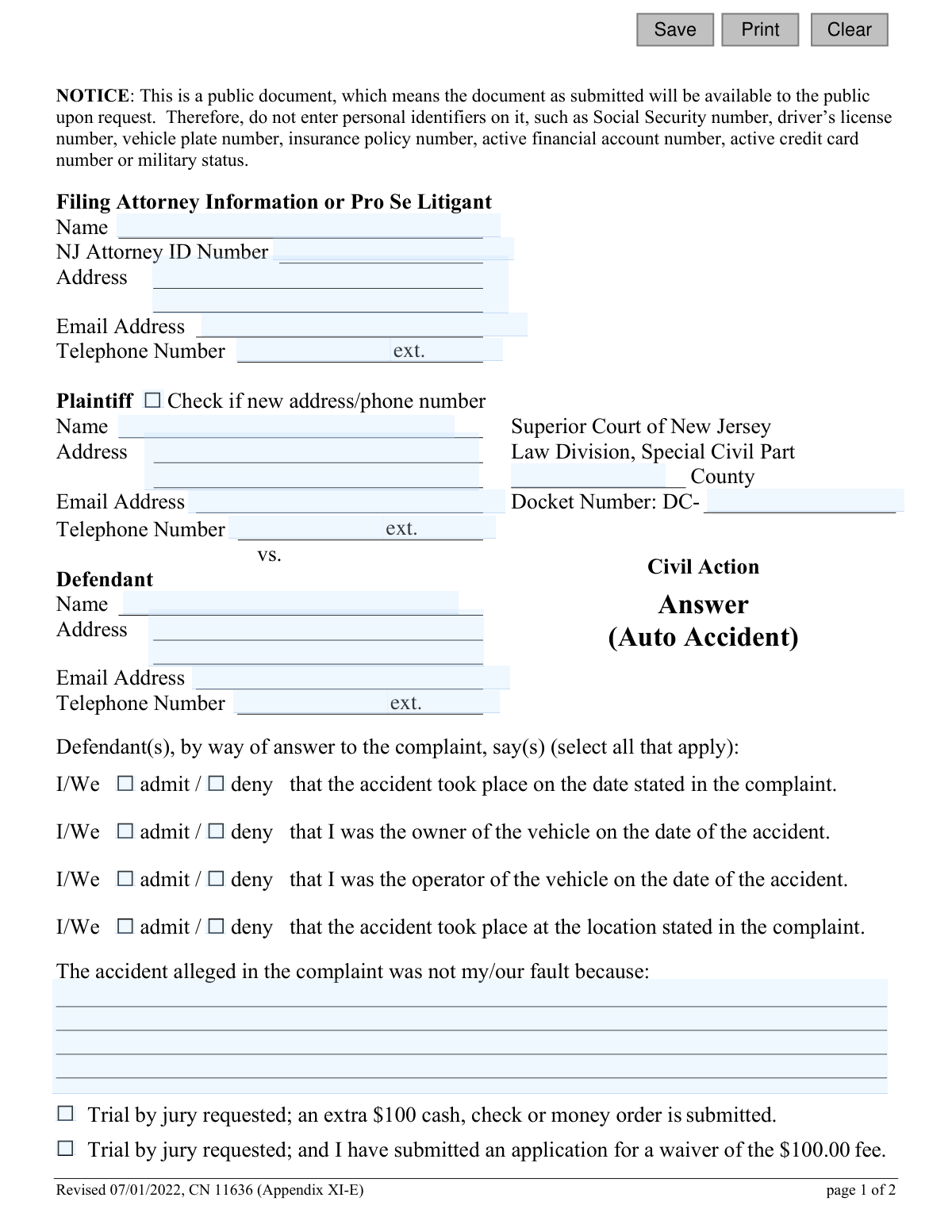
This form, officially titled Answer - Auto Accident - Appendix XI-E, is a legal pleading filed in the Superior Court of New Jersey by a defendant in response to a lawsuit concerning an automobile accident. It allows the defendant to formally admit or deny the allegations made by the plaintiff, state their own version of the facts, and request a jury trial. Today, this form can be filled out quickly and accurately using AI-powered services like Instafill.ai, which can also convert non-fillable PDF versions into interactive fillable forms.
Appendix XI-E is part of the New Jersey forms category on Instafill.
Our AI automatically handles information lookup, data retrieval, formatting, and form filling.
It takes less than a minute to fill out Appendix XI-E using our AI form filling.
Securely upload your data. Information is encrypted in transit and deleted immediately after the form is filled out.

Form specifications

Form name: Answer - Auto Accident - Appendix XI-E
Number of fields: 43
Number of pages: 1
Language: English
main-image

Instafill Demo: How to fill out PDF forms in seconds with AI

How to Fill Out Appendix XI-E Online for Free in 2026

Are you looking to fill out a APPENDIX XI-E form online quickly and accurately? Instafill.ai offers the #1 AI-powered PDF filling software of 2026, allowing you to complete your APPENDIX XI-E form in just 37 seconds or less.
Follow these steps to fill out your APPENDIX XI-E form online using Instafill.ai:
  1. 1 Navigate to Instafill.ai and upload or select the New Jersey Answer - Auto Accident form.
  2. 2 Provide your information as the defendant (or filing attorney), including name, address, and contact details.
  3. 3 Enter the case information from the complaint, such as the plaintiff's name, court county, and docket number.
  4. 4 Use the checkboxes to admit or deny the specific allegations regarding the accident's date, location, and your involvement as owner or operator.
  5. 5 If applicable, write a brief statement explaining why you believe the accident was not your fault.
  6. 6 Complete the certification section, indicating whether other court actions are pending and if other parties should be joined.
  7. 7 Review all entered information for accuracy, then use the platform to date and sign the form before downloading it for filing with the court.

Our AI-powered system ensures each field is filled out correctly, reducing errors and saving you time.

Why Choose Instafill.ai for Your Fillable Appendix XI-E Form?

Speed

Complete your Appendix XI-E in as little as 37 seconds.

Up-to-Date

Always use the latest 2026 Appendix XI-E form version.

Cost-effective

No need to hire expensive lawyers.

Accuracy

Our AI performs 10 compliance checks to ensure your form is error-free.

Security

Your personal information is protected with bank-level encryption.

Frequently Asked Questions About Form Appendix XI-E

This form is a legal document used by a defendant to formally respond to a civil complaint filed against them for an auto accident in the Superior Court of New Jersey, Special Civil Part.

The defendant(s) named in an auto accident lawsuit must complete this form to answer the plaintiff's complaint. You can fill it out yourself as a 'Pro Se Litigant' or have your attorney complete it on your behalf.

This notice is a warning not to include sensitive information like your Social Security, driver's license, or insurance policy numbers on the form. As a public document, this information must be omitted to protect your privacy.

For each statement regarding the accident's date, location, and vehicle ownership/operation, you must check either the 'admit' box if you agree with the plaintiff's claim or the 'deny' box if you disagree.

In this space, you should briefly and clearly state the facts from your perspective that explain why you are not responsible for the accident. This is your opportunity to present your side of the story.

Requesting a jury trial means your case will be decided by a jury instead of only a judge. You must submit an additional $100 fee with the form or apply for a fee waiver.

By signing the certification, you are confirming that the case is not pending elsewhere, all necessary parties are included, and you have removed confidential information. You also certify that you have sent a copy of this completed answer to all other parties in the lawsuit.

Checking this box makes a formal legal request for the plaintiff to provide you with copies of all documents and papers they referred to in their complaint. They are required to provide these within 5 days of your demand.

The docket number is the unique case number assigned by the court. You can find this number on the original complaint or other official court documents you received for this lawsuit.

Yes, you can complete and file this form on your own as a 'Pro Se Litigant.' You would enter your own name and contact details in the section at the top of the form.

Yes, services like Instafill.ai use AI to help you accurately auto-fill form fields with your information. This can save you time and help prevent common errors.

Simply upload the 'Answer - Auto Accident' PDF to the Instafill.ai platform. Its AI will make the form interactive, allowing you to easily type your information into the fields and download the completed document.

If your PDF is not interactive, you can use a service like Instafill.ai. It can convert a flat, non-fillable PDF into a fillable form that you can complete on your computer.

The completed form must be filed with the Superior Court of New Jersey, Law Division, Special Civil Part in the county where the case was filed. You must also serve a copy on the plaintiff or their attorney.

Compliance Appendix XI-E
Validation Checks by Instafill.ai

1
Docket Number Presence and Format
This check ensures the Docket Number field is not empty and follows the expected format, starting with 'DC-'. The Docket Number is a critical unique identifier for the case in the court system. If this field is missing or incorrectly formatted, the document cannot be correctly filed and associated with the existing civil action, leading to processing delays or rejection.
2
Filer Information Completeness
Validates that the name and address fields under 'Filing Attorney Information or Pro Se Litigant' are completed. This information is essential for the court to identify and communicate with the person filing the answer. A failure to provide this information would make the submission anonymous and invalid, preventing the court from processing the document.
3
Defendant Information Presence
Ensures the Defendant's Name and Address fields are filled out. As the defendant is the party responding to the complaint, their identity and contact information must be clearly stated on the form. Missing this information would make it unclear who is answering the complaint, rendering the document legally insufficient.
4
Admit/Deny Selection Logic
For each of the four statements regarding the accident, this check verifies that exactly one box ('admit' or 'deny') is selected. It is logically impossible to both admit and deny the same fact, and failing to select either leaves the answer ambiguous. An invalid selection would require clarification from the filer, as the court needs a clear response to each allegation.
5
Certification of Other Actions Logic
This validation checks that if the box for 'the following actions or arbitration proceedings are pending or contemplated' is selected, the corresponding text field for describing them is not empty. The court requires details of any related proceedings to understand the full legal context. An incomplete certification can lead to procedural issues or sanctions.
6
Certification of Other Parties Logic
This check ensures that if the filer indicates 'the following persons or entities should be joined in this action', the associated text field providing their names is filled out. This rule ensures all necessary parties are identified, which is crucial for the proper administration of justice. Failure to provide the names makes the selection meaningless and the filing incomplete.
7
Mandatory Certification Selection
Verifies that for both the 'other actions' and 'other parties' sections of the certification, exactly one of the two available options is checked, as specified by the '(Must check one)' instruction. This ensures the filer makes a definitive statement on both matters as required by court rules. Submissions with missing or dual selections in these sections are incomplete and will be rejected.
8
Signature Date Validity
This check validates that the 'Dated' field contains a valid date that is not in the future. The signature date establishes when the certification was made and the document was finalized for service. An invalid or future date would call the document's authenticity and timing into question, potentially invalidating the submission.
9
Printed Name at Signature Presence
Ensures the 'Defendant's Name - Typed or Printed' field is filled out alongside the signature. This field clarifies the identity of the signatory, especially if the signature itself is not legible. A missing printed name can create ambiguity about who signed the document, which is a critical component of a legal filing.
10
Personal Identifier Redaction
Scans all free-text fields to detect and flag patterns of personal identifiers forbidden by the notice (e.g., Social Security numbers, driver's license numbers). This is critical because the document is public, and Rule 1:38-7(b) requires redaction to protect privacy. Submitting a document with unredacted personal identifiers violates court rules and creates a security risk.
11
Valid County Selection
This check ensures that the 'County' field for the Superior Court is filled with a valid New Jersey county name. Proper jurisdiction is a fundamental aspect of a legal case, and specifying the correct county is necessary for the case to be heard in the right venue. An invalid or missing county would result in a filing rejection.
12
Email Address Format
Validates that any entered email address (for the attorney, plaintiff, or defendant) follows the standard '[email protected]' format. This ensures that if the court or other parties use email for communication, the address is deliverable. An invalid email format would lead to communication failures and potential missed notices.
13
Jury Trial Request Logic
This check ensures that if a jury trial is requested, the user selects only one of the two related options: either that the fee is submitted or that a fee waiver has been requested. Selecting both is contradictory, and selecting neither while checking the main box would be an incomplete request. This validation ensures the filer's intention regarding the jury trial and its associated fees is clear.
14
Defendant Name Consistency
This validation compares the defendant's name entered in the party information section with the name typed or printed in the signature section. These names should match to confirm that the person signing the document is the named defendant. A mismatch could indicate a filing error or that the document was signed by an unauthorized individual, questioning its validity.

Common Mistakes in Completing Appendix XI-E

Including Prohibited Personal Identifiers

Despite a prominent notice on the first page, filers often mistakenly include personal identifiers like Social Security numbers, driver's license numbers, or insurance policy numbers. This happens because people are used to providing this information on other forms. Including this data makes it a public record, exposing the filer to identity theft and privacy risks, and may lead to the document being rejected by the court clerk. Always double-check the entire form to ensure all such confidential information has been omitted as required by Rule 1:38-7(b).

Incorrect or Incomplete Docket Number

The docket number is the court's primary identifier for a case, and it must be entered precisely, including the 'DC-' prefix. People often mis-transcribe the number from the complaint or omit the prefix, which can cause significant filing delays or lead to the document being misfiled. To avoid this, carefully copy the full docket number from the original complaint served upon you. AI-powered tools like Instafill.ai can help by remembering and correctly populating case information across related documents.

Incomplete Admit/Deny Selections

The form requires the defendant to either 'admit' or 'deny' four specific statements about the accident. A common error is leaving one or more of these lines blank, which makes the answer legally ambiguous and incomplete. This can weaken the defendant's position and may require the court to seek clarification, delaying the case. You must select one option for each of the four statements to provide a clear and complete response.

Missing Mandatory Certification Selections

Page two contains a multi-part certification that is frequently filled out incorrectly. Filers must check one box regarding other court actions AND one box regarding other parties to be joined. Many people only check one box in total, rendering the certification incomplete. An incomplete certification can lead to the answer being deemed deficient by the court. Carefully read and complete both parts of this section.

Forgetting Signature, Date, or Printed Name

A submission is not legally valid without a signature, the date of signing, and a printed or typed name. Filers, especially when in a hurry, may forget one of these three crucial elements. An unsigned or undated answer will be rejected by the court, potentially leading to a default judgment against the defendant for failure to answer. Always review the signature block before filing to ensure it is fully completed.

Leaving Pro Se Litigant Information Blank

Individuals representing themselves (pro se) sometimes leave the top 'Filing Attorney Information or Pro Se Litigant' section blank, assuming it is only for lawyers. This section is mandatory for all filers to provide their contact information to the court and the opposing party. Failing to complete this section can result in missed court notices and communications. If you are not represented by an attorney, you must enter your own name, address, email, and phone number here.

Vague 'Not My Fault' Explanation

In the space provided to explain why the accident was not the defendant's fault, many people write vague or conclusory statements like 'The plaintiff was at fault' or 'It wasn't me.' This provides no factual basis for a defense and weakens the defendant's case from the start. You should provide a brief but specific factual account, such as 'Plaintiff ran a red light' or 'Plaintiff changed lanes without signaling.' This creates a clear record of your defense.

Ignoring Jury Trial Fee/Waiver Requirement

Filers may check a box to request a trial by jury but forget to submit the required $100 fee or an application for a fee waiver. The request for a jury trial is not perfected until the fee or waiver is processed by the court. This oversight can result in the forfeiture of the right to a jury trial, meaning the case will be decided by a judge alone. If you request a jury, ensure the payment or waiver application is submitted simultaneously with the answer.

Failing to Certify Service on Other Parties

The form includes a certification stating, 'this answer was served by me upon all existing parties.' Pro se litigants often misunderstand this, believing that filing with the court is sufficient. However, court rules require you to also send a copy of the completed answer to the plaintiff or their attorney. Failing to do so can result in motions against you and potential sanctions from the court for violating procedural rules.

Overlooking the Demand for Production of Documents

At the very bottom of the form is a checkbox to 'Demand for Production of Documents.' Many filers overlook this option, missing a critical and simple first step in the discovery process. Checking this box formally requires the plaintiff to provide copies of all documents mentioned in their complaint, such as police reports or medical bills. Forgetting to check this box means losing an early opportunity to gather evidence. If the form is a non-fillable PDF, a tool like Instafill.ai can convert it to a fillable version, making it easier to see and select all available options.
Saved over 80 hours a year

“I was never sure if my IRS forms like W-9 were filled correctly. Now, I can complete the forms accurately without any external help.”

Kevin Martin Green

Your data stays secure with advanced protection from Instafill and our subprocessors

Robust compliance program

Transparent business model

You’re not the product. You always know where your data is and what it is processed for.

ISO 27001, HIPAA, and GDPR

Our subprocesses adhere to multiple compliance standards, including but not limited to ISO 27001, HIPAA, and GDPR.

Security & privacy by design

We consider security and privacy from the initial design phase of any new service or functionality. It’s not an afterthought, it’s built-in, including support for two-factor authentication (2FA) to further protect your account.

Fill out Appendix XI-E with Instafill.ai

Worried about filling PDFs wrong? Instafill securely fills answer-auto-accident-appendix-xi-e forms, ensuring each field is accurate.