
Instafill.ai
7 days free
AI form filling · 59 fields · 2 pages · done in seconds

Yes! You can use AI to fill out Antrag auf Mitgliedschaft als Fördermitglied im Verein zur Förderung der mittelständischen Wirtschaft e.V. (VFMW e. V.)

Don't type 59 fields by hand. Tell our AI about yourself, or upload a document you already have, and it fills every field in seconds. You check it, then download, print or sign.
7 days free, then $19.99/month · Cancel anytime
AI fills it, no typingEncrypted, never used to train AICancel in two clicks
Antrag auf Mitgliedschaft als Fördermitglied im Verein zur Förderung der mittelständischen Wirtschaft e.V. (VFMW e. V.), page 1
Moderate · 55/100Form Complexity Index

The AI does the filling. You just check it.

No typing into boxes, nothing to install.

Tell the AI about youAnswer a few questions in plain words, or upload a document you already have. That is all the typing there is.
AI fills every field in secondsIt puts each answer in the right box on every page, checkboxes included.
Check it and downloadReview every field, change anything, then download, print or sign the PDF.

What this form asks for

The AI fills all of it, from your answers or your documents.

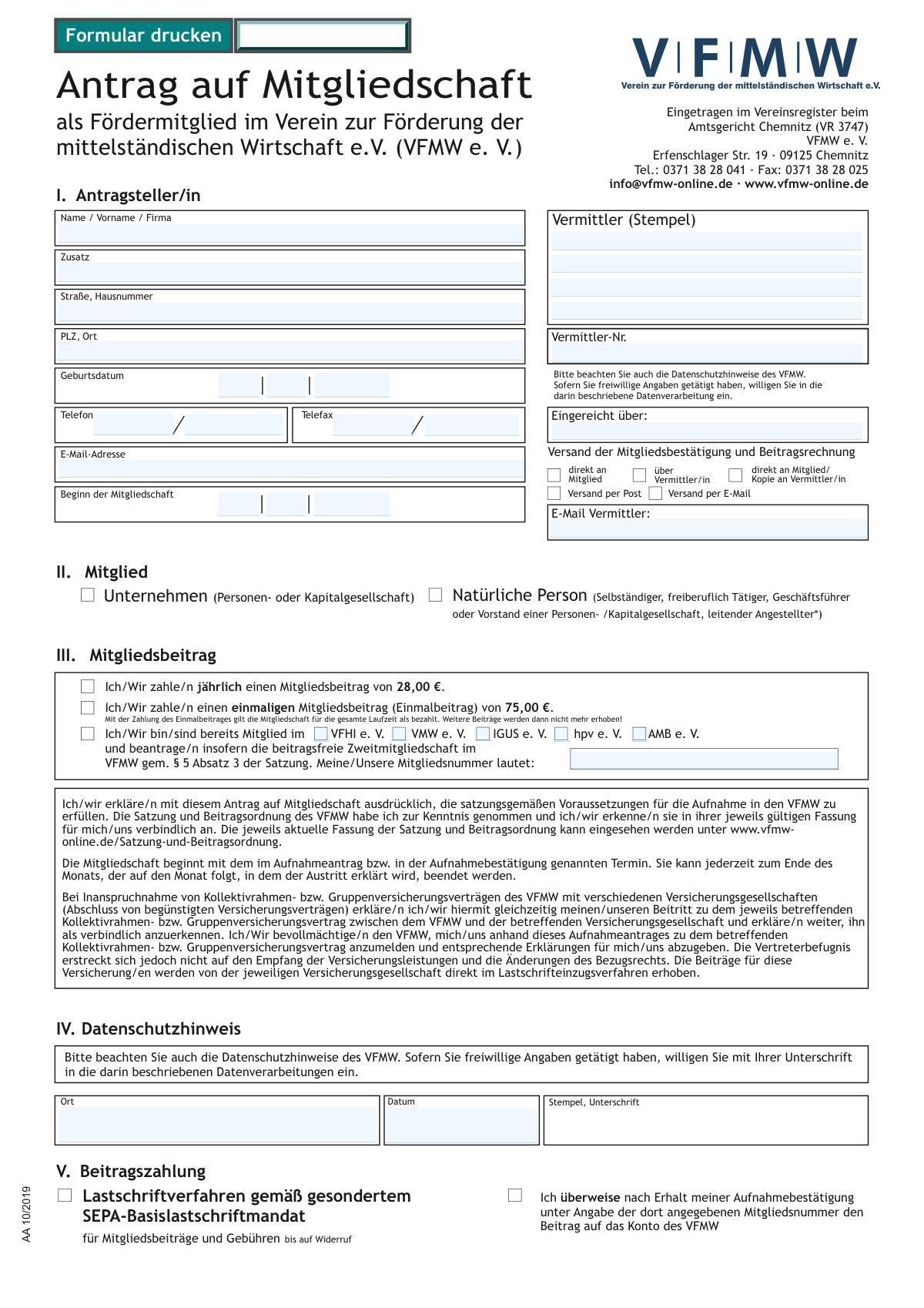
The 'Antrag auf Mitgliedschaft' is a German application form used to become a supporting member of the Verein zur Förderung der mittelständischen Wirtschaft e.V. (VFMW), an association dedicated to promoting small and medium-sized businesses. Applicants provide personal or company details, select a membership contribution plan, and authorize payment. Today, this form can be filled out quickly and accurately using AI-powered services like Instafill.ai, which can also convert non-fillable PDF versions into interactive fillable forms.
Fillable fields59
Pages2
Sections20
Questions that depend on earlier answers22
Form Complexity IndexModerate, 55/100

The AI checks your answers before you download

14 checks built for this form, so a wrong date or a missing answer is caught before anyone else sees it.

Applicant Name and Address Completeness

This check ensures that the primary applicant identification fields, specifically 'Name / Vorname / Firma', 'Straße, Hausnummer', and 'PLZ, Ort', are not empty. These fields are essential for creating the membership record and for all postal correspondence. If any of these fields are missing, the application cannot be processed and must be returned to the applicant for completion.

German Postal Code (PLZ) Format

Validates that the 'PLZ' (postal code) field contains exactly five numeric digits. This is crucial for ensuring mail deliverability within the German postal system. An incorrect format could lead to returned mail, delays in receiving membership materials, and increased administrative costs. Submissions with invalid postal codes should be flagged for manual correction.

Exclusive Member Type Selection

Verifies that exactly one of the two member type checkboxes ('Unternehmen' or 'Natürliche Person') is selected. This distinction is fundamental for determining the legal nature of the member, which affects internal statistics and potentially the services offered. If zero or both options are selected, the application is ambiguous and cannot be processed without clarification.

Conditional Birthdate for Natural Person

This rule checks that if the member type 'Natürliche Person' is selected, the 'Geburtsdatum' (date of birth) is provided and represents a valid date for a person of legal age (e.g., over 18). This is necessary for legal and contractual reasons. If 'Unternehmen' is selected, this field should be empty, as a birthdate is not applicable.

Exclusive Membership Contribution Choice

Ensures that the applicant has selected exactly one of the three membership contribution options: annual payment, one-time payment, or contribution-free secondary membership. This choice directly determines the billing and membership status. An invalid selection (none or multiple) prevents the system from creating a correct invoice and membership term.

Secondary Membership Prerequisite Check

If the 'beitragsfreie Zweitmitgliedschaft' (contribution-free secondary membership) option is chosen, this validation confirms that an existing association is selected and the corresponding membership number field is filled. This information is required to verify the applicant's eligibility for the free membership as per the association's statutes. Without this data, the claim for a free membership cannot be validated.

And 8 more checks
  • Exclusive Payment Method Selection
  • Conditional SEPA Mandate Fields
  • IBAN Structure and Checksum Validation
  • BIC/SWIFT Code Format Validation
  • Email Provision for Electronic Delivery
  • Divergent Account Holder Data Requirement
  • Logical Consistency of Contribution and SEPA Payment Type
  • Start of Membership Date Plausibility

Let AI fill out your AA 10/2019

No typing. Every field filled in seconds, checked, ready to sign.

7 days free, then $19.99/month · Cancel anytime

How to Fill Out AA 10/2019 Online for Free in 2026

What the AI walks you through.

  1. Navigate to Instafill.ai and upload or select the VFMW membership application form.
  2. Use the AI assistant to automatically fill in applicant details in Section I, including name, address, and contact information.
  3. In Section II, specify whether the membership is for a company or a natural person.
  4. Choose your desired membership contribution in Section III, such as the annual fee, a one-time payment, or a contribution-free secondary membership.
  5. Indicate your preferred payment method in Section V, either bank transfer or SEPA direct debit, and provide your bank account details if choosing the latter.
  6. Review all the information entered by the AI for accuracy, then digitally sign and date the form in the designated fields.
  7. Download, print, or submit the completed application as required by the association.

Common Mistakes in Completing AA 10/2019

The ones the AI is built to catch.

Incorrectly Identifying Applicant Type (Individual vs. Company)
Applicants often get confused between applying as a 'Natürliche Person' (individual) and an 'Unternehmen' (company), especially freelancers or small business owners. This mistake can lead to incorrect membership classification, billing errors, and issues with accessing member benefits. To avoid this, carefully read the descriptions for Section II and ensure the applicant name in Section I matches the selected member type. AI-powered tools can help by highlighting the corresponding required fields based on your selection.
Incomplete or Incorrect SEPA Direct Debit Mandate
The SEPA mandate is a frequent source of errors, including typos in the IBAN, forgetting the BIC, or failing to provide details for a different account holder. Such mistakes inevitably lead to payment failures, processing delays, and extra administrative work. To prevent this, use an AI-powered form filler like Instafill.ai, which can automatically validate the IBAN format for correctness and ensure all required banking fields are completed before submission.
Contradictory Membership Fee and Payment Type Selection
A common error is selecting an annual fee ('jährlich') in Section III but then choosing a one-time debit ('Einmallastschrift') in the SEPA mandate, or vice-versa. This contradiction confuses the payment processing system, leading to incorrect billing or payment failures. Smart tools like Instafill.ai can enforce conditional logic, alerting you to such inconsistencies or automatically selecting the correct corresponding option to ensure your choices are aligned.
Missing Required Signatures and Dates
This form requires signatures and dates in at least two places: for the main application and for the SEPA mandate. Applicants often overlook one of them, rendering that part of the application invalid and causing processing to halt. Before submitting, double-check for all 'Unterschrift' (signature) and 'Datum' (date) fields. If the form is a non-fillable PDF, a tool like Instafill.ai can convert it into a fillable version and highlight all mandatory signature and date fields to ensure none are missed.
Improperly Claiming Contribution-Free Membership
Applicants may check the box for a contribution-free secondary membership without being a member of the specified partner associations, or they forget to provide their existing membership number. Both errors will result in the application for free membership being denied and the applicant being billed the standard fee. To avoid this, ensure you are eligible and provide the required membership number. AI form-filling tools can make the membership number field mandatory if the 'beitragsfrei' box is checked, preventing incomplete submissions.
Misinterpreting the Intermediary ('Vermittler') Section
Applicants submitting the form directly often get confused by the 'Vermittler' (intermediary/broker) fields and either fill them out incorrectly or leave them blank when they were assisted by a broker. This can cause communication breakdowns, as confirmations might be sent to the wrong party. If a broker is involved, ensure their details are correctly entered; if not, these fields should be left blank. Using a guided form-filling tool can help clarify which fields are relevant to your specific situation.
Failing to Specify a Different Bank Account Holder
Many applicants overlook the need to provide separate details when the bank account belongs to a different person or entity (e.g., a spouse or parent company). They leave the 'Kontoinhaber = Antragsteller' box checked by default, which leads to direct debit failures because the name on the mandate does not match the bank's records. If the applicant is not the account holder, you must uncheck this box and fill in the correct details. AI tools can automatically reveal and mark these additional fields as required when the box is unchecked.
Providing Conflicting or Incomplete Delivery Preferences
Applicants may select 'Versand per E-Mail' (delivery by email) but fail to provide a valid email address, or they might choose conflicting delivery options. This results in delays or failure to receive important documents like the membership confirmation and invoice. Carefully select your preferred delivery method and ensure all corresponding contact information is provided. An intelligent form filler can make the email field mandatory if 'Versand per E-Mail' is selected, preventing this common oversight.
Incorrectly Transcribing the IBAN into Segmented Fields
The form breaks the IBAN into six separate fields, which can easily lead to transcription errors like miscounting characters or making a typo while splitting the number. This renders the IBAN invalid and is a primary cause of payment failures. To prevent this, transcribe the IBAN carefully, paying close attention to the segments. AI-powered tools like Instafill.ai can simplify this by providing a single field for the IBAN and then automatically formatting it correctly across the required segments.
Mixing Up Company Name and Personal Name Fields
In Section I, the field 'Name / Vorname / Firma' requires either a personal name or a company name, depending on the applicant type selected in Section II. Applicants sometimes enter both, or enter the company name and then their personal name in the 'Zusatz' (additional info) field, causing data entry confusion. This can lead to invoices and official correspondence being addressed incorrectly. To avoid this, enter only the official applicant name (either the full personal name or the legal company name) in the primary field.

Frequently Asked Questions About AA 10/2019


Is it really free for 7 days?
Yes. You pay $0 today. Cancel before Nov 10 and you are never charged. Keep it, and it is $19.99 a month for 5 fills of your AA 10/2019.
Can I fill other forms too?
This plan is for your AA 10/2019: your own AI agent fills it as often as 5 times a month. To fill other forms and upload your own, choose a Professional plan from your account.
How do I cancel?
From your account, in two clicks, any time. No email, no call.
How does the AI fill out AA 10/2019?
You answer a few questions in plain words, or upload a document you already have. The AI reads what you give it and puts each answer into the right field of AA 10/2019, on every page, in seconds. It checks the answers against the form's own rules, and you review and change anything before you download, print or sign.
What happens to my information?
It is encrypted in transit and at rest, and it is never used to train AI.
How complex is AA 10/2019 to fill out?
AA 10/2019 has a Form Complexity Index of 55 out of 100, in the moderate tier: 59 fillable fields across 2 pages. Instafill.ai's AI fills it in under a minute, with every field there for you to review before you download.
What is the purpose of this form?
This form is an application to become a supporting member of the 'Verein zur Förderung der mittelständischen Wirtschaft e.V.' (VFMW), a German association for the promotion of medium-sized businesses.
Who can apply for membership with this form?
Both companies (partnerships or corporations) and natural persons, such as self-employed individuals, freelancers, managing directors, or senior employees, are eligible to apply.
What are the membership fee options?
You can choose between an annual fee of €28.00 or a one-time lifetime fee of €75.00. A contribution-free membership is also possible if you're already a member of a partner association.
How can I pay for my membership?
You have two options: you can either pay by bank transfer after receiving your membership confirmation, or you can authorize automatic payments by completing the SEPA direct debit mandate.
What is a 'beitragsfreie Zweitmitgliedschaft' (contribution-free secondary membership)?
If you are already a member of a partner association listed on the form (like VFHI e.V. or VMW e.V.), you can apply for membership in VFMW at no extra cost. You just need to provide your existing membership number.
When does my membership officially start?
Your membership begins on the date you specify in the application or, if left blank, on the date stated in your official membership confirmation letter.
What is the cancellation policy for the membership?
You can terminate your membership at any time. The cancellation becomes effective at the end of the month that follows the month in which you submitted your notice of withdrawal.
What information do I need to provide in the SEPA direct debit mandate section?
This section requires your bank account details, including the account holder's name, IBAN, and BIC, to authorize the association to collect your membership fees automatically.
What does the 'Vermittler' field mean?
A 'Vermittler' is an intermediary or broker who may have assisted you with the application. If you applied through one, their details should be entered here.
How will my personal data be used by the association?
Your data is used to manage your membership, process payments, and, with your consent, may be shared with partners like insurance companies to provide you with special member benefits.
Can an AI tool help me fill out this application?
Yes, services like Instafill.ai use AI to accurately auto-fill form fields, which saves time and helps you avoid common mistakes.
How do I use Instafill.ai to fill this form online?
Simply upload the PDF of the form to the Instafill.ai website. The service will make the document interactive, allowing you to type your information directly into the fields and then download the completed form.
What should I do if my PDF of the form is not fillable?
If you have a non-fillable or 'flat' PDF, you can use a tool like Instafill.ai. It can convert the document into an interactive, fillable form that you can complete on your computer.
Encrypted in transit and at restNever used to train AIDelete your forms any time

Get your AA 10/2019 filled out by AI

$0 today. Cancel before Nov 10 and you pay nothing.

Other forms like this one

ERM forms: REQUEST FOR OWNERSHIP INFORMATION—ERM-14 FORM, Form I-90, Application to Replace Permanent Resident Card, Form I-485, Application to Register Permanent Residence, Form SS-8, Determination of Worker Status, Form CMS-1763, Request for Termination of Medicare Coverage, Form I-212, Application for Permission to Reapply, Form I-192, Application for Advance Permission to Enter as a Nonimmigrant, Form W-8IMY (Rev. October 2021), Certificate of Foreign Intermediary, Foreign Flow-Through Entity, or Certain U.S. Branches for United States Tax Withholding and Reporting, County of Louisa Department of Community Development – New Non-Residential Building Permit Package, Application Schedule 1: Designer Information (City of Toronto Building Permit Application), HR-Pol-Rec&Res-04 Employment Application Form (Recruitment of Permanent Employees), Fauquier County Department of Community Development – Building Trades Permit or Amendment to Existing Permit Application (Residential or Commercial), Belastingdienst VPB 075 – Verzoek fiscale eenheid Vennootschapsbelasting (Deel A – Gegevens moedermaatschappij), ROTC Cadet Academic Plan / Degree and Credit Hour Worksheet (Student Identification, Term-by-Term Courses, GPA Summary, and Completion Certification), Health Assessment – Ontario Health atHome (Fixing Long-Term Care Act, 2021) (Form 4768-69E), Health Assessment - Ontario Health atHome (Fixing Long-Term Care Act, 2021) — Form 4768-69E, Washington Single-Family Property Term Lease & Security Deposit Receipt (WA Single-Family Lease) | Revised 10/08/2025, Application for Mechanical Permit, Pennsylvania Department of State — Certificate of Termination (Domestic Limited Liability Company) (15 Pa.C.S. § 8872(f)) (DSCB:15-8872(f)), Document Checklist for a Study Permit (IMM 5483)

7 days free, then $19.99/month · Cancel anytime