Yes! You can use AI to fill out Appellate Notice of Motion (CN 10503)
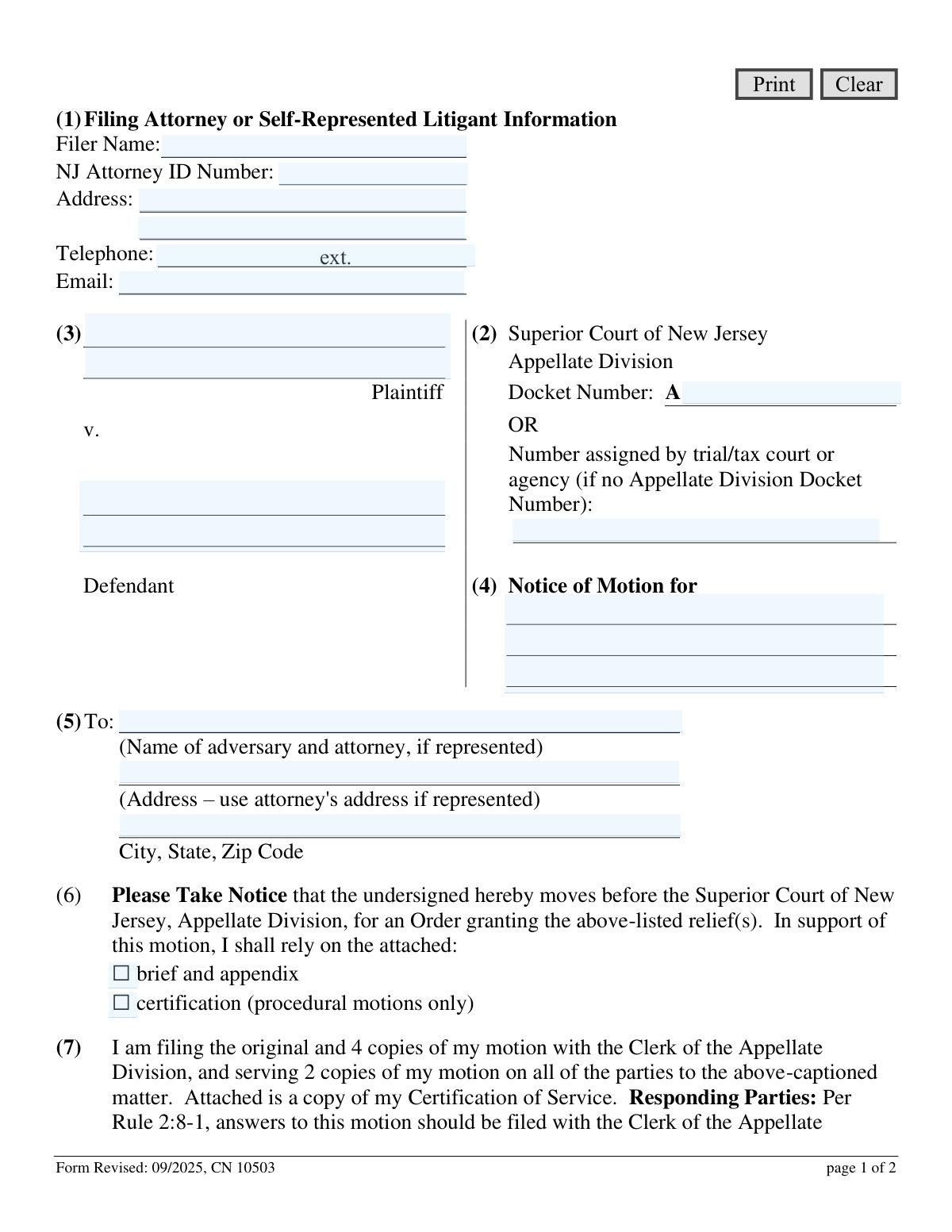
The Appellate Notice of Motion, form CN 10503, is a legal document used in the New Jersey court system to formally request a specific action or 'relief' from the Appellate Division. It is a critical first step for parties in an appeal who need to ask the court for something, such as an extension of time or a stay of a lower court's order. Today, this form can be filled out quickly and accurately using AI-powered services like Instafill.ai, which can also convert non-fillable PDF versions into interactive fillable forms.
CN 10503 is part of the
New Jersey forms category on Instafill.
Our AI automatically handles information lookup, data retrieval, formatting, and form filling.
It takes less than a minute to fill out CN 10503 using our AI form filling.
Securely upload your data. Information is encrypted in transit and deleted immediately after the form is filled out.
Form specifications
| Form name: | Appellate Notice of Motion (CN 10503) |
| Number of fields: | 21 |
| Number of pages: | 1 |
| Language: | English |
Instafill Demo: How to fill out PDF forms in seconds with AI
How to Fill Out CN 10503 Online for Free in 2026
Are you looking to fill out a CN 10503 form online quickly and accurately? Instafill.ai offers the #1 AI-powered PDF filling software of 2026, allowing you to complete your CN 10503 form in just 37 seconds or less.
Follow these steps to fill out your CN 10503 form online using Instafill.ai:
- 1 Navigate to Instafill.ai and upload or select the Appellate Notice of Motion (CN 10503) form.
- 2 Provide your personal details as the filer, including your name, NJ Attorney ID (if applicable), address, and contact information.
- 3 Enter the case information, such as the Superior Court of New Jersey, Appellate Division Docket Number, and the full case caption (Plaintiff v. Defendant).
- 4 Clearly specify the relief you are requesting from the court in the 'Notice of Motion for' section.
- 5 Input the name and address of the opposing party ('adversary') and their attorney.
- 6 Indicate whether you are attaching a brief and appendix or a certification in support of your motion, then digitally or manually sign and date the form.
- 7 Review all the AI-populated information for accuracy, then download the completed form to file with the Clerk of the Appellate Division and serve on all parties.
Our AI-powered system ensures each field is filled out correctly, reducing errors and saving you time.
Why Choose Instafill.ai for Your Fillable CN 10503 Form?
Speed
Complete your CN 10503 in as little as 37 seconds.
Up-to-Date
Always use the latest 2026 CN 10503 form version.
Cost-effective
No need to hire expensive lawyers.
Accuracy
Our AI performs 10 compliance checks to ensure your form is error-free.
Security
Your personal information is protected with bank-level encryption.
Frequently Asked Questions About Form CN 10503
This form is used to make a formal, written request to the Superior Court of New Jersey, Appellate Division, for a specific order or relief during an appeal.
Any party in an appellate case, whether an attorney or a self-represented litigant, who wants to ask the court to take a specific action must file this form.
You must also submit a supporting brief and appendix or a certification, a Certification of Service (CN 12227), and a Certification that Submission Contains No Confidential Information (CN 13252).
In this box, you should briefly state the specific relief you are requesting from the court, such as 'Extension of Time to File Brief,' 'Fee Waiver,' or 'Stay Pending Appeal.'
If an Appellate Division Docket Number has not been assigned, you should leave that line blank and instead enter the case number assigned by the trial court or agency in the space provided below it.
You must file the original and 4 copies with the Clerk of the Appellate Division and serve 2 copies on all other parties involved in the case.
There is no fee if your appeal is already open, but a $50 filing fee is required for a closed appeal or for certain motions like a Motion for Leave to Appeal.
A motion is generally decided within four weeks if there are no issues with the filing. For urgent matters, you should contact the Appellate Division's Emergent Clerk directly.
You have the option to do nothing or to file an opposition, which is typically due within 10 days of receiving the motion. Your opposition can be a brief or a certification and must include a Certification of Service.
It is unlikely, as motions in the Appellate Division are typically decided based on the written papers submitted by the parties unless the court specifically directs an oral argument.
You can file this Notice of Motion to request an extension, or for a non-accelerated appeal, you may get one 30-day extension by sending a letter if your adversary consents.
Yes, services like Instafill.ai use AI to accurately auto-fill form fields with your information, which can save you time and help prevent errors.
Simply upload the form to the Instafill.ai platform, and its AI will identify the fields and help you fill them in with your saved personal and case information. You can then review, download, and print the completed form.
You can use a service like Instafill.ai, which can convert flat, non-fillable PDFs into interactive, fillable forms that you can easily complete on your computer.
Compliance CN 10503
Validation Checks by Instafill.ai
1
Ensures Docket Number is Mutually Exclusive
This check verifies that either the 'Appellate Division Docket Number' or the 'Number assigned by trial/tax court or agency' is provided, but not both. The form requires one of these two numbers to identify the case. If both are filled or neither is filled, the submission should be rejected to prevent ambiguity or a lack of case reference.
2
Validates Appellate Docket Number Format
This validation ensures that if the 'Appellate Division Docket Number' is provided, it begins with the prefix 'A-'. This format is explicitly shown on the form and is crucial for the clerk's office to correctly route and file the document. An incorrect format could lead to processing delays or misfiling.
3
Requires Filer's Email Address in Valid Format
This check confirms that the 'Email' field in the filer's information section contains a value and that the value conforms to a standard email format (e.g., [email protected]). A valid email is essential for the court to send electronic notifications, orders, and other communications to the filer. An invalid or missing email would disrupt communication.
4
Prohibits 'et al.' in Case Caption
This validation scans the Plaintiff and Defendant name fields to ensure they do not contain the abbreviation 'et al.'. The instructions explicitly state to use the complete caption, which means all parties must be named. Using 'et al.' can create ambiguity about which parties are involved in the motion, so this rule ensures full legal clarity.
5
Mandates Description of Motion Relief
This check ensures that the 'Notice of Motion for' field (Box 4) is not empty. This field describes the specific relief being requested from the court and is the primary purpose of the form. A blank submission is meaningless and would be rejected, as the court would not know what action the filer is requesting.
6
Verifies Exclusive Selection of Supporting Document
This validation ensures that exactly one of the two checkboxes, 'brief and appendix' or 'certification', is selected. The instructions indicate a motion must be supported by one of these options. The system must prevent submissions with zero or both options selected to ensure compliance with procedural rules.
7
Validates Signature Date
This check verifies that the 'Date' field is populated with a valid date and that the date is not in the future. The signature date legally attests to when the document was signed and is a critical piece of metadata for court records. An invalid or future date would compromise the document's legal standing.
8
Requires Printed Name for Signature
This validation ensures that the 'Print Name' field accompanying the signature is not blank. A legible printed name is necessary to identify the signatory, especially if the signature itself is difficult to read. This is crucial for accountability and verifying the identity of the person filing the motion.
9
Ensures Completeness of Filer Information
This check verifies that the filer's name, full address, and telephone number fields are all completed. This contact information is essential for the court and opposing parties to communicate with the filer regarding the motion. Incomplete information can halt the legal process and lead to the motion being dismissed for improper form.
10
Ensures Completeness of Adversary Information
This validation confirms that the adversary's name and full address (or their attorney's, if represented) are provided in Box 5. This information is legally required to prove that the opposing party was properly served with the notice of motion. Failure to provide this information would invalidate the service and cause the motion to be rejected.
11
Validates NJ Attorney ID Number Format
This check validates that, if a value is entered for the 'NJ Attorney ID Number', it conforms to the expected format (e.g., a specific number of digits). This ID uniquely identifies an attorney within the New Jersey bar, ensuring proper identification for licensed professionals. An incorrectly formatted ID could lead to misidentification or suggest the filer is not a registered attorney.
12
Requires Full Case Caption
This validation ensures that both the Plaintiff and Defendant name fields (Box 3) are filled out. A complete case caption is fundamental to identifying the legal matter to which the motion pertains. Submitting a form without naming both primary parties would make it impossible for the clerk to file the document in the correct case file.
Common Mistakes in Completing CN 10503
Filers often get confused between the 'Appellate Division Docket Number' (which starts with 'A') and the 'trial/tax court or agency number'. Entering the wrong number or putting the right number in the wrong field can cause the motion to be misfiled or rejected. To avoid this, filers should carefully check their most recent court documents for the correct, current docket number and enter it in the appropriate field as instructed in Box 2.
The instructions specify that filers must submit a 'Certification of Service (CN 12227)' and a 'Certification that Submission Contains No Confidential Information (CN 13252)'. A very common mistake is to only file the Notice of Motion itself, which results in a deficient filing. The clerk's office will likely return the entire package, delaying the motion until all required documents are submitted together.
The form requires filers to check whether their motion is supported by a 'brief and appendix' or a 'certification'. Many filers incorrectly select 'certification' for substantive motions (like a Motion for Stay or Summary Disposition) that legally require a full brief. This is a critical procedural error that will lead to the motion being denied or rejected for failing to meet the requirements of Rule 2:8-1(a).
The instructions explicitly state to enter the complete case title exactly as it appears on trial court papers and to not use abbreviations like 'et al.'. Filers frequently shorten names or use 'et al.' out of habit, which can lead to filing rejections for not conforming to court standards. It is crucial to copy the full caption precisely to ensure the document is correctly docketed.
The instructions clearly state that motions for a 'Stay' or 'Fee Waiver' must first be filed and denied in the trial court before being brought to the Appellate Division. A frequent and serious mistake is filing these motions directly with the Appellate Division, which lacks initial jurisdiction. This results in an automatic rejection, wasting valuable time and effort.
In Box 5, filers must list the opposing party's information. A common error is to list the adversary's personal address even when they are represented by an attorney. The instructions are clear that if a party is represented, the attorney's name and address must be used for proper service, and failing to do so can lead to the motion being dismissed for improper notice.
It is a simple but surprisingly common mistake to leave the signature or date line blank. An unsigned legal document is considered invalid and will be immediately rejected by the clerk's office upon receipt. This requires the filer to resubmit the entire package, causing unnecessary delays in having the motion heard.
The form and instructions contain conflicting information, stating both 'original and 4 copies' and 'original and 3 copies'. This ambiguity often leads filers to submit the wrong number of documents. This results in a deficiency notice from the clerk, which halts the motion's progress until the correct number of copies is provided as required by the court.
Box 4 asks for the specific relief sought 'in just a few words' (e.g., 'Fee Waiver'). Filers often write a long, narrative explanation instead of a concise title for their motion. This can confuse the clerk and delay processing, as the court needs a clear, brief label to properly categorize and route the motion for review.
Self-represented litigants are often confused by fields like 'NJ Attorney ID Number' in Box 1. They may leave the entire section blank or incorrectly enter personal information, leading to an incomplete or improperly filled-out form. Litigants should fill out all personal contact information but leave attorney-specific fields like the ID number blank. AI-powered tools like Instafill.ai can help by recognizing user roles and guiding them to fill only the relevant fields.
Saved over 80 hours a year
“I was never sure if my IRS forms like W-9 were filled correctly. Now, I can complete the forms accurately without any external help.”
Kevin Martin Green
Your data stays secure with advanced protection from Instafill and our subprocessors

Robust compliance program
Transparent business model
You’re not the product. You always know where your data is and what it is processed for.
ISO 27001, HIPAA, and GDPR
Our subprocesses adhere to multiple compliance standards, including but not limited to ISO 27001, HIPAA, and GDPR.
Security & privacy by design
We consider security and privacy from the initial design phase of any new service or functionality. It’s not an afterthought, it’s built-in, including support for two-factor authentication (2FA) to further protect your account.
Fill out CN 10503 with Instafill.ai
Worried about filling PDFs wrong? Instafill securely fills appellate-notice-of-motion-cn-10503 forms, ensuring each field is accurate.