Yes! You can use AI to fill out Application for Assignment of Counsel (CIC 5A)
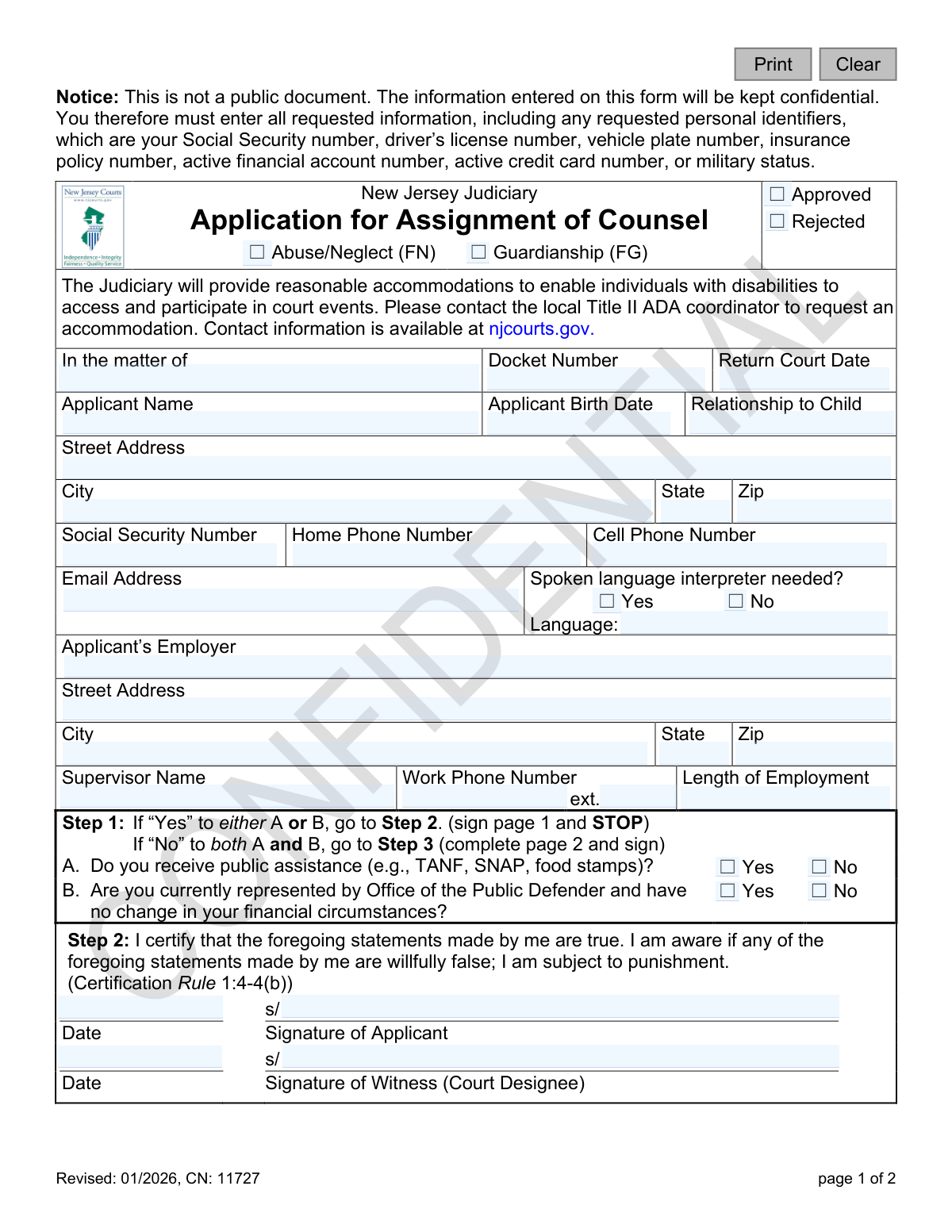
Form CIC 5A, Application for Assignment of Counsel, is a legal document used in the New Jersey Judiciary system for individuals who cannot afford legal representation. The form gathers detailed personal and financial information to assess an applicant's eligibility for a court-appointed lawyer in cases such as abuse/neglect or guardianship. Today, this form can be filled out quickly and accurately using AI-powered services like Instafill.ai, which can also convert non-fillable PDF versions into interactive fillable forms.
CIC 5A is part of the
New Jersey forms category on Instafill.
Our AI automatically handles information lookup, data retrieval, formatting, and form filling.
It takes less than a minute to fill out CIC 5A using our AI form filling.
Securely upload your data. Information is encrypted in transit and deleted immediately after the form is filled out.
Form specifications
| Form name: | Application for Assignment of Counsel (CIC 5A) |
| Number of fields: | 87 |
| Number of pages: | 1 |
| Language: | English |
Instafill Demo: How to fill out PDF forms in seconds with AI
How to Fill Out CIC 5A Online for Free in 2026
Are you looking to fill out a CIC 5A form online quickly and accurately? Instafill.ai offers the #1 AI-powered PDF filling software of 2026, allowing you to complete your CIC 5A form in just 37 seconds or less.
Follow these steps to fill out your CIC 5A form online using Instafill.ai:
- 1 Navigate to Instafill.ai and upload or select the Application for Assignment of Counsel (CIC 5A).
- 2 Provide your personal information, including your name, address, contact details, and employer information as prompted by the AI.
- 3 Answer the initial screening questions in Step 1 regarding your receipt of public assistance or current representation by the Office of the Public Defender.
- 4 Follow the form's logic: if you answered 'Yes' to either screening question, proceed to sign on page 1; otherwise, continue to the financial section on page 2.
- 5 If required, complete the detailed financial information in Step 3, providing details on your monthly income, assets, expenses, and debts.
- 6 Carefully review all the information entered by the AI for accuracy, then electronically sign and date the appropriate certification statement to finalize your application.
Our AI-powered system ensures each field is filled out correctly, reducing errors and saving you time.
Why Choose Instafill.ai for Your Fillable CIC 5A Form?
Speed
Complete your CIC 5A in as little as 37 seconds.
Up-to-Date
Always use the latest 2026 CIC 5A form version.
Cost-effective
No need to hire expensive lawyers.
Accuracy
Our AI performs 10 compliance checks to ensure your form is error-free.
Security
Your personal information is protected with bank-level encryption.
Frequently Asked Questions About Form CIC 5A
This form is used to request a court-appointed lawyer if you are involved in an Abuse/Neglect (FN) or Guardianship (FG) case in New Jersey and cannot afford to hire one yourself. The court reviews your financial information to determine if you are eligible for this service.
You should fill out this form if you are a party in a relevant court case, such as child abuse/neglect or guardianship, and you believe you cannot afford to pay for your own legal representation.
This information is required to verify your identity and financial situation to determine your eligibility for a court-appointed attorney. The form states that this information will be kept confidential and is not a public document.
Step 1 is a quick screening to see if you qualify based on receiving public assistance or already having a public defender. If you answer 'Yes' in Step 1, you only sign on page 1; otherwise, you must complete the detailed financial information in Step 3 on page 2.
If you receive public assistance like SNAP or TANF, check 'Yes' for question A in Step 1. You can then sign in Step 2 and do not need to fill out the detailed financial section on page 2.
You only need to complete page 2 if you answered 'No' to both questions in Step 1 on the first page. If you qualify under Step 1, you do not need to provide the detailed financial breakdown.
It is helpful to have documents that verify your financial status, such as pay stubs, public assistance letters, bank statements, and bills for your monthly expenses. This ensures you can accurately complete the income, assets, and expenses sections on page 2 if required.
The court will review your application to determine your eligibility for a court-appointed lawyer. A court official will mark the form as 'Approved' or 'Rejected', and you will be notified of the decision.
The form includes a certification stating that you are subject to punishment if you willfully provide false statements. It is crucial to be truthful and accurate when completing the application.
Yes, the form asks if you need a spoken language interpreter. Be sure to check 'Yes' and write in your language so the court can provide an interpreter to assist you during court proceedings.
Yes, services like Instafill.ai use AI to help you accurately fill out forms by auto-filling fields from your saved information. This can save you time and help reduce errors, especially on detailed financial sections.
Simply upload the CIC 5A form to the Instafill.ai platform. The AI will identify the fields, allowing you to fill them out interactively or use the auto-fill feature to populate your personal and financial details quickly and accurately.
If you have a non-fillable or 'flat' PDF, you can upload it to a service like Instafill.ai. The platform can convert it into an interactive, fillable form, allowing you to type your information directly into the fields before printing.
Compliance CIC 5A
Validation Checks by Instafill.ai
1
Conditional Completion of Page 2
This check verifies the application's core logic. If the applicant answers 'No' to both questions in Step 1 (A and B), then the financial information on page 2 (Step 3) must be completed. This is critical for determining financial eligibility when public assistance is not a factor. If this validation fails, the form is considered incomplete and cannot be processed for eligibility determination.
2
Conditional Exclusion of Page 2
This check ensures that if an applicant answers 'Yes' to either question in Step 1 (A or B), the financial details on page 2 (Step 3) are left blank. Answering 'Yes' indicates presumptive eligibility, making the detailed financial breakdown unnecessary. Submitting page 2 data in this case could cause processing confusion and delays.
3
Valid Social Security Number Format
This validation ensures the 'Social Security Number' field is entered in a valid 9-digit format, such as XXX-XX-XXXX or XXXXXXXXX. The SSN is a required personal identifier for case management and identity verification as stated in the form's notice. An invalid format will prevent the system from accepting the submission and require the applicant to correct the entry.
4
Applicant Birth Date Validity
This check confirms that the 'Applicant Birth Date' is a valid date and logically precedes the application date. It ensures the applicant is of a reasonable age to be a party in the case, typically over 18. An invalid or future date would indicate a data entry error, halting the process until a plausible birth date is provided.
5
Conditional Interpreter Language Specification
This validation checks that if the 'Spoken language interpreter needed?' box is marked 'Yes', the corresponding 'Language' field is filled out. This is crucial for ensuring the court can provide meaningful access and arrange for the correct interpreter. Failure to specify the language will result in a follow-up action to obtain the missing information, delaying court proceedings.
6
Gross Monthly Income Summation
This check verifies that the 'Total Income (gross monthly)' field is the correct sum of all individual income sources listed (Welfare, Salary, Unemployment, etc.). This ensures the accuracy of the financial data used to determine eligibility for assigned counsel. A mismatch would trigger an error, requiring the applicant to review and correct their income figures before the application can be evaluated.
7
Total Monthly Expenses/Debt Summation
This validation ensures the 'Total Expenses/Debt' field accurately reflects the sum of all individual monthly liability entries (Mortgage, Rent, Utilities, Loans, etc.). Accurate expense data is essential for a complete financial picture and fair eligibility assessment. If the total does not match the sum of its parts, the form will be flagged for correction to prevent an incorrect assessment.
8
Total Assets Value Calculation
This check confirms that the 'Total Value of Assets' field is the correct sum of the 'Real Estate' and 'Other Personal Property' values. This calculation is a key component of the applicant's overall financial standing. An incorrect total could lead to a flawed eligibility decision, so the system will reject the calculation until it is arithmetically correct.
9
Conditional Signature Placement
This check validates that the applicant has signed in the correct location based on their answers in Step 1. If 'Yes' to A or B, the signature must be on page 1; if 'No' to both, the signature must be on page 2. This confirms the applicant has followed the correct workflow and is certifying the appropriate set of information. An incorrect signature placement invalidates the certification and requires re-signing in the proper section.
10
Required Applicant Information Completeness
This validation ensures that all mandatory applicant fields on page 1, such as 'Applicant Name', 'Street Address', 'City', 'State', and 'Zip', are filled out. This basic contact and identifying information is essential for all case records and communications. An application with missing required information will be rejected as incomplete.
11
Valid Phone Number Format
This check ensures that the 'Home Phone Number' and 'Cell Phone Number' fields contain valid 10-digit phone numbers. Correctly formatted phone numbers are vital for the court or assigned counsel to contact the applicant. The system should reject entries that do not conform to standard phone number patterns to ensure data quality.
12
Conditional 'Living Arrangement' Specification
This validation rule checks that if the 'Living Arrangement' is marked as 'Other', the 'Specify' text field next to it is not empty. This provides necessary context for the applicant's household situation, which can impact financial assessment. If 'Other' is selected but not specified, the form will be considered incomplete and require clarification.
13
Valid Email Address Format
This check verifies that the 'Email Address' field, if provided, contains a string in a valid email format (e.g., [email protected]). While not always mandatory, a valid email is a primary method for electronic communication and document delivery. An invalid format would render the field useless and should be flagged for correction.
14
Numeric Financial Fields
This validation ensures that all fields under the 'Income', 'Expenses/Debt', and 'Assets' sections contain only valid numeric or currency values. Non-numeric characters in these fields would make calculations impossible and corrupt the financial data. The system must prevent the entry of text or symbols to maintain the integrity of the financial assessment.
Common Mistakes in Completing CIC 5A
The form has critical branching logic at Step 1 that determines whether the applicant fills out page 1 only or continues to page 2. Applicants often misread or ignore these instructions, either stopping prematurely or filling out financial details unnecessarily. This error results in an incomplete or incorrect submission, causing processing delays and requiring the court to return the form for correction. To avoid this, carefully read the instructions in Step 1 before signing or proceeding to the next page.
The form explicitly asks for 'Gross monthly' income, which is the total amount earned before any taxes or deductions are taken out. A very common mistake is for applicants to enter their take-home pay (net income), which is a lower figure. This misrepresentation can lead to an inaccurate financial assessment, potentially causing the application to be rejected for providing incorrect data. Always refer to a pay stub for the 'gross earnings' amount to ensure accuracy.
The application has two separate signature sections: one on page 1 (Step 2) and another on page 2. Applicants frequently sign in the first section they see on page 1, regardless of their answers in Step 1. Signing in the wrong place invalidates the application, as it either certifies the wrong information or fails to certify the required financial disclosure on page 2. This leads to automatic rejection and significant delays.
Applicants often hesitate to provide their Social Security Number (SSN) due to privacy concerns and may leave the field blank. However, the notice on page 1 explicitly states that personal identifiers like the SSN are required for this confidential document. Omitting this mandatory information will result in the application being deemed incomplete and rejected, delaying the critical process of assigning legal counsel. All requested identifiers must be provided as instructed.
The form requires all expenses to be listed as monthly amounts, but people often have bills that are paid weekly, quarterly, or annually. A common error is entering these amounts without converting them to a monthly average, such as listing a six-month car insurance premium as a single monthly expense. This skews the financial picture and leads to an inaccurate assessment. All expenses must be converted to their monthly equivalent (e.g., divide an annual bill by 12) for accurate reporting.
Applicants frequently leave financial fields like 'Credit Card Debt,' 'Other Personal Property,' or 'Open Judgments' blank, assuming a zero is implied or the information is not important. An empty field is ambiguous and forces reviewers to treat the application as incomplete, slowing down the process while they request clarification. It is crucial to fill in every field, entering '0' or 'N/A' where appropriate, to present a complete and transparent financial statement.
The form requires the applicant to manually sum the 'Total Income,' 'Total Value of Assets,' and 'Total Expenses/Debt' columns. Manual arithmetic is prone to error, and an incorrect total can cause the reviewer to question the accuracy of the entire financial statement, potentially triggering a manual audit that delays approval. Using a calculator is essential, and AI-powered form-filling tools like Instafill.ai can prevent this by performing calculations automatically as data is entered.
The top of the form requires a 'Docket Number' and 'Return Court Date,' which are essential for linking the application to the correct legal case. Applicants, especially those unfamiliar with the court system, may not know this information or may forget to transfer it from other court documents. An application missing this data cannot be processed, as it cannot be connected to a specific case, leading to immediate rejection. This information must be copied carefully from the official court notice or summons.
This form is often distributed as a non-fillable PDF, forcing applicants to print it and fill it out by hand. This frequently leads to illegible handwriting, calculation errors, and an inability to easily correct mistakes, which can result in a rejected application. To avoid these issues, tools like Instafill.ai can convert flat PDFs into interactive, fillable forms, which helps ensure data is legible, validated, and calculated correctly, significantly reducing the chance of errors.
Saved over 80 hours a year
“I was never sure if my IRS forms like W-9 were filled correctly. Now, I can complete the forms accurately without any external help.”
Kevin Martin Green
Your data stays secure with advanced protection from Instafill and our subprocessors

Robust compliance program
Transparent business model
You’re not the product. You always know where your data is and what it is processed for.
ISO 27001, HIPAA, and GDPR
Our subprocesses adhere to multiple compliance standards, including but not limited to ISO 27001, HIPAA, and GDPR.
Security & privacy by design
We consider security and privacy from the initial design phase of any new service or functionality. It’s not an afterthought, it’s built-in, including support for two-factor authentication (2FA) to further protect your account.
Fill out CIC 5A with Instafill.ai
Worried about filling PDFs wrong? Instafill securely fills application-for-assignment-of-counsel-cic-5a forms, ensuring each field is accurate.