Yes! You can use AI to fill out Attorney Access Verification Form

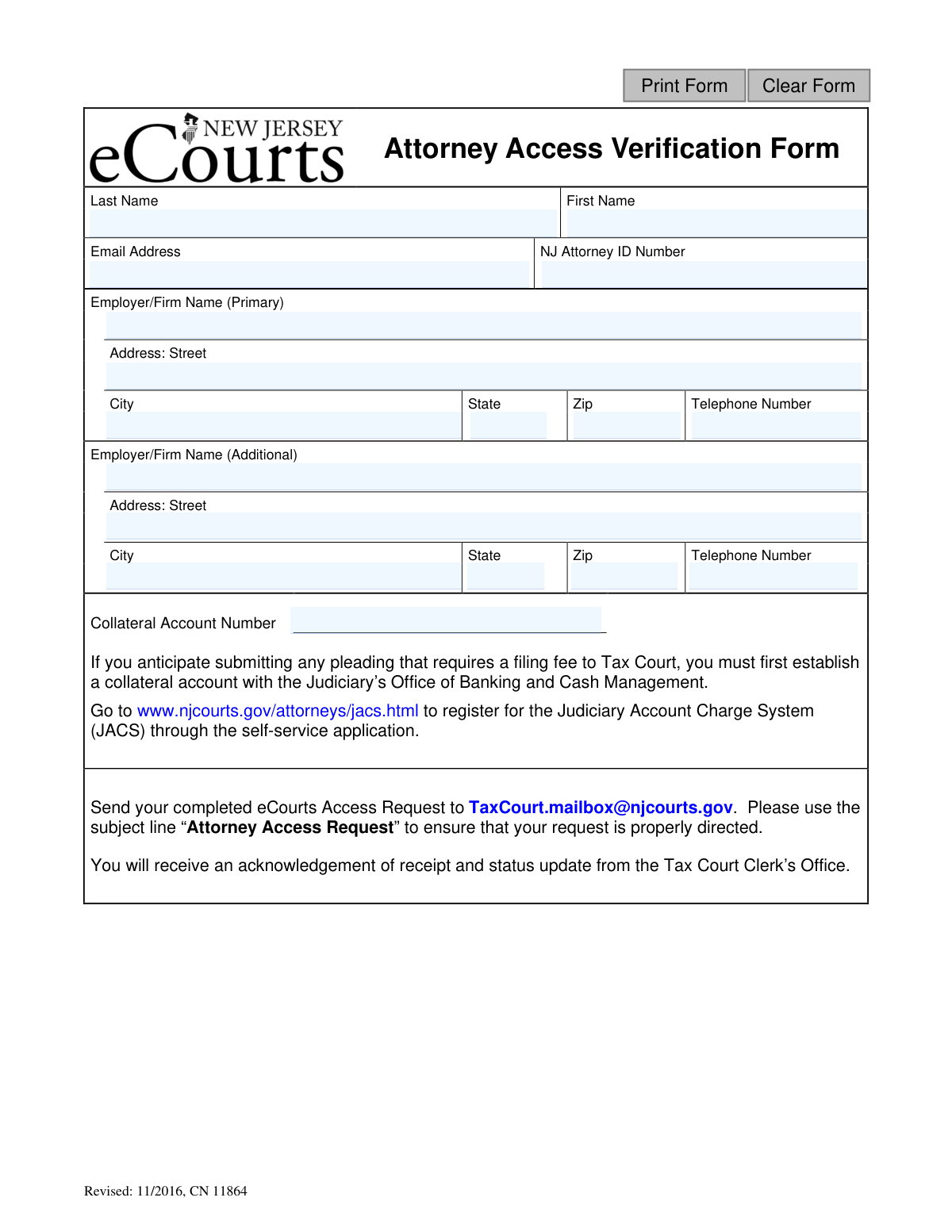
The Attorney Access Verification Form is a document required by the New Jersey Judiciary for attorneys to gain access to its electronic court systems, such as eCourts. It collects essential verification details like the attorney's name, NJ Attorney ID, firm information, and a Collateral Account Number for Tax Court filings. Completing this form is a mandatory step for attorneys wishing to file and manage cases electronically within the NJ court system. Today, this form can be filled out quickly and accurately using AI-powered services like Instafill.ai, which can also convert non-fillable PDF versions into interactive fillable forms.
CN 11864 is part of the New Jersey forms category on Instafill.
Our AI automatically handles information lookup, data retrieval, formatting, and form filling.
It takes less than a minute to fill out CN 11864 using our AI form filling.
Securely upload your data. Information is encrypted in transit and deleted immediately after the form is filled out.

Form specifications

Form name: Attorney Access Verification Form
Number of fields: 19
Number of pages: 1
Language: English
main-image

Instafill Demo: How to fill out PDF forms in seconds with AI

How to Fill Out CN 11864 Online for Free in 2026

Are you looking to fill out a CN 11864 form online quickly and accurately? Instafill.ai offers the #1 AI-powered PDF filling software of 2026, allowing you to complete your CN 11864 form in just 37 seconds or less.
Follow these steps to fill out your CN 11864 form online using Instafill.ai:
  1. 1 Navigate to Instafill.ai and upload or select the Attorney Access Verification Form.
  2. 2 Provide your personal information, including your last name, first name, email address, and NJ Attorney ID number.
  3. 3 Enter the details for your primary employer or firm, including the name, full address, and telephone number.
  4. 4 If applicable, provide the same information for an additional employer or firm in the next section.
  5. 5 Input your Collateral Account Number if you anticipate filing pleadings that require a fee in Tax Court.
  6. 6 Carefully review all the information entered by the AI to ensure it is accurate and complete.
  7. 7 Download the completed form and follow the submission instructions to email it to [email protected].

Our AI-powered system ensures each field is filled out correctly, reducing errors and saving you time.

Why Choose Instafill.ai for Your Fillable CN 11864 Form?

Speed

Complete your CN 11864 in as little as 37 seconds.

Up-to-Date

Always use the latest 2026 CN 11864 form version.

Cost-effective

No need to hire expensive lawyers.

Accuracy

Our AI performs 10 compliance checks to ensure your form is error-free.

Security

Your personal information is protected with bank-level encryption.

Frequently Asked Questions About Form CN 11864

This form is used by New Jersey attorneys to request access to the Tax Court's eCourts system. It verifies your identity and professional details to grant you electronic filing privileges.

Any attorney who needs to electronically file documents, particularly those requiring a filing fee, with the New Jersey Tax Court must complete this form to gain access to the eCourts system.

A collateral account is necessary if you anticipate submitting any pleading to the Tax Court that requires a filing fee. This account, part of the Judiciary Account Charge System (JACS), is used to process those fees.

You must register for the Judiciary Account Charge System (JACS) through the self-service application on the New Jersey Courts website. This will establish your collateral account and provide you with the required number.

Email your completed form to [email protected]. You must use the subject line “Attorney Access Request” to ensure your request is properly directed.

After submission, the Tax Court Clerk’s Office will send you an acknowledgement of receipt. You will receive a separate status update regarding your access request later.

You will need your full name, email address, NJ Attorney ID number, and the name and address for your primary and any additional firms. If you will be paying filing fees, you also need your Collateral Account Number.

The form provides space for a primary and one additional employer. You should list your primary firm and your most relevant secondary firm; if you have concerns about other affiliations, contact the Tax Court Clerk's Office for guidance.

The form itself does not specify a deadline, but you should submit it well in advance of any filing deadlines you may have with the Tax Court to ensure your access is granted in time.

Yes, services like Instafill.ai use AI to accurately auto-fill form fields with your saved information, which can save time and help prevent errors.

Simply upload the Attorney Access Verification Form PDF to the Instafill.ai platform. The tool will make the form fields interactive, allowing you to type your information, sign electronically, and download the completed document.

If you have a non-fillable or 'flat' PDF, you can use a service like Instafill.ai. It can convert the document into an interactive, fillable form online, allowing you to complete it easily.

Compliance CN 11864
Validation Checks by Instafill.ai

1
Ensures First Name is Provided
This check verifies that the 'First Name' field is not empty. The first name is a mandatory component for identifying the attorney and creating their access profile. If this field is left blank, the form submission will be rejected, and the user will be prompted to enter their first name.
2
Ensures Last Name is Provided
This check verifies that the 'Last Name' field is not empty. The last name is a critical identifier for the attorney and is required for verification against the bar records. A missing last name will result in a validation failure, preventing form submission until the field is completed.
3
Validates Email Address Format
This validation ensures the value entered in the 'Email Address' field conforms to a standard email format (e.g., '[email protected]'). A valid email is essential for sending the user an acknowledgement of receipt, status updates, and account credentials. If the format is invalid, the user cannot submit the form, preventing communication failures.
4
Validates NJ Attorney ID Number
This check ensures the 'NJ Attorney ID Number' field is not empty and matches the expected format. This ID is the primary key for verifying the attorney's standing with the New Jersey Judiciary. An invalid or missing ID will prevent the system from confirming the attorney's credentials, thus blocking the access request.
5
Ensures Primary Employer/Firm Name is Provided
This check verifies that the primary 'Employer/Firm Name' field is filled out. This information is required for the attorney's professional record and contact details within the eCourts system. An incomplete submission without this primary information will be rejected to ensure a complete profile.
6
Validates Completeness of Primary Address
This check ensures that if a primary employer is listed, the full address (Street, City, State, Zip) is also provided. A complete address is necessary for official records and potential correspondence. If any part of the address is missing, the user will be prompted to complete it before the form can be submitted.
7
Validates Primary Address State Format
This check ensures the 'State' field for the primary address contains a valid, two-letter state abbreviation. Using a standardized state code is crucial for data integrity and proper mail routing. The system should reject non-standard entries and guide the user to provide a valid abbreviation.
8
Validates Primary Address ZIP Code Format
This validation confirms that the 'Zip' code for the primary address is in a valid 5-digit or 9-digit (ZIP+4) format. A correct ZIP code is essential for accurate mail delivery and location-based services. An invalid format will trigger an error, requiring the user to correct it.
9
Validates Primary Telephone Number Format
This check ensures the 'Telephone Number' for the primary employer is a valid 10-digit number, ignoring common formatting characters. A valid phone number is a key piece of contact information for verification or communication. The system will reject entries that do not represent a valid phone number to ensure data quality.
10
Validates Collateral Account Number Format
This check validates the format of the 'Collateral Account Number' if a value is provided. While the field is optional, any entered data must conform to the Judiciary Account Charge System (JACS) format to ensure it can be correctly linked for filing fees. An incorrectly formatted number would cause processing errors and should be flagged to the user.
11
Ensures Completeness of Additional Employer Information
This logical check verifies that if any field for the 'Additional Employer/Firm' is filled out, then all associated fields (Name, Street, City, State, Zip, Telephone) for that entry are also complete. This prevents the submission of partial or unusable secondary contact information. The user should be prompted to either complete the section or clear it entirely.
12
Cross-references Attorney ID with Name
This check performs a lookup against an external database (e.g., the NJ Bar roll) to confirm that the provided 'NJ Attorney ID Number' belongs to the attorney specified in the 'First Name' and 'Last Name' fields. This is a critical security and verification step to prevent identity mismatch or fraudulent access requests. A mismatch would result in an immediate rejection of the application pending manual review.
13
Checks for Unique NJ Attorney ID Number
This validation verifies that the provided 'NJ Attorney ID Number' has not already been used to register for eCourts access. Each attorney should have only one access profile linked to their unique ID. If a duplicate is found, the system should inform the user that an account already exists and provide instructions for account recovery instead of creating a new one.

Common Mistakes in Completing CN 11864

Misunderstanding the Collateral Account Number Requirement

Attorneys often fill out this form before reading the specific instructions for the 'Collateral Account Number' field, assuming they can arrange it later. If you intend to file any pleading that requires a fee, leaving this field blank or writing 'Pending' will render your application incomplete. This will halt the process until you establish a Judiciary Account Charge System (JACS) account and provide the number, causing significant and preventable delays.

Failing to Follow Email Submission Instructions

Applicants frequently overlook the submission details at the bottom of the form and send it to a general court email address or use a vague subject line like 'Form Submission'. This can cause the email to be lost, filtered as spam, or routed to the wrong department, meaning the request is never processed. To ensure your request is received and handled promptly, you must email the form to [email protected] with the exact subject line 'Attorney Access Request'.

Entering an Incorrect or Incomplete NJ Attorney ID Number

This mistake often happens due to a simple typo or confusion with a bar number from another jurisdiction. Since the NJ Attorney ID is the primary key for verifying an attorney's standing with the Judiciary, an incorrect number will cause an immediate verification failure. The application will be rejected, forcing the attorney to correct the error and resubmit, significantly delaying their access to eCourts.

Submitting the Form with an Email Address Typo

A simple typing error in the email address field, such as '.con' instead of '.com', is one of the most common and frustrating mistakes. If the email address is incorrect, the Tax Court Clerk’s Office cannot send the acknowledgement of receipt, status updates, or the final access credentials. The attorney is left waiting indefinitely, unaware that their application is stalled due to a failed communication channel. AI-powered form filling tools like Instafill.ai can help prevent this by auto-populating validated contact information.

Using a Nickname Instead of the Official Legal Name

It's a common habit to use a nickname (e.g., 'Bob' for Robert) or an initial on forms, but on an official verification document, this can cause problems. The name provided must exactly match the full legal name associated with your NJ Attorney ID in the official Judiciary database. A mismatch will lead to a verification failure and rejection of the form, requiring you to resubmit with the correct information.

Providing an Incomplete or Informal Employer Name

Attorneys may use common abbreviations or informal names for their firm (e.g., 'Smith Law' instead of 'The Law Offices of Smith & Associates, P.C.'). This can create ambiguity and may not match official records, potentially slowing down the verification process while the clerk seeks clarification. Always use the full, official legal name of your firm as it is registered. Tools like Instafill.ai can store and populate the complete, official firm name to ensure consistency and accuracy.

Submitting a Handwritten or Poorly Scanned Form

When a form is printed, filled out by hand, and scanned, it can result in illegible handwriting or a low-quality image that is difficult to read. This makes it difficult or impossible for court staff to accurately process the information, leading to delays or rejection while they request a clearer copy. If the original PDF is not fillable, AI tools like Instafill.ai can convert it into an interactive version, allowing you to type directly into the fields for a clean and legible submission.

Using an Outdated Version of the Form

An attorney might find and use an old version of the form saved on a local drive or from an unofficial source. This form is marked 'Revised: 11/2016,' and using an even older version could mean it lacks required fields or has outdated submission instructions. Submitting an obsolete form will likely result in rejection and require you to start over with the current version, which should always be sourced from the official NJ Courts website.

Leaving the 'Additional Employer' Section Ambiguously Blank

An attorney with only one employer sees the 'Additional Employer/Firm Name' section and simply leaves it empty. While this is technically correct, it can create minor uncertainty for the processor, who might wonder if the information was accidentally omitted rather than not applicable. For maximum clarity, it is good practice to write 'N/A' in the first field of an unused section to signal that it has been seen and is intentionally left blank.
Saved over 80 hours a year

“I was never sure if my IRS forms like W-9 were filled correctly. Now, I can complete the forms accurately without any external help.”

Kevin Martin Green

Your data stays secure with advanced protection from Instafill and our subprocessors

Robust compliance program

Transparent business model

You’re not the product. You always know where your data is and what it is processed for.

ISO 27001, HIPAA, and GDPR

Our subprocesses adhere to multiple compliance standards, including but not limited to ISO 27001, HIPAA, and GDPR.

Security & privacy by design

We consider security and privacy from the initial design phase of any new service or functionality. It’s not an afterthought, it’s built-in, including support for two-factor authentication (2FA) to further protect your account.

Fill out CN 11864 with Instafill.ai

Worried about filling PDFs wrong? Instafill securely fills attorney-access-verification-form forms, ensuring each field is accurate.