Yes! You can use AI to fill out Attorney and Client Certification of Notification of Complementary Dispute Resolution (CDR) Alternatives
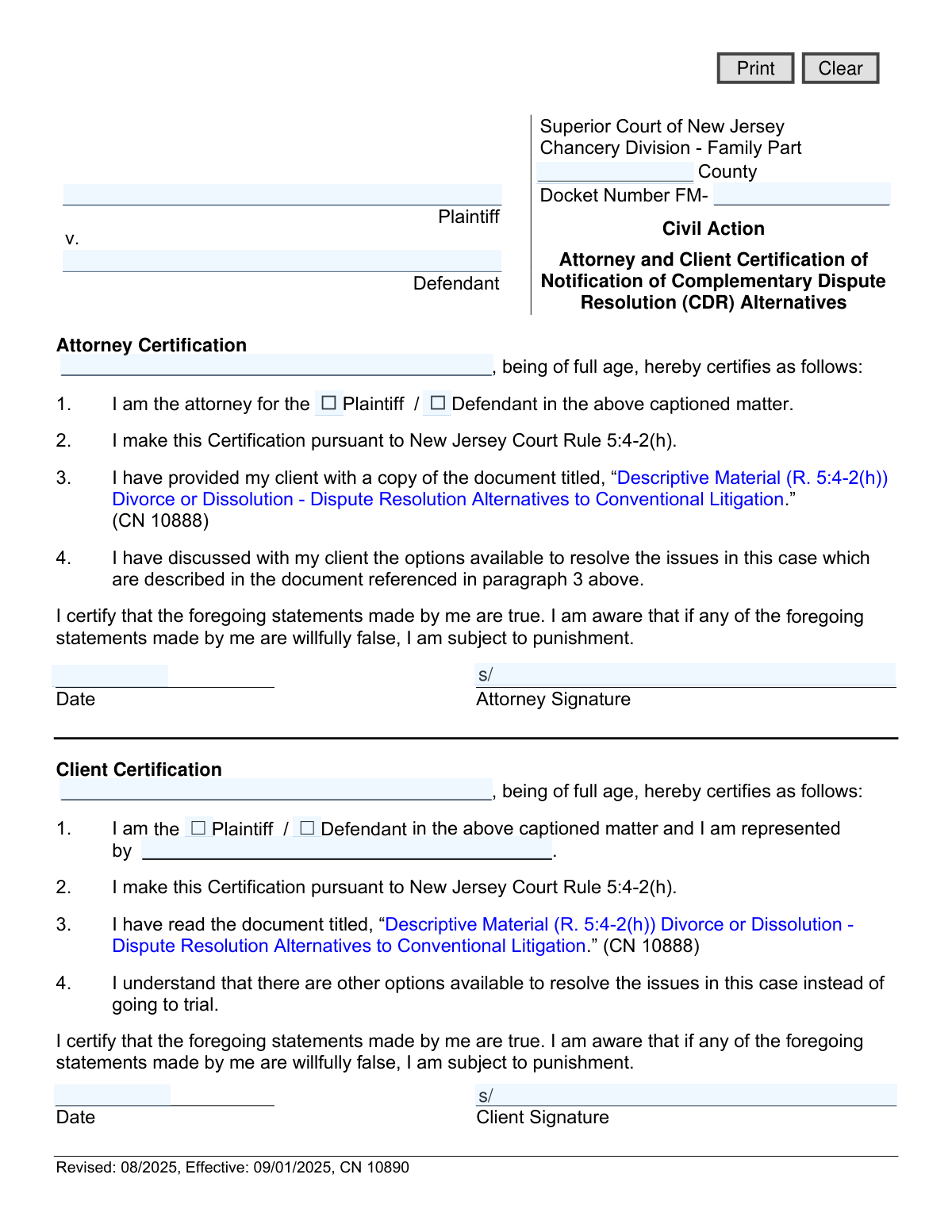
Form CN 10890 is a legal document required by the Superior Court of New Jersey, Chancery Division - Family Part, pursuant to Court Rule 5:4-2(h). It serves as a formal certification by both an attorney and their client, confirming they have received, read, and discussed materials outlining Complementary Dispute Resolution (CDR) alternatives to traditional litigation in divorce or dissolution cases. This ensures all parties are aware of options like mediation before proceeding with a trial. Today, this form can be filled out quickly and accurately using AI-powered services like Instafill.ai, which can also convert non-fillable PDF versions into interactive fillable forms.
CN 10890 is part of the
New Jersey forms category on Instafill.
Our AI automatically handles information lookup, data retrieval, formatting, and form filling.
It takes less than a minute to fill out CN 10890 using our AI form filling.
Securely upload your data. Information is encrypted in transit and deleted immediately after the form is filled out.
Form specifications
| Form name: | Attorney and Client Certification of Notification of Complementary Dispute Resolution (CDR) Alternatives |
| Number of fields: | 17 |
| Number of pages: | 1 |
| Language: | English |
Instafill Demo: How to fill out PDF forms in seconds with AI
How to Fill Out CN 10890 Online for Free in 2026
Are you looking to fill out a CN 10890 form online quickly and accurately? Instafill.ai offers the #1 AI-powered PDF filling software of 2026, allowing you to complete your CN 10890 form in just 37 seconds or less.
Follow these steps to fill out your CN 10890 form online using Instafill.ai:
- 1 Navigate to Instafill.ai and upload or select the 'Attorney and Client Certification of Notification of CDR Alternatives' (CN 10890) form.
- 2 Provide the case information, including the County, Docket Number, and the full names of the Plaintiff and Defendant.
- 3 Complete the 'Attorney Certification' section by entering the attorney's name and checking the box to indicate whether they represent the Plaintiff or Defendant.
- 4 Fill in the 'Client Certification' section with the client's name, their role in the case (Plaintiff or Defendant), and the name of their representing attorney.
- 5 Carefully review all the auto-filled information for accuracy and completeness.
- 6 Once verified, the attorney and client must sign and date their respective certification sections.
- 7 Download, print, or electronically file the completed and signed form with the appropriate Superior Court of New Jersey.
Our AI-powered system ensures each field is filled out correctly, reducing errors and saving you time.
Why Choose Instafill.ai for Your Fillable CN 10890 Form?
Speed
Complete your CN 10890 in as little as 37 seconds.
Up-to-Date
Always use the latest 2026 CN 10890 form version.
Cost-effective
No need to hire expensive lawyers.
Accuracy
Our AI performs 10 compliance checks to ensure your form is error-free.
Security
Your personal information is protected with bank-level encryption.
Frequently Asked Questions About Form CN 10890
This form serves as proof that your attorney has informed you about alternatives to a traditional court trial for resolving your family law case, such as mediation. Both you and your attorney must sign it to certify this discussion has taken place as required by the court.
This form must be completed by both the attorney and their client (either the plaintiff or the defendant) involved in a Family Part case in the Superior Court of New Jersey.
CDR refers to various methods used to settle legal disputes outside of a conventional trial. These alternatives, such as mediation and arbitration, are often less confrontational, faster, and more cost-effective than litigation.
Document CN 10888, titled 'Divorce or Dissolution - Dispute Resolution Alternatives to Conventional Litigation,' is an informational guide from the New Jersey Courts. Your attorney is required by court rule to provide you with a copy and discuss it with you.
No, signing this form does not commit you to any specific dispute resolution method. It only certifies that you have been informed about your options and have discussed them with your attorney.
The Docket Number is a unique identifier assigned to your case by the court when it is first filed. This number will appear on all official court documents, and your attorney will provide it for this form.
This form is usually filed with the court at the beginning of your case, along with the initial complaint or answer. Your attorney will handle the submission as part of your case filing.
This certification is required by New Jersey Court Rule 5:4-2(h). Refusing to sign could delay your case, as the court requires this confirmation before proceeding.
No, this specific form is designed for clients who are represented by an attorney to certify a conversation between them. If you are representing yourself (pro se), you would not use this form.
Yes, services like Instafill.ai use AI to accurately auto-fill form fields from your saved information. This can save time and help reduce errors when completing legal documents.
You can use a service like Instafill.ai to upload a scan or photo of the form. The platform can convert it into a fillable format, allowing you to type your information, add signatures, and save a completed digital copy.
If you have a non-fillable or 'flat' PDF, you can use a tool like Instafill.ai to make it interactive. This allows you to easily complete it on your computer without needing to print and write by hand.
Compliance CN 10890
Validation Checks by Instafill.ai
1
Ensures Plaintiff Name is Provided
This validation checks that the 'PlaName' field is not empty. The Plaintiff's full name is required to properly identify the parties in the legal action. If this field is left blank, the form is considered incomplete and cannot be correctly filed with the court, leading to rejection.
2
Ensures Defendant Name is Provided
This validation checks that the 'DefName' field is not empty. The Defendant's full name is essential for identifying all parties involved in the case. Failure to provide this information makes the document legally insufficient and will prevent it from being processed.
3
Validates County Selection
This check verifies that a valid New Jersey county has been entered or selected in the 'TypeCounty' field. The form is specific to the Superior Court of New Jersey, so the county must be a legitimate jurisdiction for the case to be filed correctly. An invalid or missing county will result in a filing error.
4
Validates Docket Number Format
This validation ensures the 'CaseDocket' number follows the required court format, starting with 'FM-' followed by a specific number sequence. A correctly formatted docket number is critical for associating this certification with the correct case file in the court's system. An incorrect number could lead to the document being lost or misfiled.
5
Verifies Attorney's Represented Party Selection
This check confirms that the attorney has selected either the 'Plaintiff' or 'Defendant' checkbox ('partyAtty'). This selection is mandatory to clarify which party the attorney is certifying on behalf of. Without this selection, the certification is ambiguous and therefore invalid.
6
Verifies Client's Party Status Selection
This validation ensures the client has selected either the 'Plaintiff' or 'Defendant' checkbox ('partyClient') to identify their role in the case. This is a required field for the client's certification to be clear and complete. An unselected status makes the client's declaration unclear.
7
Cross-Validates Attorney and Client Party Selections
This check compares the party selected in the Attorney Certification ('partyAtty') with the party selected in the Client Certification ('partyClient'). Both selections must be identical (e.g., both are 'Plaintiff'). This prevents logical contradictions on the form, ensuring the attorney and client are certifying for the same role in the case.
8
Matches Client's Attorney Name with Certifying Attorney
This validation verifies that the attorney's name entered by the client ('attyClient') matches the name of the attorney in the Attorney Certification section ('AttyName'). This confirms that the client is acknowledging representation by the same attorney who is co-certifying the document. A mismatch indicates a significant error that must be corrected before filing.
9
Matches Client Name to Case Party Name
This check ensures the name entered in the Client Certification ('PartyName') matches either the Plaintiff's name ('PlaName') or the Defendant's name ('DefName'), based on the client's party selection. This confirms the person signing the certification is a principal party to the case. A mismatch would suggest the wrong individual is completing the form.
10
Validates Attorney Signature Date
This validation ensures the 'sigDtAtty' field contains a valid date in a standard format (e.g., MM/DD/YYYY) and is not a future date. The signature date is a legal requirement that establishes when the attorney made the certification. An invalid or future date would render the certification void.
11
Validates Client Signature Date
This validation ensures the 'sigDtClient' field contains a valid date in a standard format and is not set in the future. This date is crucial as it records when the client certified their understanding of the CDR alternatives. An invalid date would compromise the legal validity of the client's certification.
12
Ensures Attorney Signature is Present
This check verifies that the attorney's signature field ('sigAtty') is not empty, indicating a digital signature has been applied or an image uploaded. A missing signature makes the attorney's certification legally non-binding and incomplete. The form will be rejected by the court without the attorney's signature.
13
Ensures Client Signature is Present
This validation confirms that the client's signature field ('sigClient') is not empty. The client's signature is their personal attestation to the statements made in their certification, and its absence renders that portion of the form invalid. The form is not legally complete without the client's signature.
Common Mistakes in Completing CN 10890
Filers often overlook the 'County' field at the top of the form or enter the county where they live instead of the county where the case is filed. This is a critical error because it determines which court clerk's office will process the document. An incorrect or missing county will lead to filing rejection and significant delays in the case.
The form provides the 'FM-' prefix, but filers must add the remaining unique digits for their case. A common mistake is forgetting to add the full number or transposing digits from other case documents. Without the complete docket number, the court cannot link the certification to the correct case file, resulting in rejection. AI-powered tools like Instafill.ai can help prevent these data entry errors by validating formats and ensuring required fields are not left empty.
Both the attorney and client sections contain mandatory checkboxes to identify their role as either Plaintiff or Defendant. It's easy to overlook these small boxes, but failing to check one renders the certification ambiguous and incomplete. The court clerk will likely reject the form, requiring a corrected version to be resubmitted and delaying the legal process.
A serious error occurs when the attorney and client select conflicting roles—for example, the attorney checks the 'Plaintiff' box while the client checks the 'Defendant' box. This direct contradiction indicates a lack of coordination and will cause the form to be immediately rejected by the court. To prevent this, the attorney and client must review the form together to ensure their party designations are identical.
In the 'Client Certification' section, there is a specific line for the client to write the name of their attorney. Clients sometimes miss this field, assuming their signature is sufficient to link them to their counsel. This omission makes the form technically incomplete, as it fails to formally connect the client's acknowledgment to their specific legal representation.
The names entered for the Plaintiff and Defendant in the top caption must exactly match the names of the individuals signing the certification sections. People may use nicknames or slight variations, creating a discrepancy that can lead to filing rejections. To avoid this, always use the full, official legal names as they appear on the complaint. AI-powered form filling tools like Instafill.ai can help prevent this by auto-populating names consistently across all relevant fields from a single entry.
The date fields next to the signature lines are frequently left blank or filled with an incorrectly formatted or future date. A legal certification without a signature date can be deemed invalid by the court, as it's unclear when the attestation was made. This can lead to rejection and require the parties to re-sign and re-file the document.
When filling out a PDF, users might simply type their name in the signature field, which is typically not a legally binding signature for court documents. Courts have specific rules for electronic and physical signatures, often requiring a 'wet' ink signature or a specific digital format like '/s/ Name'. If the original document is a flat, non-fillable PDF, tools like Instafill.ai can convert it into an interactive form that supports the application of proper, compliant digital signatures.
This form requires certifications from both the attorney and the client to be valid. A common mistake is for only one party to complete and sign their section before the form is filed. This renders the document incomplete and defeats its purpose, and the court will reject it until a fully executed version is submitted.
Court forms are periodically updated, as indicated by the 'Revised' and 'Effective' dates. Using an old version of the form after a new one has been issued is a frequent cause for rejection, as the court requires filings to be on the most current version. To avoid this, always download the form directly from the official New Jersey Courts website before filling it out to guarantee you are using the correct version.
Saved over 80 hours a year
“I was never sure if my IRS forms like W-9 were filled correctly. Now, I can complete the forms accurately without any external help.”
Kevin Martin Green
Your data stays secure with advanced protection from Instafill and our subprocessors

Robust compliance program
Transparent business model
You’re not the product. You always know where your data is and what it is processed for.
ISO 27001, HIPAA, and GDPR
Our subprocesses adhere to multiple compliance standards, including but not limited to ISO 27001, HIPAA, and GDPR.
Security & privacy by design
We consider security and privacy from the initial design phase of any new service or functionality. It’s not an afterthought, it’s built-in, including support for two-factor authentication (2FA) to further protect your account.
Fill out CN 10890 with Instafill.ai
Worried about filling PDFs wrong? Instafill securely fills attorney-and-client-certification-of-notification-of-complementary-dispute-resolution-cdr-alternatives forms, ensuring each field is accurate.