Yes! You can use AI to fill out Attorney Supplement to Complaint/Modification - Non-Dissolution Action

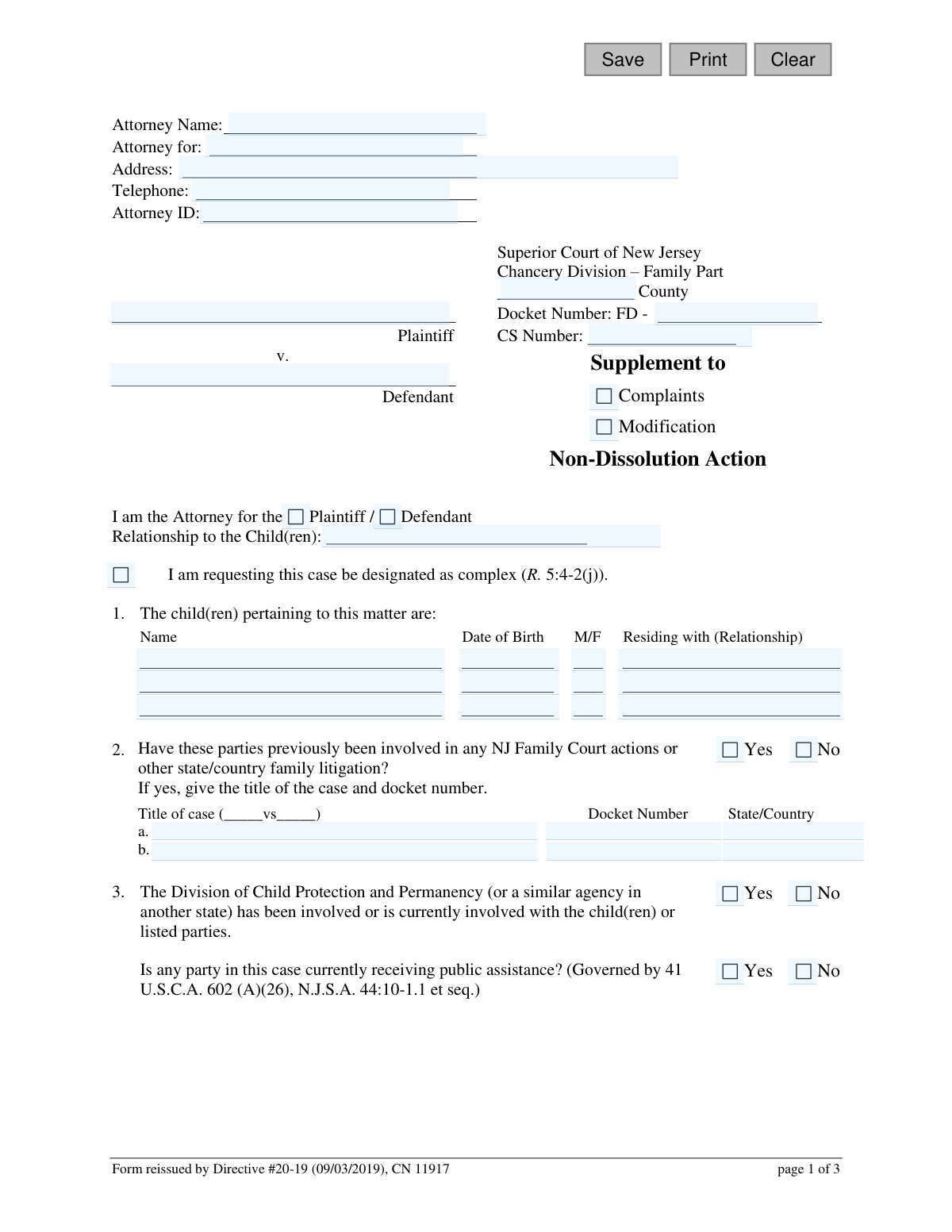
This form, officially known as the Attorney Supplement to Complaint/Modification - Non-Dissolution Action, is a required document for attorneys in the Superior Court of New Jersey, Chancery Division – Family Part. It is used to provide the court with essential details about a case that does not involve the dissolution of a marriage, such as requests for paternity, child support, custody, or parenting time modifications. It ensures all necessary information and requested reliefs are clearly stated for the court's review. Today, this form can be filled out quickly and accurately using AI-powered services like Instafill.ai, which can also convert non-fillable PDF versions into interactive fillable forms.
CN 11917 is part of the New Jersey forms category on Instafill.
Our AI automatically handles information lookup, data retrieval, formatting, and form filling.
It takes less than a minute to fill out CN 11917 using our AI form filling.
Securely upload your data. Information is encrypted in transit and deleted immediately after the form is filled out.

Form specifications

Form name: Attorney Supplement to Complaint/Modification - Non-Dissolution Action
Number of fields: 91
Number of pages: 1
Language: English
main-image

Instafill Demo: How to fill out PDF forms in seconds with AI

How to Fill Out CN 11917 Online for Free in 2026

Are you looking to fill out a CN 11917 form online quickly and accurately? Instafill.ai offers the #1 AI-powered PDF filling software of 2026, allowing you to complete your CN 11917 form in just 37 seconds or less.
Follow these steps to fill out your CN 11917 form online using Instafill.ai:
  1. 1 Navigate to Instafill.ai and upload or select the 'Attorney Supplement to Complaint/Modification - Non-Dissolution Action' form.
  2. 2 Enter the attorney's information, case details like county and docket number, and identify the plaintiff and defendant.
  3. 3 Provide detailed information for each child involved in the matter, including their name, date of birth, and with whom they reside.
  4. 4 Disclose any previous family court actions, involvement with the Division of Child Protection and Permanency, or if any party receives public assistance.
  5. 5 Use the AI assistant to accurately check the boxes for all reliefs being sought, such as establishing paternity, modifying child support, or changing custody.
  6. 6 Indicate which required documents (like the IV-D Application or a Financial Statement) and any additional certifications are being attached.
  7. 7 Review the entire supplement for accuracy, then certify the statements by providing the attorney's signature and the date before downloading for court submission.

Our AI-powered system ensures each field is filled out correctly, reducing errors and saving you time.

Why Choose Instafill.ai for Your Fillable CN 11917 Form?

Speed

Complete your CN 11917 in as little as 37 seconds.

Up-to-Date

Always use the latest 2026 CN 11917 form version.

Cost-effective

No need to hire expensive lawyers.

Accuracy

Our AI performs 10 compliance checks to ensure your form is error-free.

Security

Your personal information is protected with bank-level encryption.

Frequently Asked Questions About Form CN 11917

This form is used by attorneys in New Jersey Family Court to specify the exact relief being sought in a non-dissolution case, such as establishing or modifying custody, support, or parenting time.

This supplement must be completed by the attorney representing either the plaintiff or the defendant in a Non-Dissolution Family Part action. It is not intended for self-represented litigants.

A Non-Dissolution action, or 'FD' docket case, involves family disputes between unmarried individuals. This typically includes matters like child custody, parenting time, and child support for parents who were never married.

The required attachments vary based on the relief you are seeking. Common documents include the Attorney Complaint/Modification, a IV-D Application, a Confidential Litigant Information Statement, and relevant financial statements as listed in the 'Required Attachments' section.

You should check the box to designate a case as complex if it involves unusually complicated legal or factual issues, numerous expert witnesses, or other factors that may require specialized case management by the court.

The Financial Statement for Summary Support Actions is a simpler form used when only child support is at issue. The more detailed Case Information Statement (CIS) is required for requests involving spousal support, college expenses, or other complex financial matters.

Yes, Section 4 of the form is a checklist that allows you to select all the different types of relief you are seeking in your action, such as establishing paternity and requesting child support at the same time.

If the parties have been involved in prior family litigation in New Jersey or any other state, you must provide the case title (e.g., Plaintiff v. Defendant), the docket number, and the state or country where the case was heard.

Towards the end of the form, there is a dedicated section to request interpreting services. You must check the box and specify the language required for the party or witness.

No, they are different documents. A Certificate of Parentage (COP) is a form signed by unmarried parents to legally establish paternity, whereas a birth certificate is an official record of a child's birth.

Yes, services like Instafill.ai use AI to accurately auto-fill form fields from your case files or practice management software, saving you time and helping to prevent data entry errors.

Simply upload the Attorney Supplement PDF to Instafill.ai. The platform's AI will automatically detect the fields, allowing you to quickly populate them with your client's information and generate a completed form.

You can use a service like Instafill.ai, which can convert non-fillable or 'flat' PDFs into interactive, fillable forms. This allows you to complete, save, and print the document without needing to fill it out by hand.

Compliance CN 11917
Validation Checks by Instafill.ai

1
Docket Number Format Validation
This check ensures the Docket Number is entered in the correct format, which appears to be 'FD - [County Code] - [Number]'. It is crucial for correctly identifying and filing the case within the court's system. A failure to match the format would prevent the form from being associated with the correct case file, causing processing delays or rejection.
2
Attorney Role Specification
Validates that the attorney has specified whether they are representing the 'Plaintiff' or the 'Defendant'. This information is fundamental to understanding the context of the filing and the attorney's standing in the case. If this selection is missing, the court cannot properly process the document as the filer's role is ambiguous.
3
Child Date of Birth Validity
This check verifies that each 'Date of Birth' entered for a child is a valid date and is in the past. This prevents data entry errors like typos or future dates, which are logically impossible. Accurate birth dates are essential for determining jurisdiction, calculating potential child support, and establishing age-related legal parameters.
4
Conditional Previous Litigation Details
If the user answers 'Yes' to the question 'Have these parties previously been involved in any NJ Family Court actions...', this validation ensures that the corresponding fields for 'Title of case', 'Docket Number', and 'State/Country' are filled out. This is important for providing a complete case history to the court and avoiding duplicate or conflicting proceedings. Failure to provide these details would render the 'Yes' answer incomplete.
5
Minimum Relief Selection
Ensures that at least one checkbox is selected in the 'The following relief(s) is being sought' section. The entire purpose of the form is to request specific legal actions from the court. If no relief is requested, the form has no legal purpose and cannot be acted upon by the court.
6
Conditional Paternity Question
If the 'Establish Paternity' relief is checked, this validation requires an answer ('Yes' or 'No') to the question 'Were the parents of the child(ren) married at the time of birth?'. This information is legally significant for paternity proceedings. An omission would require the court to seek clarification, delaying the case.
7
Conditional Financial Statement for Support Actions
This check verifies that if any relief related to establishing, modifying, or terminating child or spousal support is requested, the appropriate financial disclosure attachment is also checked ('Financial Statement for Summary Support Actions' or 'Case Information Statement'). Courts require financial disclosures to make any ruling on support matters. Submitting a request without the required financial data will lead to its rejection.
8
Conditional Enforcement Order Details
If the 'Enforce the current support order' checkbox is selected, this validation ensures the text field describing the order is not empty. The court needs to know specifically which order the attorney is seeking to enforce. Failure to provide this detail makes the request unenforceable and ambiguous.
9
Conditional Interpreter Language Specification
If the 'Request for Interpreting Services at the Hearing' box is checked, this validation ensures the 'Language' field is filled in. The court cannot arrange for an interpreter without knowing which language is needed. An omission would result in no interpreter being present at the hearing, causing delays and potential due process issues.
10
Conditional ADA Accommodation Specification
If the 'Request for ADA Accommodation' box is checked, this validation ensures the 'Specify' field is completed. The court needs to know the specific accommodation required to comply with the Americans with Disabilities Act (ADA). A blank request is not actionable and would result in the necessary accommodation not being provided.
11
Signature Date Logic
This check ensures the signature date is a valid date and is not set in the future. A post-dated signature is not legally valid for a current certification. This validation maintains the integrity of the certification that the statements are true as of the date of signing.
12
Completeness of Child Information Row
This validation ensures that if a child's name is entered in the first section, the corresponding 'Date of Birth', 'M/F', and 'Residing with' fields for that child are also completed. Partial information is insufficient for court records and for making determinations related to the child. This check enforces data integrity for each child listed.
13
Required County Selection
Validates that the 'County' field for the Superior Court of New Jersey has been filled out. This is a critical piece of information that determines which courthouse has jurisdiction and where the document must be filed. A missing county would make it impossible to route the document correctly.
14
Attorney Phone Number Format
This check ensures the attorney's telephone number is provided and follows a standard format (e.g., 10 digits, possibly with parentheses or hyphens). A valid phone number is essential for the court or opposing counsel to contact the filing attorney with questions or notifications. An invalid or missing number can severely hinder communication and delay case progress.

Common Mistakes in Completing CN 11917

Incorrect or Incomplete Docket Number

Filers often enter the docket number without the required 'FD-' prefix or mis-type the numerical portion. This happens due to oversight or not having the correct case file information readily available. An incorrect docket number will cause the filing to be misdirected or rejected by the court clerk, delaying the legal process until the information is corrected and resubmitted.

Failing to Specify the Represented Party

Attorneys frequently forget to circle or otherwise indicate whether they represent the 'Plaintiff' or 'Defendant' near the top of the form. This simple oversight creates ambiguity for court staff and the judge, who need to know immediately which party is filing the supplement. To avoid this, double-check that you have clearly marked which party you are the attorney for before signing.

Ambiguous or Contradictory Relief Requests

In Section 4, filers may check conflicting boxes (e.g., 'Increase Child Support' and 'Decrease Child Support') or fail to check any boxes at all. This confusion makes it impossible for the court to understand the filer's objective, leading to rejection or the need for clarification. Carefully review all checkboxes to ensure they accurately and non-contradictorily reflect the specific legal relief being sought.

Missing Required Attachments

A very common error is failing to include all necessary documents listed under 'Required Attachments,' such as the Confidential Litigant Information Statement or a Financial Statement. Filers may forget the document or mistakenly believe it is not needed for their specific request. This is a primary cause for filings to be marked as deficient, halting all progress until the complete package is submitted.

Forgetting to Attach the Order to be Enforced

When checking the box to 'Enforce the current support order,' filers often neglect to attach a copy of the specific order they want enforced. The court cannot take action on an enforcement request without the exact order in question. To prevent this, always make a copy of the order and attach it to the submission whenever requesting enforcement.

Incomplete Prior Litigation Information

In Section 2, filers may indicate 'Yes' to previous family court actions but then fail to provide the complete case title, docket number, and state/country. This information is critical for the court to identify potential jurisdictional conflicts or review relevant case history. Incomplete details can cause delays while the clerk's office requests the missing information.

Confusing Certificate of Parentage with Birth Certificate

The form explicitly states that the Certificate of Parentage is not the Birth Certificate, yet filers often attach the latter. This mistake occurs because people assume the documents are interchangeable. Attaching the wrong document when seeking to establish paternity will result in a deficient filing, as the Certificate of Parentage is a specific legal document acknowledging paternity.

Omitting the Attorney ID

Attorneys sometimes leave the 'Attorney ID' field blank, especially if filling out the form in a hurry. This ID is the court's primary method for verifying the attorney's standing and ensuring all communications are directed correctly. Forgetting it can cause administrative delays and communication breakdowns. AI-powered tools like Instafill.ai can help prevent this by saving and auto-populating recurring information like an Attorney ID.

Incorrectly Answering Public Assistance or DCPP Questions

Filers may incorrectly answer 'Yes' or 'No' regarding a party's receipt of public assistance or involvement with the Division of Child Protection and Permanency (DCPP). This often happens due to a lack of knowledge about the other party's situation. An incorrect answer can have serious consequences, particularly for child support calculations and enforcement, as state agencies may need to be involved.

Vague Child Residency Information

In the table for child information, the 'Residing with (Relationship)' column is often filled out ambiguously, for example, by just listing a name instead of the relationship (e.g., 'Mother', 'Father', 'Maternal Grandparent'). This lack of clarity can create confusion for the court when trying to understand the current living situation for custody and parenting time matters. Always specify the person's relationship to the child. Since this form is a non-fillable PDF, a tool like Instafill.ai can convert it into a fillable version, making it easier to enter clear and legible information.
Saved over 80 hours a year

“I was never sure if my IRS forms like W-9 were filled correctly. Now, I can complete the forms accurately without any external help.”

Kevin Martin Green

Your data stays secure with advanced protection from Instafill and our subprocessors

Robust compliance program

Transparent business model

You’re not the product. You always know where your data is and what it is processed for.

ISO 27001, HIPAA, and GDPR

Our subprocesses adhere to multiple compliance standards, including but not limited to ISO 27001, HIPAA, and GDPR.

Security & privacy by design

We consider security and privacy from the initial design phase of any new service or functionality. It’s not an afterthought, it’s built-in, including support for two-factor authentication (2FA) to further protect your account.

Fill out CN 11917 with Instafill.ai

Worried about filling PDFs wrong? Instafill securely fills attorney-supplement-to-complaintmodification-non-dissolution-action forms, ensuring each field is accurate.